avatarJulian Molina

Free AI web copilot to create summaries, insights and extended knowledge, download it at here

1591

Abstract

span> <span class="hljs-keyword">token</span> <span class="hljs-built_in">from</span> <span class="hljs-keyword">the</span> most reliable source. In our <span class="hljs-keyword">case</span>, that is <span class="hljs-keyword">the</span> website <span class="hljs-keyword">at</span> <span class="hljs-keyword">https</span>://superalgos.org. Other sources may <span class="hljs-keyword">try</span> <span class="hljs-built_in">to</span> trick you <span class="hljs-keyword">into</span> buying <span class="hljs-keyword">a</span> fake <span class="hljs-built_in">version</span> <span class="hljs-keyword">of</span> <span class="hljs-keyword">the</span> <span class="hljs-keyword">token</span>!</pre></div><figure id="d425"><img src="https://cdn-images-1.readmedium.com/v2/resize:fit:800/1*zQpYzSBzZUnsn0z_cO3Wyg.png"><figcaption></figcaption></figure><h2 id="ce0e">Find the token in Trust Wallet</h2><ul><li>Back in Trust Wallet, click the configure icon on the top-right corner.</li></ul><figure id="5260"><img src="https://cdn-images-1.readmedium.com/v2/resize:fit:800/1*Myo5h2UsZGmFoCTU0Pc3Mg.png"><figcaption></figcaption></figure><ul><li>Paste the contract address you copied from the website into the <i>Search tokens</i> box.</li></ul><figure id="13b7"><img src="https://cdn-images-1.readmedium.com/v2/resize:fit:800/1*tWIxplfWGfQ92wltaVqfyw.png"><figcaption></figcaption></figure><ul><li>The app should immediately find the BEP20 Superalgos SA token.</li><li>Now touch the slider on the right to activate it!</li></ul><figure id="afc4"><img src="https://cdn-images-1.readmedium.com/v2/r

Options

esize:fit:800/1*k0LXKyyWxUmCqM_BumokEA.png"><figcaption></figcaption></figure><ul><li>Touch the arrow on the top-left corner to go back to the main screen.</li></ul><figure id="8f04"><img src="https://cdn-images-1.readmedium.com/v2/resize:fit:800/1*uSb8UrR-I2G93bu92FdUOw.png"><figcaption></figcaption></figure><ul><li>Et voilà! The token is now listed as another asset in your wallet!</li></ul><figure id="3c1c"><img src="https://cdn-images-1.readmedium.com/v2/resize:fit:800/1*edHxim8SQY5VMrVuxp1cLA.png"><figcaption></figcaption></figure><ul><li>If you touch it, you’ll go to the asset screen, where you can get an address to receive tokens from a third party, or to send tokens whenever you get a hold of some!</li></ul><figure id="2928"><img src="https://cdn-images-1.readmedium.com/v2/resize:fit:800/1*WeJ21U3hegNF-11KNE7ARg.png"><figcaption></figcaption></figure><h1 id="9fd4">You May Also Want to Learn…</h1><div id="7f11" class="link-block"> <a href="https://readmedium.com/how-to-buy-the-superalgos-sa-token-using-trust-wallet-ca37aec0c0f5"> <div> <div> <h2>How to Buy the Superalgos (SA) Token Using Trust Wallet</h2> <div><h3>Buying the token is the best way to support Superalgos contributors!</h3></div> <div><p>medium.com</p></div> </div> <div> <div style="background-image: url(https://miro.readmedium.com/v2/resize:fit:320/1*ASvoVmCNoOyFtThIR_VzmA.png)"></div> </div> </div> </a> </div></article></body>

SUPERALGOS TOKEN

How to Configure the Superalgos (SA) Token in Trust Wallet

Trust Wallet is a mobile wallet you may use to hold and transact with your Superalgos (SA) Tokens.

Trust Wallet is a mobile cryptocurrency wallet that supports — among other standards — BEP20 tokens. This is one of the wallets you may use to hold and transact with your Superalgos (SA) tokens.

Download and Install

If you haven’t yet, download and install Trust Wallet on your preferred device and follow the on-screen instructions to complete the setup. Once you are up and running, follow the steps below to set up the Superalgos (SA) token.

Adding the Superalgos (SA) Token

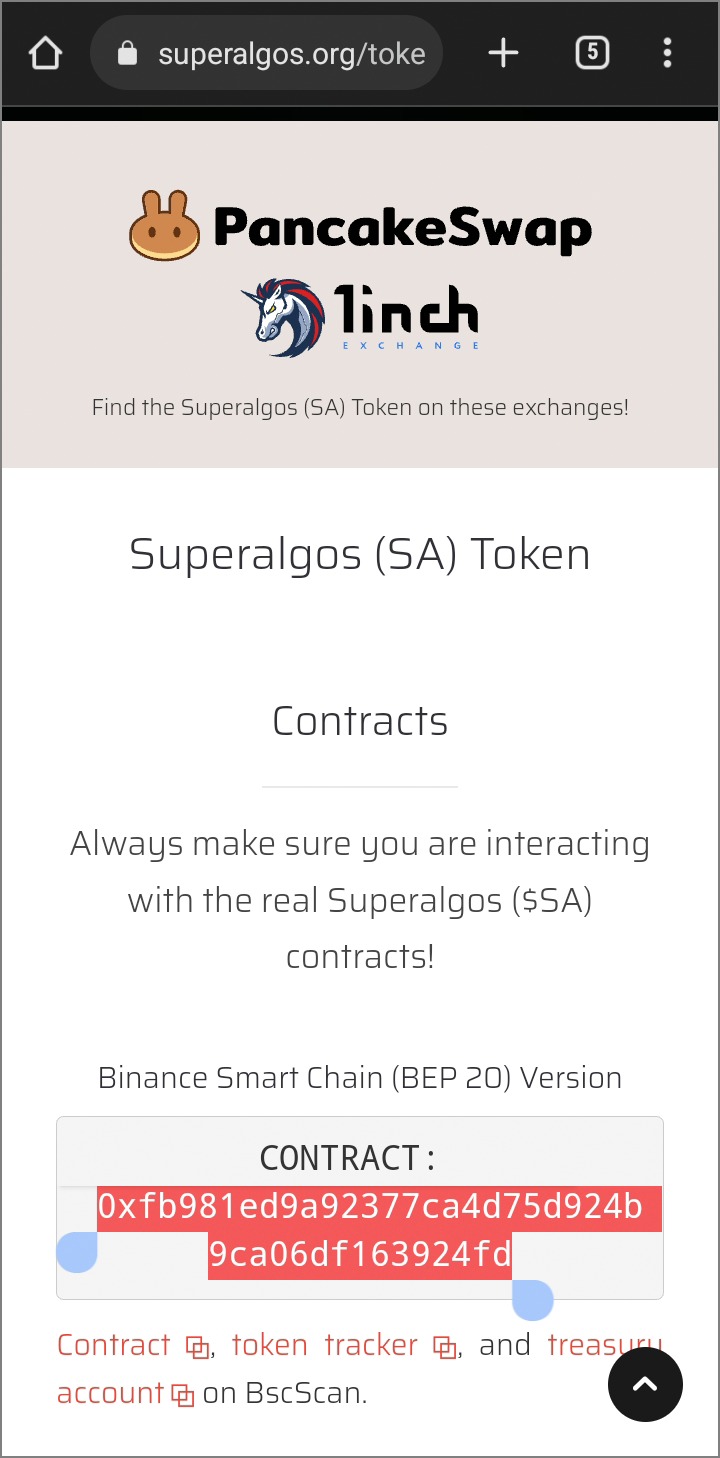
1. Get the contract address from the website

IMPORTANT: Always get the contract address of the token from the most reliable source. In our case, that is the website at https://superalgos.org. Other sources may try to trick you into buying a fake version of the token!
Find the token in Trust Wallet

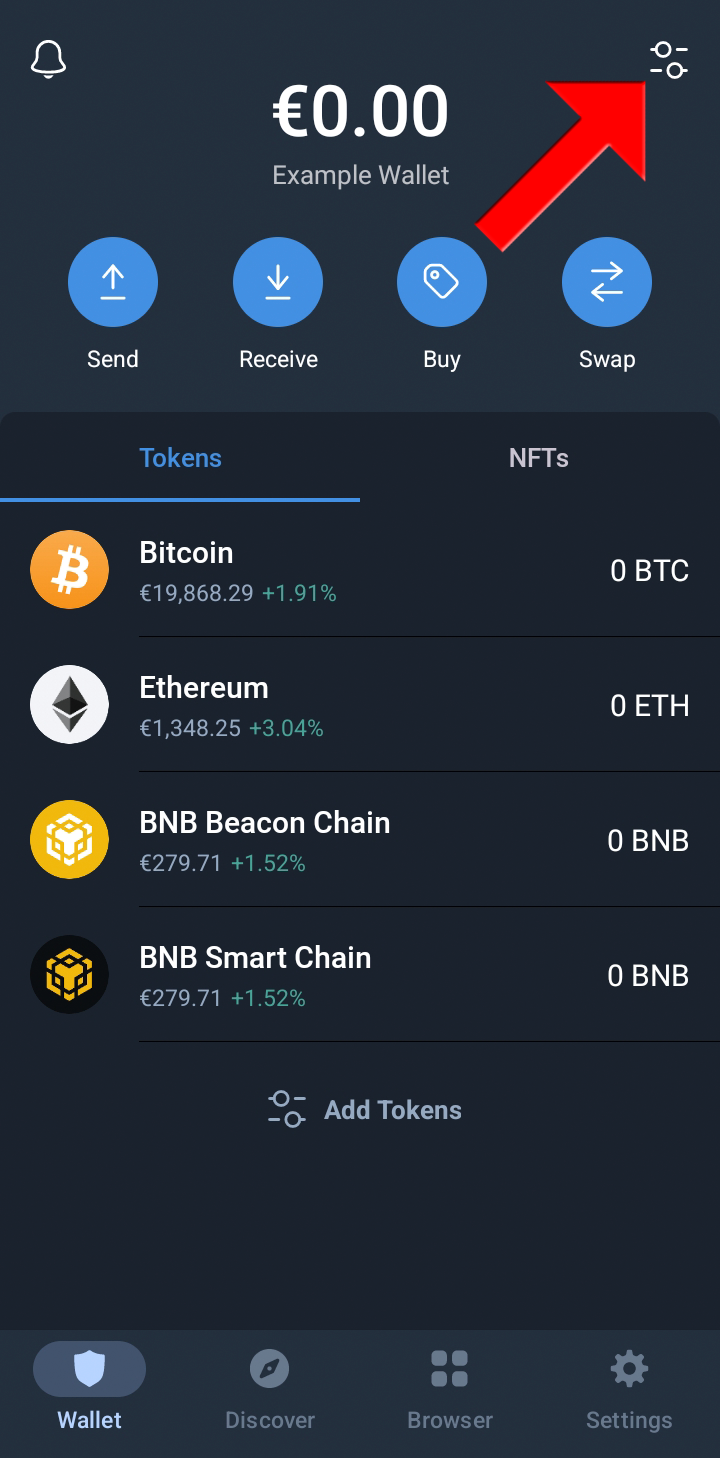
  • Back in Trust Wallet, click the configure icon on the top-right corner.
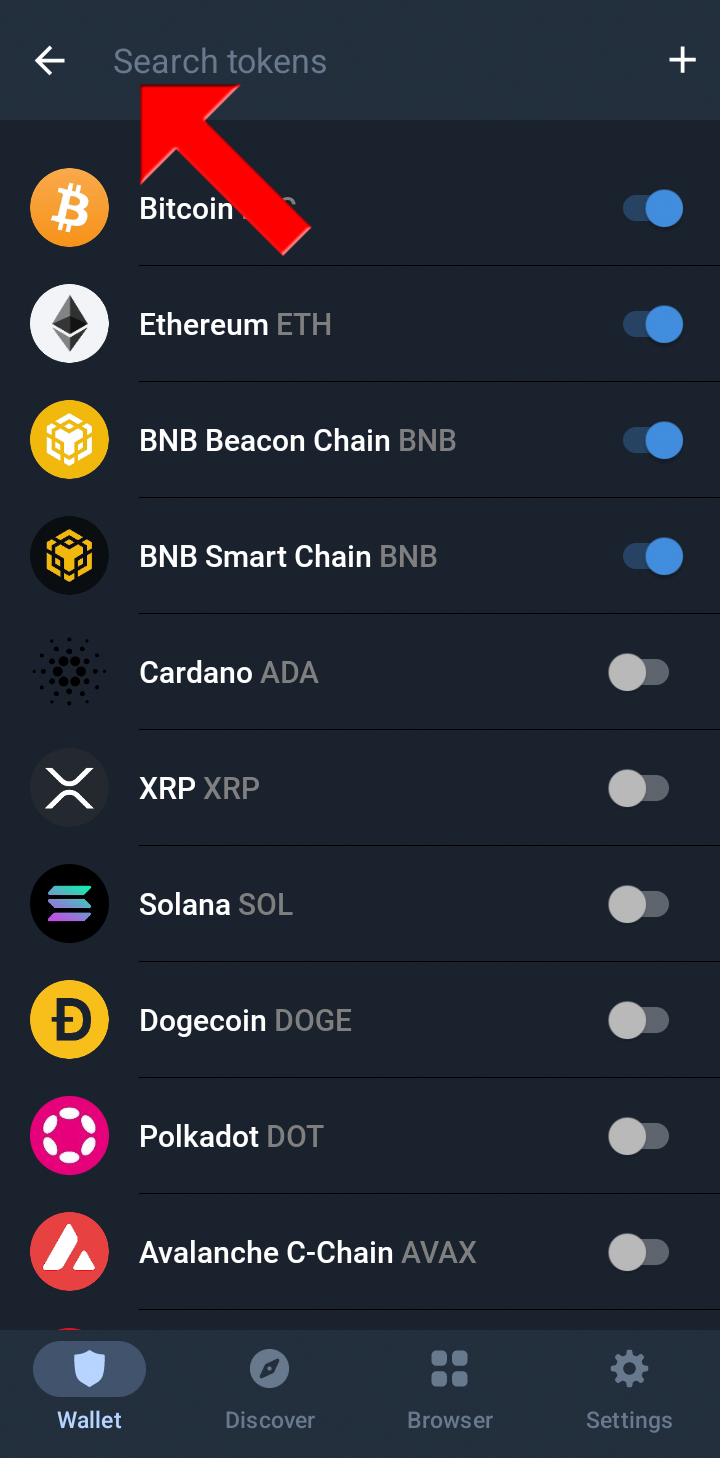
  • Paste the contract address you copied from the website into the Search tokens box.
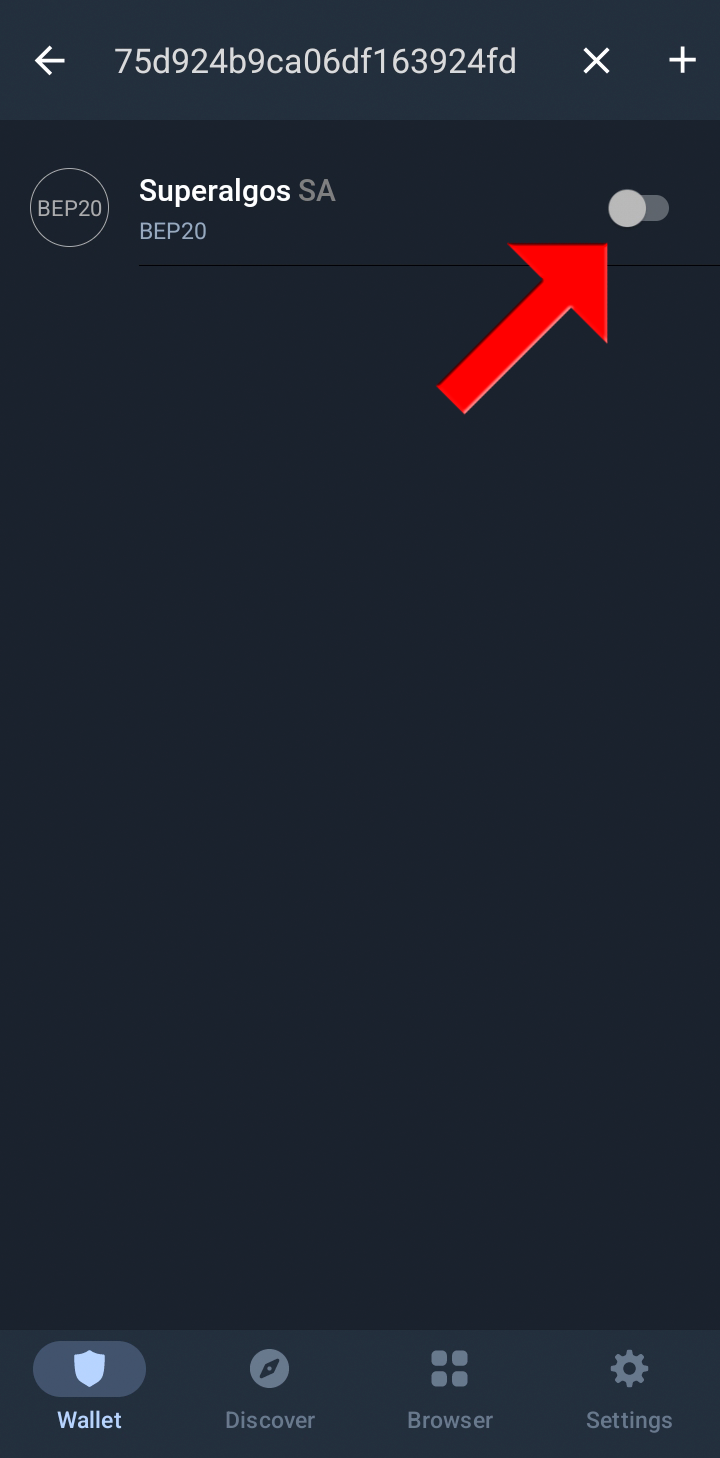
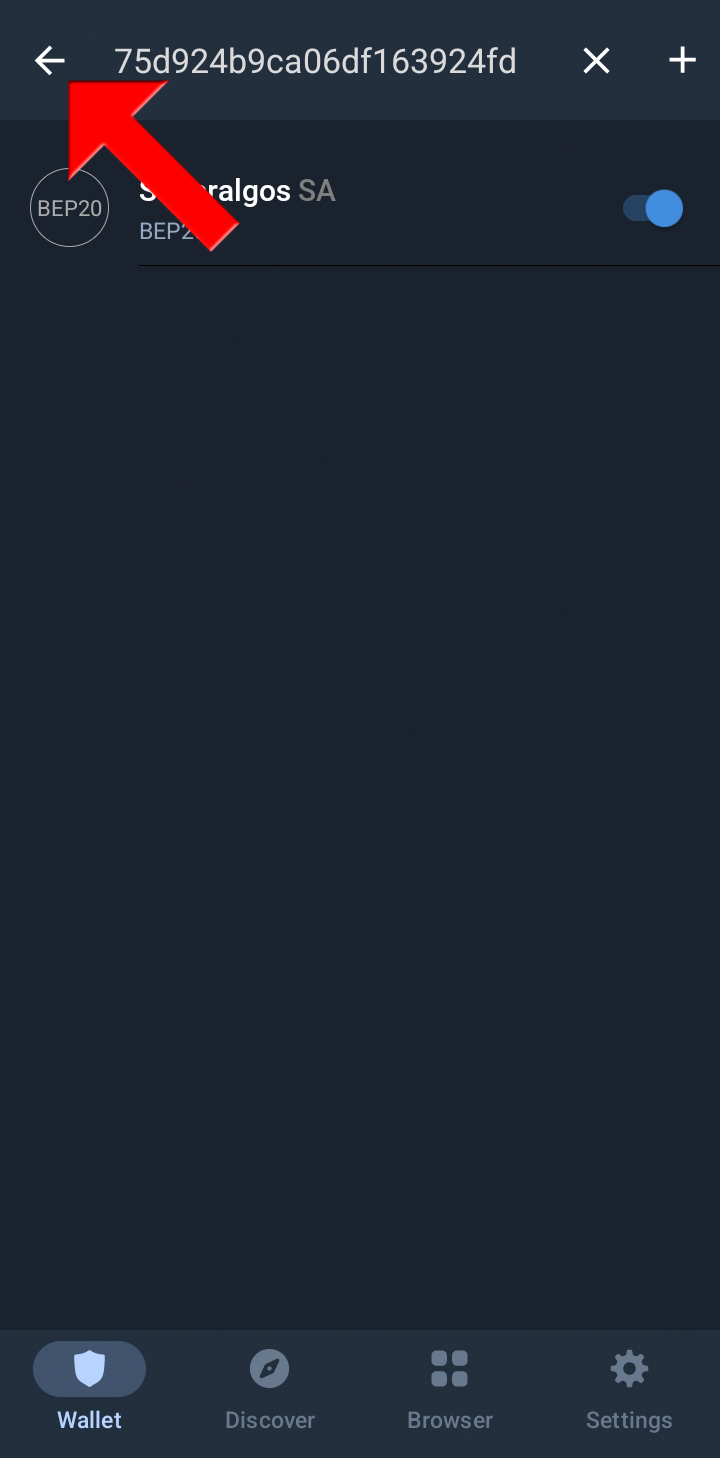
  • The app should immediately find the BEP20 Superalgos SA token.
  • Now touch the slider on the right to activate it!
  • Touch the arrow on the top-left corner to go back to the main screen.
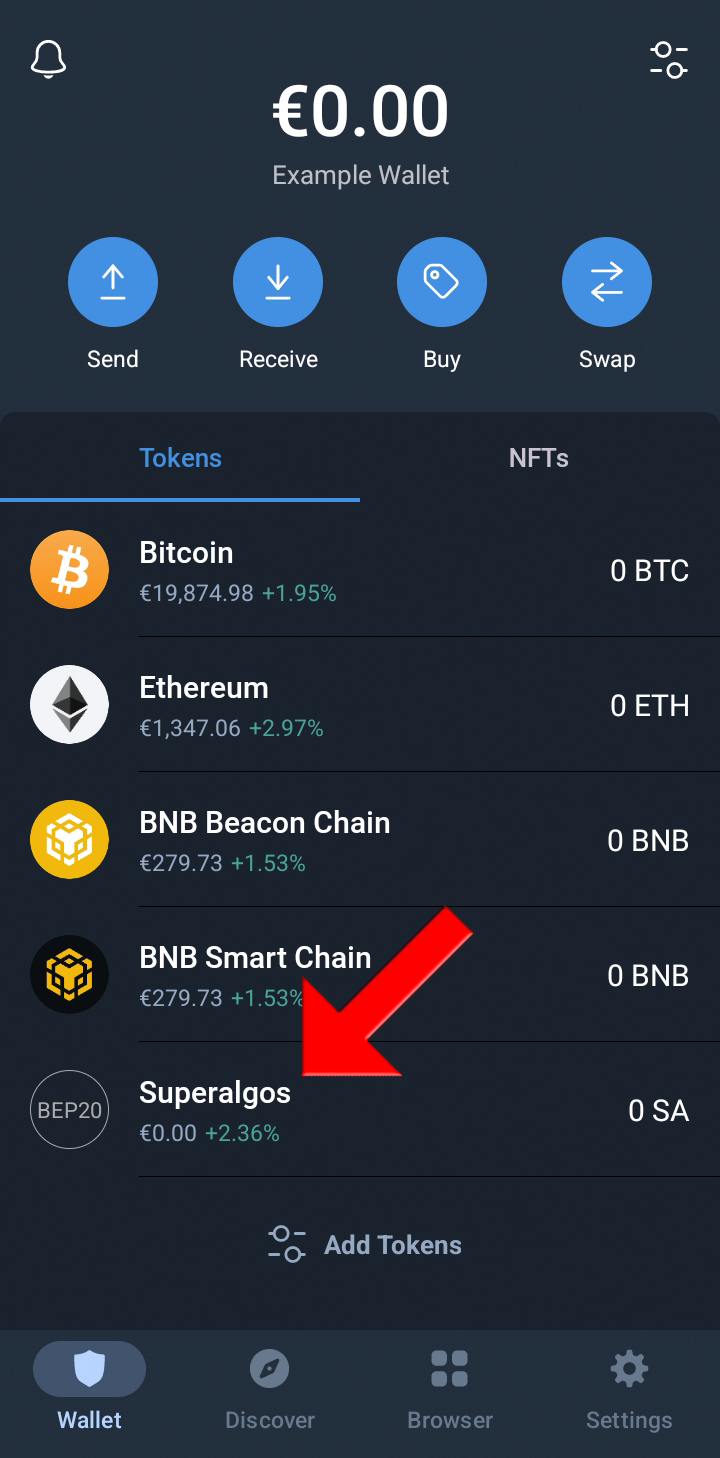
  • Et voilà! The token is now listed as another asset in your wallet!
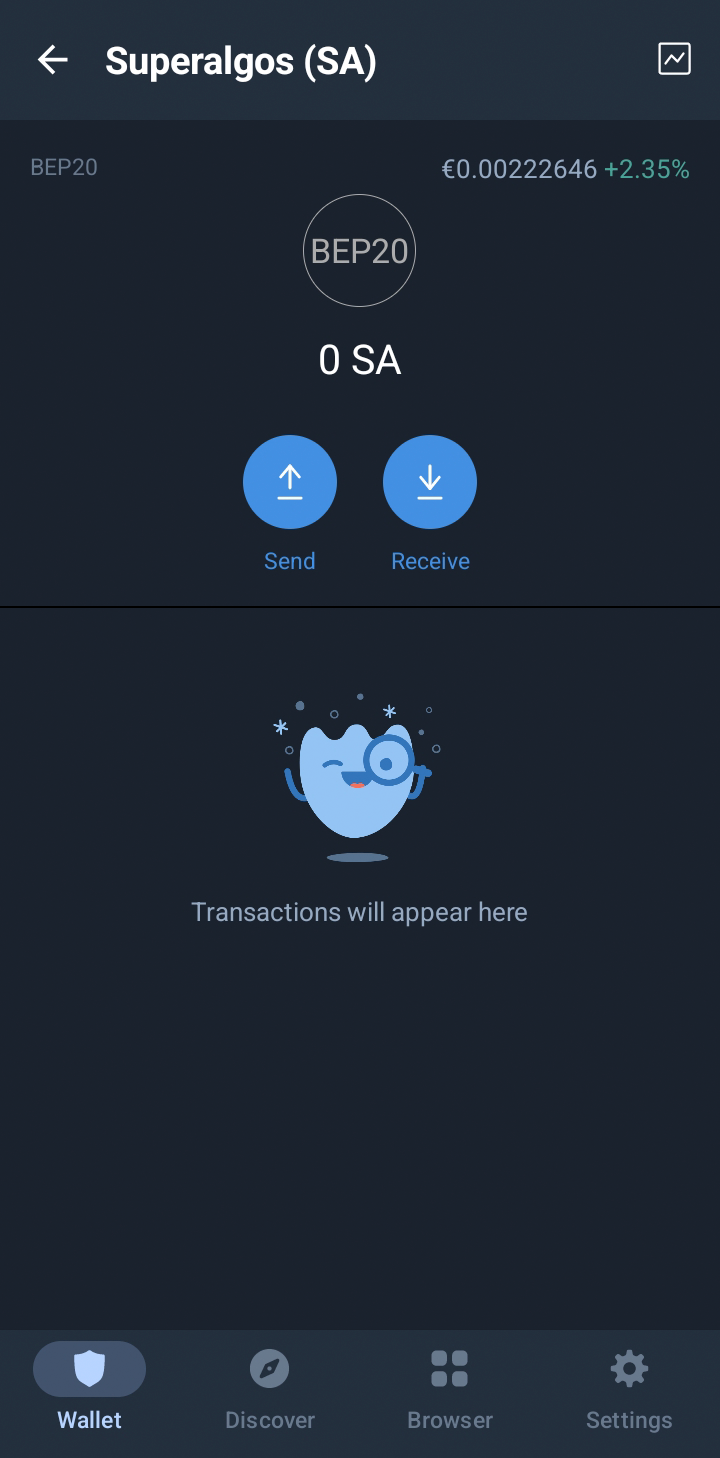
  • If you touch it, you’ll go to the asset screen, where you can get an address to receive tokens from a third party, or to send tokens whenever you get a hold of some!
You May Also Want to Learn…

Superalgos
Superalgos Token
Crypto Trading
Cryptotradingbot
Crypto Trading Platform
Recommended from ReadMedium