avatarAndrew

Free AI web copilot to create summaries, insights and extended knowledge, download it at here

3686

Abstract

Subject (required)</li><li>Medium</li><li>Style</li><li>Artist</li><li>Website</li><li>Resolution</li><li>Additional details</li><li>Color</li></ol><p id="c114">First you will need a description of the subject with as much detail as possible. E.g.</p><p id="f75a"><code>Subject</code></p><blockquote id="3744"><p>A young woman with light blue dress sitting next to a wooden window reading a book.</p></blockquote><p id="feb6">We got the following image, which matches the prompt pretty well.</p><figure id="44d6"><img src="https://cdn-images-1.readmedium.com/v2/resize:fit:800/0*yKvvInAEEsB1T3of.png"><figcaption></figcaption></figure><p id="8cc8">We can be more specific. Let’s add a medium. Some examples are: digital painting, photograph, oil painting. Let’s use</p><p id="fc42"><code>Medium</code></p><blockquote id="f488"><p>Digital painting</p></blockquote><p id="157d">The new prompt is</p><blockquote id="a960"><p>Digital painting of a young woman with light blue dress sitting next to a wooden window reading a book</p></blockquote><p id="c98b">The resulting image is</p><figure id="6c81"><img src="https://cdn-images-1.readmedium.com/v2/resize:fit:800/0*t17bDLJBn_cHXbZc.png"><figcaption></figcaption></figure><p id="8ac1">You can see the image changes from photograph to digital art.</p><p id="b39a">You get the idea. Let’s define the rest of them</p><p id="090c"><code>Artist</code></p><blockquote id="612f"><p>by Stanley Artgerm Lau</p></blockquote><p id="e151"><code>Website</code></p><blockquote id="bb66"><p>artstation</p></blockquote><p id="726f"><code>Resolution</code></p><blockquote id="e6b9"><p>8k</p></blockquote><p id="3aa1"><code>Additional details</code></p><blockquote id="5281"><p>extremely detailed, ornate, cinematic lighting</p></blockquote><p id="a92b"><code>color</code></p><blockquote id="7846"><p>vivid</p></blockquote><p id="b68b">Putting them all together, the prompt is</p><blockquote id="9471"><p>Digital painting of a young woman with light blue dress sitting next to a wooden window reading a book, by Stanley Artgerm Lau, artstation, 8k, extremely detailed, ornate, cinematic lighting, vivid.</p></blockquote><p id="a8e9">which generates this image:</p><figure id="f909"><img src="https://cdn-images-1.readmedium.com/v2/resize:fit:800/0*lhndk3H5d2NjE0Uo.png"><figcaption></figcaption></figure><p id="03dd">By adding keywords to the prompt, we can engineer the image to get the style we want.</p><h1 id="90af">Tips for good prompts</h1><ul><li>Be specific in subject.</li><li>Use multiple exclamation marks !! to stress a word and brackets () to reduce its strength.</li><li>Use appropriate medium type consistent with the artist.</li><li>Artist name is a very strong style modifier. Use wisely.</li><li>Experiment with blending styles.</li><li>Use websites like <a href="https://lexica.art/">Lexica</a> to study other people’s prompts. If you like a particular image, use the prompt as starting point.</li></ul><h1 id="ac8c">Some good keywords for you</h1><p id="c1a7">Below are some of my favorite keywords and their effects. (Tested with Stable Diffusion v1.4)</p><p id="65a0">Enjoy!</p><h1 id="c949">Medium</h1><p id="eb13">Medium defines a category of the artwork.</p><figure id="714c"><img src="https://cdn-images-1.readmedium.com/v2/resize:fit:800/1*PMxRTeoaOSUOW9up0BLccQ.png"><figcaption></figcaption></figure><h1 id="e77d">Style</h1><p id="7d23">These keywords further refine the art style.</p><figure id="a033"><img src="https://cdn-images-1.readmedium.com/v2/resize:fit:800/1*9ygAjTDpPETxKHsMDXV7sg.png"><figcaption></figcaption></figure><h1 id="63cf">Artist</h1><p id="9cd8">Mentioning the artist in the prompt is a strong effect. St

Options

udy their work and choose wisely.</p><figure id="0169"><img src="https://cdn-images-1.readmedium.com/v2/resize:fit:800/1*Z-ksr78_R8Ij9eOhLJ5DSw.png"><figcaption></figcaption></figure><h1 id="4bbd">Website</h1><p id="45af">Mentioning an art or photo site is a strong effect, probably because each site has its niche genre.</p><figure id="2a17"><img src="https://cdn-images-1.readmedium.com/v2/resize:fit:800/1*y6GMUpJMdhJS4huLqDJ0_g.png"><figcaption></figcaption></figure><h1 id="2547">Resolution</h1><figure id="d312"><img src="https://cdn-images-1.readmedium.com/v2/resize:fit:800/1*vv-gPbunLj5Xm6thlsInZA.png"><figcaption></figcaption></figure><h1 id="91b9">Additional details</h1><p id="d111">Add specific details to your image.</p><figure id="4be7"><img src="https://cdn-images-1.readmedium.com/v2/resize:fit:800/1*ckcbJXeqvTeyTLYfDy9FlA.png"><figcaption></figcaption></figure><h1 id="80c1">Color</h1><p id="1e8a">Add additional color scheme to the image.</p><figure id="ec7f"><img src="https://cdn-images-1.readmedium.com/v2/resize:fit:800/1*iRjNzvIfZVjiornCEEV4SQ.png"><figcaption></figcaption></figure><h1 id="f752">Summary</h1><p id="c910">In this post, we have gone through the basic structure of a good prompt. This should be used as a guide rather than rules. The Stable Diffusion model is very flexible. Let it surprise you with some creative combination of keywords!</p><p id="7007">If you have problem generating stunning artworks, this <a href="https://andrewongai.gumroad.com/l/stable_diffusion_prompt_generator">Stable Diffusion prompt generator</a> would be able to help you. In the next post, I will show you how to make this prompt generator using Notion.</p><p id="c80c">You may also like:</p><div id="d10d" class="link-block"> <a href="https://readmedium.com/how-to-fine-tune-your-ai-images-with-these-simple-prompting-techniques-b7b243ef7e8f"> <div> <div> <h2>How to fine-tune your AI images with these simple prompting techniques</h2> <div><h3>Generated an AI image, it’s close but not quite what you want? In this article, I will teach you a few simple prompting…</h3></div> <div><p>medium.com</p></div> </div> <div> <div style="background-image: url(https://miro.readmedium.com/v2/resize:fit:320/1*IJOHMAp6YgZesYscB9FM1A.jpeg)"></div> </div> </div> </a> </div><p id="3aeb">Follow me on <a href="https://twitter.com/intent/follow?original_referer=https%3A%2F%2Fwww.sagiodev.com%2F&amp;ref_src=twsrc%5Etfw%7Ctwcamp%5Ebuttonembed%7Ctwterm%5Efollow%7Ctwgr%5Eandrewwongai&amp;region=follow_link&amp;screen_name=andrewwongai">Twitter</a> to get content like this.</p><p id="2a92">Consider using my products to support me</p><ul><li><a href="https://andrewongai.gumroad.com/l/stable_diffusion_quick_start">Stable Diffusion Quick Start Guide — Generate AI images in a minute</a></li><li><a href="https://andrewongai.gumroad.com/l/prompt_builder_for_stable_diffusion_premium">Prompt builder for Stable Diffusion: AI Image made easy</a></li><li><a href="https://andrewongai.gumroad.com/l/stable_diffusion_AI_artwork_collage">Shuffled gallery for AI artwork</a></li><li><a href="https://apps.apple.com/us/app/lucid-markdown-keyboard/id1616092954">Markdown Keyboard for iPhone and iPad</a></li><li><a href="https://apps.apple.com/us/app/notion-keyboard-notionkey/id6443495034">Notion Keyboard — Notionkey for iPhone and iPad</a></li></ul><p id="5872"><i>(This article first appears in my <a href="https://www.sagiodev.com/blog/how_to_engineer_prompts_for_ai_images/">blog</a>)</i></p></article></body>

How to come up with good prompts for AI image generation
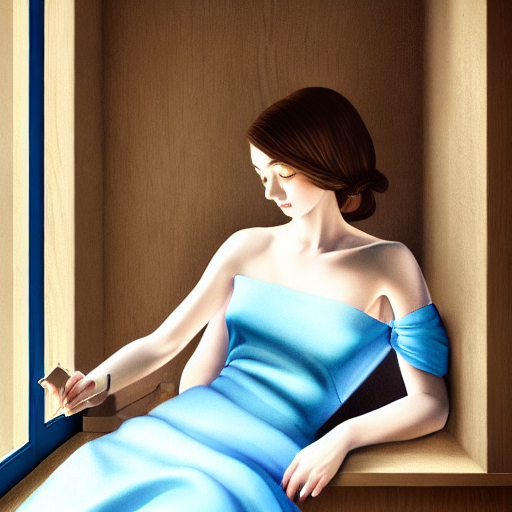
In this post, I’ll teach you how to create good prompts for generating AI art work images. I will base my method on Stable Diffusion, an open-source text-to-image AI model.

(If you are new to AI art, check out my Quick Start Guide and Stable Diffusion prompt builder.)

What is Stable Diffusion?

Stable Diffusion is a text-to-image AI model. It is trained on 2.3 billion image and text description pairs. Because it has seen so much, the model encodes relationship between image pixel values and it’s text descriptions.

As a result, if you put in description like “A Photo of a cat sitting on top of a building”, it would give you images like these:
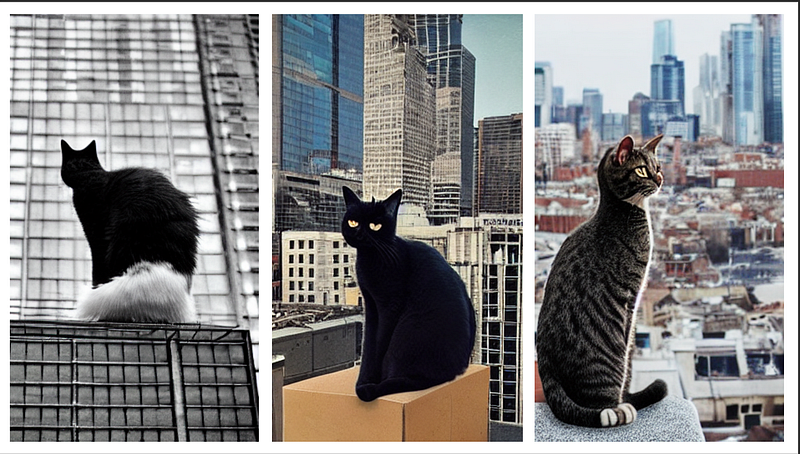
You may be thinking what’s so special about these images? Couldn’t we get millions of them in a Google search? What’s intriguing about this technology is that you can prompt the model to generate high quality images that do not exist before. For example, you can ask for a portrait painting of Emma Watson by the 19th century American painter John Singer Sargent:
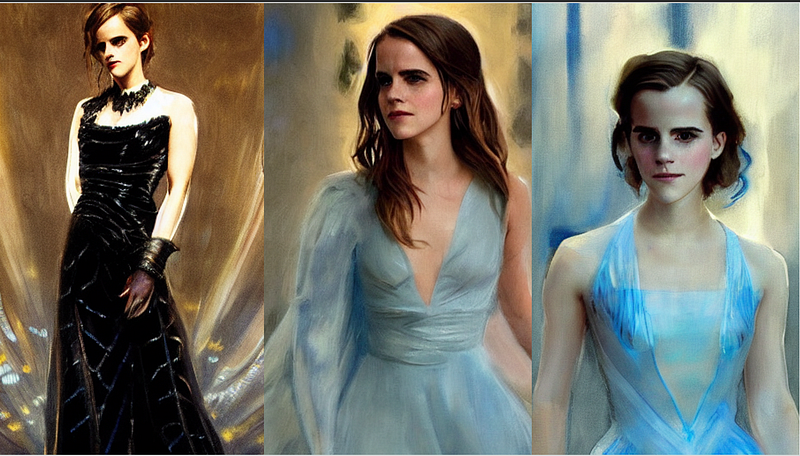
It is incredible that such images can be produced from keyword-pixel correlations! What’s mind-boggling is that it gets the artistic style, faces (which our brains are very unforgiving of tiny mistakes) and shadows correctly, and blends them all together in an aesthetically pleasing manner. I believe that the wonder of large numbers is beyond the comprehension of human minds.

What so special about Stable Diffusion?

This year we have seen a few image generation AI such as DALLE 2 and MidJourney. They too are capable of generating stunning images from text prompts. What’s so special about Stable Diffusion are

  1. Open-source.
  2. Low computer hardware requirement.

The implication of these two together is big. You can download the model and run it on your local computer. Now there are PC and Apple version available. There’s an explosion of free-to-use image generation AI powered by Stable Diffusion. The low cost of run allows entrepreneurs to explore Freemium or Ad-supported business models. The end result is going to be making the AI technology more accessible.

Where can I try my prompts?

The easiest way to use Stable Diffusion is via DreamStudio.AI. It is from the creator of Stable Diffusion. You will get some free credits after signing up.

Anatomy of a good prompt

There are proven techniques to generate high quality, specific images. Your prompt should cover most if not all of these areas

  1. Subject (required)
  2. Medium
  3. Style
  4. Artist
  5. Website
  6. Resolution
  7. Additional details
  8. Color

First you will need a description of the subject with as much detail as possible. E.g.

Subject

A young woman with light blue dress sitting next to a wooden window reading a book.

We got the following image, which matches the prompt pretty well.
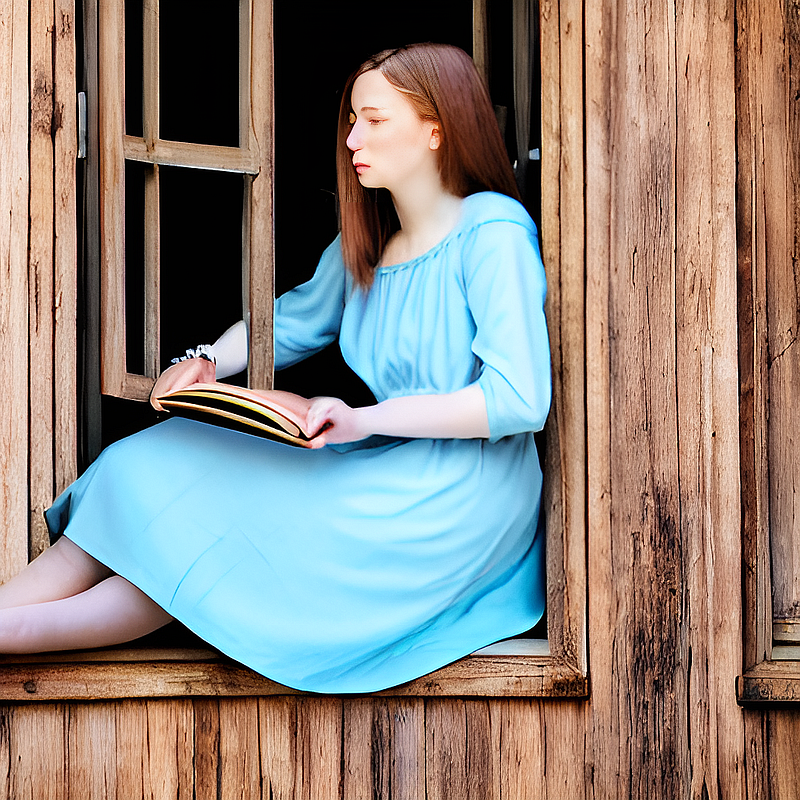
We can be more specific. Let’s add a medium. Some examples are: digital painting, photograph, oil painting. Let’s use

Medium

Digital painting

The new prompt is

Digital painting of a young woman with light blue dress sitting next to a wooden window reading a book

The resulting image is
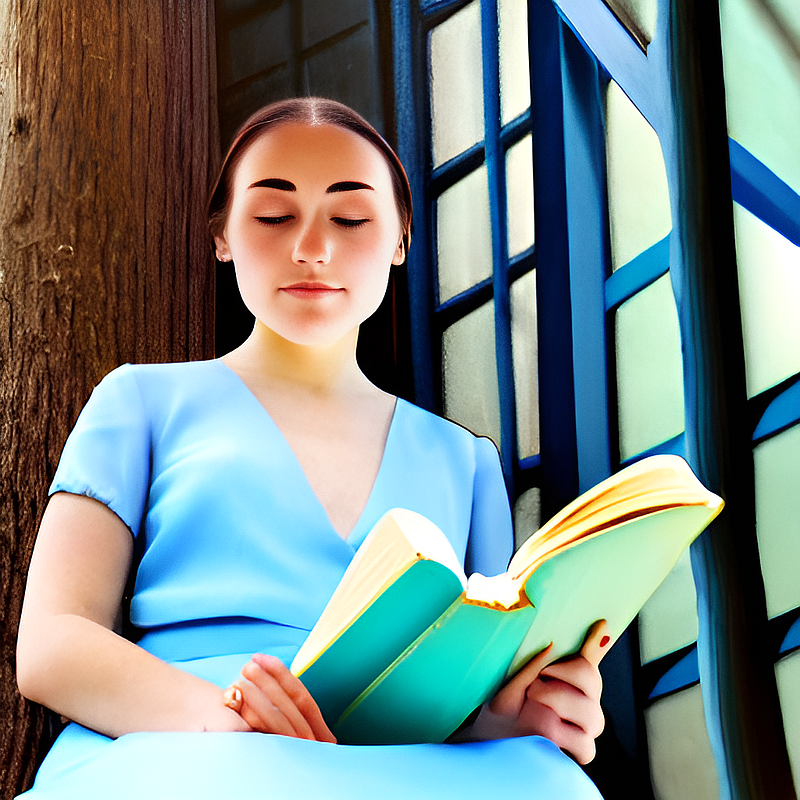
You can see the image changes from photograph to digital art.

You get the idea. Let’s define the rest of them

Artist

by Stanley Artgerm Lau

Website

artstation

Resolution

8k

Additional details

extremely detailed, ornate, cinematic lighting

color

vivid

Putting them all together, the prompt is

Digital painting of a young woman with light blue dress sitting next to a wooden window reading a book, by Stanley Artgerm Lau, artstation, 8k, extremely detailed, ornate, cinematic lighting, vivid.

which generates this image:
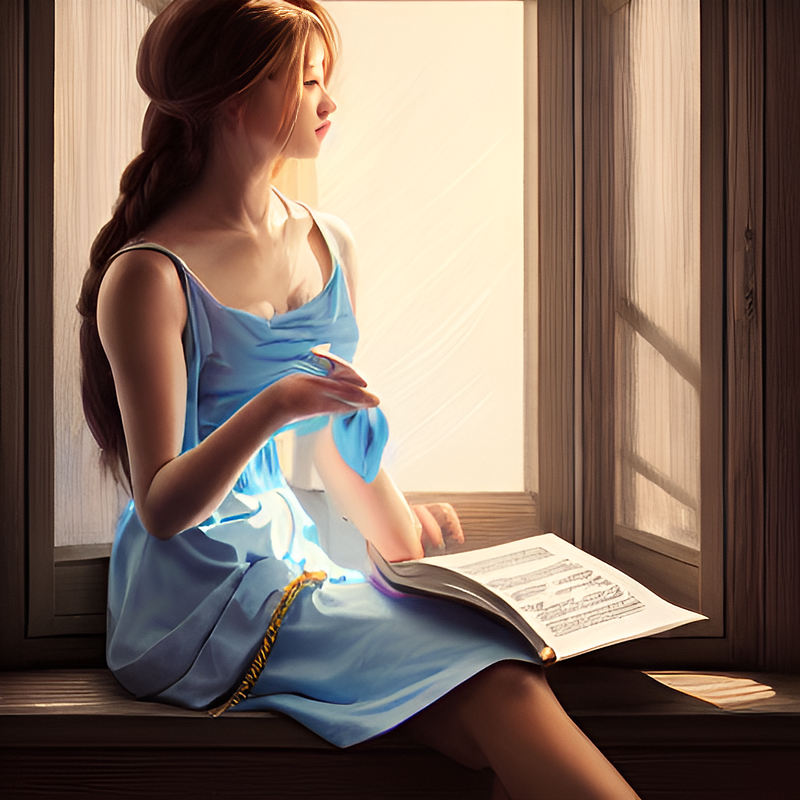
By adding keywords to the prompt, we can engineer the image to get the style we want.

Tips for good prompts

  • Be specific in subject.
  • Use multiple exclamation marks !! to stress a word and brackets () to reduce its strength.
  • Use appropriate medium type consistent with the artist.
  • Artist name is a very strong style modifier. Use wisely.
  • Experiment with blending styles.
  • Use websites like Lexica to study other people’s prompts. If you like a particular image, use the prompt as starting point.

Some good keywords for you

Below are some of my favorite keywords and their effects. (Tested with Stable Diffusion v1.4)

Enjoy!

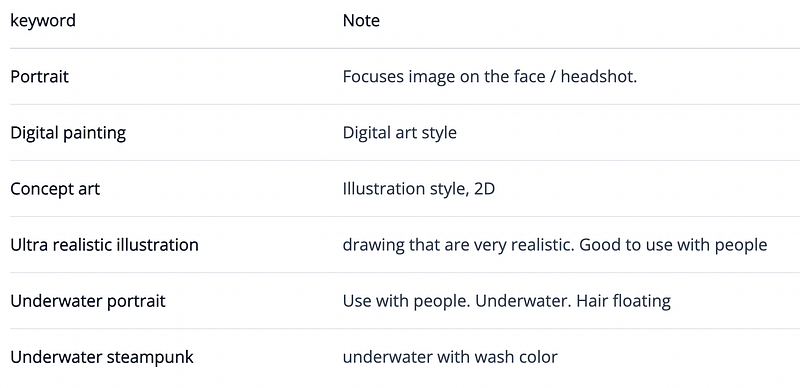
Medium

Medium defines a category of the artwork.
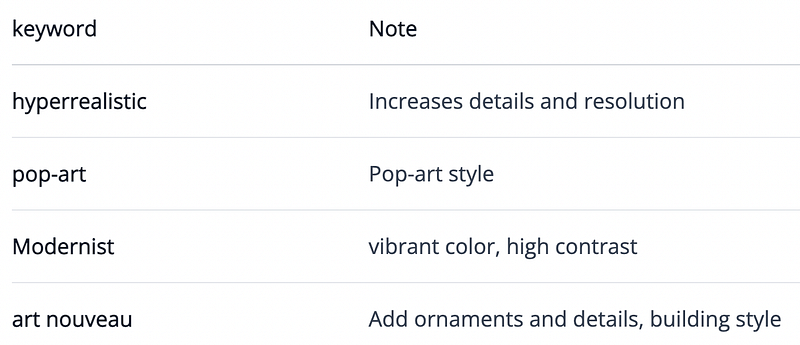
Style

These keywords further refine the art style.
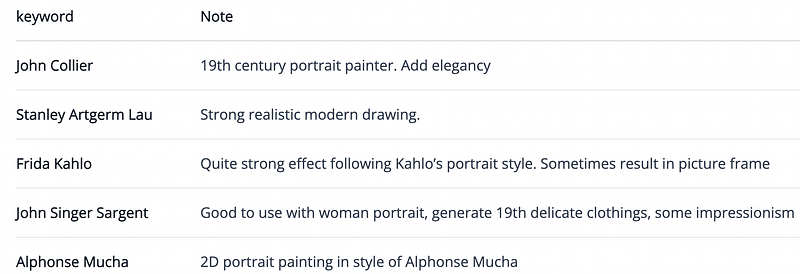
Artist

Mentioning the artist in the prompt is a strong effect. Study their work and choose wisely.
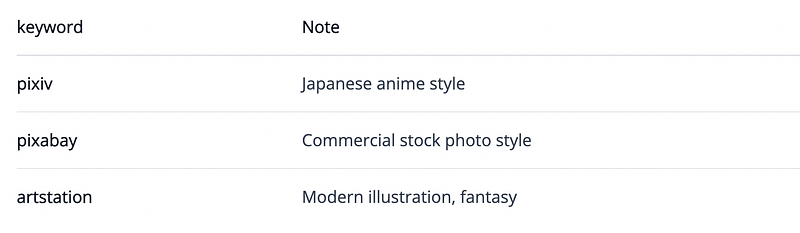
Website

Mentioning an art or photo site is a strong effect, probably because each site has its niche genre.
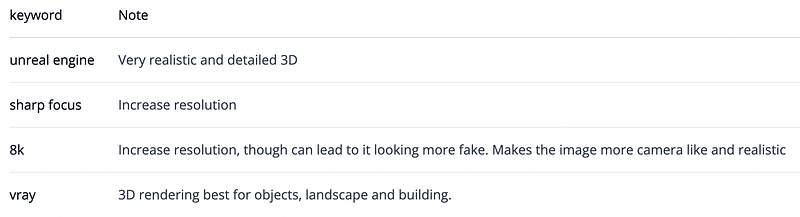
Resolution
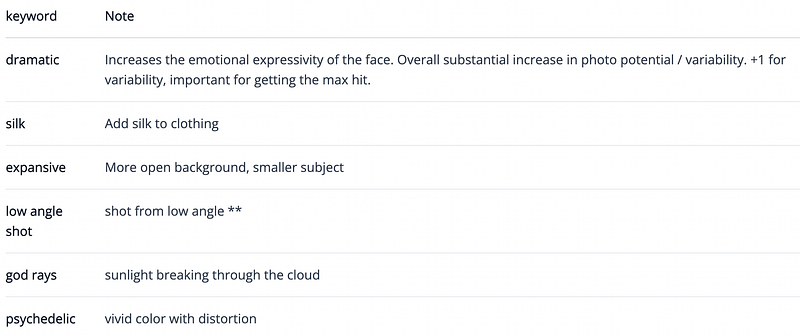
Additional details

Add specific details to your image.
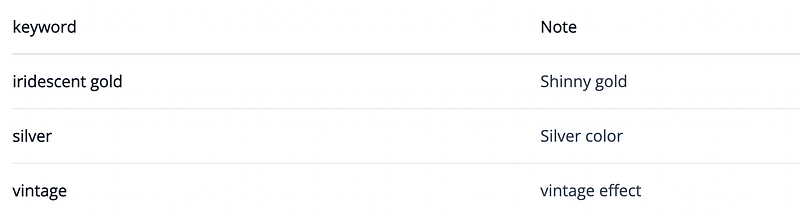
Color

Add additional color scheme to the image.
Summary

In this post, we have gone through the basic structure of a good prompt. This should be used as a guide rather than rules. The Stable Diffusion model is very flexible. Let it surprise you with some creative combination of keywords!

If you have problem generating stunning artworks, this Stable Diffusion prompt generator would be able to help you. In the next post, I will show you how to make this prompt generator using Notion.

You may also like:

Follow me on Twitter to get content like this.

Consider using my products to support me

(This article first appears in my blog)

Stable Diffusion
Ai Art
Ai Art Generator
AI
Ai Applications
Recommended from ReadMedium