
How to Checkout Git Repo at a Specific Version or Revision
Step-by-Step Guide
Many times, I find myself that I need to get back to an older revision of my Git repository for reasons such as wanting to look at what I did a while ago, or somehow I messed up my current version and committed without realizing what actually I did. But hey, this is where the power of a version control software such as Git comes into the picture. At least I don’t have to create multiple files like “final.pdf”, “final-final.pdf”, etc.
How to check out for an older revision?
To checkout for an older revision, we first need to go back to back to the revision we need. This can either be found out through a date you are looking for a commit message.
Let’s understand this with an example of my repository https://github.com/rahulbhadani/medium.com
Now, say we are interested in checking out this repository as it was on October 9, 2022. To do that, first, click on commits history (21 commits) as shown below:

Now, we want to restore a revision from Oct 9, 2022. For that, let’s click on the commit hashes shown in Figure 2.
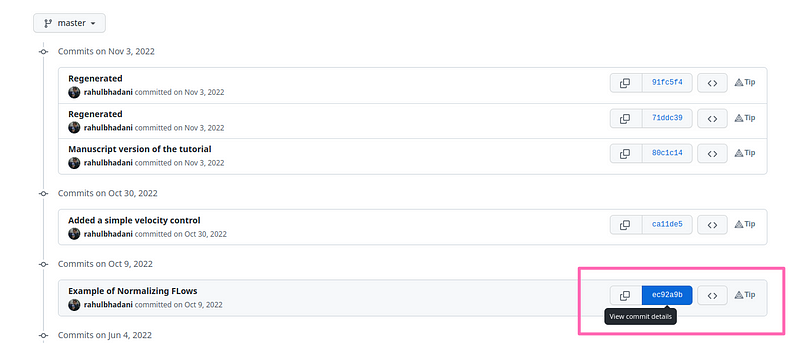
It will show you changes that was committed on Oct 9, 2022 as shown in Figure 3, I call this diff window.

From the diff window, note down the commit hash as shown in the lower box in Figure 3. You can also click on ‘Browse files’ to inspect files for this specific commit directly on your browser.
After noting down the commit hash, type the following on your computer in the command line:
git clone https://github.com/rahulbhadani/medium.com
cd medium.com
git checkout ec92a9bc7b2aa165df630ed5e268ec58fc0716a2
This will cause the local branch of your GitHub repo checkout on your commit to revert to the commit corresponding to ec92a9bc7b2aa165df630ed5e268ec58fc0716a2 .
You will get the following output in your command line terminal
Note: switching to 'ec92a9bc7b2aa165df630ed5e268ec58fc0716a2'.

You are in 'detached HEAD' state. You can look around, make experimental
changes and commit them, and you can discard any commits you make in this
state without impacting any branches by switching back to a branch.

If you want to create a new branch to retain commits you create, you may
do so (now or later) by using -c with the switch command. Example:

  git switch -c <new-branch-name>

Or undo this operation with:

  git switch -

Turn off this advice by setting config variable advice.detachedHead to false

HEAD is now at ec92a9b Example of Normalizing FLows
Conclusion
Version control software like Git is extremely powerful and can save hours of your time and make you more productive if you use it the right way. It is not only meant for tech-savvy professionals, nerds, and programmers, but even authors of books, journalists, and office workers can use and get benefits from it.

Follow me on LinkedIn, and Medium for more content like this.


