
How to Check Whether an Element is in the Viewport or Not?
Use a neat and clean way (Intersection Observer API) to determine the visibility of the element in the viewport.
While developing websites/web applications, you might have come across a recurring problem that you want to do some action based on whether the element is in the viewport or not. This type of situation is very common in interactive websites.

In this article, we will explore a way to check the visibility of an element in the viewport.
In order to determine the visibility of the element, we will use one of the browser’s APIs called Intersection Observer API .
Before Intersection Observer API was introduced in the browser, People have used element’s method such Element.getBoundingClientRect() , events, etc.. to determine the visibility of the element. This approach comes with some performance issues as well because we would have to listen for events and accordingly call for methods constantly. Performance overload increases if we increase the number of elements checked for visibility.
Intersection Observer API
It provides a way to asynchronously observe changes in the intersection of a target element with an ancestor element or with a top-level document’s viewport.
Check for compatibility
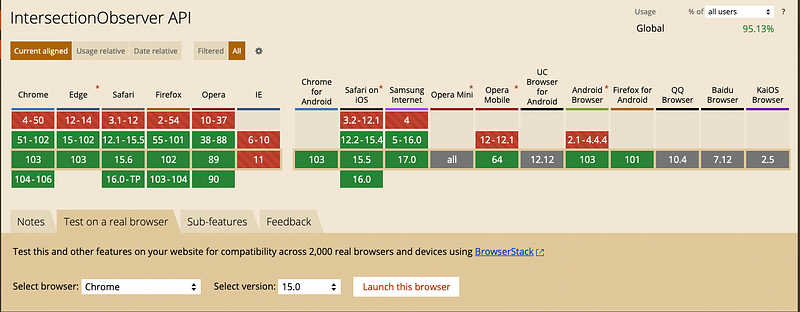
As you can see in the above picture, Intersection Observer API is supported by the latest version of pretty much every browser except IE (Internet Explorer). There will be no problem related to whether it is supported or not
You can explore other aspects of Intersection Observer API at https://caniuse.com or by clicking on the link provided below.
Implementation of Intersection Observer
In order to implement Intersection Observer, we need a target element & an Intersection Observer to observe the visibility of the target element.
Know more about the Intersection Observer here
We can implement Intersection Observer in these simple steps.
- Create an observer
const options = {
    root: null,
    threshold: 0.5
};
const callback = function(entries, observer) {
     entries.forEach((entry) => {
        console.log(entry.isIntersecting);
     });
}
let observer = new IntersectionObserver(callback, options);Here you can see that we have passed options as well as callback to create an observer. In options, the value of root is null, it means that it will take viewport as a reference to determine the visibility. The threshold value is 0.5 , it means that if the target is visible more than 50%, then callback will be invoked.
The callback function takes two parameters, entries and observer. The entries is list of IntersectionObserverEntry type object.
2. Select a target and observe it
const target = document.getElementById("target");
observer.observe(target);
That’s all.
Check if the element is visible to the viewport or not
In order to check that an element is in the viewport or not, we set threshold value to 0 . With this, the callback is invoked as soon as the element enters the viewport or leaves the viewport
const target = document.getElementById("target");
function callback(entries, observer) {
     entries.forEach((entry) => {
       if(entry.isIntersecting) {
         console.log("visible");
       } else {
         console.log("not visible");
       }
    });
}
function createObserver(target, callback) {
   const options = {
      root: null,
      threshold: 0
   };
   const observer = new IntersectionObserver(callback, options);
   observer.observe(target);
}

createObserver(target, callback);
Check the working example here:
Check if the element is fully visible to the viewport or not
In order to check if an element is fully visible or not, we set threshold the value to 1 . With this, the callback is invoked as soon as the full element enters in the viewport or leaves the viewport entirely.
const target = document.getElementById("target");function callback(entries, observer) {
entries.forEach((entry) => {
if(entry.isIntersecting) {
console.log("Fully visible");
} else {
console.log("not fully visible");
}
});
}function createObserver(target, callback) {
const options = {
root: null,
threshold: 1
};
const observer = new IntersectionObserver(callback, options);
observer.observe(target);
}
createObserver(target, callback);Check the working example here.
That’s all.
If you enjoyed this article, please follow me here on Medium for more stories about technology.
Stay ahead of the curve! Sign up for my newsletter and receive exclusive content, valuable insights, and the latest updates delivered straight to your inbox. I also write extensive blogs on FrontendRoom.
More content at PlainEnglish.io. Sign up for our free weekly newsletter. Follow us on Twitter and LinkedIn. Check out our Community Discord and join our Talent Collective.