
How to capture UX project requirements
Three approaches for different scenarios

A recent hot topic for me at work has been project requirements. Although most people know about requirements gathering, I’ve never managed to find a useful and actionable guide to documentation.
Therefore, this article includes:
- What requirements are and why they are important
- Who does the work of gathering them and how
- Three different methods for documentation and management that I’ve used on different types of projects
This may not be the sexiest article I’ve ever written, but hopefully it will be useful to someone.

What are “requirements”?
Anyone who has tried to design or redesign a digital product knows you need a brief. And once you have that initial brief, you’re going to have a load more questions about what the client business wants, what they are trying to do for users and what the technical limitations or opportunities are.
This is where requirements come in.
Requirements are about answering as many questions as you can, and writing those answers down in such a way that they are actionable and trackable.
In short, it’s a list of things that are required for a project to be a success.
There are generally three groups of requirements for a digital product:
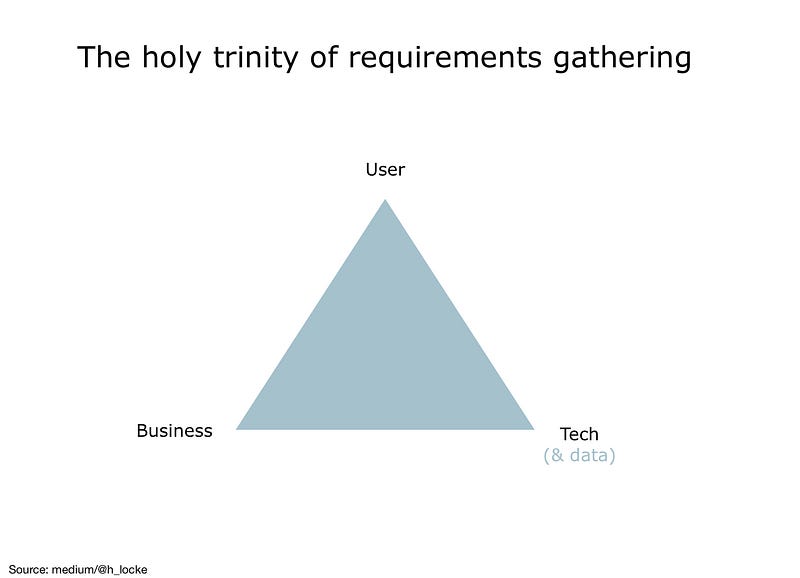
Business requirements — What will success look like for the business and how do business needs influence the final product solution?
Technical (and data) requirements — What are the limitations and opportunities of the proposed technology and data systems which will enable the delivery of the product solution?
User requirements — What do users need from the product in order for it to be usable, useful, desirable, accessible and so forth?
Why do you need them?
Requirements give you a blueprint of objectives, rules and criteria that the final product solution should adhere to. It expands the brief into as much detail as is needed to ensure total clarity across the project.
More than just a business brief
A brief tends to be about what a business wants. Requirements ensure that users have at least one third of the focus, and that technical teams have a chance of delivering the project vision. We’ve previously looked at the kind of frantic back-tracking that is needed if you skip this.
Reducing scope creep
By answering and detailing as many questions as possible, you remove or at least reduce the possibility of any confusion or misunderstanding between teams and stakeholders as to the purpose, scope, challenges or execution of the project. This means that you are less likely to get half way through the project and either have a stakeholder say you’ve misunderstood something, or that they want to add in a whole new stack of features.
Note: reduce, not eliminate. For your entertainment, I have previously included “not gathering requirements” in my top 11 list of things that go wrong on a UX project.
Communication tool
They also allow you to manage change with total transparency.
It is not necessary or feasible to write one set of requirements at the beginning of the project and stick to them forever. Nor is not a good idea to write them, put them in a drawer and never look at them again.
The best use of requirements is capture them, share them, communicate and refer to them throughout the project. And track changes.
Change management
And then, when needs change because the business wants something different, the tech can’t do something after all, or research shows users needs something different, you can go back and update them. And continue to share and communicate them.
Internal project consistency
Something that can be overlooked is consistency between requirements and the solution — especially when clients and stakeholders change things rapidly.
Keeping requirements up to date helps to ensure that changes are then rolled out across the IA, UX, UI and any other work to ensure consistency throughout the project from end to end. Keeping this process lean depends on the types of deliverables you choose for documenting requirements — more on that below.
In short, the solution being designed should always aim to satisfy requirements, even as they change.
This is something I have written about previously when discussing portfolio narratives.

How do you get them?
As above, I think most people know that requirements are gathered via research methods. Here are some examples of the kinds of activities that may be involved:
Business requirements — Stakeholder and subject-matter expert interviews and workshops, surveys, reviewing previous strategy documentations, service safaris.
Tech (and data) requirements — Stakeholder and subject-matter interviews, systems reviews, technical specifications and documentation, suppliers mapping and interviews, data analysis.
User requirements — User research such as interviews, usability testing existing products, focus groups (if you must), surveys, observation/ethno. Sometimes you’ll also have stakeholders within a client business who are great user proxies to interview as well (note: not instead of users).

Who does requirements gathering?
On smaller projects, I’d expect a UX Designer/Consultant to be able to complete high level requirements on their own, with the majority of technical requirements handled by a dev/build team who manage their own backlog and processes. This person would obviously still need to have research and stakeholder facilitation skills.
On larger projects, where there is significant business and technical complexity, I’d expect it to be a team of at least three people, skilled in research and interview techniques for needs extraction.
An example of job titles/roles by requirements area:
- Business needs — Business analyst / Consultant
- Technical capabilities and limitations — Tech Lead / Architect (and data analyst/strategist)
- User needs — UX Lead
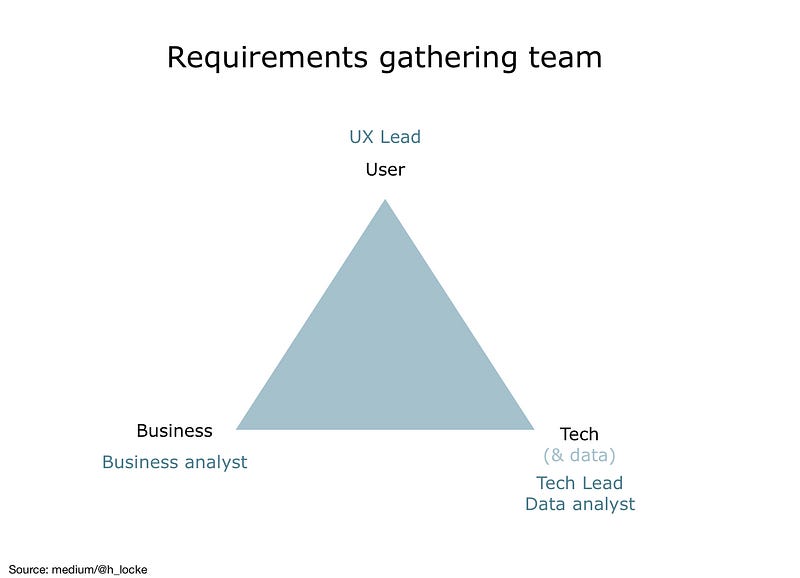
If you’re lucky enough to have the three areas covered with specialists, it’s a real opportunity to develop strong relationships with stakeholder leads in each area and the teams they have supporting them.
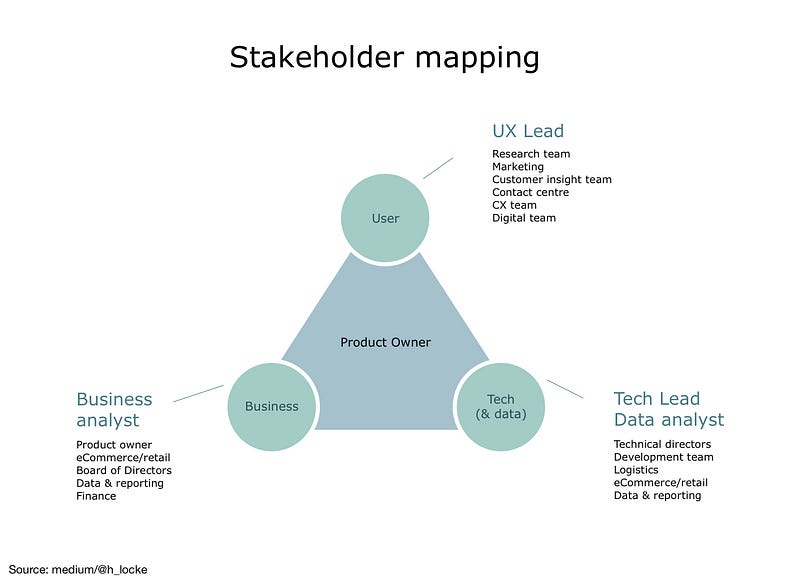
Here’s what that stakeholder mapping could look like:
User needs
A UX lead can often find insights from and build strong collaborative relationships with Research teams, Marketing departments, Customer Insights teams, call centre operations and leadership, a CX or VoC team, and of course the digital or eCommerce department.
Business needs
The business analyst is the best friend of the Product Owner, understands the KPIs of eCommerce and retail, can report to the Board of Directors as well as understand reporting from data and finance teams.
Tech & data needs
Tech architects and data analyst or strategy leads are perfectly positioned to dive into complex areas of the business such as the IT department, their technical teams and development infrastructure, systems dependencies, logistics teams, eCommerce and retail again, specifically the analysts’ work and any stakeholders involved in reporting.
These three leads then work together as a squad to iterate requirements, whilst representing the needs of their stakeholders and end users of the Product.
More on managing large groups of stakeholders.
How should requirements be documented?
Yes of course, the first response is it depends. This time, it depends on the type and size of the project, the needs of stakeholders, the structure of the team involved and the processes all three will need to follow.
So find this out before you steam ahead. Ask first. Never assume.
The desired outcome is that you create enough documentation to reduce project risk, and the least documentation needed to move forward.
Here are three simple ways to document and manage requirements:
1. Simple reqs — a Word document
The simplest way to write project requirements for a simple project is a Word document.
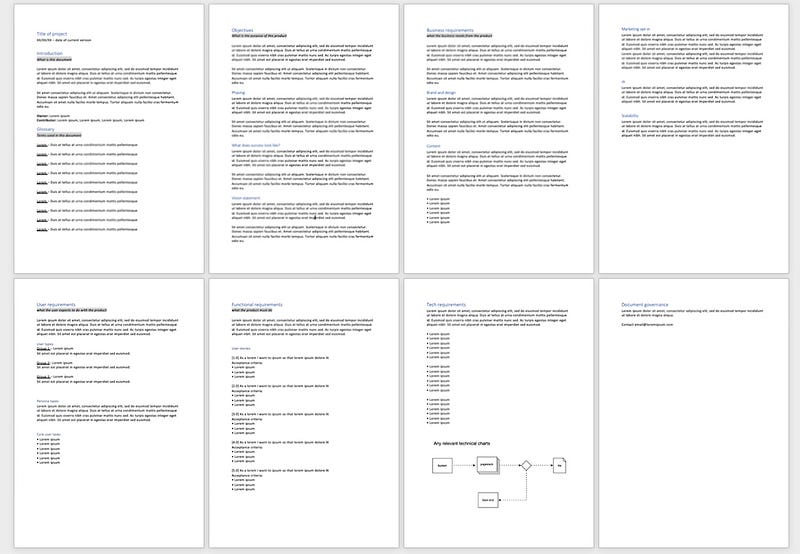
Looks like: Three sections: Business, User, Tech/Data requirements. Should remain fairly high level because the project itself is simple. If you find the document becoming complex, then your project is more complex and another approach (below) could be of use.
Managed as: Stays in a shared Word document or PDF (if you can’t trust people not to change things). Changes should be highlighted with dates and ownership of changes.
Good for: Simple projects, but with external stakeholders who need to be managed in order to maintain clarity and reduce future scope creep. They are useful on those projects where as a UX Lead, you don’t have a dedicated tech architect— because you can hand off to the Product Owner and their dev team to integrate this into Confluence/Jira and create their own user stories.
Not good for: Any level of project complexity. If you need to document a large amount of user stories and acceptance criteria, a Word document can become visually long and overwhelming very quickly. Also, if you need line item approval line item approval or to track comments between stakeholders it can get messy.
2. Detailed B/U/T and functional specs — A Spreadsheet
This is a format that allows you to create not only higher level requirements for business, user and tech, but also detailed line items for functionality, mapped closely against user stories. As a shared spreadsheet, you can engage dev teams with the kind of granular questions they often have, and allows them to surface edge cases that you might never think of.
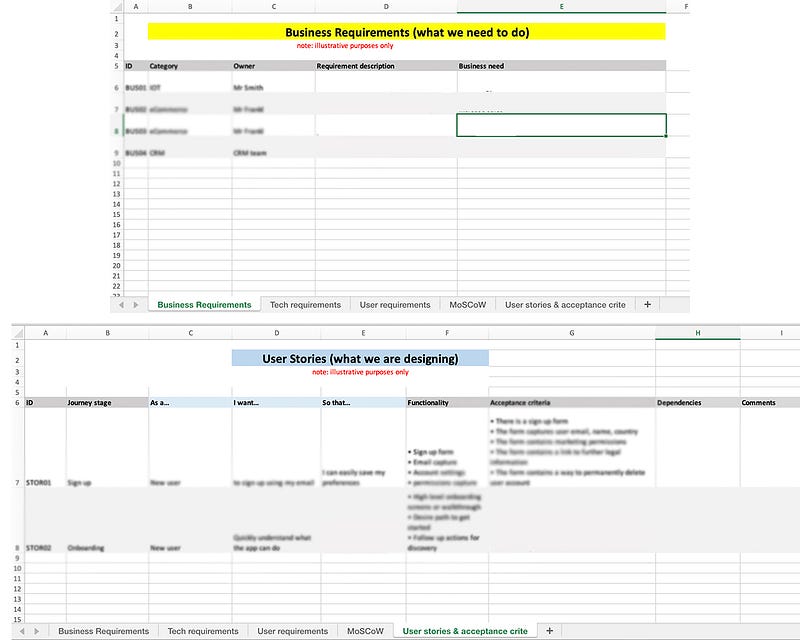
Looks like: Yes you guessed it, a spreadsheet
Managed as: Shared spreadsheet via Google Sheets or Sharepoint, or similar platform of excitement.
Good for: Working with a dev team which is separate from the Product team day-to-day. This could be a client’s third party supplier, or a large in-house team. Again, it supports complexity and the need for detail, allows you to track comments and MoSCoW as well as acceptance criteria and agile points systems.
Not good for: Using this approach on a simple waterfall project can create unnecessary work for you and overwhelm the Product or stakeholder team. Let’s face it — Excel scares some people. It’s also a heavy piece of documentation which is not needed if you have small agile teams or squads which include devs working together every day.
3. User story mapping — Post-its and/or Trello
My favourite way to work with requirements, which is also the fastest and most efficient on agile projects, is with a basic whiteboard and a stack of post its. Oh, I miss the real world. Miro is just not the same.
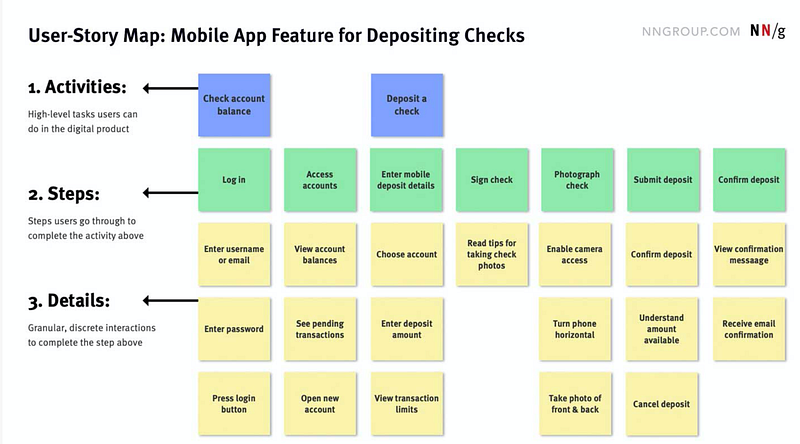
Looks like: In this scenario you are taking user stories or key tasks within the user journey and mapping steps and functionality against them. This graphic is from the NN website where they have a full article on this.
Managed as: Either on a real whiteboard, yet another Miro board, or transferred to Trello.
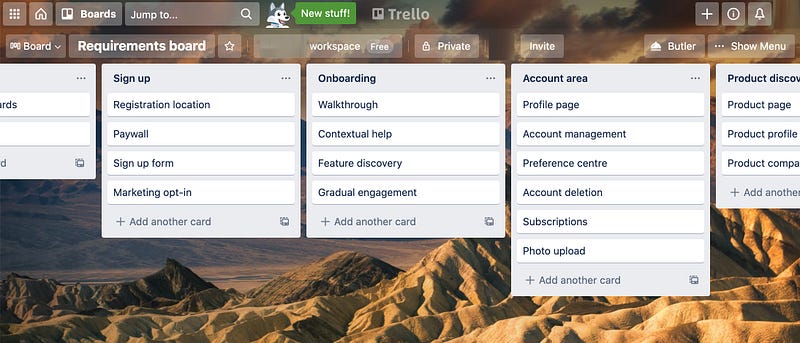
Good for: Goes without saying, this is used a lot by Agile teams. But it also can be used for smaller waterfall projects in some scenarios — here’s why. The reason this super-slimmed down, less time consuming method works is because Agile teams are empowered to define their own requirements and crack on with design and development. Similarly, if you are working in a small in-house waterfall team, on your own project, or with one or two stakeholders who trust you and your skills to take the work forward then this approach will be lean and effective however..
Not good for: Teams who are not empowered to create and manage their own user stories. This method requires putting trust and control into a team. Therefore, using this method will not work where you have:
- Large numbers of stakeholders (needing more visibility)
- A limited skill set within the team (and you’re going to have to go outside to get input and approval)
- Competing complex objectives (where you have to negotiate your way over time to alignment around requirements)
- Requirements that are likely to change throughout the project (and you need to track all those financial and political implications)
- Lack of focus on the user (if stakeholder and business needs mean user-centred decisions cannot be made by the team)

It depends
As you can see, the type of documentation depends on your project scope, stakeholder profile, team structure and the ongoing management and communications needs for the project.
These are just three examples that have been successful on the types of projects I’ve worked on. The most important thing however is to create whatever type of documentation supports transparency and communication (thereby reducing risk) but is balanced with the ability to move forward without unnecessarily heavy documentation.
It’s ok if you create something that is a combination of documents, or doesn’t look like any of the above — so long as it works for your team and your stakeholders.
If you found this useful, consider subscribing for free to get email alerts when I post new articles, or you can join Medium for full access to my article archive, plus everything else on Medium.


