
How to Call APIs From Ethereum Smart Contracts
Find and use oracles to retrieve off-chain data in your smart contracts

Due to the nature of blockchain ecosystems, accessing off-chain data from on-chain smart contracts is not natively possible. However, Chainlink provides a platform for blockchain oracles, which are nodes on the network that act as a bridge between on-chain and off-chain data. Oracles enable smart contracts to retrieve data from the outside world.
Each oracle node can be configured to perform a wide range of tasks depending on the adapters it supports. Some of these adapters include HTTP GET, HTTP POST, JSON Parse, Multiply, and more.
How to Use Chainlink Oracles
Note: We’re using the Ropsten testnet in this example.
Coingecko API is public and free, but if you choose to upgrade, use the promo code
CGALEXROANwhen signing up to receive $500 off your annual subscription!
Let’s assume that we want to create a smart contract that acts upon the USD price of Ethereum, as reported from the popular price analysis site CoinGecko. We know that there is no native way our smart contract can call an external HTTP API, but an oracle node can.
Using the request-and-response cycle, our smart contract can request data from an oracle node, configured to perform HTTP GET requests, and implement a callback function for the oracle to fulfil with a response.
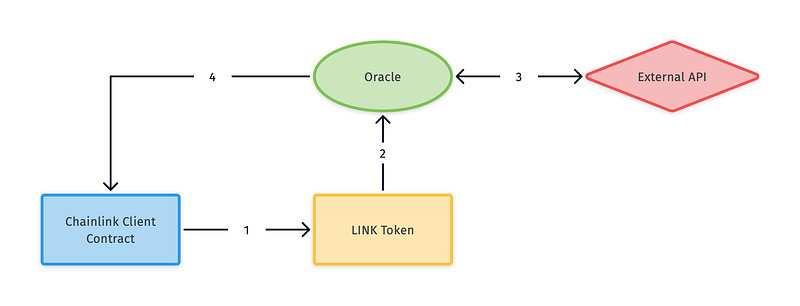
We can’t use any oracle, because each is configured to perform specific tasks depending on their support. To find a high-quality oracle to suit our needs, we must search for one using a listing service like Chainlink Market.
Chainlink market
Listing services enable us to find oracles that can serve our requests. Popular APIs often have oracle implementations of requests to specific endpoints pre-configured, making our development much more straightforward. We can determine if an oracle already implements our desired CoinGecko endpoint by heading to the Chainlink Market homepage and typing “CoinGecko” in the search bar.
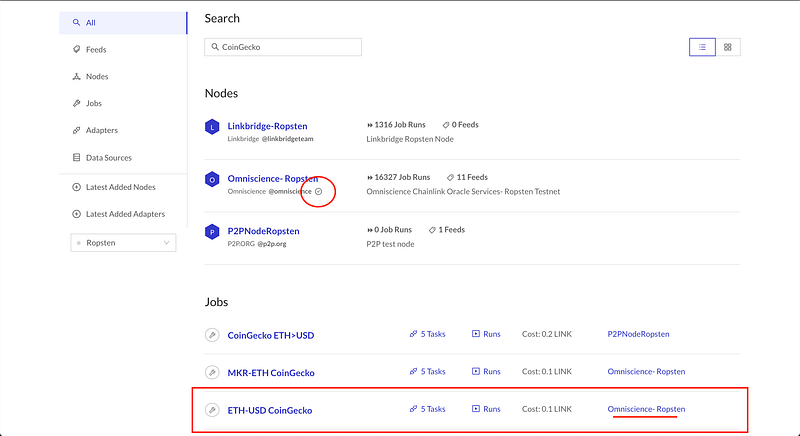
As we can see in figure 2, we have some results!
The Nodes section lists the oracle nodes that have returned results for the search string. This likely means that they support jobs which retrieve data from the CoinGecko API. Of the three nodes available, Omniscience-Ropsten is verified (circled), indicating its trustworthiness. It also has the highest number of job runs.
Scrolling down we can see ETH-USD CoinGecko under the Jobs heading. This looks perfect, as it seems to describe exactly what we want to retrieve, and uses the verified node. Clicking on the link will provide us with more information about the job.
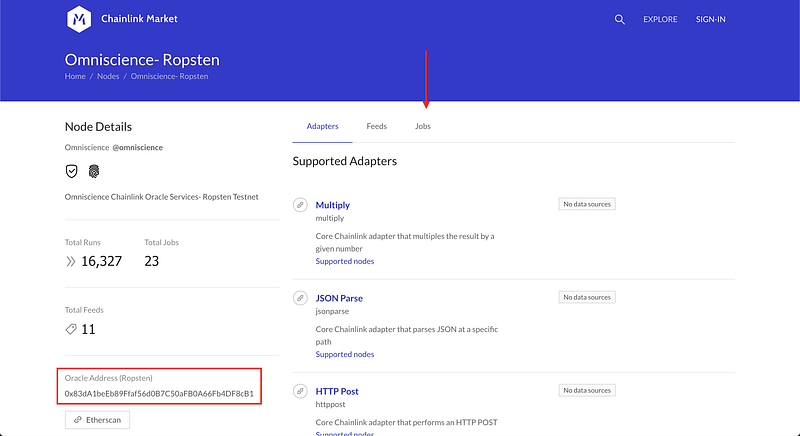
Figure 3 shows the node details page, which gives us more information about the Oracle node. On the left-hand side (inside the red rectangle) is the on-chain address of the oracle. If we are to use this oracle, we need to make a note of this address.
On the right-hand side of the screen are three tabs: Adapters, Feeds, and Jobs. Click on Jobs and scroll until you find ETH-USD CoinGecko. Click on that link to display the job information page.
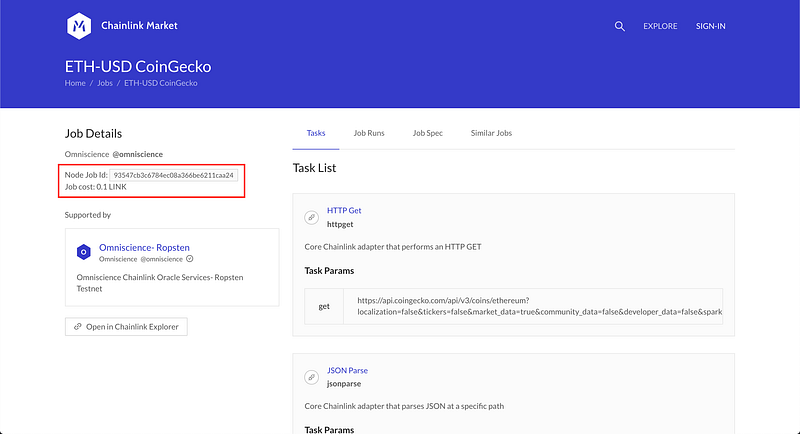
Figure 4 shows us the job information page, where we can see details about what it does when requested. Highlighted are the job ID and the cost of running this job (make a note of these, too).
On the right-hand side of the page is the Task List. This is the list of operations the job performs when it is invoked. Each task uses a supported adapter, one after the other, creating a chain of tasks. Let’s walk through each task in the list to figure out how the job gets the data we want:
1. HTTP GET Request
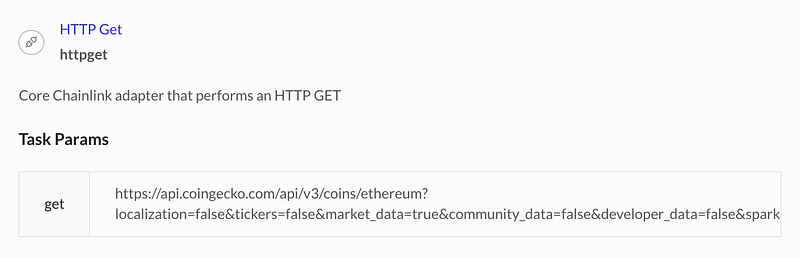
The first task is the call to the CoinGecko API using HTTP GET. We can confirm from the URL in the params that it makes the correct CoinGecko request. This returns a JSON response body.
2. JSON Parse
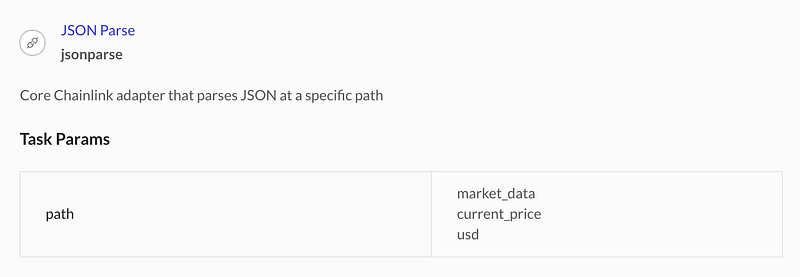
Since task 1 returns JSON, the next task needs to parse it to access the target data. Task 2 uses the JSON Parse adapter to traverse the returned JSON object using the path provided. The target data in the path from task 2, for example, would be located in the following JSON structure:
{
  "market_data":
    {
      "current_price":
        {
          "usd": "PRICE_HERE"
        }
    }
}
3. Multiply
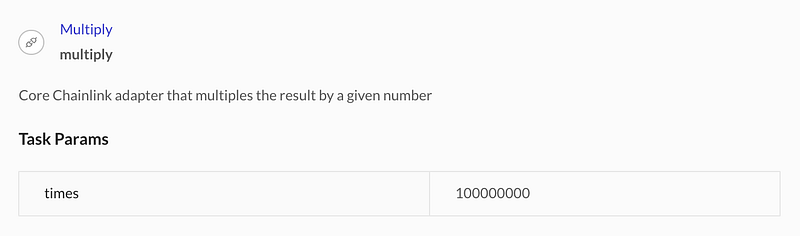
We’ve retrieved the price from the JSON, but it’s not quite ready yet. Since Solidity can’t handle decimals, task 3 multiplies the price by 100,000,000 to ensure it can be represented as an integer.
4. ETH Int256
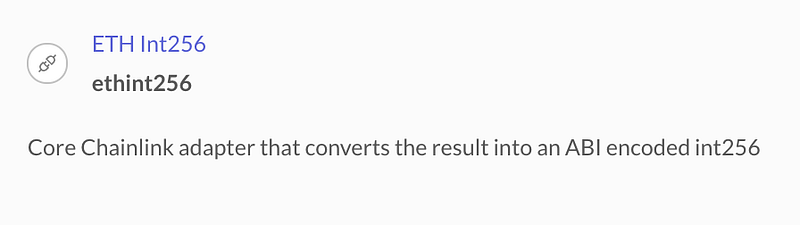
Task 4 then converts the result into encoded int256.
5. ETH Transaction
Finally, task 5 creates an Ethereum transaction to send the result back to the original contract.
Write the Contract
Now that we have selected an oracle that we know can serve our request let’s write the contract that will make the request. Chainlink provides a parent contract called ChainlinkClient that we will extend to facilitate the request-and-response cycle.
Figure 5 shows us our ExampleOracleClient contract. It has the functionality to request the latest USD price of Ethereum from CoinGecko, using the oracle we found through Chainlink Market. Let’s walk through line by line:
- Line 7: The Oracle address found in figure 3 on the node details page
- Lines 8 and 9: The job ID and the price for the job seen in figure 4
- Line 11:
currentPriceis the field that will be populated by the oracle fulfilling the request. - Line 19:
setPublicChainlinkToken()is a function made available in theChainlinkClientparent contract that sets the address of the LINK token on the current network. - Lines 22–25:
requestEthereumPrice()builds the Chainlink request using the oracle address, job ID, price, and callback function. It then requests the data usingsendChainlinkRequestTo(), another function provided by the parentChainlinkClientcontract. - Line 27: The callback function used by the Oracle to fulfil the request
- Line 32: Function enabling the owner to withdraw LINK tokens from the contract
- Line 37: A utility function used to build the request
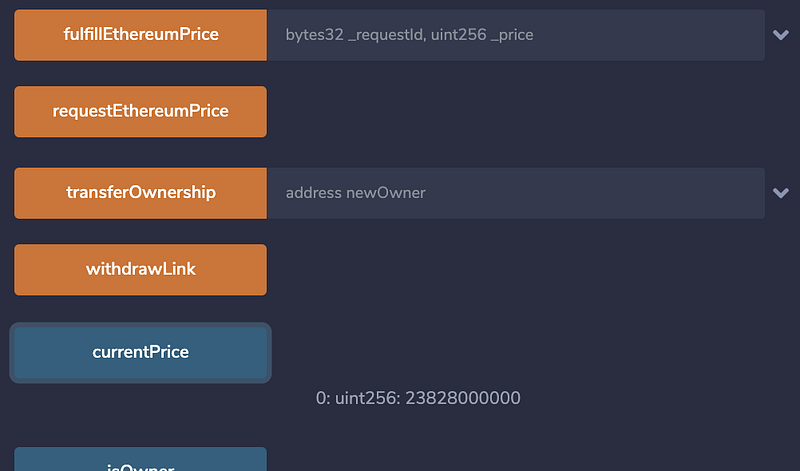
Try pasting this contract into Remix IDE and deploying to the Ropsten testnet. Once deployed, send some Ropsten LINK to its address (you can find the Ropsten LINK faucet here). Then, when that transaction has succeeded, click requestEthereumPrice in the list of functions available to you. After a few seconds/minutes, click the currentPrice button, and you should see a price!
Conclusion
Chainlink oracles are powerful tools that enable interoperability between the outside world and the blockchain. Listing services like Chainlink Market are a useful directory service for finding oracles that best suit your smart contracts' needs.
In our example, we found an oracle job that was already configured to request data from the endpoint we were targetting. If such a job doesn’t exist, or you can’t find it, that’s OK too. Oracles also support jobs that accept GET request URLs as parameters to go and fetch data from. This means that you can retrieve data from any external API using Chainlink oracles.
Further Reading
If you’re interested in blockchain development, I write tutorials, walkthroughs, hints, and tips on getting started and building a portfolio. Check out some of these resources: