
How to calculate VAT using Python
Because I have been working for close to five decades and have had numerous roles, it was only inevitable that at some point I would study and be awarded qualifications in accounting. When I began studying accounting, students would have to purchase workbooks to study and work from. My study aides were a notebook to take notes and complete practice problems, a pencil or biro, and a calculator to carry you computations.
One thing I did do was to create Excel spreadsheets to carry out computations that I needed to complete on a regular basis. For instance, when I had a job as an invoice auditor at a company in the oil and gas industry that is based in Reading, UK, I created an Excel spreadsheet that would automatically calculate gross sales, net sales and value added tax, or VAT. This was a useful spreadsheet for me to have because I only needed to enter the data into the spreadsheet and it would automatically be calculated.
Since I have been studying Python, I have read that Python is a better tool to use than Excel, but so far I have yet to confirm this. One thing I have done, however, is to write a small program to calculate the gross sales and net sales based on value added tax.
VAT is a consumption tax placed on a product whenever value is added at each stage of the production chain, from production to point of sale. The amount of VAT that the user pays is on the cost of the product, less any of the costs of materials used in the product that have already been taxed. If you would like to know more about how to calculate VAT then you can refer to this article in the AAT website, found here:- — Study tips: how to calculate VAT — AAT Comment
I have written two small pieces of code in a Google Colab Jupyter Notebook. In order to execute the program, I imported the two libraries that are the mainstays of Python, numpy and pandas.
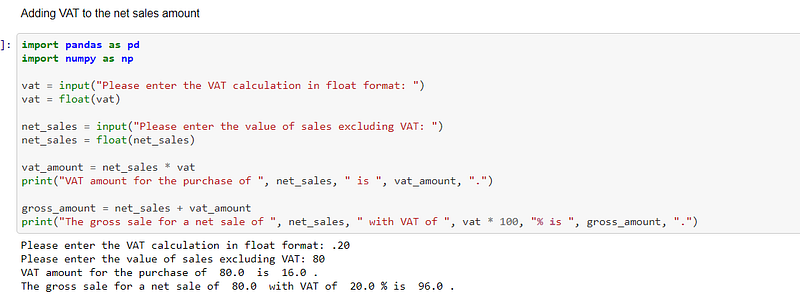
In the first cell of the program I wrote, I merely wanted to add sales tax to the net sales to come up with the gross sales.
In this program I ask the user to enter the VAT because VAT is different for location in the world. I live in the UK, so I entered 20% sales tax, but someone living in another country is free to enter the tax of their location. The VAT rate is then converted to a float.
After the VAT rate has been entered, the user is asked to enter the net sales. The net sales is then converted to a float.
The VAT amount is then calculated by multiplying the net sales to the VAT rate.
The gross sales is calculated by adding the VAT amount to the net sales.
The code for this small program can be seen in the screenshot below and the calculations are printed out beneath the cell:-
The second program I have written is a piece that will extract the VAT from the gross sales. In the UK, the VAT is automatically added to the sale, so this is the format that most people would like to see.
The user is asked to enter the VAT rate. I wrote the program in this manner so that it can be used in any location.The VAT rate is then converted to a float.
The user is then asked to enter the gross sales, which is then converted to a float.
The net sales is calculated by dividing the gross sales by 1 plus the VAT rate.
The actual VAT amount is calculated by multiplying the net sales by the VAT rate.
The calculations are printed below the cell in the screenshot below.:-

You will see that the VAT amount is incorrect and this is an anomaly in Python concerning rounding of floating point arithmetic. Computers represent floating point numbers as binary, and it turns out that storing a precise decimal fraction as binary is not possible. A code that can be used to resolve this issue is to use the round() function. This code can be seen in the screenshot below:-

The complete code for this post can be found in my personal GitHub account, the link of which is here:- Udacity-Course/Calculate_VAT_using_Python.ipynb at main · TracyRenee61/Udacity-Course (github.com)


