
How To Build Your Own Customized Personal Computer From Buying A ‘Shell’ (Hint: not found on beaches.)
What goes where, what connects to what and, why do you need an antistatic mat?
“Computers are incredibly fast, accurate, and stupid. Human beings are incredibly slow, inaccurate, and brilliant. Together they are powerful beyond imagination.”
Disclaimer notice: Just before we start, I want to let you know that my reason for using Amazon for referencing purposes throughout this ‘how to’ article is purely out of my own preferences, and I do not in any way make any remuneration from using this online service, or by promoting them within this article, which remains mine in its entirety.
From owning one of the very first ever basic computers that my mum and dad had bought me for me, as a Christmas present in the early 1980s, I have forever held a starving attraction to this fascinating and fast-evolving technology.
You can see this earlier article that I wrote below, about how computers caught my attraction, and how this led to me building my very first personal computer from a ‘shell’ to a fully-functioning system purely as a result of my wanting to know that I too was capable of building one, one which had the qualities of meeting the individual specifications that I chose, for my nephew who was at the time, just about the same age as I was, when I first got my own basic computer. I so wanted him to enjoy the thrill of having a computer, to experience the excitement that I felt when I had been at his age at that time.
Owning one of these was much akin to letting a ‘chocoholic loose in Willy Wonka’s chocolate factory.’ Pure temptation beyond any realm of possibility
Way back, shortly after the turn of the new Millenium, I decided to do just that and go ahead building one.
Now after so many years of having worked in the field of mental health, I understand the processes of how our minds work in manipulating our psyche every second of our lives, every hour, every day, every month, and every year.
Mental health, let’s say, is split between good mental health and bad mental health. By engaging in a task that can support us so much in achieving our target of maintaining that ‘good mental health,’ must then surely grow our levels of self-confidence, our self-esteem, and support us in realizing our self-worth.
Building your very own personal computer (and I say this from my own perspective of having achieved it) is not difficult. I may well be physically disabled but, you too can meet the goal if you really want to.
The process mostly involves screwing in the right screws and connecting the right cables, so as long as you’re careful with your components and take the proper safety precautions, you can build your own PC.
I assume at this moment in time that you have purchased a monitor, a keyboard, and a mouse, for your user interfacing with what will be, your new purpose-built computer?
What NO? Now you tell me! Well, you better just pop out and buy these necessities like, now!
So what are the ‘proper’ precautions then?
There’s an invisible risk when building a computer that can destroy even the most powerful system, that being: Static electricity. This is the very same force that lets you shock your friends when you wear woolly socks, or what builds up when you rub a balloon against your woolly jumper, then move the balloon near your hair and watch pieces of your hair start to instantly stand up. It can also fry electronic components in a heartbeat. Fortunately, the build-up of static is easy to all but eliminate with a few simple steps.
One simple solution is to purchase an anti-static wristband. One end wraps around your wrist, and the other clips somewhere on the computer case, keeping the wearer constantly grounded. Touching the case frequently with the power supply unit plugged in and powered off achieves the same effect. Anti-static bands can be purchased here on Amazon for around £3.99
So what do you need to begin with?
You are going to need to invest some time & money (oh, don’t forget, you need the determination to succeed too.) So you are going to need to decide how you want your home-built computer to work for you. Do you want it to simply play games on, or are you simply aiming to use it primarily for writing & editing the latest piece of your novel? Whatever your decision, it will determine what type of motherboard, memory, and graphics card you will need to purchase.
- Tower unit/casing: It kind of gives it away in the name don’t you think? The unit is where the internal components are going to be housed safely and securely. Prices vary from £39.99 and upwards on Amazon.
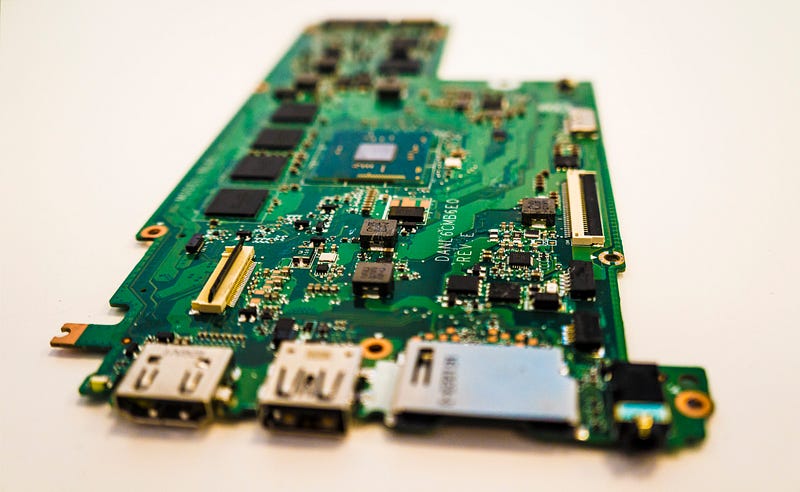
- Motherboards: These are essentially what is going to form the backbone that ties the computer’s components together at one spot and allows them to talk to each other. Prices vary from £54.99 and upwards on Amazon.
- Memory: This is the primary, internal workspace inside the computer, it is most commonly known as RAM (random access memory). Internal memory comes in specifications of4GB, 8GB, 12GB, and 16GB. In contrast, disk or solid-state storage capacities in a computer are typically 128GB or 256GB and higher. Prices vary from 50.99 and upwards on Amazon.
- Graphics card: Essentially the type you need to purchase will depend upon whether or not, you are going to play games or not, as higher-end cards are required for gaming needs. Prices vary from £69.28 and upwards on Amazon.
- Sound card: This is essential if you want to produce sounds on a computer that can be heard through speakers or headphones. Prices vary from £17.99 and upwards on Amazon.
- Processor: This, basically speaking, is an integrated electronic circuit that performs the calculations that run the computer. The processor is able to perform arithmetical, logical, input/output (I/O), and other basic instructions that are passed from an operating system (the software you will require to interact with the computer, when you have built it) such as Windows 11. Prices vary from £97.95 and upwards on Amazon.
- CPU cooler: Very much a ‘must-have’ if you don’t want thermal damage to be the death of your computer. This draws heat away from a CPU chip and other hot-running chips such as a graphics card, or a sound card. Prices vary from £27.99 and upwards on Amazon.
- Power supply (PSU): This converts mains alternate current(AC) electricity to a more low-voltage regulated, direct current (DC) power for the internal components of a computer. Prices vary from £39.00 and upwards on Amazon.
✅ Before you rush out to purchase your PSU, please do make certain that you have double-checked that your initial choice of casing is going to correctly house it. Check which PSU model will comfortably fit snugly into your chosen casing.✅
- Storage drives: This component is a necessary piece essential to store the operating system, the applications, and the data files such as any documents, pictures, and music that you are going to use on your computer. The rest of the components in your computer work in tandem to show you the applications and files, that you have stored on your hard drive. Prices vary from £75.00 and upwards on Amazon.
- Windows 10 operating system: the software’ brains’ of the project that enables all human interfacing to be carried out. Prices vary from £69.00 and upwards on Amazon.
So once you have bought all these supplies that you are going to need, then let’s take a look at what needs to be done next.
What piece goes where then?
Well, inside the casing of course! The casing you choose for housing your computer components is going to be of your choosing, and for your individual preferences. Each component part you decide to choose on purchasing should come with information on exactly where it resides inside the tower casing, so make certain to follow them and you should not go far wrong!
What connects to what?
Initially, and first things first, install the power supply. Then the processor, followed by the RAM (random access memory) you have chosen. Now to the fun bit, install the motherboard. Next comes the time to install the CPU (or the computer processing unit) cooler.
Next up is to install the graphics card, then put in place any expansion cards you may have chosen. Time to install your storage drive(s) and make any final connections.
Not quite power on time just yet! Check first that you have followed any of the manuals that come with each component parts, and have interconnected each and every piece firmly.
Replace the housing case (the tower) and then, and only then, will it be finally the moment to connect the mains power and switch it on.
How much does it all cost?
All the information that I have brought to you today, is correct as of today’s access and publishing date (05.11.2021.) Without the costs of a separate monitor, keyboard, and mouse (all needed to provide the user interface) you would need to look at shelling out around £546.17 to build your own perfectly chosen, built, and individually styled personal computer. Although do remember that, the end cost will also be dependent on what type of mouse, keyboard, or monitor.
By the time you have built your very own computer, with the exact specifications that you have decided upon, it will do no end of good to your sense of confidence, self-worth, and to your self-esteem.
Thank you for reading 💕.
If you liked what you read then please leave a comment and let me know. I will happily reply to each one. Each comment from my readers allows me to push my creativity forward, and keep the lights running into the wee small hours of the night, with a steaming mug of coffee by my side…
Each one of your comments stops me from dozing off over the keyboard!
I love writing articles & fictional stories. They give me scope to express myself and free my mind. After working as a mental health nurse for 30 years, writing allows me an effective emotional release, one which I hope you will join me in experiencing.
Please do follow me on Twitter.
And here on Medium where you will find me merrily tapping away on my keyboard! If my articles do not bore you to tears then, why not subscribe to me too😊 below.
✨I can’t wait to hear from you soon… Jonathan💕.
Perhaps you would like to support me throughout my writing journey? If so then why not subscribe to my emails too, so you’ll know when I’ve next published. It might even cheer up your lonely inbox😳