
How to Build Your Author Email List
Six simples steps to building your email list.

Everyone will tell you as a writer, you need an email list. Above everything else for your marketing, this is the one thing you really do need to have, why?
Imagine you worked for a year on your first book. You got a beautiful cover; a fantastic editor and the book is so brilliant you’re sure it’s going to be a bestseller. But then, social media closes for good — all platforms, or maybe they all block you on the same day. How are you going to tell people you have a new book out?
What about if Amazon decided they didn’t like you and removed all your books (it has happened to authors), how would you tell readers where to find you?
What if Medium closed and you had all these new blog posts you’d written and were taking them to another platform, who would you let your readers know where to find you?
I know these things probably won’t happen, but the point I am making is that you don’t have control over the other services. You do have control over your email list, and as writers in an online world, we have numerous ways to reach readers and fans, but there is no guarantee they’ll all be there tomorrow. Email lists are a way for you to talk to you readers whenever you want or need. It’s like having a backup of all your fans in one place.
I wrote an article about why you need an email list. You can read that here.
Today I want to talk about how to set your email list up. I’ve listed six steps here.
Step 1. Choose Your Email Service Provider
This is not the same as your email service provider for your emails going in and out, Such as Gmail, Hotmail or Yahoo. A service provider for your author list is a place where you can create and keep a database of reader emails, where they sign up to receive communications from you.
There are a few email platforms out there, but the popular providers writers use are, Mailchimp, MailerLite and Convert kit.
Which one you use really depends on what you need. I suggested having a good look at what they all offer and selecting the one best suited to your needs. Don’t worry too much if you find in a year; you want to switch. All of them have easy migration processes where you can move your email address.
Mailchimp
Mailchimp offers a free version. You can have a free account for your first 2,000 subscribers; after that, the price varies depending on how many subscribers you have.
Mailchimp has everything you’ll need for a mailing list.
• Create sign up forms for your website
• Create different lists
• Import subscribers
• Create automated workflows (Send automatic emails)
• Data analysis
• A/B testing
• Free forever up to 2,000 subscribers
Of the three, Mailchimp has the best user interface for creating your emails. It is easy to use and user-friendly, offering templates for their users. Mailchimp is the most widely used email service, and many other writer services integrate with them such as WordPress, BookFunnel, Story Origin, Facebook adverts and so much more you’ll need along the way.
However, Mailchimp can get quite pricey. While they offer a forever free plan — a limit of 2,000 subscribers, after that and as your list grows, you do need to start paying, and Mailchimp can get a little expensive.
Another thing that isn’t so good is, if you have more than one email list, for example, you have an email list of Medium readers and an email list of your book readers, if you have any subscribers who appear on both lists, you will be charged for them twice.
In short, Mailchimp has the best email functionality, but it is a little more costly.
MailerLite
As the name suggests, this is almost like a lite version of what Mailchimp can offer you. It can offer all the same things I listed above for Mailchimp.
• Create sign up forms for your website
• Create different lists
• Import subscribers
• Create automated workflows (Send automatic emails)
• Data analysis
• A/B testing
• Free forever up to 1,000 subscribers
In terms of pricing, MailerLite is a lot cheaper. At 2,500 subscribers, Mailchimp will charge you around $30 a month, and MailerLite will charge $20, while that is only the difference of $10, when you get to a bigger list, for example, 30,000 subscribers, Mailchimp will charge you around $200 per month, and MailerLite is still less than $100.
Additionally, MailerLite also doesn’t charge you if you have duplicate subscribers.
The downside is, MailerLite is less integration. That is important, especially when you’re trying to grow your list in the first place. Also, MailerLite has fewer features. I am also not a lover of their interface, but they are an ever-growing and changing platform and ae always adding new features to their service.
For MailerLite, you pay less, but it doesn’t have as good a functionality as Mailchimp.
ConvertKit
While Mailchimp and MailerLite are very similar, ConvertKit comes in with a different approach. ConvertKit is geared towards professional bloggers, especially those with courses and webinars to sell.
However, ConvertKit does come with a powerful interface which allows segmentation, automation and easy integration. It has an easy to use interface but is quite simplistic when it comes to the email designs.
While both MailerLite and Mailchimp offer the users easy to use templates to design their emails, ConvertKit has a more simplistic approach and basic emails. If you are looking to dress your emails up, ConvertKit doesn’t have that ability.
For pricing, the plan starts at around $30 a month for up to 5,000 subscribers. After that, you’ll need to negotiate your pricing plan with their team.
What I use
I use Mailchimp at the moment, but as my list is growing to quite a high number, I am considering switching my list to MailerLite. I am roughly paying $100 a month at the moment, and if I can reduce that, I will.
I do weed my list every week, taking out people who have unsubscribed (you get charged for these too) and removing people who haven’t opened the last six months’ worth of emails. But weeding your list is good practice whatever platform you choose.
Step 2. Create Something to Give Away
I know, I know. You don’t want to be writing something and then giving it away for free. I get it. You’ve worked hard, and you want to start earning from it.
There are mixed feelings I see in the writer community for this approach. Some writers will tell you, if you offer a free thing, perhaps a free short story, a free novella or even a free novel, you’ll get people who’ll sign up for the free gift and leave. And it is true; they will. Some will even sign up for the free gift, never buy your book and then email you for further free books as you publish. It can be off-putting.
Others will tell you this is a great approach. You give potential readers what is called a Loss leader or a Reader Magnet, new subscribers to your list will get your free book(s). These readers will then read the free items you gave them, love it (we hope) and go on to buy your other book(s), or whatever it is you want them to do. Eventually, those new readers will become fans, and then they’ll become friends.
Your reader magnet will vary depending on what the purpose of your list is.
I have seen writers offer, free short courses, non-fiction, like how to get you first ten reviews or how to get your first 1,000 subscribers. Non-fiction author, Joanna Penn, offers a free author blueprint. Bestselling author, Mark Dawson offers a free starter library for his series.
You could offer (ideas off the top of my head)
• An exclusive video
• A novella, novel or short story
• Training programme
• A digital download
• A printable
• A free audiobook of one of your titles
What I do
I have three stories I give away: two novellas and one short story. I am lucky in the fact I write two series. For the bigger series, I have a novella and a short story, both of which are origin stories for two of my well-loved characters. They’re a good introduction into the series or a good bonus for any reader who has read my books and wants a little more time with the characters.
I have another series with a co-author. She and I wrote a novella of the first meeting for our two main characters.
I give away all three for free vie Bookfunnel, Story Origin, and Facebook adverts. The caveat is they need to sign up for my mailing list to get it. Of course, they can unsubscribe straight away if they wish, and the odd person does. But I don’t mind that. They’re reading my book; maybe they’ll like it enough to go and buy the series, perhaps they won’t. Neither of us have lost anything if they take the free books and run. I’ve not wasted time trying to sell to them (I have automated emails for that) and they have not wasted any money trying me out as an author.
My first series is now twenty books long. I get a lot of read through from the two books I give away. With my service prodder, I can see who clicked the book link for the first book in the series. Giving away that free book has the potential to sell twenty more books per subscriber. For me, I’ll take the hit of those who want a freebie and nothing more.
Step 3. Create a Landing Page
The email providers do offer landing pages.
Landing pages need to be simple. Don’t clutter them with adverts or links to other books. What you need on there is a simple box for collecting emails, and what you’re giving them in exchange for their email address. That is it.
Do not put your bio here; do not place links to new books or anything else here. The landing page is for people who have never read your work before. You don’t want to overload them with information and scare them off.
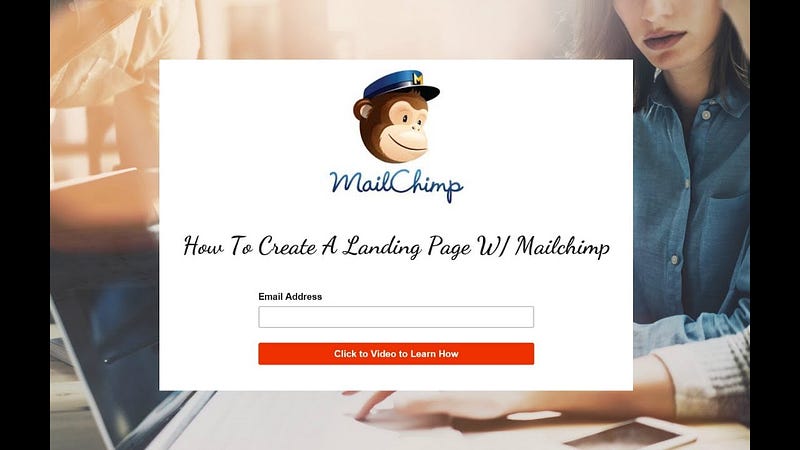
This image is from Mailchimp, in place of the chimp you would probably have the cover of whatever you’re giving away. Your title would be something like, tell me where to send your free book (change the word to suit), and then an email box for subscribers to add their email.
Keep it as simple as that.
What I use
I talk about BookFunnel a lot because I use it. They have landing pages for you and will collect email address. This is where Mailchimp integration comes in because BookFunnel will put those subscribers straight into your email list for you.
I also have a landing page which I created on my website. It is a simple form as above, and one I created myself. If I weren’t able to do that, I would have probably used the landing page Mailchimp has to offer.
Step 4. Send Your Free Gift
How you do this will depend on what email provider you selected in step one.
ConvertKit gives you the option to upload your free gift and have them deliver it to the readers. For something like MailerLite or Mailchimp, you might have to send them to a download page to collect it. This is where providers such as BookFunnel, Prolific Works and Story Origin come in. They will deliver your book to readers in a format they want.
What I do
I use BookFunnel to deliver my books.
BookFunnel does charge you, but I don’t think it’s expensive.
For a first-time author, the plan starts at $20 a year. For that, you can have 500 downloads of your book a month and can give away up to 5 titles. There is also a mid-lost author level for $100 a year, which allows you to have 5,000 downloads per month of your book, and a bestselling author level, for $250 a year, which allows unlimited downloads per month.
For me, I am at the mid-list level with this, and it serves me well. I don’t get complaints from readers telling me they couldn’t get their free books. In fact, I get reply emails thanking me for their free book and that they look forward to reading it.
Step 5. Welcome Email and Automation Sequence
Write your welcome email, but do not go for the hard sell here. It is the same with your landing page. You do not want to overwhelm potential readers with a sales pitch. No one wants that
What they want is to know who you are. And no, I don’t mean you have to give them your life history or anything personal. But they do want to know who you are as an author.
I have five emails in my sequence that new subscribers get across six weeks.
The first email welcomes the new subscriber, tells them who I am, what I write and how happy I am to meet them. There are no links and no book adverts in this first email. I thank them for downloading the free book and tell them I hope they like it.
The second email is sent a few days later and asks them if they got their free book. It tells them I hope they’re enjoying it and gives them instructions in case they didn’t manage to get that free book the first time around. No sales pitches here either. I do, however, tell them, if they enjoyed the book, would the mind leaving me a review. And I provide the link for that.
The third email is sent two weeks after the first and gives new subscribers a second book to read. It tells them about the character and why I wrote this book and gives them an insight into my author journey.
The fourth email is sent four weeks after the first email and tells them about my Facebook group, my social media things, and where they can go if they’d be interested in joining my reader team of advanced readers.
The fifth email goes out six weeks after email one, and this is the first time they get any sales information from me. In this email, I tell them how lovely it has been to meet them, and that I hope they’ve enjoyed the two books I gave. They get links again, in case for some reason they didn’t manage to download their free books.
I will tell them about book one in my series and talk about the character. I direct them to the sales page for this book. I figure, by now, they’ve been with me for six weeks, and have read two of my books, chances are, if they like what they’ve read, they’ll want the first book in my series.
After this, the subscriber is moved to my main mailing list, where they’ll receive regular updates from me via email about my books, me, and anything of interest I need to tell them regarding my writer world.
Step 6. Promote, Promote and Promote
Where you promote it is up to you, but you want to shout about it everywhere.
• Social media. Have an easy to find link on your social media pages. I have an advert on Facebook that offers free books to people, and when they click it, it sends them to my landing page.
• Include the link in every piece of writing you do, be it in your book, or at the end of a blog post.
• Put it on your website. Yes, you do need an author website, but that’s a topic for another day, and while it is important, it is not as important as having this email list.
• Join promotions.
• There are many promotional and sharing sites out there where you can offer your free gift in exchange for an email.
The providers I use are Book Funnel, Prolific Works, and Story Origin. All of them have group giveaways, where your book will be listed with other books of the same genre, and the idea is all those authors share that promotional page to their social media and email lists, and their readers then select your book to try and sign up to your list to get it.
• Newsletter Swaps. I feature other authors in my newsletter, and in turn, they feature me. We share each other’s books and links, and one of those links I ask to be shared is my landing page.
Lastly
Please don’t jump in with the hard sell. You will scare people off. Do not spam your subscribers. You will get reported.
Do make sure subscribers can easily find how to remove themselves off your list.
You might want to keep every email list, but remember you’re paying for that email to be there. You don’t want to pay for a subscriber who doesn’t want to read your emails and will likely hit delete the moment it lands in their inbox.
It might all sound like a lot, but honestly, once this is all set up, it runs itself for you. The only thing you need to do is the maintenance of your list. I do mine weekly because I get a lot of new subscribers every week.