
How to Build Real-World Experience in Cyber Security: Mini Home Labs and Practical Projects

Breaking into the field of cybersecurity can be challenging, especially when faced with the need for real-world experience. Certifications and lectures are valuable, but hands-on projects provide a unique opportunity to apply theoretical knowledge. In this article, we’ll explore five practical projects that tech students like myself and transitioning professionals can undertake to gain practical experience and enhance their resumes.
Project 1: AWS Goat — Hands-on Penetration Testing

Objective: Deploy an infrastructure within AWS and practice penetration testing.
1. Set Up AWS Account:
- Create an AWS account if you don’t have one.
- Go to the AWS Marketplace and search for “Go Fish simulator.”
- Choose the simulator by Hail Bites, subscribe (free for the first week), and configure.
2. Launch AWS Goat:
- Follow the instructions to launch AWS Goat.
- Configure VPC settings, ensuring a public subnet for effective testing.
- Launch the instance and set up security groups.
3. Explore the Simulator:
- Access the simulator through the provided URL.
- Log in using the credentials (admin and instance ID).
- Familiarize yourself with the dashboard and run simulated phishing campaigns.
Project 2: Azure Goat — Compromising Cloud Infrastructure

Objective: Set up an entire infrastructure in AWS to simulate compromising an organization’s cloud infrastructure.
1. Fork Azure Goat Repo:
- Fork the Azure Goat repository from GitHub.
- Create AWS User:
- Go to AWS IAM and create a user with admin privileges.
- Obtain access key and secret access key.
2. Configure GitHub Secrets:
- Set up access key and secret access key as GitHub secrets.
3. Run Terraform:
- Use Terraform to deploy the Azure Goat infrastructure.
- Choose module one (Blog application) for this project.
4. Explore and Attack:
- Access the deployed infrastructure.
- Utilize the provided attack manuals to simulate attacks and vulnerabilities.
Project 3: AWS WAF — Web Application Firewall Setup
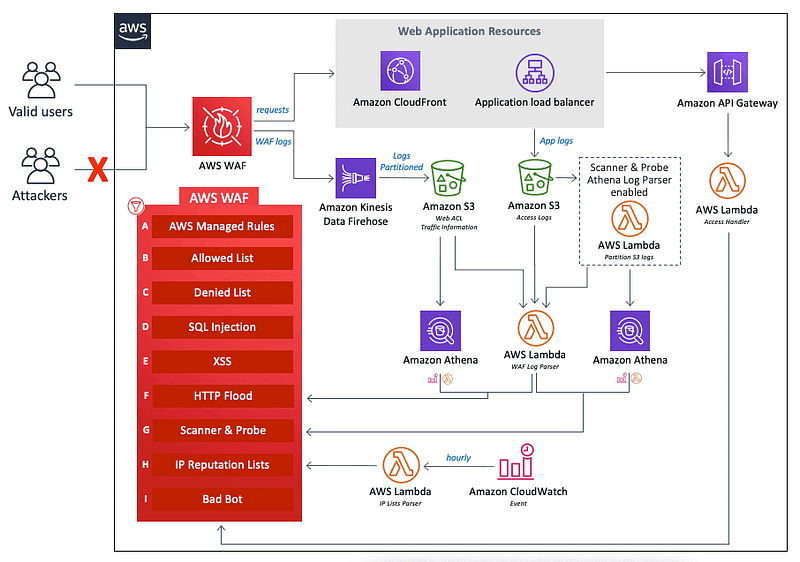
Objective: Set up a web application firewall within AWS to monitor web requests.
1. Configure AWS WAF:
- Go to AWS WAF and create a web ACL.
- Choose CloudFront distribution (even if not attaching to an application).
2. Define Rules:
- Define rules for the web ACL, incorporating managed rule groups.
- Explore available rule sets, such as those for fraud prevention and bot control.
3. Complete Setup:
- Complete the setup, considering sampling options.
- Test the configuration and explore additional features.
Project 4: Identity Access Management (IAM) in AWS
Objective: Learn IAM concepts, create users, groups, and roles within AWS.
1. Navigate to IAM:
- Access AWS IAM console.
2. Create Users and Groups:
- Create IAM users (e.g., User1, User2).
- Place users into groups (e.g., DemoGroup1, DemoGroup2).
- Assign policies to groups (e.g., AdministratorAccess, ReadOnlyAccess).
3. Password Policy Management:
- Set and manage password policies within IAM.
- Configure password complexity requirements.
4. Review Changes:
- Use AWS CloudTrail to review changes made in IAM.
- Explore event history and understand recorded activities.
Project 5: Audit with Prowler in AWS

Objective: Conduct an audit within AWS using Prowler, an automation tool for security checks.
1. Open AWS CloudShell:
- Access AWS CloudShell for a command-line interface.
2. Install Prowler Dependencies:
- Install Prowler dependencies using the provided commands.
3. Configure AWS Access:
- Configure AWS access using
aws configurewith access key and secret access key.
4. Run Prowler Checks:
- Run Prowler checks for a chosen compliance framework (e.g., CIS benchmarks).
- Understand the automated results and identify areas of improvement.
5. Download Results:
- Copy results to an S3 bucket for further analysis.
- Download and review the comprehensive report generated by Prowler.
By completing these hands-on projects, tech students and transitioning professionals can gain valuable experience in cybersecurity, covering various aspects such as penetration testing, cloud security, web application protection, identity access management, and compliance auditing. Documenting these projects on your resume showcases practical skills and enhances your credibility in the cybersecurity field. Remember to always adhere to ethical guidelines and use these skills responsibly.
Successfully winning, one byte at a time 🚀
v/r
Denise B


