
How To Build Angular With Java Backend For Production
A step by step guide with an example project

There are so many ways we can build Angular apps and ship for production. One way is to build Angular with or Java and another way is to build the angular and serve that static content with NGINX web server. With Java we have to deal with the server code as well, for example, you need to load index.html page with java controller.
In this post, we will see the details about building an Angular app with Java Backend for production. We will go through step by step with an example.
- Prerequisites
- Example Project
- How To Build For Production
- Summary
- Conclusion
Prerequisites
I have written an article on how to build and develop an Angular app with Java Backend. If you are not familiar with it and go through the whole process here is the article.
Example Project
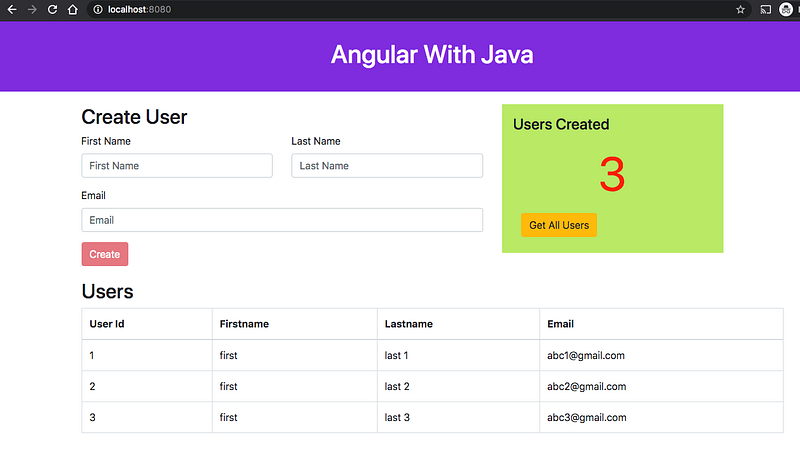
This is a simple project which demonstrates developing and running Angular application with Java. We have a simple app in which we can add users, count, and display them at the side, and retrieve them whenever you want.

Here is a Github link to this project. You can clone it and run it on your machine.
// clone the project
git clone https://github.com/bbachi/angular-java-example.git
// Run Angular on port 4200cd /src/main/ui
npm install
npm start// Run Java Code on 8080
mvn clean install
java -jar target/users-0.0.1-SNAPSHOT.jarHow To Build For Production
Usually, the way you develop and the way you build and run in production are completely different. As you have seen in the prerequisite project, in the development phase, we run the java server and the Angular app on completely different ports. The Angular app is running on port 4200 with the help of a webpack dev server and the java server is running on port 8080.
But in the production, we package the whole application into a war file and deploy that on the tomcat container which usually runs on the port 8080.
Project Structure
Let’s understand the project structure for this project. We need to have two completely different folders for java and angular. It’s always best practice to have completely different folders for each one. In this way, you will have a clean architecture or any other problems regarding merging any files.

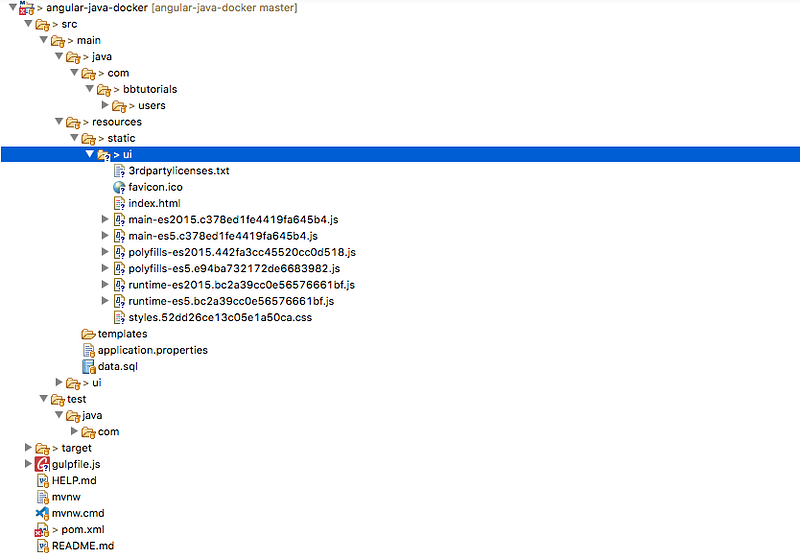
The only thing that is different between development and production phases is that all the compilation Angular code goes to this folder /src/main/resources/static. Whatever static assets you put under the static folder you can directly redirect from your Java Controller as below.
Now we need a maven plugin to compile the Angular code as part of the build process. We have a plugin called frontend-maven-plugin that can be used to compile all the Angular source code. Here is the link to know more about this plugin.
There is another plugin called exec-maven-plugin which executes commands in our case we are running gulp to place all the compiled source code from folder /src/main/ui/dist to /src/main/resources/static.
Make sure your angular.json file has correct path as the output directory.
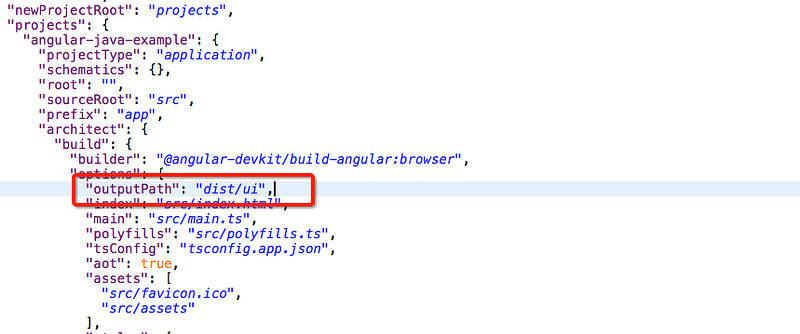
Here is the gulpfile.js that is used in this project. What it does copy all the compiled Angular code to the static folder.
We need to make sure you have these plugins included as part of the pom.xml with all the necessary executions.
When you run the build you can directly access the whole application on http://localhost:8080/.
// build the project
mvn clean install
// Run the application
java -jar target/users-0.0.1-SNAPSHOT.jar
Summary
- There are so many ways we can build Angular apps and ship for production.
- One way is to build Angular with Java.
- In the development phase, we can run Angular and Java on separate ports.
- In the production phase, we packed the entire Angular source code and Java code into a deployable war file.
- In the production phase, you can build the Angular app and put all the assets in the dist folder and load it with the java code.
- We should use two maven plugins: frontend-maven-plugin which compiles angular code and put it in the dist folder, exec-maven-plugin which runs gulp file to place the compiled angular code to the appropriate location src/main/resources/static.
- Make sure the build output directory is correct in the angular.json file.
Conclusion
This is one way of shipping Angular apps. This is really useful when you want to do server-side rendering or you need to do some processing on the server-side.


