
Hands-on Tutorials
How to Build a WordPiece Tokenizer For BERT
Easy guide to building a BertTokenizer from scratch
Building a transformer model from scratch can often be the only option for many more specific use cases. Although BERT and other transformer models have been pre-trained for many languages and domains, they do not cover everything.
Often, these less common use cases stand to gain the most from having someone come along and build a specific transformer model. It could be for an uncommon language or a less tech-savvy domain.
BERT is the most popular transformer for a wide range of language-based machine learning — from sentiment analysis to question and answering. BERT has enabled a diverse range of innovation across many borders and industries.
The first step for many in designing a new BERT model is the tokenizer. In this article, we’ll look at the WordPiece tokenizer used by BERT — and see how we can build our own from scratch.
WordPiece
BERT uses what is called a WordPiece tokenizer. It works by splitting words either into the full forms (e.g., one word becomes one token) or into word pieces — where one word can be broken into multiple tokens.
An example of where this can be useful is where we have multiple forms of words. For example:
By splitting words into word pieces, we have already identified that the words "surfboard" and "snowboard" share meaning through the wordpiece "##board" We have done this without even encoding our tokens or processing them in any way through BERT.
Using word pieces allows BERT to easily identify related words as they will usually share some of the same input tokens, which are then fed into the first layers of BERT.
As a side-note, there are many other transformer tokenizers — such as SentencePiece or the popular byte-level byte-pair encoding (BPE) tokenizer. They each have their pros and cons, but it is the WordPiece tokenizer that the original BERT uses.
Building the Tokenizer
When building a new tokenizer, we need a lot of unstructured language data. My go-to for this is the OSCAR corpus — an enormous multi-lingual dataset that (at the time of writing) covers 166 different languages.
However, there are many datasets out there. HuggingFace’s datasets library also provides easy access to most of these. We can see just how many with Python:
A cool 1306 datasets. Many of these are ginormous too — OSCAR itself is split into 166 languages, and many of those ‘portions’ of OSCAR contain terabytes of data.
We can download the OSCAR Italian corpus using HF’s datasets. However, we should be careful as the full dataset contains 11.3B samples. A total of ~69GB of data. HF allows us to specify that we’d like only a portion of the full dataset using the split parameter.
Inside our split parameter we have specified that we would like the first 2000000 samples from the train dataset (most datasets are organized into train, validation, and test sets). Although this will still download the full train set — which will be cached locally for future use.
We can avoid downloading and caching the full dataset by adding the streaming=True parameter to load_dataset — in this case split must be set to "train" (without the [:2000000]).
Data Formatting
After downloading our data, we must reformat it into simple plaintext files where a newline separates each sample. Storing every sample in a single file would create one — huge — text file. So instead, we split them across many.
Training
Once we have saved all of our simple, newline separated plaintext files — we move on to training our tokenizer!
We first create a list of all of our plaintext files using pathlib.
And then, we initialize and train the tokenizer.
There are a few important arguments to take note of here, during initialization we have:
clean_text— cleans text by removing control characters and replacing all whitespace with spaces.handle_chinese_chars— whether the tokenizer includes spaces around Chinese characters (if found in the dataset).stripe_accents— whether we remove accents, whenTruethis will make é → e, ô → o, etc.lowercase— ifTruethe tokenizer will view capital and lowercase characters as equal; A == a, B == b, etc.
And during training, we use:
vocab_size— the number of tokens in our tokenizer. During later tokenization of text, unknown words will be assigned an[UNK]token which is not ideal. We should try to minimize this when possible.min_frequency— minimum frequency for a pair of tokens to be merged.special_tokens— a list of the special tokens that BERT uses.limit_alphabet— maximum number of different characters.workpieces_prefix— the prefix added to pieces of words (like##boardin our earlier examples).
After we’re done with training, all that is left is saving our shiny new tokenizer. We do this with the save_model method — specifying a directory to save our tokenizer and our tokenizer name:
And with that, we have built and saved our BERT tokenizer. In our tokenizer directory should find a file — vocab.txt.
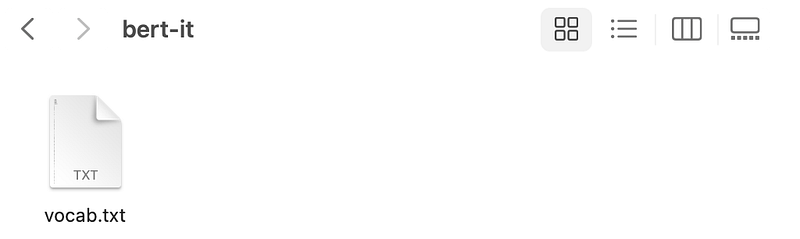
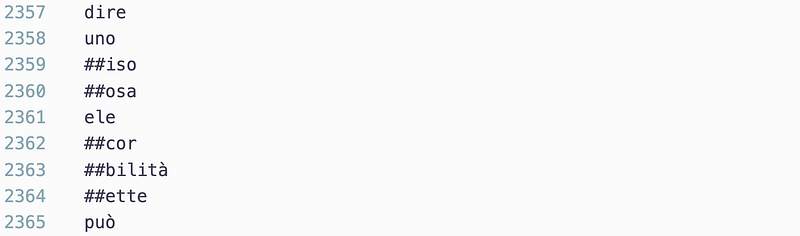
During tokenization vocab.txt is used to map text to tokens, which are then mapped to token IDs based on the row number of the token in vocab.txt — those IDs are then fed into BERT!
Tokenizing
Now we have our tokenizer; we can go ahead and load it using from_pretrained as we would with any other tokenizer , we must specify the local directory where we saved the tokenizer.
And we tokenize as per usual too:
Here we return the three tensors we need for most BERT tasks, input_ids, token_type_ids, and attention_mask. We can see the initial [CLS] token represented by 2 and the final [SEP] token represented by 3.
As our vocab.txt file contains the mappings for our tokens and token IDs (e.g., the row numbers) — we can access the tokens by aligning our input_ids token IDs to the rows in vocab.txt:
Let’s try another — this is a good one if you ever find yourself in Italy:
And finally, let’s tokenize something that will be split into multiple word pieces:
And that’s everything we need to build and apply our Italian Bert tokenizer!
That’s all for this article covering the build process of a custom WordPiece tokenizer for BERT.
I hope you enjoyed it! If you have any questions, let me know via Twitter or in the comments below. If you’d like more content like this, I post on YouTube too.
Thanks for reading!
🤖 70% Discount on the NLP With Transformers Course


