
How to Build a Web App for your Data Science Project
If you crunch numbers on your computer, does it make a sound?
I recently used Deep Reinforcement Learning to build an AI player for Philosopher’s Football, in honor of the late John Conway. And I wanted a way to show the results to people, so I created a website philosophers.football where you can play against the bot or other people.
You can play against the AI there and get a feel for it and the game, though the AI is still training – it may take a few weeks to get any good.
Along the way, I had to deal with a figure out a substantial number of technologies to get my model from Jupyter notebook code to deployment. Now, if I had a dollar for every “tutorial” I read whose software I couldn’t install, whose code I couldn’t run, or that didn’t actually tell me how to deploy anything, I would… well, I wouldn’t be rich, but I’d be able to afford a lot more hardware to train my models on. And my AI player would be a lot better right now.
I particularly found frustrating the line-by-line code examples that work to do exactly what the author did. The second you want to do something different (like your own project), they tend to be less helpful. (I mean, I still used them though).
So, my solution is to write you an all-in-one guide to serve as a map of the relevant technologies, a sense of what they do, and resources to use. The hope is that with this, you can visualize the path to turning your project into a web app. In my experience, this is always the first step.
As a bonus, thanks to Docker, I’m able to guarantee that if you clone my github repo and follow the instructions, the code is guaranteed to run. Crucially, this means you can modify it and get a sense of what it does.
In particular, when I got started I really had only a rough of how the Internet worked and no clear picture of how my project was going to end up on the Internet.
So, to be clear, here is what this is not:
- This is not a tutorial on industrial grade deployment technologies. This is for a hobby project. You will learn a lot about what problems those industrial-grade technologies solve however.
- This is not a line-by-line walk-through tutorial.
- This definitely doesn’t cover security. My website definitely has a password and some built in security features, but just be nice, okay?
- This is definitely not best practices for developing a web app. I’m not a web designer or dev. What I built won’t even work on your phone. But it definitely works on your computer as you can see for yourself. Plus you probably (?) won’t vomit when you the color scheme.
- This is not about how to create your models or use a database (core data-science stuff). This is about how to deploy your model, possibly using a database.
The “Stack”
a.k.a the intimidating list of all the technologies I used. I’m going to explain the important ones below, I promise. This is a table of contents.
Core Technologies
These are the things I actually spent time thinking about and writing code for.
- (Backend/API) Django, a Python web framework/package thingy that makes handling the database and building an API a breeze. Add in here the related but technically separate Django REST framework for a standard API and Django Channels to support WebSocket connections and asynchronous computation (the models run in parallel to the server).
- (Frontend) React a JavaScript web framework/library thingy from Facebook that makes pretty pictures in the browser.
- (Machine Learning) PyTorch a Machine Learning framework/Python package thingamajig for Neural Networks. Also from Facebook.
- (Deployment/Virtualization) Docker a virtual-machine thingy that defines itself by swearing its not a virtual machine. For our purposes, it functions sort of like conda (or pip) on steroids (ish) – it magically solves all issues with installing software. Very important because you might want to later run your code on a server, and installing all the software again is going to be a pain. (Your server runs Linux and doesn’t have a mouse).
Other Fancy Words
Technologies I used but barely had to touch
- (Database) PostgreSQL: nice, free, open source, is a database. Python’s built in SQLite couldn’t do some slightly-less-basic things, so too bad.
- (Key-Value Store) Redis a not-exactly-a-SQL-database. In this application it functions as a queue so that your models can run in parallel to your web-facing server application. When your model is done, it lets the actual server know.
- (Webserver) nginx a free open-source webserver. Django is also a webserver; in retrospect I might have used in instead.
- (Hosting) Digital Ocean it’s like Google Cloud or Amazon Web Services (AWS) or Microsoft Azure but substantially less complicated. Very easy to set up. Also (crucially) very cheap.
- (Training) Google Colab for GPU/TPU access and Google Drive for persistent storage to back it. Again, substantially cheaper than the other options (I already spent my $300 in free Google Cloud (GCP) credits). Note: I did actually spend a lot of time with this one, but it functions as just a Jupyter notebook robbed of any good keyboard shortcuts. So it wasn’t a lot of work.
Honorable Mention
- CSS the language that decides how things are going to actually look. For some reason, the Principle of Least Surprise, a maxim about designing user interfaces (like a website) doesn’t apply to the language for making them.
- HTML come on you know this one. You worked on your homepage for Neopets or Myspace back in the day, right?
Okay, time for the actual guide. The plan is to work backwards from what it’s going to look like at the end to how to get started
The Finished Application
At the end, here’s how your code is going to relate to your user, who’s going to think that your website is “Wow so cool.”
You’re going to pay someone (it’s cheap, like $5/month) to run a computer for you. As far as you know, it’s a real computer. But actually it’s a virtual computer, which is a program running on a real computer with a Pinnochio complex (it thinks it’s a real computer too). The beauty is that it doesn’t matter; it’s pretty good at pretending.
Unlike your computer, that computer is going to have a real Internet connection where people can find it. And it will be on 24/7 and never leave the house and get out of wifi range.
And that computer is going to run Docker, and Docker is going to run your code. You could also not use Docker and just run directly on that computer, but it’s a pain.

Okay, what is your code going to do? The only thing that happens on the Internet is that computers get messages and receive messages. Like using the United States Postal Service (USPS) but it’s not bankrupt and it moves at the speed of light plus traffic (there’s always traffic). On the Internet, these messages are called “packets.”
Packets roughly come in different types, called protocols, just like USPS things (first-class, spam, certified mail, parcels, media-mail etc.). For now we’ll just worry about the regular old HTTP. The one you know from the beginning of urls like http://philosophers.football.
When someone visits your website, they send an HTTP GET request, shown as #1 in the diagram below. In short they send a mail-piece saying “please send me your webpage.” What comes back is a bunch of stuff to show (Hyper Text Markup Lanuage – HTML), instructions for how to show it (Cascading Style Sheets – CSS), and most importantly, a bunch of code to run (JavaScript). Browsers pretty much only run JavaScript, so you’ll have to write some JavaScript to make things work.
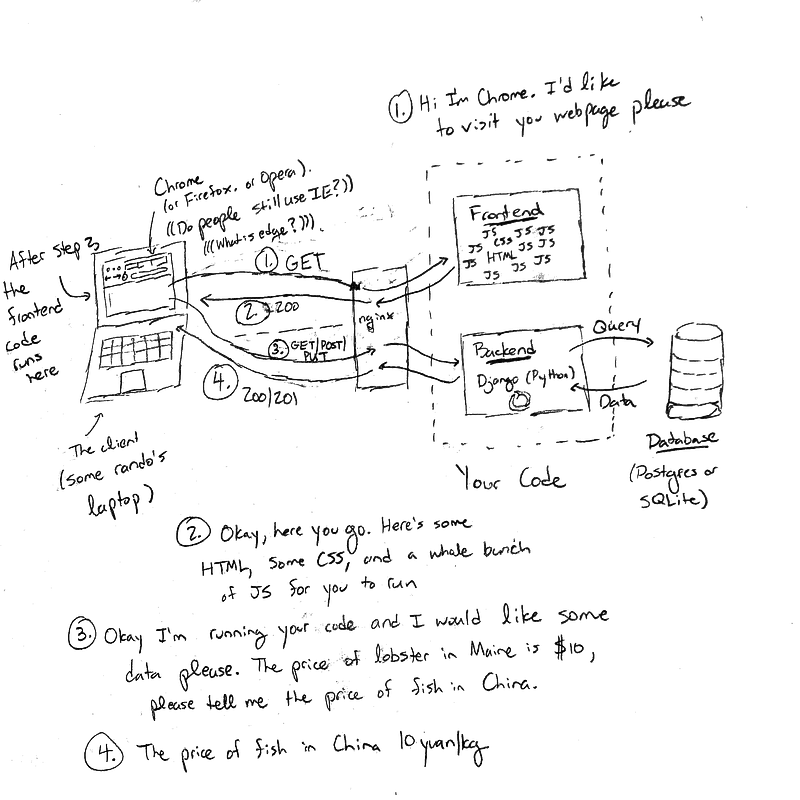
Your website picks up the “radio” and says “roger, 200, here’s the website.” The number (200) means “OK.” You probably have met good old 404 all sorts of times (the 400s and 500s mean: things are not okay please leave me alone). Code 418 “I’m a teapot” means that the server won’t brew coffee because it is, permanently, a teapot. (Seriously. If I had made that up I’d be doing standup right now).
Notice that box standing between your website and that laptop on the left? That’s the actual webserver. In industrial-grade applications it does all sorts of fancy things. In our case, it just takes the messages in and decides where to send them. Like the mail room in an office building. I used nginx but Django (see below) is perfectly capable of doing it too. I just didn’t want to put all my frontend code inside of my backend code. It seemed awkward.
Okay, so now you have code running on somebody else’s laptop. You’re in! Don’t try to do anything bad to their computer, it’s a ridiculously over-prosecuted federal crime. (Also the browser has pretty good security; it won’t let you too do much bad stuff). What can your JavaScript code do? It can render animations on that laptop, it can decide to do whatever it wants when the user clicks somewhere on the page, and it can talk to your server all by itself.
Django
Great, so now you know how your code is going to run. What is that code exactly? The first part is the server.
Django is a web framework in Python. The Django tutorial is pretty good so I won’t go into too much depth. What does it do?
- It handles setting up your database (CREATE TABLE) as well as writing to and querying it. The abstractions it builds are pretty good so you don’t need to muck around writing SQL queries directly (though you can if you want to, for more complicated queries).
- It handles “server side routing.” This means, for example, that if someone navigates to www.yoursite.com/page1, they get whatever you decided page 1 should be. If instead they go to www.yoursite.com/page2, they get something else.
- It lets you run python code to decide what the content is going to be on the page. For example, if someone accesses a page, you can query their username in your database and also display information about their account (like their birthday, if they told you previously).
- It handles all the HTTP shenanigans like reading the incoming message and sending the appropriate type of response.
- It also does a bunch of other stuff, like security, authenication, etc.
In addition to plain Django, you might want to set up an api that returns data instead of a web page. You can do this with djangorestframework (the tutorial is also quite good). This provides two key extensions:
- Serializers. These convert data from the data-structure you might have in your database into a data-structure (usually Javascript-object notation — JSON) that you can send to the browser and the client application.
- API Views. A simple decorator to handle different types of HTTP requests such as GET (“send me some data”), POST (“here’s some data related to what’s in the database already”), or PUT (“upload/create a whole record to the database.”)
Finally, you may want some things to happen quickly. The HTTP protocol is designed so that every time the client sends a message, it’s supposed to get its response back almost immediately. And if it doesn’t send a message, it can’t receive one. This is a problem if you need to wait, say because it takes a little while for your model to process the incoming data. Websockets are a solution to this, and are supported by Django channels (also with a good tutorial). With Websockets, you can send a message anytime you want and possibly more than one.
React
React, a Facebook product is another “web framework” for writing the code to run on the client side. Again, it has a good tutorial so I won’t go into too much detail.
The basic structure is that everything you see is a “component.” Components can either be stateless or not. If stateless, they act like a function: they take in arguments and produce an output, namely some HTML that will be displayed by the client’s browser. They can also be stateful. Stateful objects can remember things. So if, for example, you are building a board game, the state can be the position of the board and whose turn it is.
Another thing to keep in mind is “client side routing” available with react-router. What this does is make it so that you only have to send your user one page. Then when they go to www.yoursite.com/page1, your React app looks at the URL and decides to render page 1. Similarly for www.yoursite.com/page2, they get page 2 rendered. But they don’t have to talk to the server every time: they just get the one page that knows to look at the URL and decide what to display.
Docker
Docker is the technology I found the most annoying to wrap my head around. I think this is because it insists on using its own vocabulary and also defines itself by not being a virtual machine even though it solves exactly the same problem.
The point of Docker is that, with the technology, you can define with code an environment that your code will run in. Sort of like a virtual environment on steroids. These instructions, in plain English, might say something like:
- Create a new “virtual” computer
- Install Python 3.6
- Copy in my Django code from my Github repository
- Run the command to start the Django server
These instructions go in a Dockerfile. The Dockerfile is built into a Docker image. Finally, you can create a container based on this image. And it is the container that runs your code.
The crucial point of Docker is that this code will run the same on every computer. And it’s very easy to get your hosting provider (like Digital Ocean) to give you a server with Docker already installed. Then all you have to do is start up a docker container based on the image you want.
Also, you may want more than one image. For example, one image can run the database, one image can run your backend server, and one image can run your frontend server.
Nginx
I ended up using Nginx as the main webserver. So when you visit the side, first nginx looks at what URL you are trying to visit and then either routes it to Django or else serves up the single set of React files that handle deciding what to render with client side routing.
You can also accomplish this with Django, and that would probably be easier.
Conclusion
If you have a project in mind and make it through the Django and React tutorials, you should come across the other things you need to do and be able to handle them with aplomb. Hopefully, this roadmap gives you a good idea of where to get started!