
How to Build a Simple Auto-Login Bot with Python
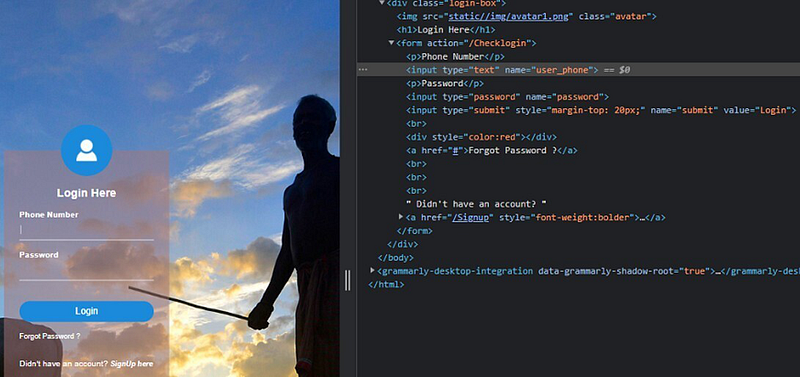
‘ll guide you through building a simple auto-login bot using Python. The bot will automate the login process for a website and perform the login on your behalf. We’ll use the requests library to handle HTTP requests and BeautifulSoup to parse the website's HTML content.
Prerequisites:
Basic knowledge of Python programming.
Familiarity with HTML and HTTP concepts.
Step 1: Set up the Environment
First, make sure you have Python installed on your computer. You can download it from the official website (https://www.python.org/downloads/) if you don’t have it already.
Next, we need to install the required libraries. Open your terminal or command prompt and run the following commands:
pip install requests
pip install beautifulsoup4
Step 2: Import the Required Libraries
Now that you have the necessary libraries installed, create a new Python file and import the required modules:
import requests
from bs4 import BeautifulSoup
Step 3: Inspect the Website
Before we proceed, inspect the login page of the website you want to automate. Identify the form fields (username, password) and the login endpoint URL (where the form is submitted).
Step 4: Get the CSRF Token
Some websites use CSRF tokens for security. If the website you’re working with uses CSRF tokens, you need to fetch it from the login page first. It’s usually found in a meta tag. Here’s how you can do it:
def get_csrf_token(login_url):
    response = requests.get(login_url)
    soup = BeautifulSoup(response.text, 'html.parser')
    csrf_token = soup.find('meta', {'name': 'csrf-token'})['content']
    return csrf_token
Step 5: Create the Login Function
Now, let’s write a function to perform the login. Replace 'your_username' and 'your_password' with your actual login credentials.
def auto_login(login_url, username, password):
    csrf_token = get_csrf_token(login_url)
    session = requests.Session()

    login_data = {
        'username': 'your_username',
        'password': 'your_password',
        'csrf_token': csrf_token
    }

    response = session.post(login_url, data=login_data)

    if response.status_code == 200:
        print("Login successful!")
    else:
        print("Login failed.")
Step 6: Test the Auto-Login Bot
Now that we’ve completed the bot, let’s test it. Replace 'http://example.com/login' with the actual login URL of the website you want to automate.
if __name__ == "__main__":
    login_url = 'http://example.com/login'
    username = 'your_username'
    password = 'your_password'
    auto_login(login_url, username, password)
Step 7: Run the Bot
Save the Python script and run it using the following command:
The bot will perform the login process and display either “Login successful!” or “Login failed.” based on the response from the website.
Please note that this tutorial is intended for educational purposes and may not work on all websites due to their unique login mechanisms and security measures. Always make sure you have permission to automate actions on websites and use bots responsibly. Additionally, some websites may have anti-bot measures that can detect and block your bot.
Support me with a coffee: https://www.buymeacoffee.com/sarahdev


