
How to Build a Scalable Multi-Tenant SaaS Platform Using Angular, C#.NET, Entity Framework and Cloud Providers for Startups
Delivering Software-as-a-Service (SaaS) solutions to multiple customers (tenants) can be challenging without the right architecture. This guide will help you build a scalable, secure, and cost-effective multi-tenant SaaS platform using Angular for the frontend, C#.NET for the backend, and Azure, AWS, or GCP for cloud services. We’ll cover core concepts, implementation steps, code snippets, and best practices to set you up for success.
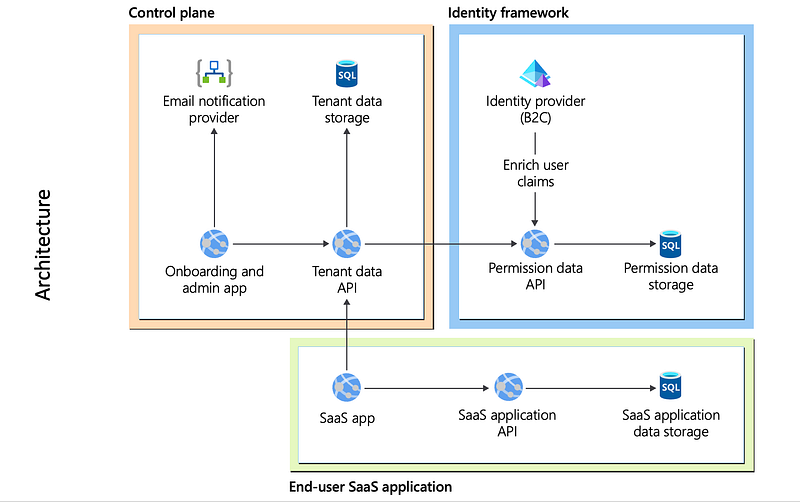
What is Multi-Tenancy, and Why Does It Matter?
Multi-tenancy is an architectural approach where a single application serves multiple tenants, with each tenant’s data and configurations isolated. It enables cost-efficiency by sharing resources while maintaining strict data separation. For example, platforms like Microsoft Office 365 allow businesses to share infrastructure while keeping their data secure and tenant-specific.
Key Benefits of Multi-Tenancy:
- Cost Efficiency: Shared infrastructure reduces operational costs.
- Simplified Maintenance: Updates and patches are applied once for all tenants.
- Scalability: Easily onboard new tenants and scale resources.
- Customization: Serve unique configurations and branding per tenant.
Key Multi-Tenancy Strategies:
- Database-per-Tenant: Each tenant gets its own database.
- Shared Database with Tenant Column: A single database with tenant-specific data identified by a column.
- Schema-per-Tenant: A shared database with separate schemas for each tenant.
High-Level Architecture
A startup SaaS platform doesn’t need a complex, microservice-driven architecture. Here is a simple monolithic design that includes the recommended startup stack components from Microsoft.

Frontend: Angular
- Detect tenants through subdomains, paths, or query parameters.
- Apply tenant-specific themes and configurations dynamically.
- Route guards for tenant-level access control.
Backend: ASP.NET Core
- Middleware to resolve tenants from requests.
- Tenant-aware database interactions and business logic.
- Tenant-specific authentication and authorization.
Cloud: Azure, AWS, or GCP
- Scalable compute and storage solutions.
- Managed databases for tenant data isolation.
- Identity management for tenant-specific user authentication.
User Sign-in Workflow

Step 1: Angular Frontend Implementation
Imagine you’re building a SaaS platform where customers access their dedicated instance through URLs like tenant1.myapp.com or myapp.com/tenant2. This setup not only identifies tenants dynamically, but also enhances the user experience with tenant-specific branding and configurations.
1. Tenant Detection
The first step is to detect the tenant from the URL. For subdomain-based detection, split the hostname:
const tenant = window.location.hostname.split('.')[0];For path-based tenants, Angular’s ActivatedRoute helps extract the tenant information:
const tenant = this.route.snapshot.paramMap.get('tenant');Setting up subdomain routing in the cloud requires configuring your DNS provider (e.g., Azure DNS, AWS Route 53, or GCP Cloud DNS). Each tenant gets a CNAME record pointing to your application’s base domain, enabling seamless redirection.
2. Dynamic Theming and Branding
Why theming? Imagine each tenant wants their brand colors and logos displayed. This improves usability and fosters a sense of ownership. Store tenant-specific themes in JSON files:
import tenantConfig from `./assets/config/${tenant}.json`;Apply the styles dynamically using Angular’s Renderer2:
this.renderer.setStyle(document.body, 'background-color', tenantConfig.theme.backgroundColor);This ensures each tenant sees their unique branding when accessing the app.
3. Route Guards for Tenant-Specific Logic
Security is paramount in a multi-tenant system. Use route guards to restrict access:
canActivate(route: ActivatedRouteSnapshot): boolean {
    const tenant = this.tenantService.getTenant();
    return tenant && this.authService.isAuthenticated(tenant);
}
This logic ensures that only authenticated users of a specific tenant can access its resources.
4. Multi-Tenant Modules
Want to offer custom features to specific tenants? Dynamically load modules based on the tenant:
const modulePath = `./modules/${tenant}-module/${tenant}-module.module`;
import(modulePath).then(m => this.loadModule(m.TenantSpecificModule));
This approach isolates tenant-specific functionality while maintaining a clean codebase.
Step 2: Backend Implementation in ASP.NET Core
1. Middleware for Tenant Resolution
Imagine handling requests from multiple companies, each expecting their data and operations to remain isolated yet share the same platform. For instance, Company A at a.myapp.com and Company B at b.myapp.com both interact with the same backend, but have separate configurations and databases. To achieve this, a Tenant Resolution Middleware becomes essential.
This middleware intercepts every incoming request to identify the tenant by examining headers, subdomains, or request paths. It ensures that the backend dynamically adjusts to the appropriate database, settings, or resources, creating a seamless and secure multi-tenant experience.
Create middleware to extract the tenant ID from requests:
public class TenantResolutionMiddleware {
    private readonly RequestDelegate _next;

    public TenantResolutionMiddleware(RequestDelegate next) {
        _next = next;
    }

    public async Task Invoke(HttpContext context, ITenantService tenantService) {
        var tenantId = context.Request.Headers["X-Tenant-ID"] ?? "default";
        tenantService.SetTenant(tenantId);
        await _next(context);
    }
}
Register the middleware:
app.UseMiddleware<TenantResolutionMiddleware>();
2. Tenant-Aware Database Configuration
Configure Entity Framework to switch databases dynamically:
services.AddDbContext<AppDbContext>((serviceProvider, optionsBuilder) => {
    var tenantService = serviceProvider.GetService<ITenantService>();
    var connectionString = tenantService.GetConnectionString();
    optionsBuilder.UseSqlServer(connectionString);
});
Here, based on the current tenant, we fetch a different connection string. As a best practice, DO NOT store connection strings with database server IP, username and password in an application configuration file. Instead, use build pipelines environment variables or Cloud Key/Secret management service; for example, Azure KeyVault.
3. Authentication and Authorization
Use a cloud identity provider for tenant-specific authentication, such as Azure AD B2C:
services.AddAuthentication(OpenIdConnectDefaults.AuthenticationScheme)
    .AddMicrosoftIdentityWebApp(Configuration.GetSection("AzureAdB2C"));
This is a big topic and demand a separate blog in the future.
Step 3: Cloud Integration
The cloud integration involves multiple steps. For example, setting up load balancer, API gateway, rate limiting, caching etc.
Here are few cloud services per providers you might need to implement the solution.
Azure Implementation hints
- App Service: Host the Angular frontend and .NET backend.
- Azure SQL: Elastic pools for cost-efficient database-per-tenant.
- Azure AD B2C: Tenant-specific user authentication.
- Blob Storage: Store tenant-specific files.
- Azure Front Door: Route traffic based on subdomains or paths.
AWS Implementation
- Lambda: Serverless logic for tenant onboarding.
- RDS: Managed databases for tenant data.
- Cognito: Tenant-specific user management.
- S3: File storage for tenants.
- API Gateway: Route tenant-aware API requests.
GCP Implementation
- Cloud Run: Containerized backend services.
- Cloud SQL: Scalable databases.
- IAM: Tenant-specific roles and permissions.
- Cloud Storage: Tenant file storage.
- Cloud Endpoints: Secure APIs.
Step 4: Automating Tenant Onboarding
Imagine onboarding a new tenant, like “Acme Corp,” to your SaaS platform. Traditionally, this could involve manually setting up a database, configuring subdomains, and creating user accounts — a process both time-consuming and prone to errors. Now, consider an automated system that handles all of this seamlessly. The goal? Faster onboarding, reduced manual effort, and an enhanced user experience.
When a sales deal closes, your system could trigger an onboarding workflow. For instance, Acme Corp signs up, and their subdomain (acme.myapp.com) is configured automatically through your cloud DNS provider (e.g., Azure DNS, AWS Route 53, or GCP Cloud DNS). Simultaneously, a tenant-specific database is provisioned, and branding assets, like logos and themes, are dynamically associated with the new tenant.
Onboard a new tenant workflow
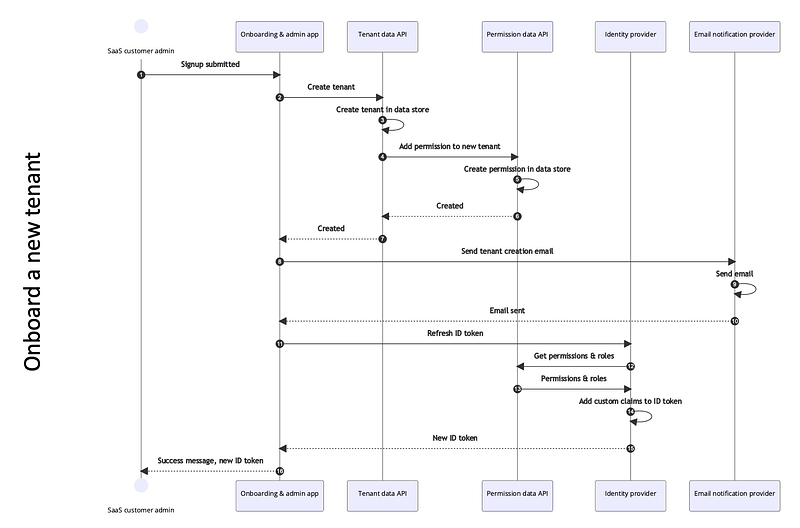
Here’s how automation can simplify this process:
- Dynamic Resource Provisioning: Serverless functions or APIs can create the required resources on the fly. For example, you might use an Azure Function to set up a new database:
[FunctionName("CreateTenantDatabase")]
public static async Task<IActionResult> Run(
    [HttpTrigger(AuthorizationLevel.Function, "post")] HttpRequest req,
    ILogger log) {
    string tenantId = req.Query["tenantId"];
    string connectionString = $"Server=tcp:yourserver.database.windows.net;Initial Catalog={tenantId};";
    // Logic to create a database
    return new OkObjectResult($"Database created for tenant: {tenantId}");
}
2. Subdomain Configuration: Automate subdomain creation using the APIs of your cloud DNS provider. For example, in AWS Route 53, a Lambda function could add a CNAME record pointing to your application’s load balancer.
3. Tenant-Specific Theming: Once the technical setup is complete, load branding configurations for the new tenant from a JSON file or a database, ensuring their users experience a personalized interface immediately upon login.
This level of automation ensures that new tenants can start using your platform in minutes, not days, fostering a delightful first impression and reducing operational bottlenecks.
Add a user to a tenant workflow

Step 5: Monitoring and Logging
Monitoring and logging are very critical aspect of multi-tenant SaaS platform. You need not only the error logs, but the access logs, trigger events, reports, identify the user journey heatmap, capture data to see which modules have been mostly used and which are rarely.
Azure, AWS, GCP provide their own services for such telemetry however there are many tools which can help this topic to capture more details like SmartLook, Adobe Analytics, Sentry, DataDog etc.
Best Practices for Multi-Tenant SaaS
- Ensure strict tenant isolation for security.
- Use caching and indexing to optimize performance.
- Regularly back up tenant data and configurations.
- Dynamically scale resources based on tenant needs.
Conclusion
By following this guide, you can create a robust, scalable, and secure multi-tenant SaaS platform with Angular, C#.NET, and your preferred cloud provider. Whether you choose Azure, AWS, or GCP, the architecture ensures efficient resource utilization and a seamless tenant experience.
Checkout my YouTube channel and if you would like to me create a YouTube videos on this topic, drop me a message in the comment section.
Cheers!


