
How to build a Calendar: Whiteboard Sketch
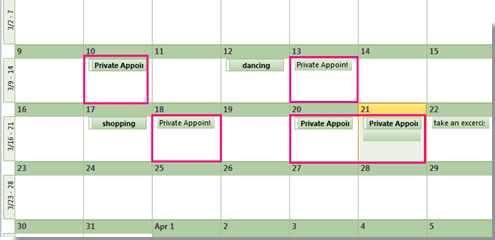
Calendar is important in my daily life. It frees part of my brain from remembering tedious scheduled tasks and makes it easier to manage my time. As an engineer who use google calendar heavily, I’m intereted of how such calendar system is built from zero and upgraded with more features. Here I put some of my studies below.
Calendar MVP: personal offline calendar
- Functions:
Very simple calendar should at least suppot the followings:
- Add, remove, edit a calendar event.
- When one calendar event is close by, notify user.
- Pull calendar for this week, next week or this month.
2. Data Structure
Now let’s consider which data structure is suitable to store calendar events, while making each of the operation fast.
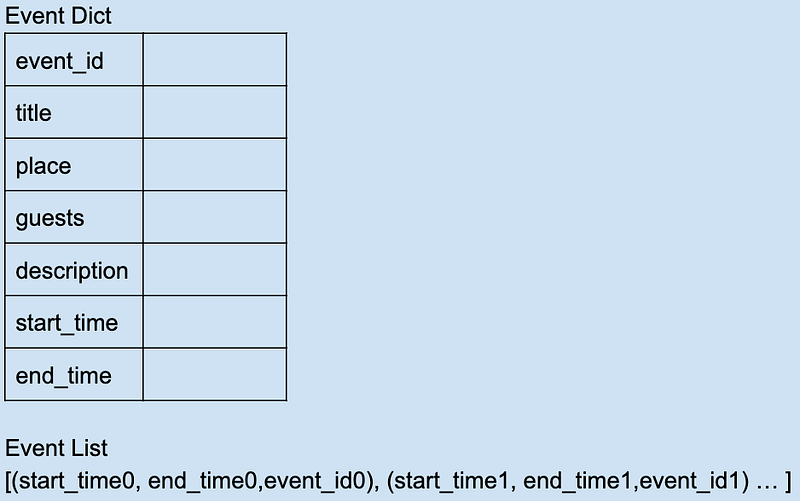
It’s natural that we would use dictionary to store event keys, each of them maps to an event object, for easy lookup and editing. And at the same time, keep an index with events sorted by (start_time, end_time), so that when timer traverses through, it notifies user whener it meets an event.
When user wants to see schedule of the week, just return the sublist of Event List formatted with event details to frontend.
3. Class methods
Below is my hacky implementation of CalendarEvent, CalendarEventList, and Calendar.
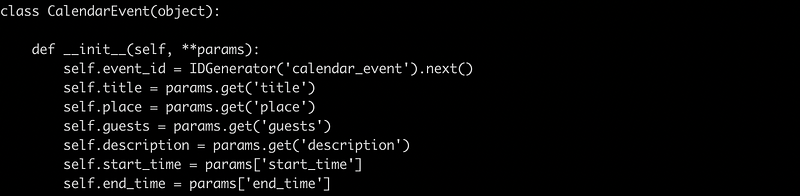
CalendarEvent hosts all detailed info of an event, we need the support of global ID generator to give us a unique ID whenever new event is created.
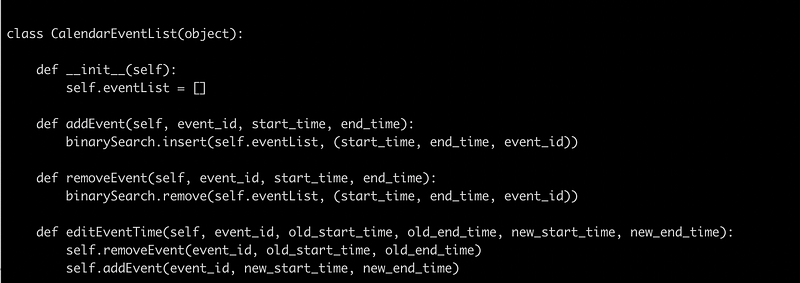
CalendarEventList is an index of event ids sorted by time, where adding event/removing event/editing event time each is of O(log(n)) time complexity with binary search.
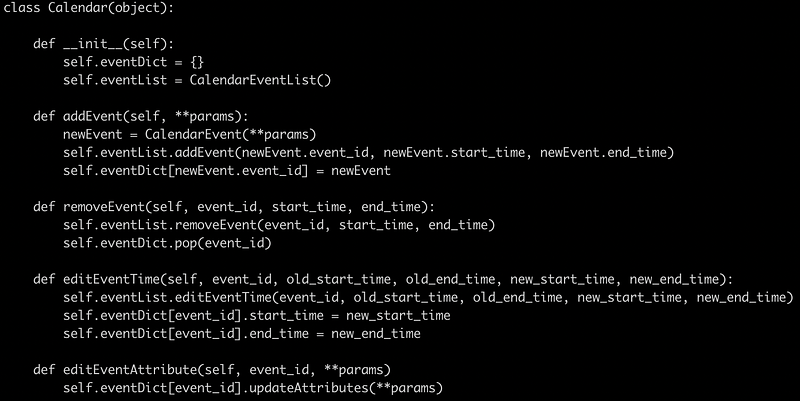
Calendar acts as the outer layer of our calendar system. It keeps event_id <-> event object dictionary, and the index of sorted events by time. Note that it supports editing event attributes (excluding start/end time), which is of O(1) complexity.
4. Special Case: recurring event
However, what if I want to add monthly event of paying my apartment bill? Adding it to eventDict is easy, but adding it to eventList would make the list inifite long.
For those special cases, it’s probably best to put them aside, and only pick them up when they are to be used, so that we don’t waste too much space.
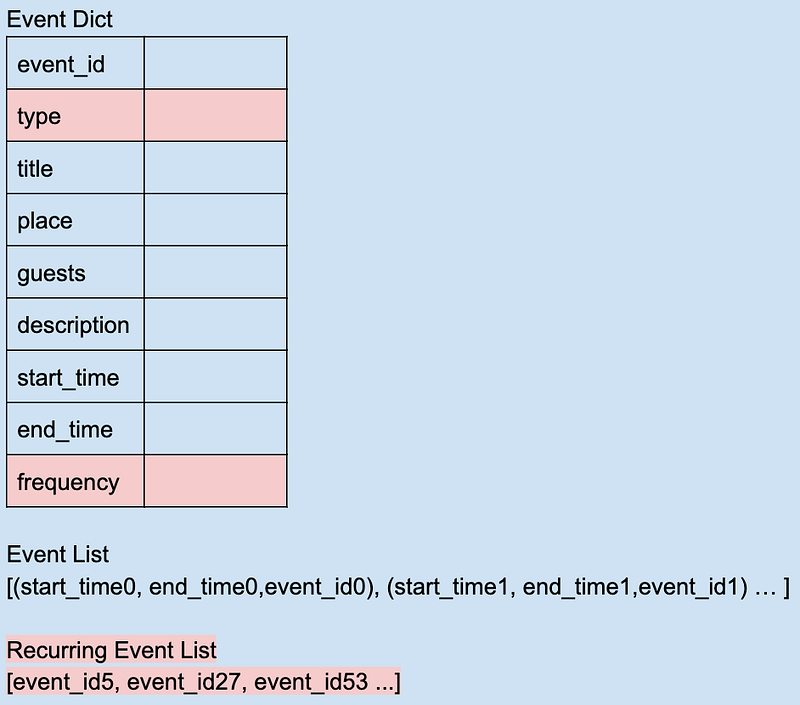
In addition to eventDict and eventList, now we have recurringEventList that only stores recurring event ids in the list. When user wants to pull the calendar, we check each recurring event in recurringEventList, insert them into eventList if applicable, and return the ‘merged’ evenList back to the user.
Now data stucture looks like this:
And we’ll need to alter our code a bit too (CalendarEventList object is pretty much the same) :
In the outer layer class, we check event type before adding it to eventList for non-recurring events. When pulling event list, we check each event in recurEventList and retrieve all its occurrence in given time window. If any, insert them into the prepared event list and return to frontend. Time complexity for it is O(mlog(n)), where n is the number of non-recurring events in time window, m is the number of occurrences of all recurring events in time window.
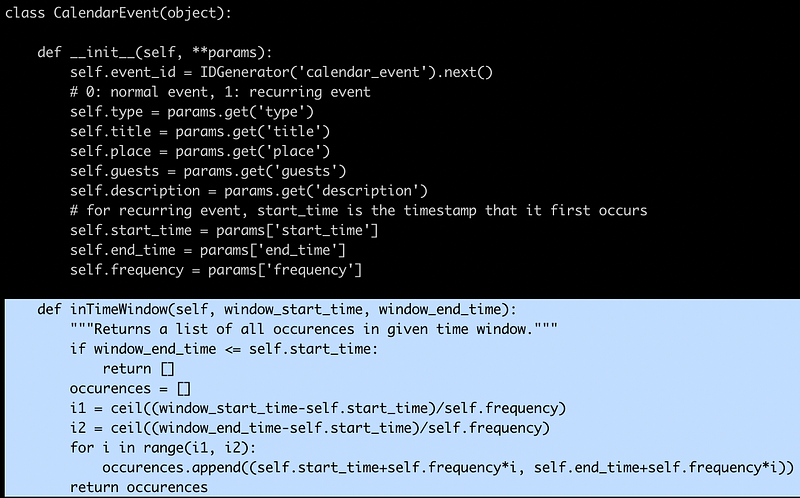
Of curse, we need to do some math for each recurring event. Buggy code here, just to give an idea.
Calendar V2: sync with server side
After you get off work, you suddenly come up with something you want to add to tomorrow’s schedule. Nothing need to worry about, you just need to log in to your account on your personal laptop and pull your work calendar here. A calendar server could backup your calendar, and allow you to access your calendar from multiple ends.
- Server end data structure
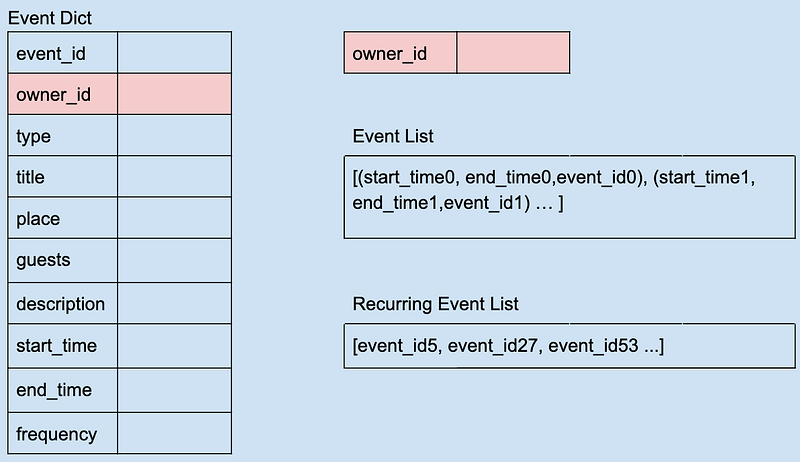
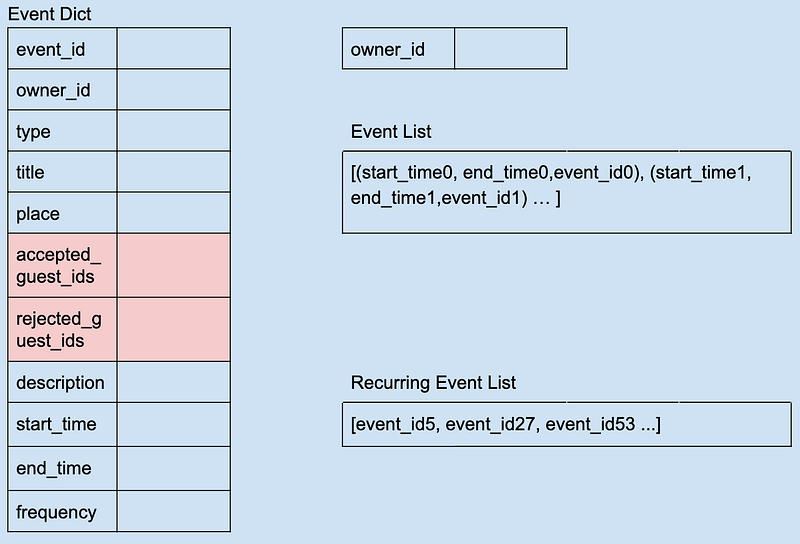
Each calendar event should belong to one owner_id, and for each owner, we keep an event list and a recurring event list.
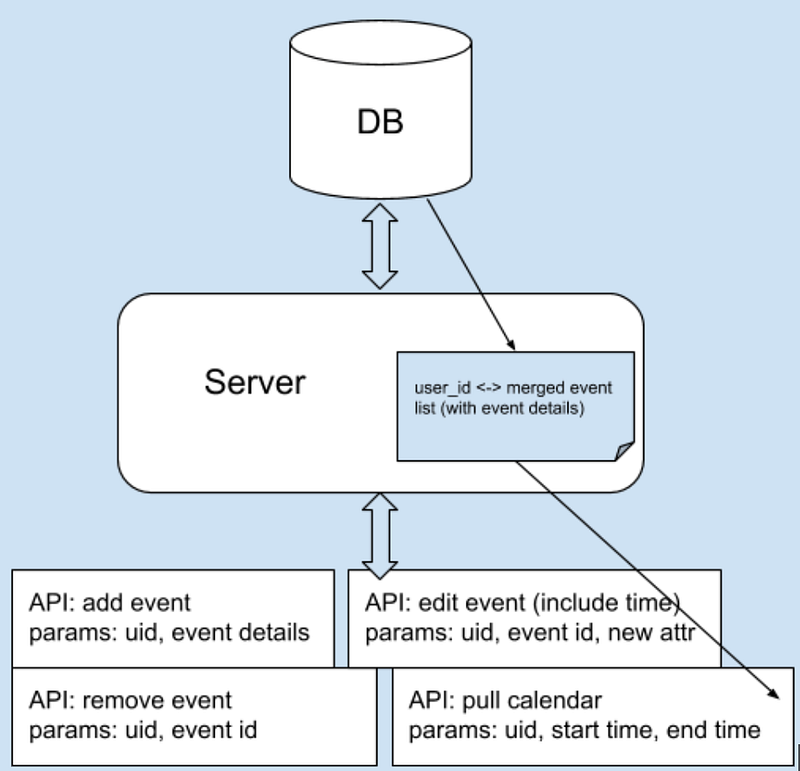
2. Server end API
APIs are designed to support each basic function listed in above section. Since during user busy working hours, he/she might check calendar frequently and thus trigger pull calendar request multiple times, we can cache merged event list for that user in main memory, so that no need to do relatively expensive merging time to time.
3. Trade-offs
Some features might ‘look easy’ but they cost non-trivial engineer effort, when engineer resource is limited, we can do some wise trade-offs.
- Only allow editing calendar when online, so that any change comes with real time sync between user and server end. Otherwise, server should handle some edgecases such as: user removes eventA on offline laptop but later he thinks he’d rather edit event details rather than remove it, then he edits eventA online on his iPad. Now, what will happen when user’s laptop reconnects to internet?
- Only notify user about incoming event when user’s calendar page is open. Time counter at user end (Mac, iPhone, etc) will handle the notification task. Otherwise if every user need to be notified no matter calendar page is opened or closed, it means server side should run a time counter and send notification whenever any user’s event is happening. This increases serverside load a lot.
Calendar V3: interact with multiple users
If I have a discuss session and want to invite my PM to join, butmy PM is super busy, I can’t event catch him on Slack. With a calendar that supports interaction among multi users, I don’t have to wait for my PM and ask him whether the time works for him, simply pull his calendar, find common free slots, set up an event and send invitation. This is how calendar decouples people’s work and saves us time.
- Functions
Let’s see what new functions we have in this senario:
- Pull another user’s calendar, show it together with mine.
- Send invitation to event guests
- Accept / reject invitation
2. Data Structure
We used to have owner_id, guest_ids for each event, now we want to differentiate guests who accept event invite from who reject.
3. Server <-> Client
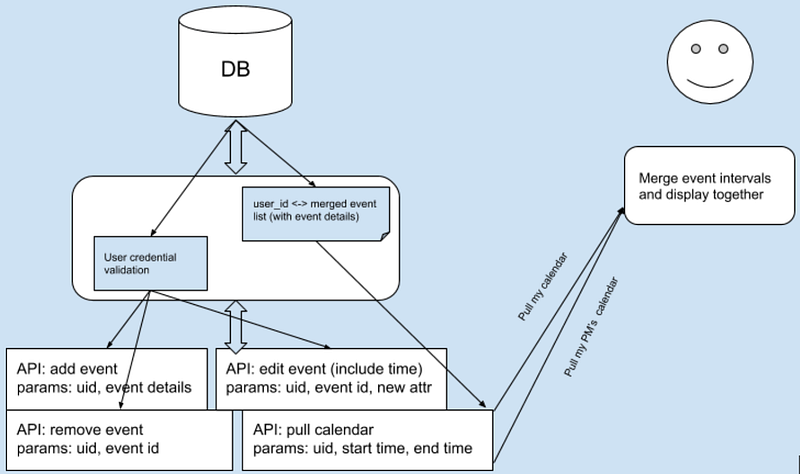
To pull both my and my PM’s calendars, client side sends a pull request with my user id and another pull request with my PM’s id, and client will do an event intervals merging process to display two calendars together.
Note that although I have read access to my PM’s calendar, I don’t have write access. User credential validation is a must part as out calendar system becomes more powerful.
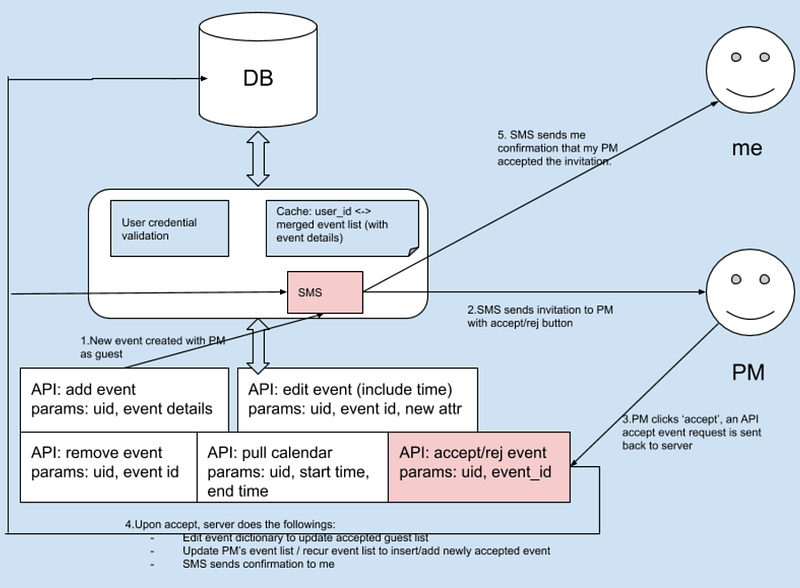
After I create an event and invite my PM, here are what happens:
- Server end, new event created with PM as guest
- SMS sends invitation to PM with accept/reject button
- PM clicks ‘accept’, an API accept event request is sent back to server
- Upon accept, server does the followings:
- Edit event dictionary to update accepted guest list
- Update PM’s event list / recurring event list to insert/add newly accepted event
5. SMS sends confirmation to me
Note that in addition to previously mentioned APIs, we have new APIs to support guests accepting/rejecting event.
Calendar : Scale
Ok, what’s the scale of our calendar system?
- Numbers
Let’s be a bit ambitious, say we will have 1 billion users in near future.
Assume each user edits his/her calendar once per day, and check his/her calendar 10 times per day (this should be more than enough for our prediction, cause most users are inactive users).
And we have:
- 10⁹ users
- Write: 1/per user per day -> total 10k qps
- Read: 10/per user per day -> total 100k qps
Assume each user owns 4 active events, and each of them have 40 non-recurring events (own or invited) for a month, 4 recurring events (own or invited).
And we have:
- 4*10⁹ events
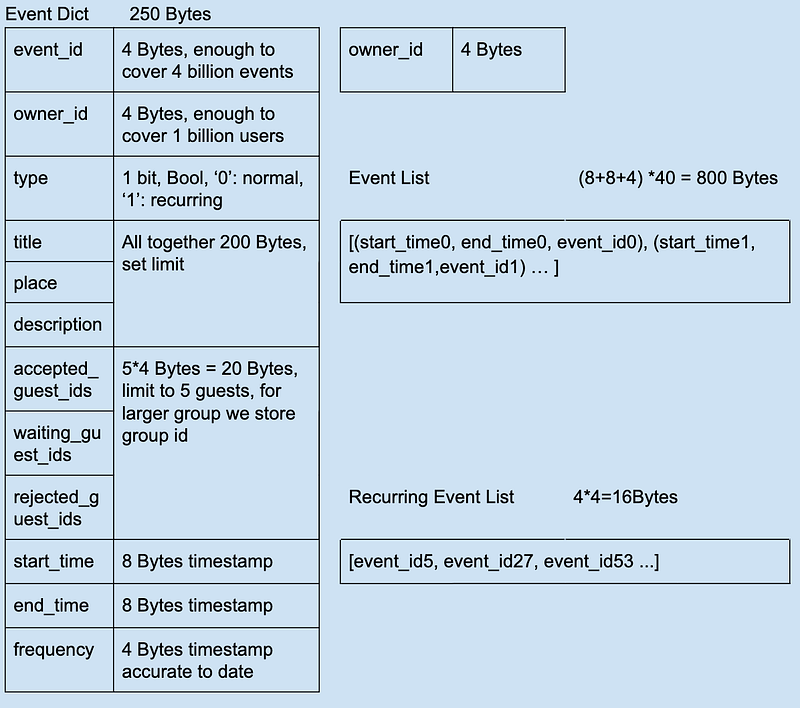
For Event Dict:
- 250 Bytes * 4*10⁹ = 10¹² Bytes
For Event List + Recurring Event List for all users:
- (4+800+16) * 10⁹ = 8.2 * 10¹¹ Bytes
So all together, we need ~ 1TB space.
2. Other thoughts
- A proper sharding strategy would be to store calendars of users from the same company or same society together, since they are likely to be each other’s guests.
- Past events are rarely checked, we could have a batch that regularly moves data from frequently accessed DB to relatively inactive datastore.