
Medium Boost Through Canva Design
How To Boost Medium Traffic With Canva!
Simple Growth And Recognition Strategy For Medium With Canva!
Medium Non-Members Can Read The Full Story HERE!
What you will learn from this article.
Looking at this Medium strategy in a nutshell.
Creating your free Canva website for Medium.
More traffic to your Medium website with Canva.
Do we have proof that it works?
Looking at this Medium strategy in a nutshell.
Boosting Medium reads and responses through Canva is easier than you think. In all honesty, we just thought of this strategy while we were driving traffic to our other Canva one-page websites for affiliate products.
Then it hit us, “But if it works to get affiliate link traffic, then surely it will work to get more Medium traffic!”.
So off we went, diving right in. Please don’t ask us where all our ideas are coming from. We can only answer, “the voices in our heads!”.
As entrepreneurs, I am sure that our fellow entrepreneurs will back us on this. Once you reach a certain level of knowledge, things just start making sense. And in that, all your knowledge comes together, forming fresh ideas.
But before we get started, you will need to create your free Canva account. Yes, there is a pro upgrade option (the best $12 we spend every month), but there is no need to upgrade.
You can simply Sign Up For Canva 100% FREE! And start creating stunning designs. Images, Videos, Mobile Videos, Presentations, Websites, and much more. You are going to love the power of this tool!
What this strategy is all about
Is to create kind of like a business website to promote your Medium profile and Medium publications in the event you already have your own Medium publications.
But you know the best part about this? Without doing a single thing like posting the website on social media etc. It started receiving views almost instantly.
Why?
Because Canva also drives traffic to your website!
But we will get to that a bit later with proof after just a few minutes. Without doing any promotion, and by just creating the free website in Canva and receiving free traffic.
Creating your free Canva website for Medium.
In our opinion, the Canva website builder is by far the easiest website builder we have seen thus far. And we have tested most of the well-known website builders. It is perfect for beginners and professionals alike.
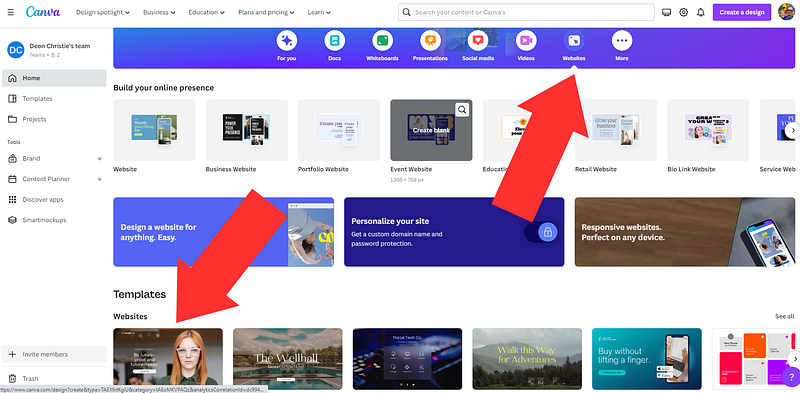
As seen above, illustrated from inside our Canva dashboard. You simply click on “Websites”, and then “select a template” you would like to use. There is a template ready for just about any niche or professional type of website you can think of!
Believe it or not, it really is that simple.
Anyone can do this we can assure you, even if you have never built a website in your life. But we will provide you with an example to give you a better idea.
Personally, we focused on including the below-mentioned details in our free Canva one-page website. Contact details are usually in the footer or last page of the free website.
Contact Details.
Professional Social Profiles.
Medium Profile.
Medium About Page.
Medium Publications.
Achievements And Awards.
Medium Story Video.
Medium story video? Yes, a while back we covered a strategy on how to turn Medium posts into HD YouTube videos with Canva and Lumen5. You might want to check out the post below on that and turn your Medium stories into YouTube videos.
With your website pages, you want to include as many of the details as mentioned above. Not necessarily all of them, in the event you don’t have those videos yet for instance. Just try and include as many of those as you can.
If you have any achievements and awards to display, then do that. Because the more professional your website is, the more attention you will attract.
Be as transparent with your contact details as possible.
As seen in the illustration below. We have used the page that displays achievements to redirect to our Medium “About” page. When you share achievements and rewards, does that not form part of introducing yourself?
And should you then not be sharing what you are all about, and what your readers can expect from you?
Just get to know your way around Canva. We leave that up to you. But you can view this exact website we use to drive traffic to Medium and use it as a guideline.
Please, do not go and create a direct replica.
Be creative and use the guidelines which will make it easy enough for anyone. Then just create your own stunning one-page websites with Canva 100% free!
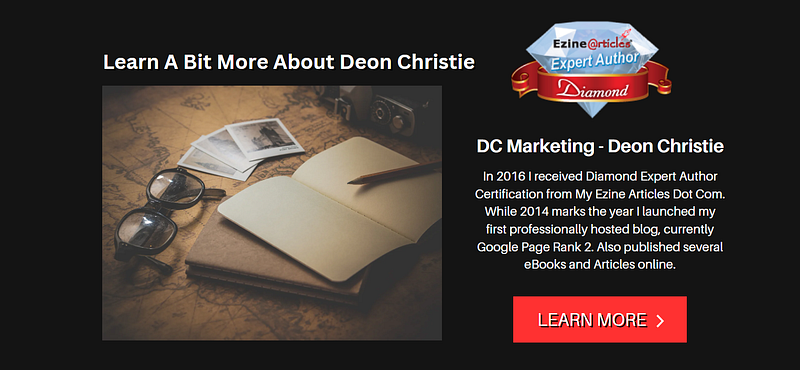
This particular website, that we have created just now for the purpose of this demonstration has but 10 pages. It does not have to be a massive website. Remember that although this is a “one-page website”.
It is also a “bridge page”, and the primary purpose of a bridge page is to redirect to another URL or site, or URLs and sites. That is why we use this exact same strategy to drive traffic to affiliate links.
You can check out the website below for a better idea. This, as mentioned before is our latest “traffic invention”. Therefore although we are still testing it, you are more than welcome to test it with us.
Check out the one-page Canva website used for this demonstration below.
By creating one-page websites in Canva for each affiliate product. And then drive lots of free traffic to the website (bridge page) with the help of Canva.
As mentioned above, this is one of many ways we use to drive free traffic to affiliate links.
However, for the purpose of this particular content marketing strategy, we need to focus on the primary end game. To get people to your Medium profile, about page, and Medium publications in the event you have any.
Having a “Contact” page in our opinion is just much more professional, as can be seen in the illustration below. Audiences are more likely to engage with a familiar face or a website with contactable details.
But, you don’t necessarily have to share your raw email if you don’t feel comfortable in doing so. What we did below was to highlight the text area “Click Here”, and add an email link, which we have covered in another article.
But let’s just do a quick recap.
After highlighting the text, you want to use the option to add a link. Then add your email address in the following format, (mailto:youremailaddress.com, etc.) with no spaces.
That way, you have just automated your website’s email response option by adding one simple word, mailto! Now the “send email” window will open the minute that link is clicked with any email service.
Pretty easy, right?
Exactly!
This is really not rocket science. Pretty easy, and pretty exciting, right?
But it is a science that requires precision, preparation, and timing. This brings us to the end of the basics on how to create a one-page Canva website for free and drive traffic to Medium.
Now it is up to you explorer. Go unlock that creativity and just follow this simple guide.
Next, we’re going to show you how much traffic this brand-new website received in the time it took us to write this article.
Don’t forget that we have not shared this new one-page website anywhere. it is only published on Canva, but fully operational and accessible via web search.
In fact, it just came in at Google page rank 4.
Meaning, not only is this a huge traffic opportunity. But your free one-page website with Canva is also indexable in search engines. I honestly cannot see how this strategy will not work.
I think we might be on to a winner here. As you can see below, we tested the site ranking in search engines with a tool called “Small SEO Tools”.
In fact, with this site you have I think around 75 free SEO tools to use.
From plagiarism checking to grammar, spelling, SEO scores in search engines and so much more. But this is just to show you the potential of what we have just stumbled across. What a pleasant surprise!

Page 4 within minutes of publishing this brand new website? No way! And we have to agree, believe us, we are as surprised as you are. We have no idea how this website ranked THAT fast!
Remember we said, this is a little something brand new we are testing. The voices in our heads came up with this. Where they get it from, well, who knows? Perhaps all the writing is just jump-starting our strategic memory.
More traffic to your Medium website with Canva.
Besides the free traffic, you will get from Canva to your one-page website., you have loads of other options. Like social sharing, and writing articles on LinkedIn.
Because the link to your free one-page Canva website is an indexable link.
It is accepted on all major social platforms. You can literally share the link to your Canva website anywhere. Heck, you can even “ping” it to search engines!
Yes, it’s THAT good, and it is THAT powerful! But you need to take your time and be sure you target the correct primary thoughts (keywords).
In our case, we focused on Medium, Writing, Marketing, Websites, Design, etc.
With these one-page Canva website URLs being universally accepted, there are no limits to how much traffic you can drive to them. And in this case, how much traffic you can get to your Medium work and grow…fast?
We think that we might just be on to something here.
What are your thoughts?
Do you think you are going to test this content marketing strategy with us?
Let us know in the comments, we would love to hear your thoughts.
Next up, proof of how many visits this brand new Canva one-page website received.
In the time it took us to write this article, with absolutely no promotional efforts from our side! Only Canva!
Do we have proof that it works?
Yes, we SO have proof, indeed, that this works, although this content marketing strategy is brand new. We honestly did not think this was going to work that well, or that fast.
Now for some, this might not seem that much, but that is beside the point. What you want to bear in mind is the fact that this free website is not only ranking page 4 in search engines.
But it started receiving traffic within minutes of launching. This is around 30 minutes later.
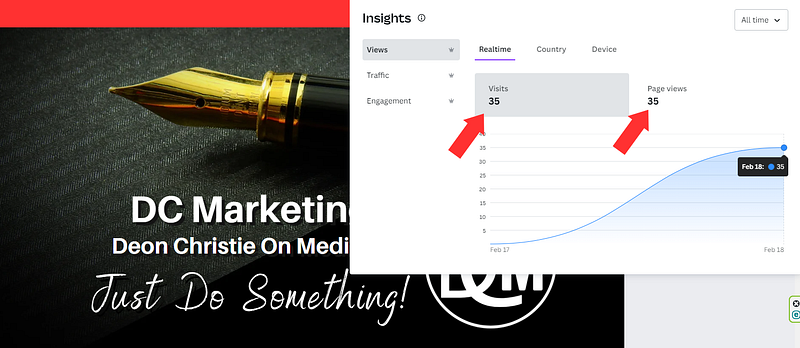
As illustrated above, 35 visits and 35 page views. Which means that each visitor also viewed the page. That is what I call targeted traffic, compliments of Canva for free!
Now all you have to do is be sure that your free Canva one-page website redirects to your Medium links. Your profile, about page, and Medium publications. And that’s it, your content marketing strategy is in place.
Simple plug-and-play activation in as little as 12 short minutes. Earn commissions in the biggest and most profitable niche markets. Promote your affiliate products with the click of a button, even on social media! perfect for newbie and intermediate marketers! — Source
AFFILIATE DISCLOSURE: Some of the links in this post are links to affiliate offers. If you visit them to make a purchase, I will earn a commission. The decision is yours, and whether or not you decide to buy something is entirely up to you. All offers come with a full money-back guarantee!
Free Stuff For My Medium Subscribers.
All new subscribers on Medium will receive 4 free gifts. 2 of my top traffic eBooks, and 2 free memberships (invitation only) for buyer traffic tools I use. Subscribe to me (Deon Christie) on Medium and your free stuff will be emailed to you asap. Medium has no affiliation, nor do they endorse the free giveaway in any way. It is my personal free giveaway to all new Medium subscribers.


