
How to Be Outstanding on LinkedIn With This Feature
Learn how to stand out from the crowd.
In 2018, LinkedIn launched a new feature that not everyone knows about it.
The ability to send voice messages of one minute max to all your contacts. This feature is not widely used and known, mainly because it’s only available in the mobile app.
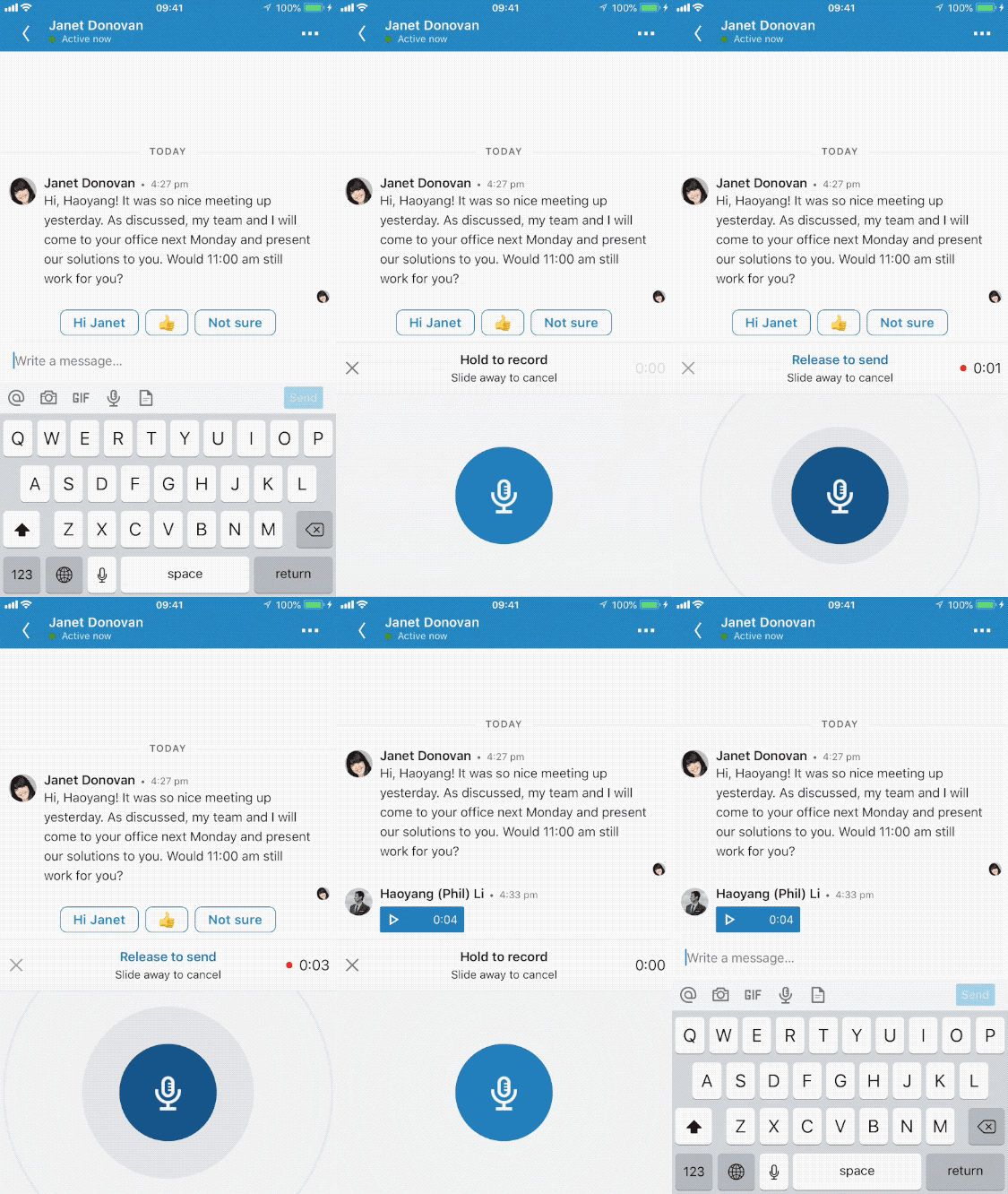
Even I didn’t know about it until three months ago a guy selling online courses contacted me on LinkedIn.
We know it’s fairly common on the platform to receive that kind of reach out. But that time stood out for me because it was in the form of a voice message.
The promotional messages I usually receive on LinkedIn are a typical copy-paste, not at all personalized, and boring. This was different.
It was the first voice message I’ve received, and it made me wonder why it’s not a usual way to catch people’s attention on LinkedIn and how to get the best out of that.
Benefits of LinkedIn Voice Messages

It Will Make You Stand Out From the Crowd
Receiving voice messages it’s not something that people are used to on LinkedIn.
Although it was introduced two years ago, there is still little use of it. By implementing it in your pitching strategy, it’ll make you stand out from the crowd. It’ll make you differentiate thanks to your unconventional approach and it’ll create curiosity in those who receive it.
It Values a Customer Relationship
Adding a voice to the small photo of your profile will make you more human. In these times of copy and paste cold pitch hearing the confident voice of the seller will make a real strike in the eyes of the person you’re talking to.
It will make the person on the other part of the screen feel like an individual rather than a number on your contact list.
Your message will be tailored to his activities and needs and the response rate will increase.

How to Use It Efficiently?
Use it as the first touch
Study the profile of the person you want to reach for your pitch. I suggest asking for the connection a couple of days before, in this way you will make your approach look more organic. Write down some information and prepare your audio.
The perfect length, in my opinion, is 30 seconds, or less. Keep it short and effective!
Tell who you are, quickly explain what your services are, and end it with a call to action. Record and press send, easy as that!
TIP: As it’s still not a commonly used feature, it’s always best to follow up with a short message. Ex: Hello, I didn’t want to take up too much of your time, so I sent you a short voice message, have a nice day!
Use it as a follow-up
This feature can also be used as a follow-up.
For example as a post-purchase exchange, thanking the person who trusted you to do the job. This way you’ll create a more fertile ground for a lifelong relationship with them. You can also use it to ask for feedback on how to improve aspects of your business.
It’s time to let cold pitching go, and replace it with a warmer approach, to a more human one.
Sell to people who are listening. — Seth Goldin
Try it and let me know!
If you liked this, you might be interested in reading: