avatar#hope

Free AI web copilot to create summaries, insights and extended knowledge, download it at here

4932

Abstract

ighly controversial RAID…</h3></div> <div><p>www.pcworld.com</p></div> </div> <div> <div style="background-image: url(https://miro.readmedium.com/v2/resize:fit:320/0*CX-rT9qFNJJifrFJ.jpg)"></div> </div> </div> </a> </div><div id="a107" class="link-block"> <a href="https://www.pcworld.com/article/3199104/intels-core-i9-and-x299-enable-crazy-raid-configurations-for-a-price.html"> <div> <div> <h2>Intel's Core i9 and X299 enable crazy RAID configurations for a price</h2> <div><h3>Storage buffs will get a massive dose of fun when Intel's X299 chipset launches. The new Core i9 chipset will support up…</h3></div> <div><p>www.pcworld.com</p></div> </div> <div> <div style="background-image: url(https://miro.readmedium.com/v2/resize:fit:320/0*m6pTzlBMmZxr_7Lg.jpg)"></div> </div> </div> </a> </div><figure id="a8d3"><img src="https://cdn-images-1.readmedium.com/v2/resize:fit:800/1*ZZiCDwF0JO3LytxWK7iM0w.jpeg"><figcaption>There is no option to add a disk to the volume here.</figcaption></figure><p id="ff81">I was looking for the “Add a Disk” option as I was also running out of space. Sometimes lack of free space makes the system slow. Usually these RAID utilities have all the options — not in this case though.</p><figure id="f872"><img src="https://cdn-images-1.readmedium.com/v2/resize:fit:800/1*obhID5n7oghlmc6dSjx4kg.jpeg"><figcaption>These are the options for the “spare” Intel disk which is not a part of the RAID volume.</figcaption></figure><p id="eeac">I have seen the Intel RAID Utility on other PCs where I have configured RAID. Hence, I went to support.dell.com and searched for a RAID utility. This is what I found:</p><figure id="1114"><img src="https://cdn-images-1.readmedium.com/v2/resize:fit:800/1*yRqgmla9vcLM85j_XWYabA.png"><figcaption></figcaption></figure><p id="3fb3">Trying to download and install this utility takes you to the Windows Store:</p><figure id="fd97"><img src="https://cdn-images-1.readmedium.com/v2/resize:fit:800/1*aj6qCvDRa37i6qmIWBKTmQ.png"><figcaption></figcaption></figure><p id="a3a0">When you run this app, it will open with a warning that you have old VROC drivers. So, you have to search for it on Google. This will eventually take you here:</p><div id="a18e" class="link-block"> <a href="https://downloadcenter.intel.com/download/30189/Intel-Virtual-RAID-on-CPU-Intel-VROC-and-Intel-Rapid-Storage-Technology-Enterprise-Intel-RSTe-Windows-Driver-for-Intel-Server-Boards-and-Systems-Based-on-Intel-62X-Chipset?wapkw=intel%20vroc%20driver%20windows%2010"> <div> <div> <h2>Download Intel® Virtual RAID on CPU (Intel® VROC) and Intel® Rapid Storage Technology Enterprise…</h2> <div><h3>IMPORTANT - READ BEFORE COPYING, INSTALLING OR USING. Do not use or load this software and any associated materials…</h3></div> <div><p>downloadcenter.intel.com</p></div> </div> <div> <div style="background-image: url(https://miro.readmedium.com/v2/resize:fit:320/)"></div> </div> </div> </a> </div><p id="fbb4">Even though it does not show compatibility with Windows 10, it does work fine and it will tell you that it is updating the drivers and replacing the Windows Store App (selected yes). Then it works for the first time without any errors:</p><figure id="e108"><img src="https://cdn-images-1.readmedium.com/v2/resize:fit:800/1*AGYEo5ApEU-ahIYmnJnsTw.png"><figcaption>Now we see that the drive has actually failed! The Windows Store App only showed parity errors. This tells us the real problem.</figcaption></figure><figure id="cc47"><img src="https://cdn-images-1.readmedium.com/v2/resize:fit:800/1*wfzXSFFCqaFUe5Jk7y0Ovw.png"><figcaption>Before you rebuild, try to ensure you use the exact same model of the drive as the replacement.</figcaption></figure><p id="27a9">Then power off the PC, take the PCIe card out and replace the SSD:</p><figure id="40ce"><img src="https://cdn-images-1.readmedium.com/v2/resize:fit:800/1*x6_2I5kS1edlEJfRl2wn3A.jpeg"><figcaption>The top one was bad.</figcaption></figure><p id="5070">What I did was replace the Intel with the new one. I am still not sure what would have happened if I had replaced the bad drive with the new one. I figured it may need the old drive to rebuild the new one. Perhaps that is not necessary. It makes sense that it could rebuild the bad drive from the existing good ones.</p><figure id="0f44"><img src="https://cdn-images-1.readmedium.com/v2/resize:fit:800/1*nZfVulVYGmsxAJjRBCLLRw.png"><figcaption>After you replace the drive, it will rebuild — this takes a while to complete<

Options

/figcaption></figure><figure id="0036"><img src="https://cdn-images-1.readmedium.com/v2/resize:fit:800/1*iDm4-5np4PlWsxdjHGkqSA.png"><figcaption>The rebuild continues for a while…</figcaption></figure><figure id="bde0"><img src="https://cdn-images-1.readmedium.com/v2/resize:fit:800/1*UARKNeC_3nuW6fd5yXaKvQ.png"><figcaption>Now, the rebuild is complete and there are no more errors.</figcaption></figure><p id="f2e2">My PC has never worked faster. I was losing like 80% performance for months because of the bad drive. And it had gotten worse since the past few days.</p><p id="e6e7">The next step is to add a new drive to expand the drive space. I plan to do that tomorrow. The below article is the continuation of this story (which turned out to be a horrible experience):</p><div id="dc4f" class="link-block"> <a href="https://todayamerican.medium.com/the-most-important-thing-nobody-ever-told-you-about-windows-pcs-a3c093b951e8"> <div> <div> <h2>The most important thing nobody ever told you about Windows PCs</h2> <div><h3>One of the most important things about Windows PCs is also the least known to most end users. Your PC will die one day…</h3></div> <div><p>todayamerican.medium.com</p></div> </div> <div> <div style="background-image: url(https://miro.readmedium.com/v2/resize:fit:320/1*19i77Y8PejSEkGRytmU_Bw.jpeg)"></div> </div> </div> </a> </div><h1 id="4e2d">Appendix</h1><div id="8b4b" class="link-block"> <a href="https://www.intel.com/content/www/us/en/support/articles/000024550/memory-and-storage.html"> <div> <div> <h2>Frequently Asked Questions about Intel® Virtual RAID on CPU (Intel®...</h2> <div><h3>Click or the topic for details: What is Intel® VROC? Intel® Virtual RAID on CPU (Intel® VROC) is an enterprise RAID…</h3></div> <div><p>www.intel.com</p></div> </div> <div> <div style="background-image: url(https://miro.readmedium.com/v2/resize:fit:320/)"></div> </div> </div> </a> </div><p id="3827">I really liked this documentation from Intel:</p> <figure id="bb2c"> <div> <div> <img class="ratio" src="http://placehold.it/16x9"> <iframe class="" src="https://drive.google.com/viewerng/viewer?url=https%3A//www.intel.com/content/dam/support/us/en/documents/memory-and-storage/ssd-software/Windows_VROC_User_Guide.pdf&amp;embedded=true" allowfullscreen="" frameborder="0" height="780" width="600"> </div> </div> </figure></iframe></div></div></figure><p id="9b3f">The list of supported third party SSDs are useful. Note, I used Samsung 970 Evo Plus which is not on this list:</p> <figure id="d0ab"> <div> <div> <img class="ratio" src="http://placehold.it/16x9"> <iframe class="" src="https://drive.google.com/viewerng/viewer?url=https%3A//www.intel.com/content/dam/support/us/en/documents/memory-and-storage/ssd-software/Intel_VROC_Supported_Configs_6-3.pdf&amp;embedded=true" allowfullscreen="" frameborder="0" height="780" width="600"> </div> </div> </figure></iframe></div></div></figure><p id="12b8">This is a useful document for those confused between Intel RSTe and Intel VROC as I was:</p> <figure id="4ff8"> <div> <div> <img class="ratio" src="http://placehold.it/16x9"> <iframe class="" src="https://drive.google.com/viewerng/viewer?url=https%3A//www.intel.com/content/dam/support/us/en/documents/memory-and-storage/ssd-software/Intel-VROC-RSTe-Name-Change-Explained-55059.pdf&amp;embedded=true" allowfullscreen="" frameborder="0" height="780" width="600"> </div> </div> </figure></iframe></div></div></figure><p id="82d8">AnandTech is great as usual in this article:</p><div id="2dfc" class="link-block"> <a href="https://www.anandtech.com/show/12435/the-intel-ssd-dc-p4510-ssd-review-part-1-virtual-raid-on-cpu-vroc-scalability/2"> <div> <div> <h2>The Intel SSD DC P4510 SSD Review Part 1: Virtual RAID On CPU (VROC) Scalability</h2> <div><h3>In order to provide a dedicated x4 link to each of our P4510 SSDs, a few components had to be swapped out. First, one of…</h3></div> <div><p>www.anandtech.com</p></div> </div> <div> <div style="background-image: url(https://miro.readmedium.com/v2/resize:fit:320/0*0PYfKhYOqv16qc9F.jpg)"></div> </div> </div> </a> </div></article></body>

How to Avert Complete Disaster on Your Work PC with RAID 5
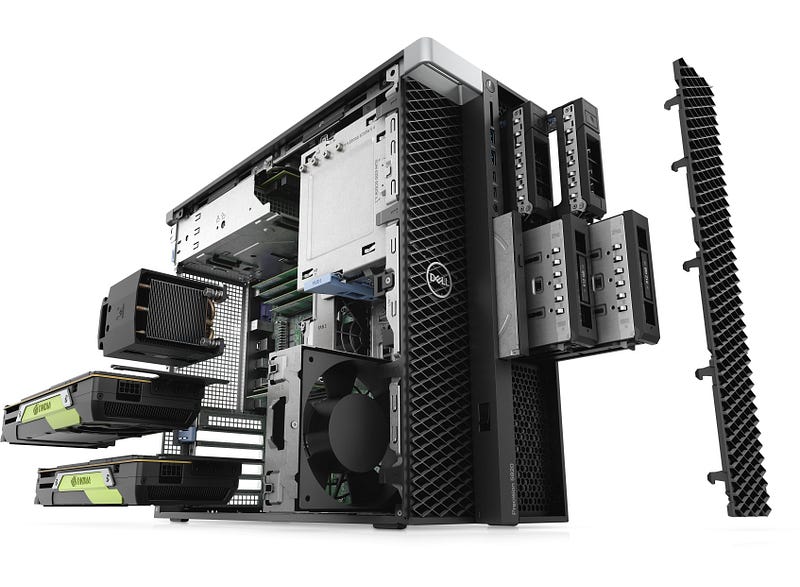
My Amazing Dell Precision 5820 Desktop

I am writing this article because so many people use PCs for work. If you can, you should configure it at-least in RAID 5 so you can work with a reasonable expectation of not being disrupted by hardware failure.

I don’t use RAID at home (Macs backup and restore great) — but I have it configured in all my work PCs (even the Dell Precision 7xxx laptop). And this totally saved me last week, as I was in the middle of several (15+) fires, and if my PC had died instead of running slower, this would have greatly made my life more miserable.

My “Aircraft Carrier” 5820 Tower is great but I had noticed a sluggishness in the past 6 months. And it got progressively worse over time. I do some crazy stuff during build to prevent manual work and I’m sure that has also caused the disk to be used more than usual. On hindsight, we should have gone with a Pro/ OEM Samsung NVMe SSD. But it’s ok — I had what I had because these drives were pretty pricey at the time we got them.

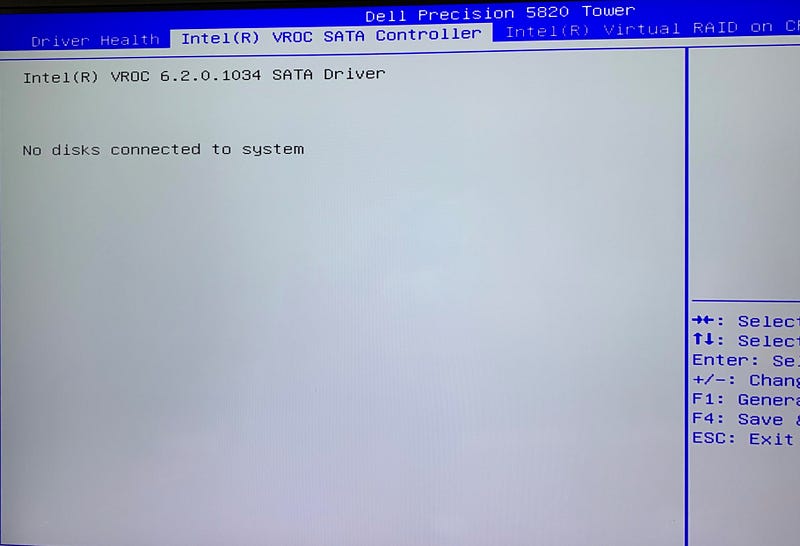
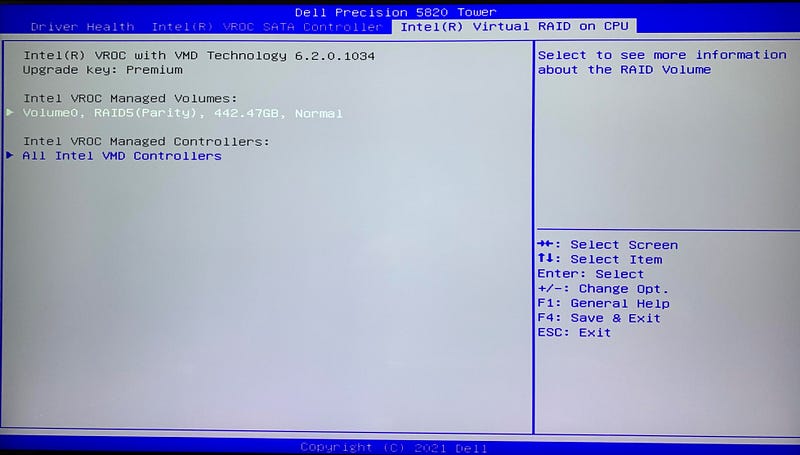
I did check the RAID “BIOS” Utility and found nothing. I mention this because most people would not know what to do until it is too late. So, I am taking you through the steps I took to debug the issue:
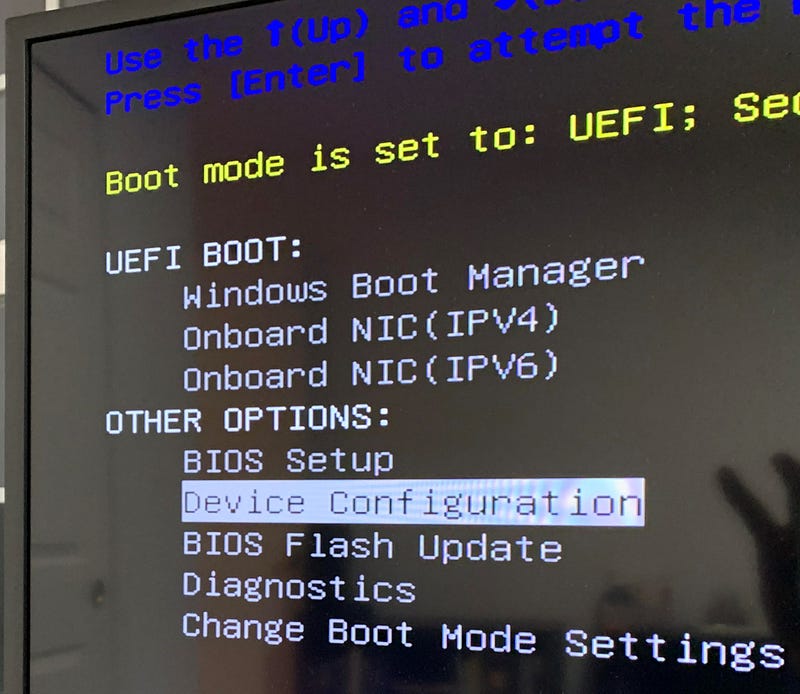
Pick this option to get to the RAID Utility. This is not very obvious.
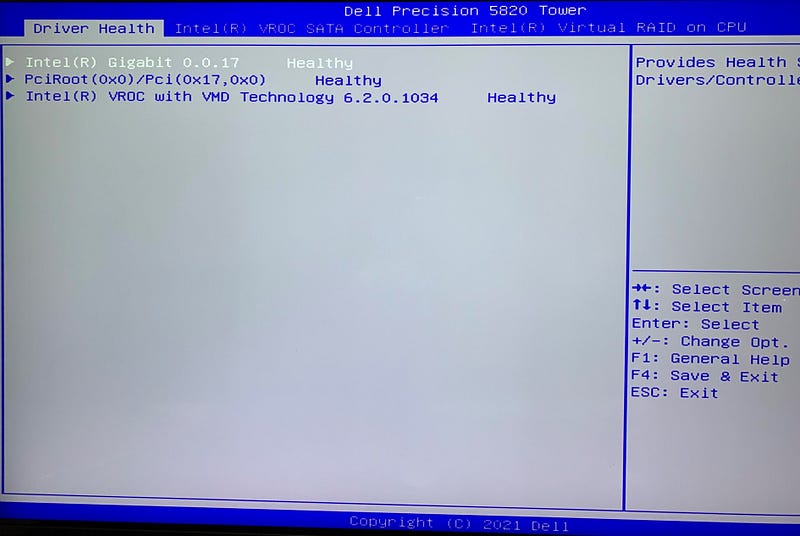
Confusing, but this is the first screen
Nothing here
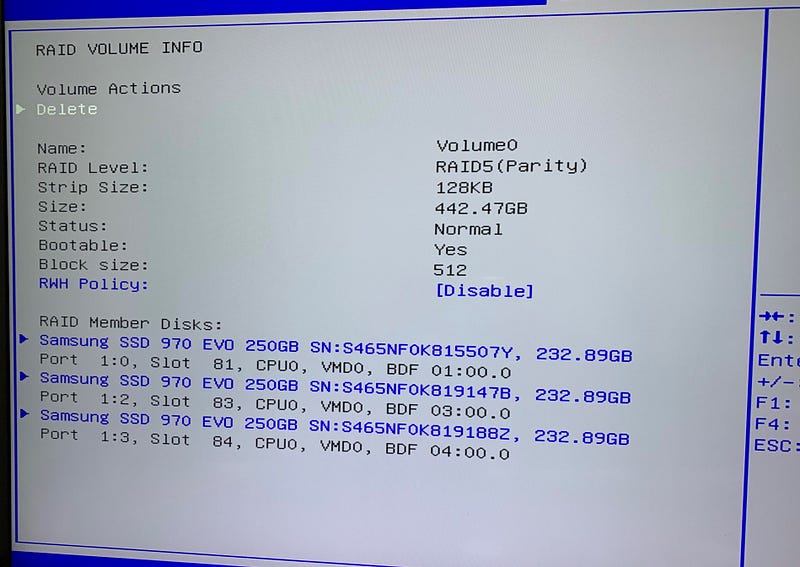
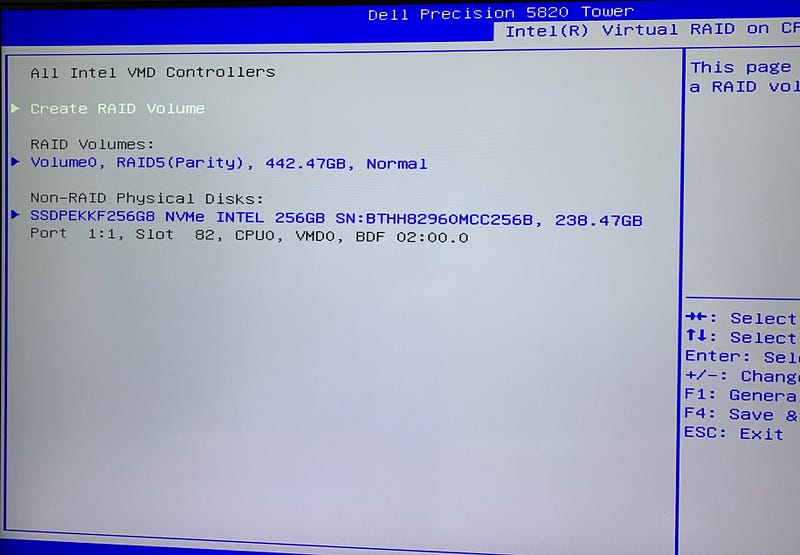
Here is where my RAID volume is configured
The interesting thing is that there is no option to add a disk here. And this had me worried for quite a bit. I’ll explain it later.

What is Intel VROC?

To do some types of RAID with Intel VROC and non Intel SSDs, you need to purchase a special hardware key which is plugged into the Motherboard.

This is one of the worst ideas from Capitalism which Intel has used for years. Make things unnecessarily complex, and customers run around confused figuring out how to use the things they paid for.

This is also why I have always purchased AMD CPUs for personal use.

AMD has this feature for free on some of its CPUs but interestingly, it does not include RAID 5.
There is no option to add a disk to the volume here.

I was looking for the “Add a Disk” option as I was also running out of space. Sometimes lack of free space makes the system slow. Usually these RAID utilities have all the options — not in this case though.
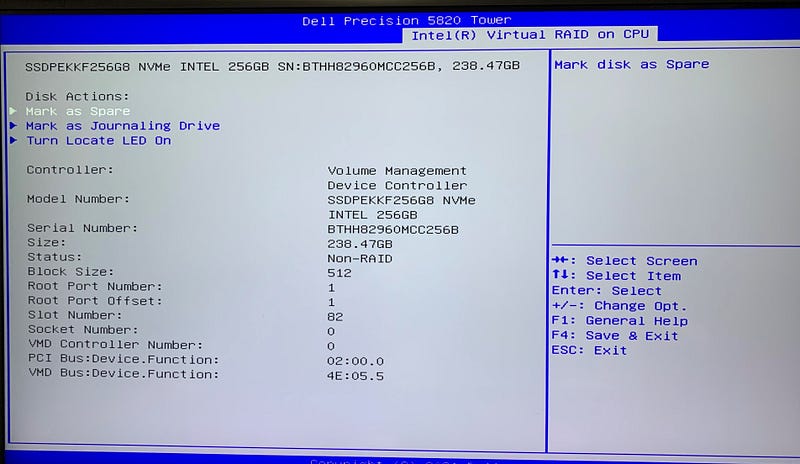
These are the options for the “spare” Intel disk which is not a part of the RAID volume.

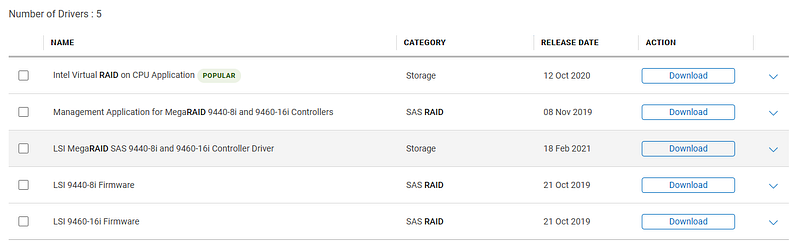
I have seen the Intel RAID Utility on other PCs where I have configured RAID. Hence, I went to support.dell.com and searched for a RAID utility. This is what I found:
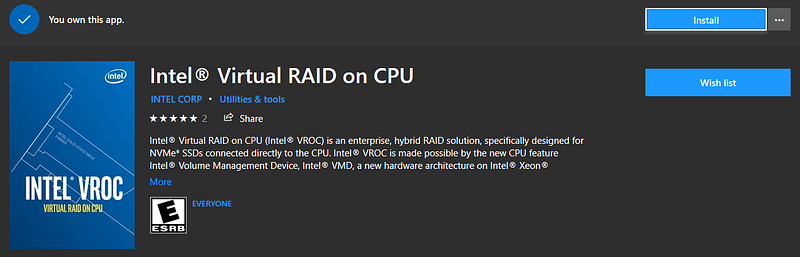
Trying to download and install this utility takes you to the Windows Store:
When you run this app, it will open with a warning that you have old VROC drivers. So, you have to search for it on Google. This will eventually take you here:

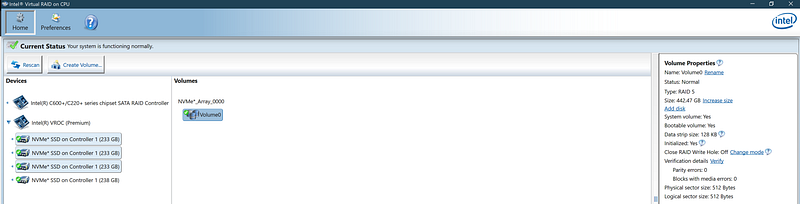
Even though it does not show compatibility with Windows 10, it does work fine and it will tell you that it is updating the drivers and replacing the Windows Store App (selected yes). Then it works for the first time without any errors:
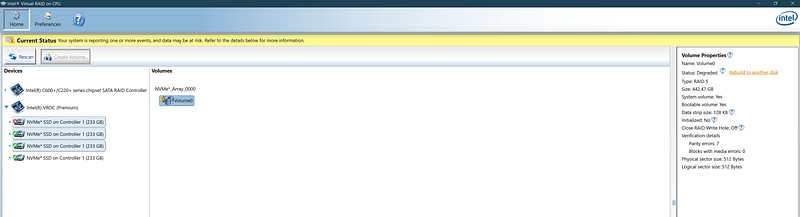
Now we see that the drive has actually failed! The Windows Store App only showed parity errors. This tells us the real problem.
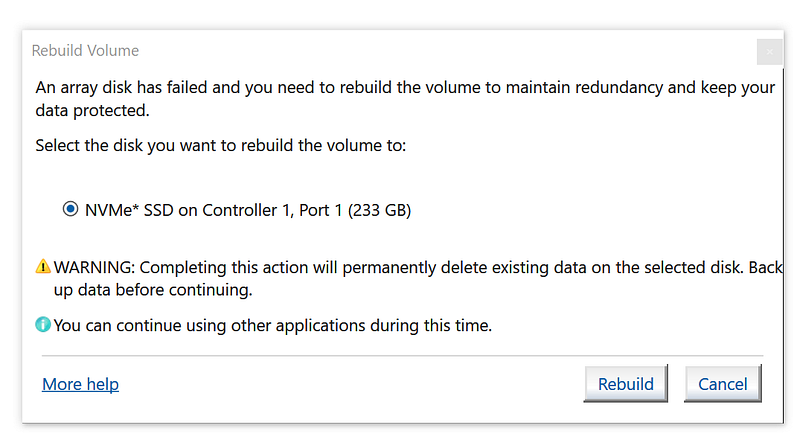
Before you rebuild, try to ensure you use the exact same model of the drive as the replacement.

Then power off the PC, take the PCIe card out and replace the SSD:
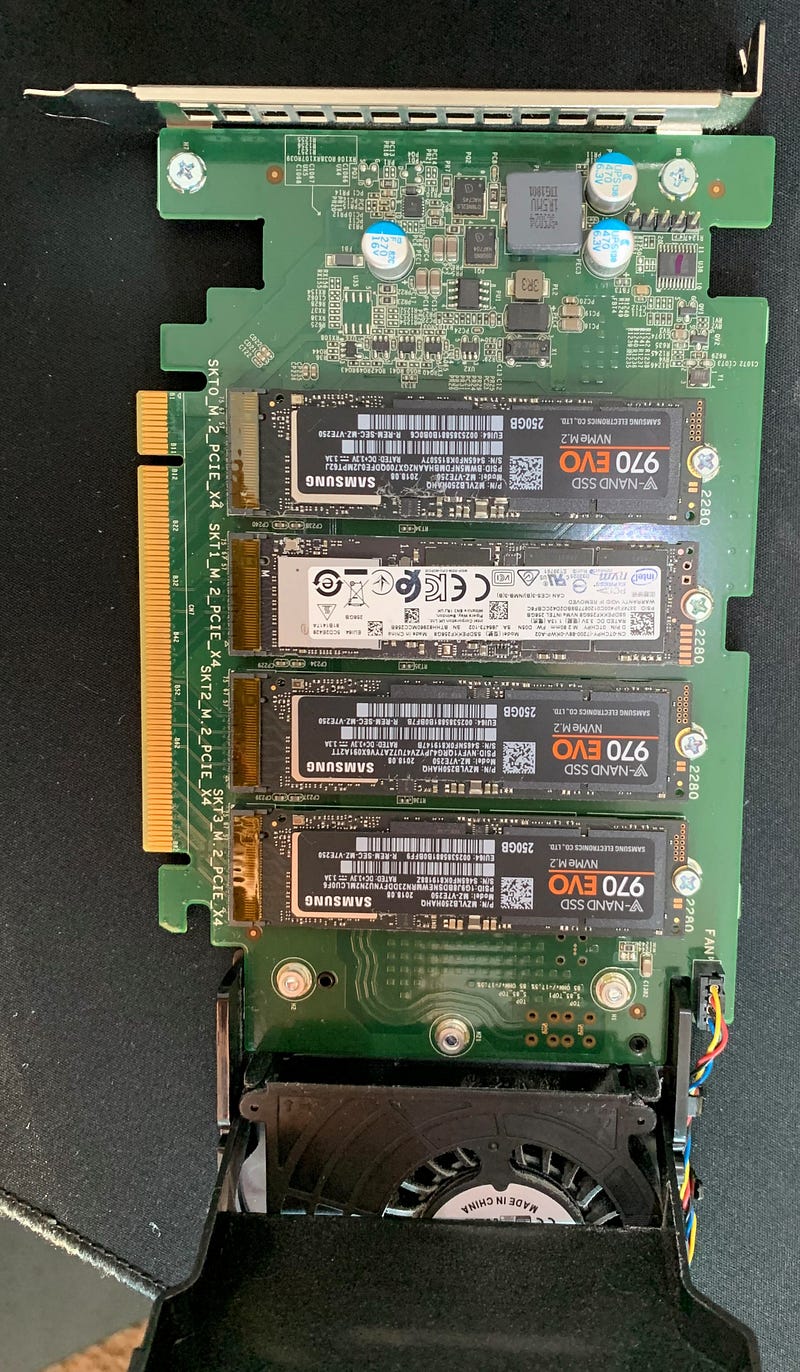
The top one was bad.

What I did was replace the Intel with the new one. I am still not sure what would have happened if I had replaced the bad drive with the new one. I figured it may need the old drive to rebuild the new one. Perhaps that is not necessary. It makes sense that it could rebuild the bad drive from the existing good ones.
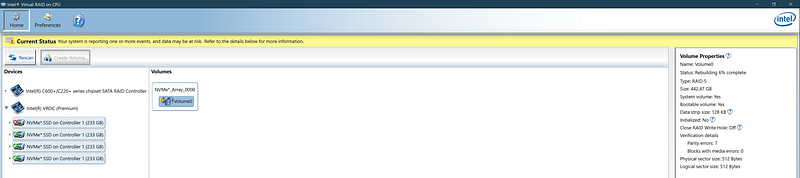
After you replace the drive, it will rebuild — this takes a while to complete
The rebuild continues for a while…
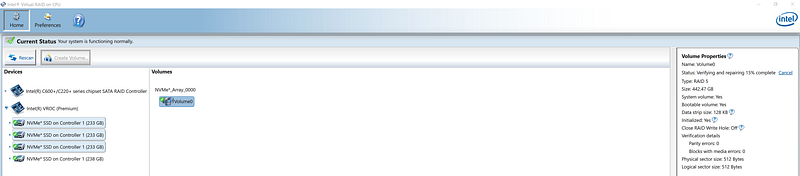
Now, the rebuild is complete and there are no more errors.

My PC has never worked faster. I was losing like 80% performance for months because of the bad drive. And it had gotten worse since the past few days.

The next step is to add a new drive to expand the drive space. I plan to do that tomorrow. The below article is the continuation of this story (which turned out to be a horrible experience):

Appendix

I really liked this documentation from Intel:

The list of supported third party SSDs are useful. Note, I used Samsung 970 Evo Plus which is not on this list:

This is a useful document for those confused between Intel RSTe and Intel VROC as I was:

AnandTech is great as usual in this article:

Dell
Raid
Intel
Storage
Ssd
Recommended from ReadMedium