
How To AutoGPT: Using External Files
How to let AutoGPT work with your local text files
This article explores how to let AutoGPT access external files to provide the script with more knowledge of our objectives, work with files, or manipulate them.
Make sure that you have the latest version of AutoGPT installed. If you don't, follow this step-by-step tutorial to catch up:
Using External Files
There are basically three ways you can add external files to your AutoGPT automation:
- adding files to AutoGPT’s working directory
- using AutoGPT plugins
Adding files to AutoGPT’s workspace directory
The workspace directory serves as a location for AutoGPT to store and access files, including any pre-existing files you may provide.
Let’s say you have a file named “data.csv”, a spreadsheet in CSV format, that you want AutoGPT to use for your task automation, then you can simply copy that file into the workspace directory:

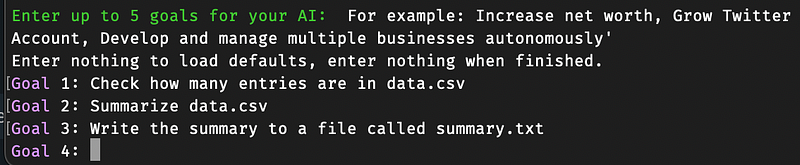
To let AutoGPT access that file, you have two options: include the filename in the initial goal descriptions.
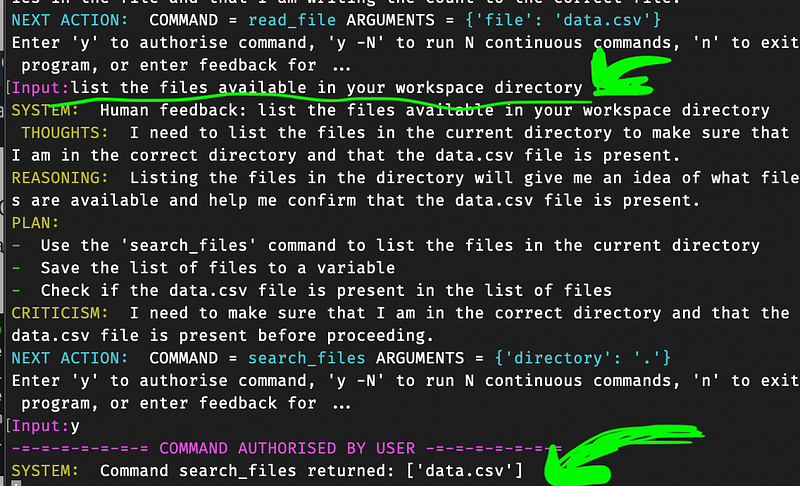
… or provide human feedback while AutoGPT is in the process of completing tasks.
Note that AutoGPT is currently only capable of reading files that are encoded in UTF-8, such as text files, CSV spreadsheets, Markdown, source code, etc.
If the file you provide is not encoded using UTF-8, AutoGPT will display an error message similar to this.

To fix it, convert the file to UTF-8 format and replace the old file in the workspace directory.
Adding files via an existing AutoGPT plugin
You can browse a vast array of AutoGPT plugins to see if the file integration you need has been implemented by either first-party or third-party plugins.
⚠️💀 WARNING 💀⚠️: Review the code of any plugin you use thoroughly, as plugins can execute any Python code, potentially leading to malicious activities, such as stealing your API keys.
Link to plugins overview:
➡️ For more information about AI & Creativity, follow me on Twitter or Medium (use my referral link to get full access to all my articles and those of thousands of other writers).
➡️ If you like my content, why not leave a “clap” at the end of this article, so more people can see it?
Stay updated with the latest news and updates in the creative AI space — follow the Generative AI publication.


