
How To Use GIF Images With Medium Profiles
Attract Attention To Medium Profiles With GIF Images!
GIF Image Files Will Attract Attention To Your Medium Profile!
Medium Non-Members Can Read The Full Story HERE!
What you will learn from this Medium story.
Attract attention to Medium profile with GIF images introduction.
Creating GIF images for your Medium profile with Canva.
How to upload your Medium profile GIF image files.
SEO Advantage Of Using GIF Images With Medium Writing.
Conclusion of boosting Medium profiles with GIF images.
Free affiliate marketing stuff for our Medium subscribers!
Attract attention to Medium profiles with GIF images introduction.
GIF image files are also known as short clips without sound and will attract attention to your Medium profile. Image files in GIF format basically are “movement”, and movement can create curiosity. Out of all the Medium profiles, your profile with GIF images will stand out in any feed. But your GIF image file size must not exceed 25 megs.
Not only can you attract attention to your Medium profile by using GIF image files, created with Canva. But you can use the exact same strategy to attract attention to your Medium stories with GIF image files as featured images. As you can see with this particular article about attracting attention to your Medium profile with GIF image files.
We have created a GIF file as the featured image to give you a better idea of the effects that can be created. The strategy is simple and rather effective because it creates curiosity. Why did you decide to read this particular Medium article? Because from all the basic featured images, suddenly there was movement, right?
This Medium article (Our 300th Medium Story Since October 2022) will guide you through how to use Canva and create these Medium profile GIF images. Attracting quite a bit more attention and the best part is that it can be done completely free. All you have to do is use Canva and be a little creative.
Yes, we are pro members of Canva, but you can create the same kind of designs for free, only, with limited options. By far the best $12 we spend each month, and well worth it. Because you can create and design just about anything with Canva. From videos to images, presentations, websites, and so much more!
The idea of using GIF image files, we found on Medium. Yes, some profiles attracted our attention much more. So, we had to investigate and research more about how that is done. GIF image files can be uploaded to Medium, to our surprise. From profile images and profile cover images to Medium story featured images.
Don’t forget that your GIF image file size cannot exceed 25 megs, as mentioned a moment ago. That is the maximum image file size allowed by Medium. Truth be told, we only recently discovered that GIF image files can also be used with Medium stories. So, here we are testing another strategy for Medium profile exposure and sharing it with you.
But hang on, these GIF image files can also be used with tutorial content. You will shortly see how the red arrow pulses when we guide you through creating GIF images. In our opinion, these GIF images are bound to attract more attention to your Medium profile and Medium articles. Wouldn’t you agree?
Creating GIF images for your Medium profile with Canva.
Creating GIF images with Canva to attract more attention to your Medium profile is rather simple to do. We will guide you through the process shortly. Basically, it comes down to 5 steps for creating GIF images as listed below. It is really not that hard to do, you just need to know your way around the Canva design options.
Go To Your Canva Dashboard.
Design A Featured Image (Presentation: 1920p X 1080p).
Be Creative And Add Video Clips.
Download Image In GIF Format.
Upload GIF Images To Medium (Profile, Cover, Medium Stories).
As can be seen, illustrated below by the pulsing red arrows. Where we simply used the arrows, and then “animated” them as “pulse animation” with the options provided by Canva. You will see the “animation” options displayed at the top of the presentation image design page.
The more you use Canva, the more you will get to know your way around designing a lot of things. In this case, you will be using the “presentation” image design option, along with the available video clips. It is important to use video clips in order to be able to download the image file in GIF format.
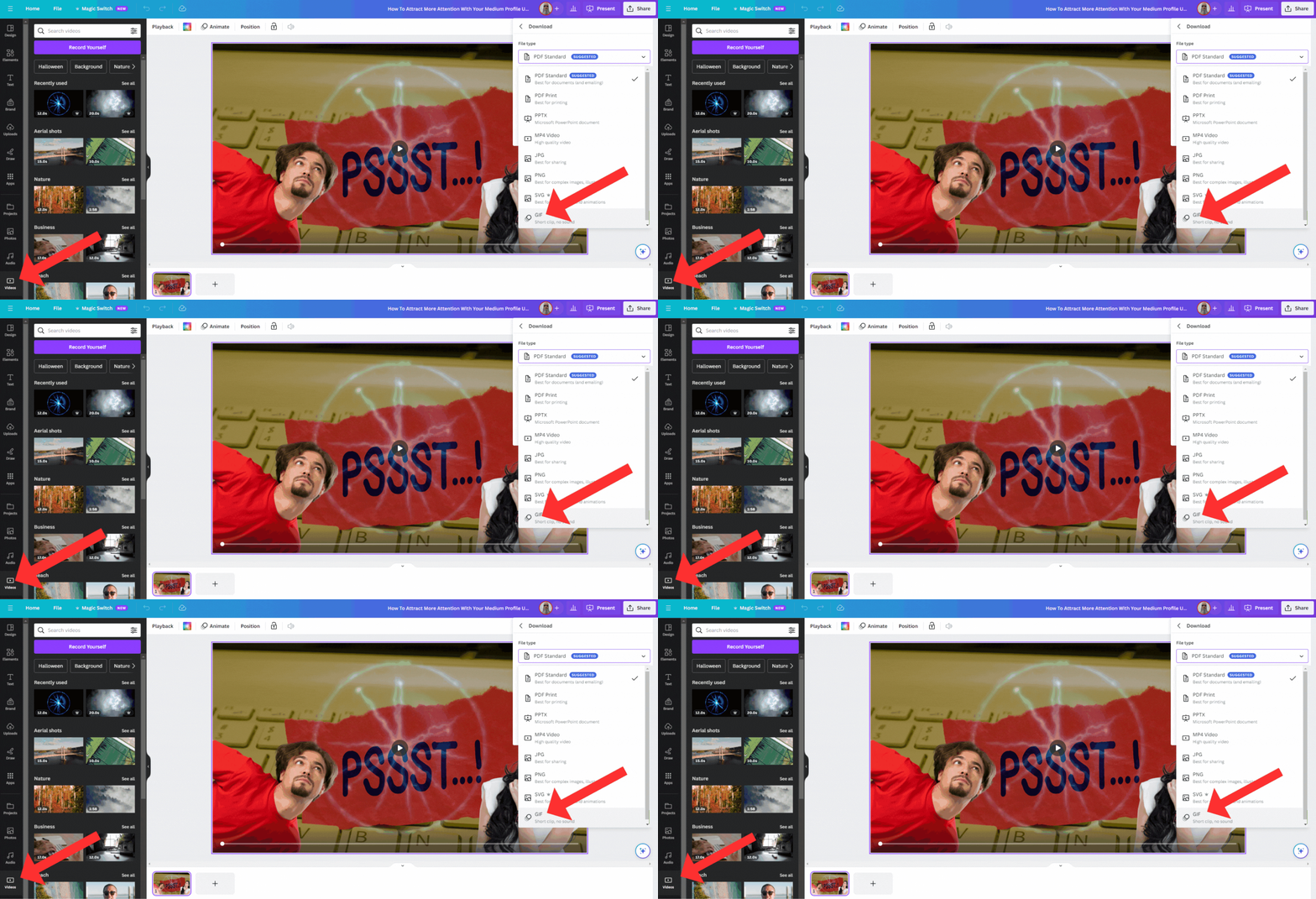
There is a reason we choose not to do a precise step-by-step instruction, we want you to figure out Canva. You will not regret doing this by yourself, because then you will not forget how you did it. Simply choose an image related to your Medium story. Or choose several images to design only one image.
Then “animate” the “presentation” or Medium story featured image with “elements” and “video clips”. You will see the design options to the left of your Canva design page and to the top of your image. It really is but only a few tools from inside your Canva design dashboard. They are.
Videos.
Animate.
Elements.
Transparency.
Position.
Transparency is the “checkered flag” symbol next to the little “paint” and “padlock” icons above your image. Only 5 of hundreds of tools on Canva are used for this particular strategy. Just take your time and play around with these options. Believe us when we say that if we can figure this out, then so will you.
We are quite convinced you will figure this out just fine. Before you know it you will be attracting much more attention to your Medium profile with GIF images. Now that you have designed your GIF images, you are ready to upload them to Medium. We will show you how to do that next for Medium profile, cover, and Medium story images.
How to upload your Medium profile GIF image files.
Allow us to use our own Medium profile as a reference because we have just updated all profile images (Logo And Cover Images). We have also used the same “lightning ball” effect that we used for the purpose of this demonstration. You should see it on “autoplay” with our profile and cover images. That is done automatically because it is a GIF image.
GIF image format is usually set to autoplay as a default setting, and you need not be concerned about that. As can be seen, illustrated below, the “lightning ball” with our Medium cover image and profile logo image. We guess it shows that we love lightning, right? We are fascinated by it, but now we’re straying off-topic again.
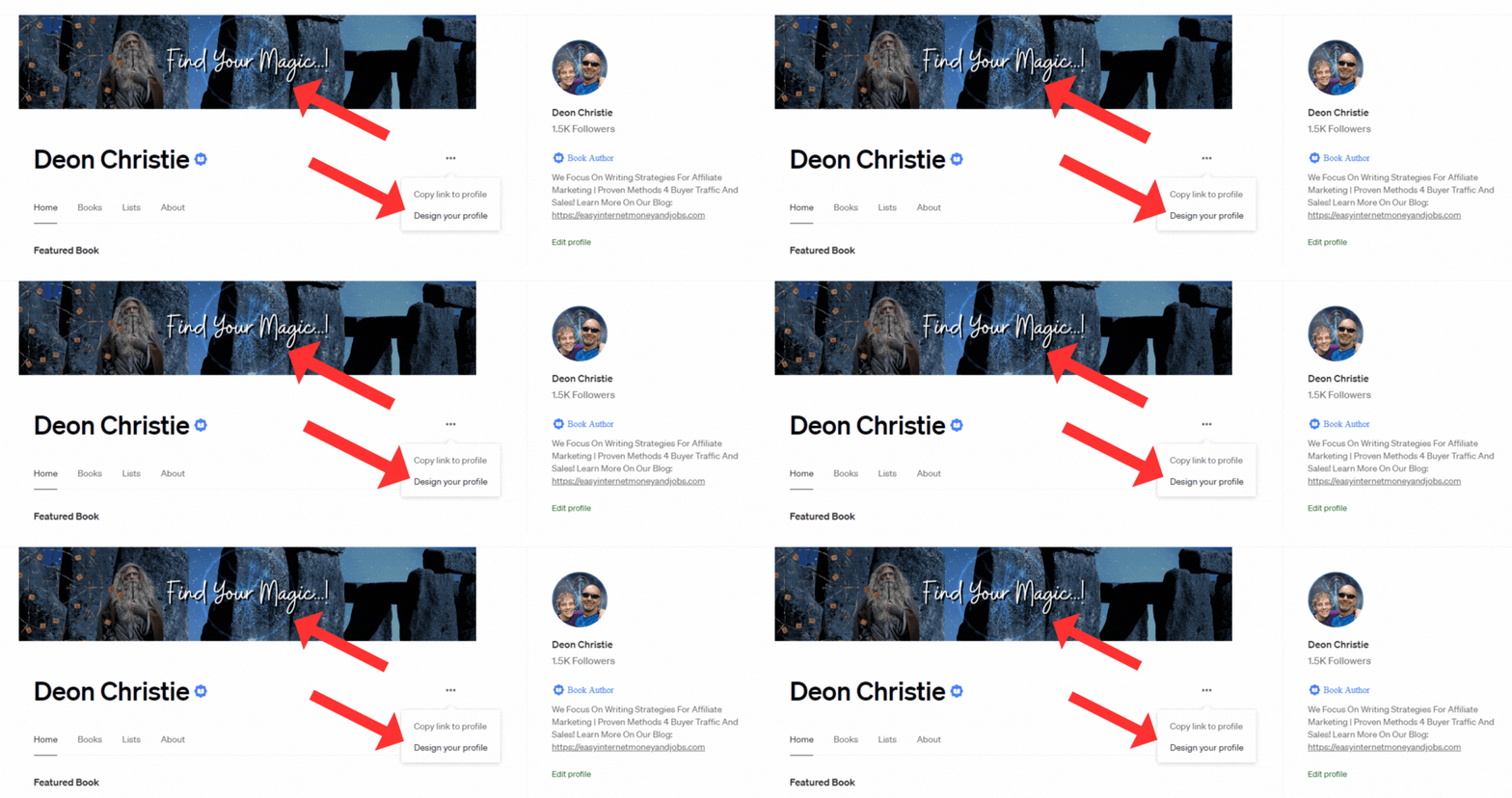
Click the 3 dots in your Medium profile for the drop-down options, and then click on “Design Your Profile”. You will be taken to your Medium profile design page, then just add the cover image that you have just created and downloaded in GIF format. After you click on “Design Your Profile” you will be taken to a page with the “Header” option to the left.
Under “Image” you just choose to upload the GIF image from your PC. But you must also include a bit of text describing your Medium profile. We chose “Make Money Online Working From Home With Writing And Affiliate Marketing” because it summarizes our content best.
Once done, go back to your Medium profile home page, and click on your profile image. Then move your cursor down to “Settings”, and open that window. Under “profile information” you can now upload your GIF image Medium profile logo. And that’s it, you’re done if you followed along. Pretty simple, right?
That covers your Medium profile and cover image, let’s take a look at Medium stories. With Medium stories, you have the option to add images, simply upload your GIF-featured image right below your subheading. Be sure that your GIF part of the image is focused on the centre of the image, making it a much better-quality thumbnail.
SEO Advantage Of Using GIF Images With Medium Writing.
This subheading was added after we noticed that this Medium story got indexed in search engines almost immediately. It would seem that this has some kind of effect on search engines as well. Perhaps this attention attraction with readers has the same effect on search engines. A rather satisfying surprise though.
We highly doubt this has anything to do with luck, perhaps we just stumbled on another SEO strategy. Less than 6 hours after publishing this Medium story was indexed in search engines, position one, on page one in Google. Google even created a snippet as illustrated below. Getting indexed in less than 6 hours was a huge surprise.
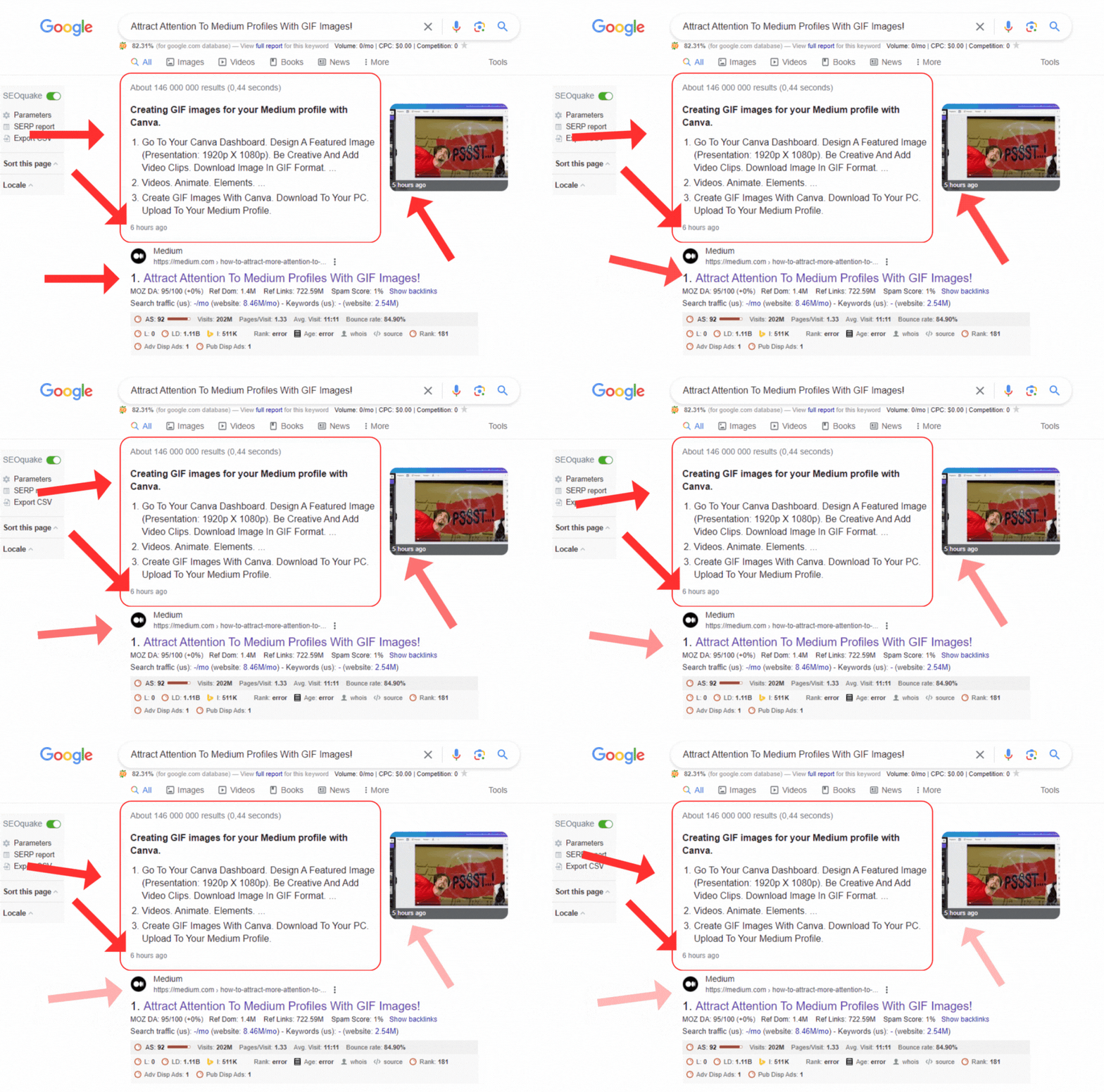
Clearly, this is also attracting the attention of search engines. Because this Medium article has not even been accepted in any Medium publications yet. If you have been following our work, then you will know we’re the “push the button and see what happens” kind of people. It so happens this “button” worked. What do you know?
Google picked the part of the Medium article that lists the steps to use GIF images to attract attention to medium profiles. We really did not see this coming, but if you don’t try then you will never know, right? We are now even more excited as to how this will “turn out”. It does look rather promising.
In the event you have any doubts about this, feel free to enter the Medium article title into your browser and search. You should see this article right at the top, we have just checked and it is maintaining its number-one ranking position. The proof is in the “pudding”, right?
Conclusion of boosting Medium profiles with GIF images.
Pretty simple strategy to attract attention to your Medium profile with GIF images, don’t you think? We thought so too and found the strategy rather exciting. This also proves something else, that you can learn something new each day. If you do, then within one year you will have learned 365 “new things”.
Being our first Medium story where we use GIF images for illustration, we are pretty curious about how this will “play out”. We have seen GIF images used as Medium profiles and cover images. But we have not seen it used with Medium stories yet, so here we are. Our first attempt at leveraging these GIF images with Medium stories.
Basically, in a nutshell, it comes down to only 4 basic steps to attract more attention to your Medium profile with GIF images. 4 Simple but rather effective steps, because we believe you are here because the GIF image attracted your attention. Please do correct us if we’re wrong in assuming this. Below are the 4 required steps.
Create GIF Images With Canva.
Download To Your PC.
Upload To Your Medium Profile.
Use With Your Medium Stories.
We will keep you posted as to just how effective this strategy is with Medium stories. We already know how effective it is when using GIF images as a Medium profile and cover images to attract more attention. Admittedly we are both curious and excited to see how this will work with Medium stories!
We did, however, find that sharing a Medium story with a GIF image does not show the image on Twitter and Facebook. Unless our internet is just slow, again! But with LinkedIn, however, the GIF file is shared, attracting attention from LinkedIn. If you find any other “snags” please let us know, let’s optimize this strategy together, shall we?
Considering the SEO advantages you just witnessed, we think the traffic possibilities here are endless! Attracting the attention of both Medium readers and search engines alike. We are pretty confident that we’re onto something here, the results speak for themselves. Every once in a while one will come across a real diamond in the rough, this is it!
If you found this Medium story helpful, kindly let us know in the comments. We would love to hear your opinion. Did you know about these design strategies with your Medium profile and GIF image files? Have you “spiced up” your medium profile yet? Do you struggle with these kinds of designs?
If you need help with anything, we speak “Medium” and “Writing” rather fluently, so feel free to reach out any time. With that, our “Attract Attention To Medium Profiles With GIF Images!” story on Medium is concluded. And with that, you now know how to attract more attention to your Medium profile with GIF image files.
New AI Children’s Book Maker, instantly generates children’s books about Anything you choose and illustrates them with any style in a matter of minutes! Don’t have an idea? It’ll come up with those too! — Source
AFFILIATE DISCLOSURE: Some of the links in this post are links to affiliate offers. If you visit them to make a purchase, I will earn a commission. The decision is yours, and whether or not you decide to buy something is entirely up to you. All offers come with a full 30 to 60 days, no questions asked, money-back guarantee!
Free affiliate marketing stuff for our Medium subscribers!
All new subscribers on Medium will receive 4 free gifts. 2 of my top traffic eBooks, and 2 free memberships (invitation only) for buyer traffic tools I use. Subscribe to me (Deon Christie) on Medium and your free stuff will be emailed to you ASAP. Medium has no affiliation, nor do they endorse the free giveaway in any way. It is our own personal free giveaway, so kindly contact us with any queries, not Medium support.


