
How to Apply L1 and L2 Regularization Techniques to Keras Models
Neural Networks and Deep Learning Course: Part 20

Prerequisite: Regularization Methods for Neural Networks — Introduction
There are several types of regularization techniques for neural networks. Today, we’ll discuss L1 and L2 regularization techniques and their Keras implementation.
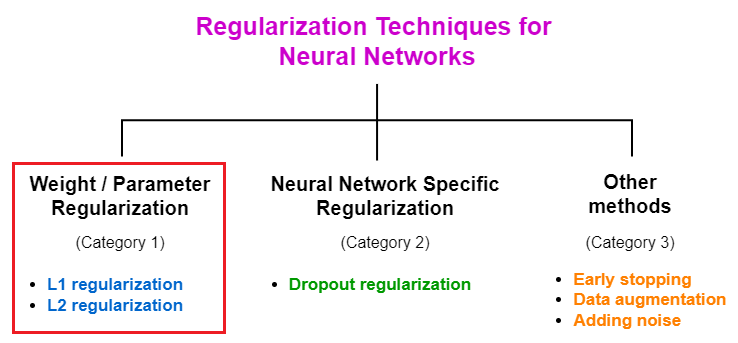
Both L1 and L2 regularization techniques fall under the category of weight/parameter regularization. This type of regularization keeps the weights of the neural network small (near zero) by adding a penalizing term to the loss function.
How L1 and L2 regularization work to mitigate overfitting in neural networks
As we already discussed in Part 1, the weights in a neural network determine the level of importance of each input feature on the final output. Large weights put too much emphasis on some inputs that may be important when training the models, but less important when testing the model on new unseen data. That will result in high variance and overfitting in the model.
By keeping the weights of the network small, the L1 and L2 regularization methods attempt to reduce overfitting. Neural networks with small weight values are not much sensitive to the noise present in the input data.
L1 and L2 regularization formation
Both L1 and L2 regularization methods are implemented by adding a regularization term (regularization component/penalizing term) to the loss function. When the regularization term is L1 norm, we perform L1 regularization and when it is L2 norm, we perform L2 regularization. L1 and L2 norms are defined as follows.
- L1 norm: λ * (Sum of the absolute values of the weights)
- L2 norm: λ * (Sum of the squared values of the weights)

λ is the regularization parameter (factor) that controls the level of regularization. It is a model hyperparameter that the user needs to define its value. It can take any value between 0 and 1 (both inclusive). The special values of λ are:
lambda=0: No regularization is applied.lambda=1: Full regularization is applied.lambda=0.01: Keras default
Pro tip: Start with no regularization and measure the model performance against the number of epochs during the training process. If you detect overfitting in the model, then apply regularization by gradually increasing the value of lambda. It is always better to plot the model performance to monitor the regularization effect.
The differences between L1 and L2 regularization
- Difference by function: In L1 regularization, more weights are equal to zero. Therefore, the nodes associated with these weights are completely removed from the network. In L2 regularization, the weights have very small values which are not zero, but close to zero. L2 regularization decreases the effect of the nodes on the output. However, those nodes are not completely removed from the network.
- Difference by usage: L2 regularization is more commonly used in deep neural networks than L1 regularization.
- Difference by formation: In L1 regularization, we use the sum of the absolute values of the weights multiplied by λ. In L2 regularization, we use the sum of the squared values of the weights multiplied by λ.
Keras implementation of L1 and L2 regularization
Define L1 and L2 regularization in Keras
First, we need to define a regularization method from one of the following available options.
In Keras, the regularization component (i.e. L1 norm, L2 norm) is known as the regularizer. There are three built-in regularizers available in the tf.keras.regularizersmodule (API).
- L1 class: We can define the L1 regularization component by using this class.
from tensorflow.keras import regularizers
l1_reg = regularizers.L1(l1=lambda)- L2 class: We can define the L2 regularization component by using this class.
from tensorflow.keras import regularizers
l2_reg = regularizers.L2(l2=lambda)- L1L2 class: We can define both L1 and L2 regularization at the same time using this class.
from tensorflow.keras import regularizers
l1_l2_reg = regularizers.L1L2(l1=lambda, l2=lambda)
Note: In each case, the most important hyperparameter is lambda which is the regularization factor that controls the level of regularization. Its default value is 0.01.
Add regularization to the layers in the network
After defining the regularization method, we need to add it to the layers in the network. Note that, in neural networks, regularization is applied per-layer basis. To do this, we use one or both of the following keyword arguments in the layer (e.g. Dense, Conv2D, etc.)
- kernel_regularizer: We use this argument to apply regularization only to the weights of the network.
- bias_regularizer: We use this argument to apply regularization only to the biases of the network. We can apply regularization to the biases as well. This keeps the bias values in the network small (near zero). However, regularizing bias values will not change the results significantly. This is because bias values have little to no effect on the output of the network.
Note: It is possible to apply regularization on both weights and biases at the same time. For this, we need to specify both kernel and bias regularizers in the layer. When we apply regularization in this way, that type of regularization is called parameter regularization because both weights and biases are considered as the parameters in the network.
There are two ways to pass the regularization method to the above keyword argument(s).
- By using a regularizer class object. Here, we have an option to change the lambda value.
kernel_regularizer=regularizers.L1(l1=lambda)- By using a string identifier. Here, we cannot change the lambda value. The default is set to 0.01. Valid identifiers are
'l1'for L1 regularization,'l2'for L2 regularization and'l1_l2'for both L1 and L2 regularization.
kernel_regularizer='l1'Examples
I will discuss four examples of adding regularization to neural network layers.
- Example 1: We add L2 regularization with
lambda=0.01(default) to a fully connected layer of 256 nodes. Here, we use a string identifier to define L2 regularization. Here, we apply regularization only to the weights of the network.
Dense(256, kernel_regularizer='l2')- Example 2: We add L2 regularization with
lambda=0.05to the same fully connected layer. Here, we use a regularizer class object to define L2 regularization. Here, we apply regularization only to the weights of the network.
from tensorflow.keras import regularizers
Dense(256, kernel_regularizer=regularizers.L2(l2=0.05))- Example 3: We add L2 regularization with
lambda=0.05to the same fully connected layer. Here, we use a regularizer class object to define L2 regularization. Here, we apply regularization to both weights and biases of the network.
from tensorflow.keras import regularizers
Dense(256, kernel_regularizer=regularizers.L2(l2=0.05),
bias_regularizer=regularizers.L2(l2=0.05))- Example 4: We add both L1 regularization with
lambda=0.02and L2 regularization withlambda=0.05to a convolutional layer. Here, we use a regularizer class object to define both L1 and L2 regularization. Here, we apply regularization only to the weights of the network.
from tensorflow.keras import regularizers
Conv2D(filters=32, kernel_size=(3, 3),
       kernel_regularizer=regularizers.L1L2(l1=0.02, l2=0.05))
Special facts about L1 and L2 regularization
- L1 and L2 regularization are only active during training. They are not present when making predictions.
- L1 and L2 regularization are applied per-layer basis.
- It is possible to apply both L1 and L2 regularization at the same time in a layer.
- L1 and L2 regularization are typically used for smaller networks. For larger networks, it is better to use neural network-specific regularization which is dropout regularization.
- An evaluation procedure must be used when using a regularizer to monitor that regularization process. For this, we can plot model performance against the number of epochs during the training process.
This is the end of today’s post.
Please let me know if you’ve any questions or feedback.
I hope you enjoyed reading this article. If you’d like to support me as a writer, kindly consider signing up for a membership to get unlimited access to Medium. It only costs $5 per month and I will receive a portion of your membership fee.
Thank you so much for your continuous support! See you in the next article. Happy learning to everyone!
Rukshan Pramoditha 2022–07–06


