
SCSS + Reactjs
How to add scss/sass in react.js?
Adding scss and sass in reactjs
Demo
What is Sass
According to Wikipedia, sass is a preprocessor scripting language interpreted or compiled into Cascading Style Sheets (CSS).
For More Read:
Let’s start
If you use the create-react-app in your project, use npm, and you can easily install and use Sass in your React projects with three simple steps.
Steps:
- Install node-sass: npm install node-sass
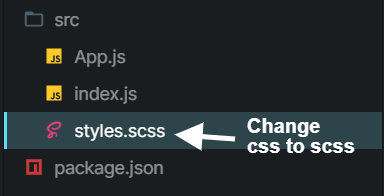
- Change file extension
.cssto.scss - Import your
.scssfiles in your React components
Change:
Code:
import React from "react";//import scss file in your componenetimport "./styles.scss";export default function App() {return (<><div className="card"><img className='image' src="https://source.unsplash.com/random" alt=' use image by unspash API '/><div className='cardBody'><h2> demo for scss </h2><p> According to Wikipedia sass is a preprocessor scripting language that is interpreted or compiled into Cascading Style Sheets (CSS).</p><button> Read More</button></div></div><div className="card"><img className='image' src="https://source.unsplash.com/random" alt=' use image by unspash API '/><div className='cardBody'><h2> demo for scss </h2><p> According to Wikipedia sass is a preprocessor scripting language that is interpreted or compiled into Cascading Style Sheets (CSS).</p><button> Read More</button></div></div><div className="card"><img className='image' src="https://source.unsplash.com/random" alt=' use image by unspash API '/><div className='cardBody'><h2> demo for scss </h2><p> According to Wikipedia sass is a preprocessor scripting language that is interpreted or compiled into Cascading Style Sheets (CSS).</p><button> Read More</button></div></div></>);}
Demo:
check demo understand all essential step
Read More on Medium:
Conclusion:
I thought you read in this article you use sass or scss in your project any problems, queries, or suggestions, tell me to comment below.
Contact me:
- https://www.facebook.com/officialrajdeepsingh/
- https://www.officialrajdeepsingh.dev/
- https://www.facebook.com/groups/JavaScriptcode/
- https://www.facebook.com/groups/pythoncodejoin/
- [email protected]