
How to add Okta as OIDC Identity Provider in AWS Cognito
Introduction
AWS Cognito is one of the most widely used Identity Provider. There are scenarios where a customer who uses AWS Cognito wants to setup federation between Cognito and Okta. For ex: As an organization, I can build a product which is integrated with AWS Cognito using OIDC. If a customer of my product wants their employees or contractors to login using their own Identity Provider like Okta, AzureAD etc., I can setup a federation between AWS Cognito and Okta, AzureAD etc. to allow those employees or contractors to access my product.
In this blog, we are going to see how to setup the federation between AWS Cognito and Okta using OIDC protocol. The steps for configuring this integration is posted in a YouTube video.
If you are using SAML federation between AWS Cognito and Okta, please follow the below blog:
AWS Cognito — Okta OIDC integration
Architecture Diagram
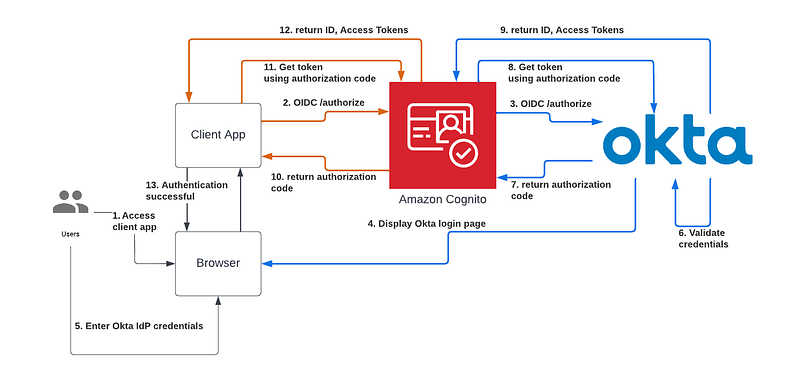
- User opens a browser and types the client app URL
- Browser displays the client app website. Depending on how the client app is designed, it might automatically initiate an Authentication flow with AWS Cognito or display the home page where users should click the login button to initiate the Authentication. This diagram shows the first option where the client app automatically initiates the OIDC flow with AWS Cognito by redirecting the user to /authorize URL.
- AWS Cognito receives the request from client app and either displays the login page with a button to initiate the OIDC federation or automatically initiate the OIDC federation with Okta by redirecting to /authorize URL.
- Okta will display the login page to the user.
- User will enter the credentials.
- Okta will validate the credentials and proceed to next step if it is valid.
- Okta will return an authorization code back to AWS Cognito.
- AWS Cognito will make a backend API call to Okta’s token endpoint to get the ID and Access tokens
- Okta will return and ID and Access tokens
- Cognito will create a user profile in the local user pool for this Okta user if it doesn’t exist and redirect back to Client app with an authorization code.
- Client app will make a backend API call to Cognito’s token endpoint to get the ID and Access tokens
- AWS Cognito will return and ID and Access tokens
- Client app will validate the ID token, check if it is a valid user and return the web page to the browser
How to configure AWS Cognito — Okta OIDC integration
Please follow this video for the step-by-step instructions
Key points to note
- When a user logs in for the first time, AWS Cognito will create a profile for that user in the local user pool. The tokens that are generated by Cognito will be based on the attribute values of Cognito user profile
- Please make sure all the attributes are mapped properly in the Cognito attribute mapping configuration. If not, it will either return an error or missing value in the ID token
- Please make sure Okta OIDC is configured with all the three scopes openid, profile and email to get all the basic attributes of the user
- Please make sure that the user who is trying to access the Okta app is assigned to that app
Thanks for reading this article. Please subscribe to the below YouTube channel and follow me in medium to learn about security and IAM.


