avatarTechMintle | Passionate About Tech & Programing

Free AI web copilot to create summaries, insights and extended knowledge, download it at here

1753

Abstract

. Once ready for publishing then you need to add non-canonical tag which you can do that by following step#3</li><li><b>Step#3 Adding the Non-canonical tag to your Medium stories:</b></li></ul><p id="b8e4">Click on the three horizontal dots in the top right of your new Medium story draft and click on “More settings”</p><figure id="d072"><img src="https://cdn-images-1.readmedium.com/v2/resize:fit:800/1*3AptBqLhWc6ApbMCSXYjtA.png"><figcaption>Click on the three horizontal dots in the top right of your new Medium story draft and click on “More settings” Picture source by the author</figcaption></figure><p id="8be1">Then, scroll down till the end and click on “Advanced setting”</p><figure id="b5f1"><img src="https://cdn-images-1.readmedium.com/v2/resize:fit:800/1*TCSkrQdjQ3rp9kBGhMwNjA.png"><figcaption>While adding a non-canonical tag to to your Medium story, click on “This story was originally published elsewhere and then paste your blog link as you can see in the picture given. / screenshot by the author</figcaption></figure><p id="6e43">When done adding the link of the story where the article is originally published. Now, you have successfully added the non-canonical tag to your medium story and you can published it on Medium without worrying about anything.</p><h2 id="57c8">Read more Medium related stories:</h2><ul><li>Benefits Of Having Your Own Medium Publication</li></ul><div id="1eee" class="link-block"> <a href="https://readmedium.com/benefits-of-having-your-own-medium-publication-93d8682af7ca"> <div> <div> <h2>Benefits Of Having Your Own Medium Publication</h2> <div><h3>What are some interesting benefits of having your own Medium publication?</h3></di

Options

v> <div><p>medium.com</p></div> </div> <div> <div style="background-image: url(https://miro.readmedium.com/v2/resize:fit:320/1*qFM1NgFiaROk8G-U4oraFQ.png)"></div> </div> </div> </a> </div><ul><li>3 powerful Ways To Make Money From Your Medium Stories</li></ul><div id="05a4" class="link-block"> <a href="https://readmedium.com/3-powerful-ways-to-make-money-from-your-medium-stories-6fae82c33ebd"> <div> <div> <h2>3 powerful Ways To Make Money From Your Medium Stories</h2> <div><h3>You can use these three ways to make money legally on Medium and follow Medium terms and services.</h3></div> <div><p>medium.com</p></div> </div> <div> <div style="background-image: url(https://miro.readmedium.com/v2/resize:fit:320/0*xRCiz3PPWEPxq0ed)"></div> </div> </div> </a> </div><ul><li>What Is A Good Read Ratio On Medium?</li></ul><div id="9c6d" class="link-block"> <a href="https://readmedium.com/what-is-a-good-read-ratio-on-medium-412ccaab3192"> <div> <div> <h2>What Is A Good Read Ratio On Medium?</h2> <div><h3>What is the ideal Read ratio of Medium articles? And, what is the average Read ratio on Medium?</h3></div> <div><p>medium.com</p></div> </div> <div> <div style="background-image: url(https://miro.readmedium.com/v2/resize:fit:320/0*TyUDru7ECECy1mZk)"></div> </div> </div> </a> </div></article></body>

How To Add Non-Canonical Tag To Your Medium Stories?

Importing your story from your blog, you had to add non-canonical tag to your Medium stories in order to not getting penalize from Google search. Here is How you can do that?

Photo by Obi Onyeador on Unsplash

How can you add non-canonical tag to your Medium stories? The process is very simple and i am going to instruct you of how properly import your stories from your blog without impacting the search engine ranking of your own blog because if you don’t add a non-canonical tag to your imported blog posts on Medium then you might face problem in getting penalize from search engines or your original post getting de-ranked on Google search.

The best practice of importing a blog post from your blog to Medium is to publish it on Medium after 24 hours.

Step-by-step Guide to import your stories from your blog and add non-canonical tag on Medium

  • Step#1 Wait for Google search crawl to fetch your new blog post: When you publish a blog post on your blog. Wait for it till 24 hours so that Google search crawl fetch your blog post. When your blog post getting index then you need to follow the step#2
  • Step#2: Copy-paste your article from your blog and paste it as a new Medium story. Add tags, a high-quality picture and optimize it for the search engine. Once ready for publishing then you need to add non-canonical tag which you can do that by following step#3
  • Step#3 Adding the Non-canonical tag to your Medium stories:

Click on the three horizontal dots in the top right of your new Medium story draft and click on “More settings”
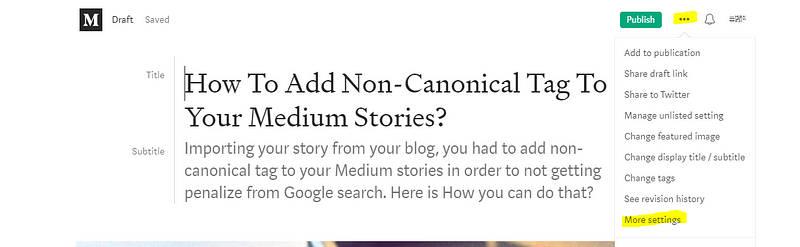
Click on the three horizontal dots in the top right of your new Medium story draft and click on “More settings” Picture source by the author

Then, scroll down till the end and click on “Advanced setting”
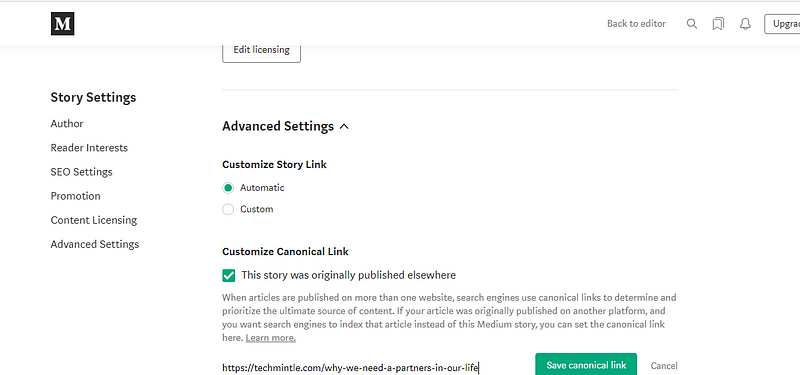
While adding a non-canonical tag to to your Medium story, click on “This story was originally published elsewhere and then paste your blog link as you can see in the picture given. / screenshot by the author

When done adding the link of the story where the article is originally published. Now, you have successfully added the non-canonical tag to your medium story and you can published it on Medium without worrying about anything.

Read more Medium related stories:

  • Benefits Of Having Your Own Medium Publication
  • 3 powerful Ways To Make Money From Your Medium Stories
  • What Is A Good Read Ratio On Medium?
Médium
Writing
SEO
Technology
Productivity
Recommended from ReadMedium