
How to add “filename” as column while reading data files from Azure ADLS into Databricks
Most of Data engineering workloads in Azure or AWS, we tend to read lot of data kept in AWS S3 or Azure ADLS, in some cases we may need filename also part of the data set once it is read into Databricks environment. This topic explains a easiest and performant way to get file name into the Data set.

Lets us see, how to get “File Names” when you read multiple files (all with same schema — csv, json, orc..etc) into databricks as a data-frame or a table?
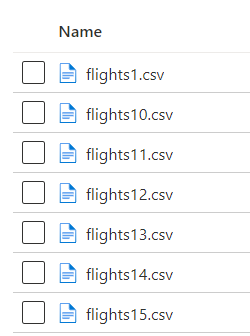
As showed on the left image there are flights csv data files as flights1.csv till flights20.csv
Each file consist of random number of records.
Read all the files into a single data-frame / table and get the filename as an additional column in the target table.
Most common solution given in the discussion is to mount ADLS and go through file by file to create a corresponding data-frame and merge all data-frames in the end.
Lets look into the traditional approach mentioned by many of the programs in my interviews
Step1: Mount ADLS to Databricks — there are various ways to do this, using SAS token, using secrets from key vault, credentials pass through.
I choose to do with credentials passthrough. Following is the snippet of code to mount storage container in databricks (run this in a notebook)
##Mount a ADLS gen2 storage container with databricks#Don't change configs
configs = {
"fs.azure.account.auth.type": "CustomAccessToken",
"fs.azure.account.custom.token.provider.class": spark.conf.get("spark.databricks.passthrough.adls.gen2.tokenProviderClassName")
}
"""
One need following details from ADLS
1. Your container Name (Optionally, corresponding directory name)
2. Your Storage account Name
"""
# Optionally, you can add <directory-name> to the source URI of your mount point.
dbutils.fs.mount(
source = "abfss://<your Container Name>@<Your storage account name>.dfs.core.windows.net/<Optional - Specific Directory under container>",
mount_point = "/mnt/<Desired name for your mount - must be unique>",
extra_configs = configs)
#List mounts
dbutils.fs.mounts()This code creates the mount with given name and lists all mounts which are in databricks.
Step2: Loop through files from the directory file by file and add an additional column with file name and append the data frame with main data-frame
I encountered this solution in majority of the interviews I did in the recent times. Curiously enquire further how does scale when you have many small files written to directory? as this one runs through a loop of files and creates a data-frame and appends with main data-frame.
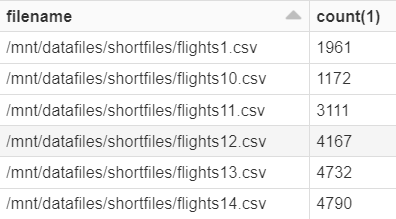
Number of records for each file and corresponding file name also associated with the dataframe / Table
Number of files directly proportionate to the time and resources utilized to run this code. This curiosity flames further thinking, to find a good solution.
Now lets look into Spark inbuilt capabilities to solution the problem above.
Step1: Mount ADLS to Databricks — there are various ways to do this, using SAS token, using secrets from key vault, credntials pass through.
Step2: Create table / data frame using *.csv (all files should have same schema) and the use “input_file_name()” SQL function
In this solution, we are using spark inbuilt function which picks metadata of the table and underlying data.
Second solution is most performant and works with inbuilt functions of Spark SQL.
Next Challenge: Please try to compare these 2 solutions.


