
How to Ace the Azure Data Fundamentals DP-900 in 7 days!
Feeling overwhelmed by the Azure Data Fundamentals DP-900 exam? No worries, I got you! 💪 In this blog, I will be your personal guide on the journey to passing the exam. From insider tips, exam objectives, and recommended study materials, I have got everything you need to succeed. Let’s gear up and pass the exam with flying colors on your first try!🚀📚🎉
Some topics I have described entirely and few of them I just gave the outline. If you want to know more, I would highly recommend checking out the tutorial video at the end of this blog.
Let’s start with the exam outline:
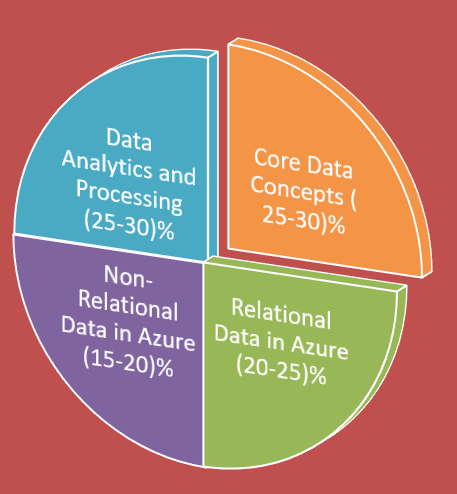
The exam will be divided mainly into 4 parts:
- Core Data concepts ( 25–30%)
- Relational Data workload ( 20–25%)
- NoSQL Data Workload(15–20%)
- Data Analytics and Processing(25–30%)
Core Data concepts ( 25–30%)
- You should be familiar with the core concepts such as what is Data, and types of data i.e Structured, Semi-structured, and Unstructured Data.
- Data processing and its types i.e Streaming and Batch processing.
- RDBMS concepts such as: What are Relational Data and a relational database?
- Data Normalization
- DDL vs DML commands
- Database objects such as Tables, Index, and Views
- SQL constraints such as Not-Null, Default, Unique, Primary key, Foreign key and check constraints.
- Data Integrity
- OLAP vs OLTP and when to use which type of processing.
- IaaS vs PaaS vs SaaS
Relational Data workload ( 20–25%)
Azure Data Services
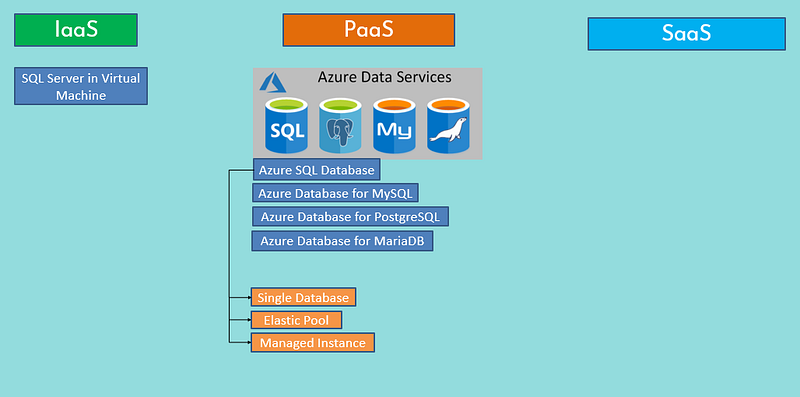
- Azure Data Services fall into the PaaS category. These services are a series of DBMSs managed by Microsoft in the cloud.
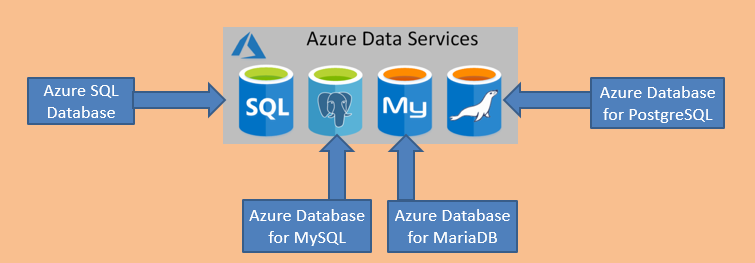
- Microsoft takes care of all your administrative tasks including server patching, backups, and updates.
- You have no direct control over the platform on which the services run.
- By default, your DB is protected by a server-level firewall
Azure SQL Database
SQL Database has 3 offerings:
- Single Database: This option enables you to quickly set up and run a single SQL Server database. (Cheapest)
- Elastic Pool: This option is similar to Single Database, except that by default multiple databases can share the same resources, such as memory, data storage space, and processing power. You are charged per pool.
- Managed Instance: You can install multiple databases on the same instance. You have complete control over this instance, much as you would for an on-premises server.
- — The Managed Instance service automates backups, software patching, database monitoring, and other general tasks, but you have full control over security and resource allocation for your databases
- Consider Azure SQL Database managed instance if you want to lift and shift an on-premises SQL Server instance and all its databases to the cloud, without incurring the management overhead of running SQL Server on a virtual machine. (BYOL)
- The managed instance has nearly 100% compatibility with SQL Server Enterprise Edition, running on-premises.
SQL Server in a Virtual Machine ( IaaS)
- You can easily move your on-premises SQL Database to Azure VM (Windows/Linux).
- This approach is suitable for migrations and applications requiring access to operating system features that might be unsupported at the PaaS level.
- You remain responsible for maintaining the SQL Server software and performing the various administrative tasks to keep the database running from day to day.
Here’s the summary of above
NoSQL Data Workload(15–20%)
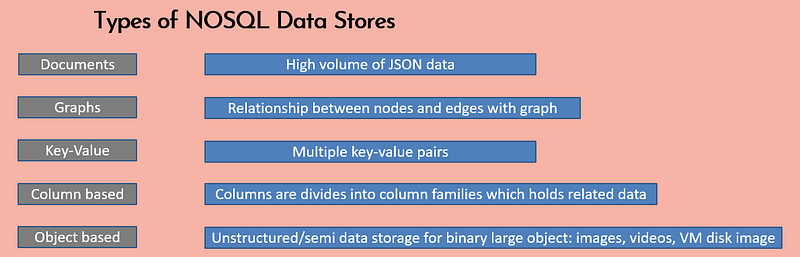
What are NoSQL or Non-relational databases?
Traditional RDBMS uses SQL syntax to store and retrieve data for further insights. Instead, a NoSQL database system encompasses a wide range of database technologies that can store structured, semi-structured, and unstructured data. They Don’t follow a fixed schema structure.
Azure CosmosDB:
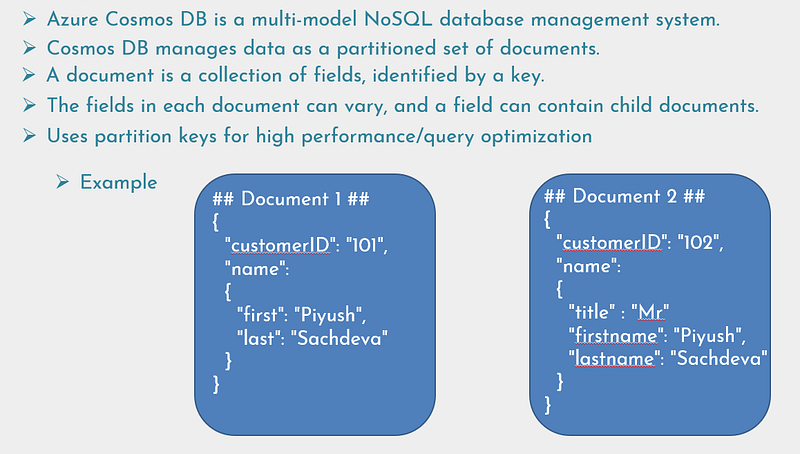
CosmosDB API:
SQL API: Enables you to run SQL queries over JSON data.
Table API: This interface enables you to use the Azure Table Storage API to store and retrieve documents.
MongoDB API: Many organizations run MongoDB(document-based DB) on-premises. You can use the MongoDB API for Cosmos DB to enable a MongoDB application to run unchanged against a Cosmos DB database or you can migrate MongoDB to CosmosDB in the cloud.
Cassandra DB API: is a column-based DBMS, the primary purpose of the Cassandra API is to enable you to quickly migrate Cassandra databases and applications to Cosmos DB.
Gremlin API: The Gremlin API implements a graph database interface to Cosmos DB. A graph is a collection of data objects(Nodes) and directed relationships(Edges). Data is still held as a set of documents in Cosmos DB, but the Gremlin API enables you to perform graph queries over data.
Azure Table Storage:
- Azure Table Storage implements the NoSQL key-value model
- In this model, the data for an item is stored as a set of fields, and the item is identified by a unique key.
- Items are referred to as rows, and fields are known as columns.
- Unlike RDBMS, it allows you to store unstructured data
- Simple to scale and allows upto 5PB of data
- Fast read/write as comparable to a relational DB, use partition key to increase performance.
- Row insertion and data retrieval is fast.
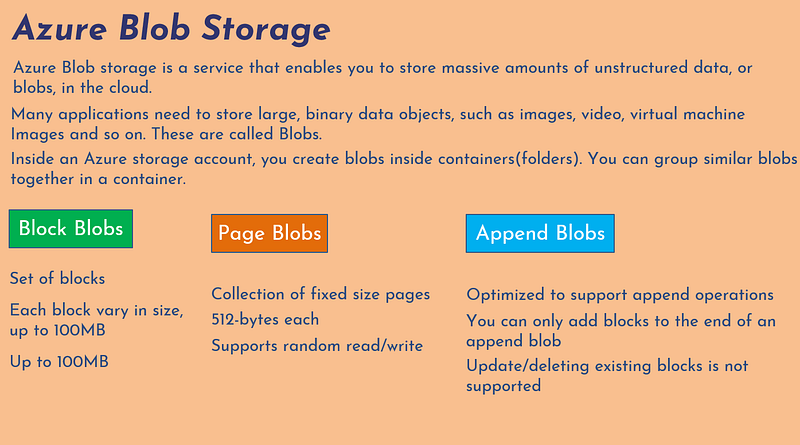
Azure blob Storage Access tiers:
- Hot
- Cool
- Archival
Azure File Storage
- Azure File Storage enables you to create file shares in the cloud and access these file shares from anywhere with an internet connection.
- Azure File Storage exposes file shares using the Server Message Block 3.0 (SMB) protocol.
- Two performance tiers: Standard and Premium
Analytics workload on Azure (25–30%)
Data Analytics Core Concepts
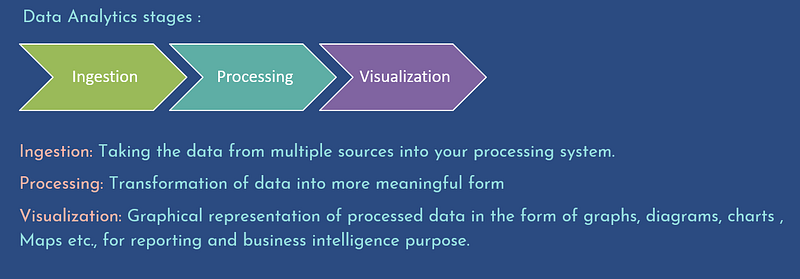
Data analytics is concerned with examining, transforming, and arranging data so that you can study it and extract useful information.
Data Analytics Techniques:
- Descriptive: What has happened, based on historical data
- Diagnostics: Why things happened.
- Prescriptive: What actions should we take to achieve a target
- Predictive: What will happen in the future based on past trends
- Cognitive: What might happen if circumstances change: AI/ML
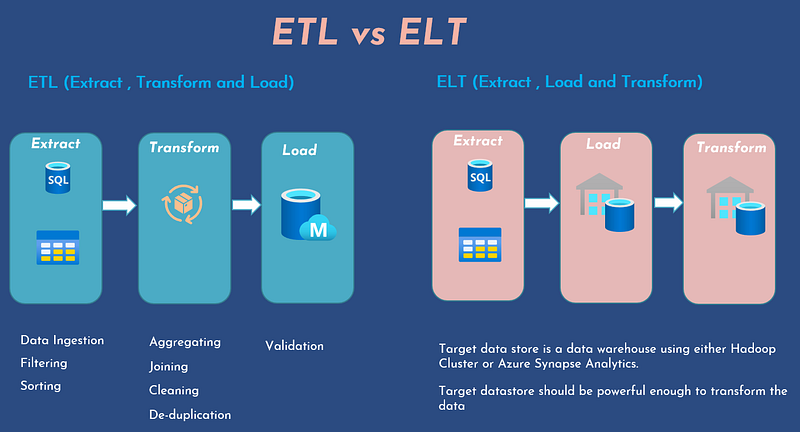
Data Warehousing
- Central Repository of data collected from one or more sources.
- Current and historical data used for reporting and analysis
- Can rename or reformat columns to make it easier for users to create reports.
- Users can run reports without affecting the day-to-day business
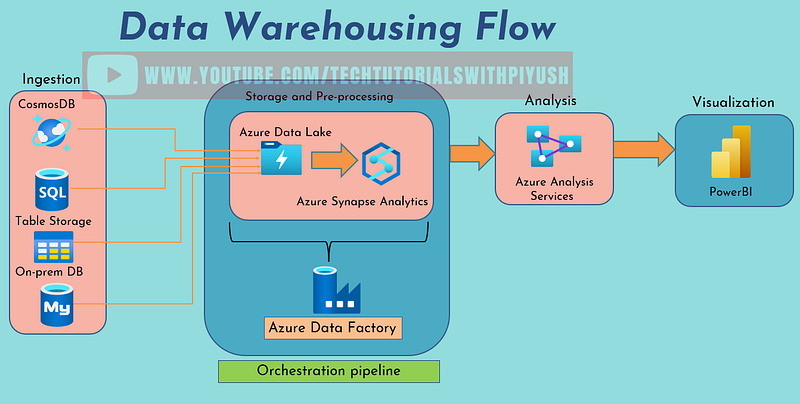
Azure Data Factory
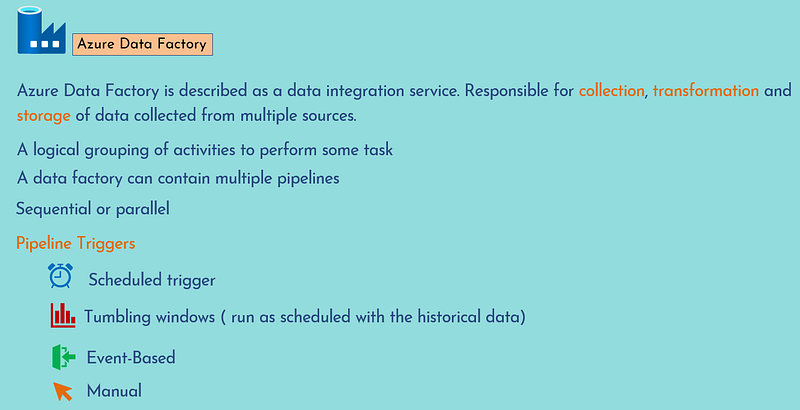
Azure Data Lake Storage
- A data lake is a repository for large quantities of raw data
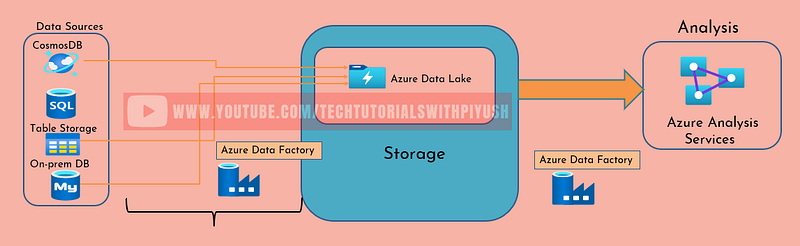
- You can think of a data lake as a staging point for your ingested data, before it’s transported and converted into a format suitable for performing analytics
- Data Lake Storage organizes your files into directories and subdirectories for improved file organization. (Hierarchical Namespace)
- Compatible with HDFS(Hadoop Distributed File System) used to examine huge datasets.
- Role-Based Access Control (RBAC) on your data at the file and directory level( POSIX access control list)
- To implement Azure Data Lake you need to have a storage account
- It Stores data that is in parquet format
Azure Databricks
- Azure Databricks is an Apache Spark environment running on Azure to provide big data processing, streaming, and machine learning.
- Can consume and process large amounts of data very quickly.
- Azure Databricks also supports structured stream processing
- In this model, Databricks performs your computations incrementally, and continuously updates the result as streaming data arrives.
- Azure Databricks provides a graphical user interface where you can define and test your processing step by step, before submitting it as a set of batch tasks.
Azure Synapse Analytics
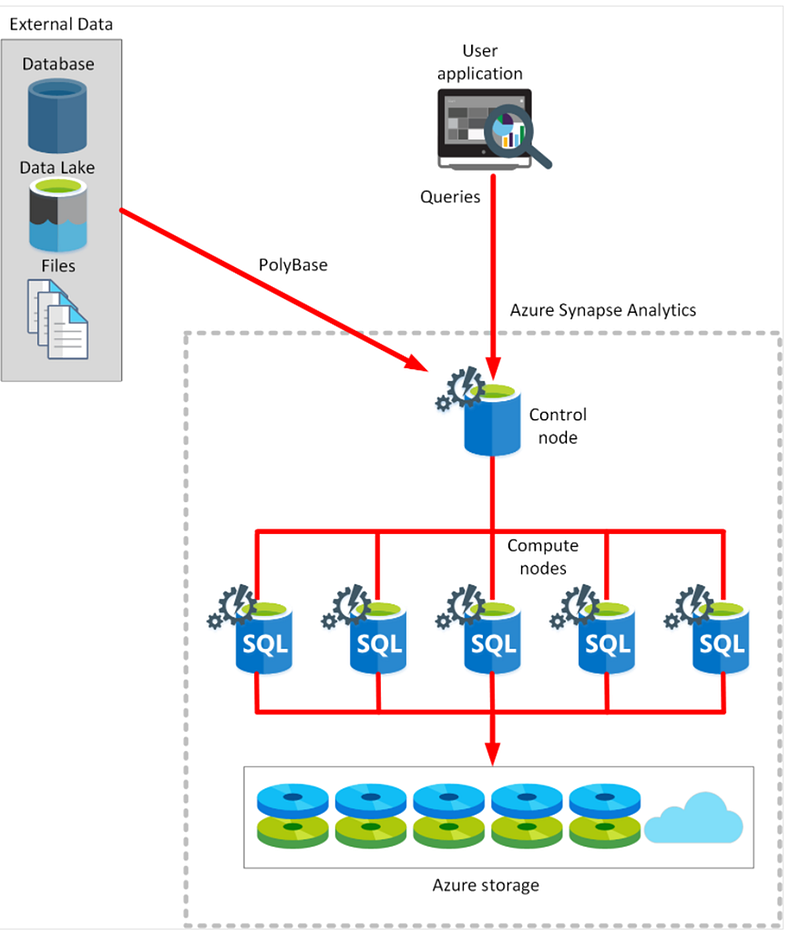
- You can ingest data from external sources, such as flat files, Azure Data Lake, or other database management systems, and then transform and aggregate this data into a format suitable for analytics processing.
- You can perform complex queries over this data and generate reports, graphs, and charts.
- It stores and processes the data locally for faster processing
- This approach enables you to repeatedly query the same data without the overhead of fetching and converting it each time.
- You can also use this data as input for further analytical processing, using Azure Analysis Services.
- Azure Synapse Analytics leverages a massively parallel processing (MPP) architecture. This architecture includes a control node and a pool of compute nodes.
- You can pause Azure Synapse Analytics to reduce costs.
Azure HD Insight
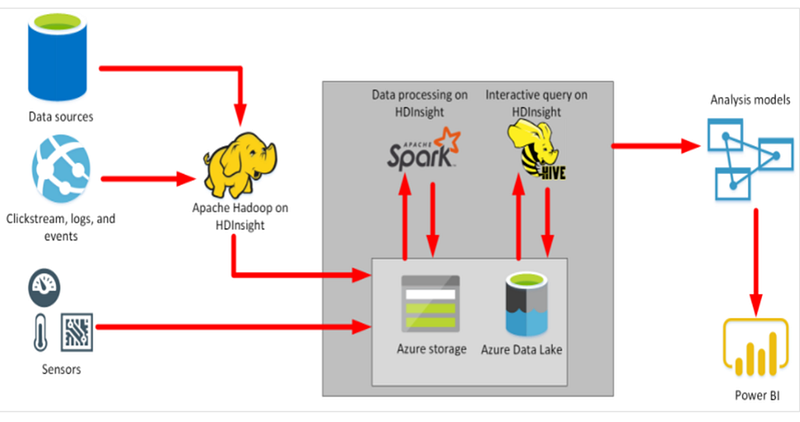
Azure HDInsight is a big data processing service, that provides the platform for technologies such as Spark in an Azure environment.
HDInsight implements a clustered model that distributes processing across a set of computers.
This model is similar to that used by Synapse Analytics, except that the nodes are running the Spark processing engine rather than Azure SQL Database.
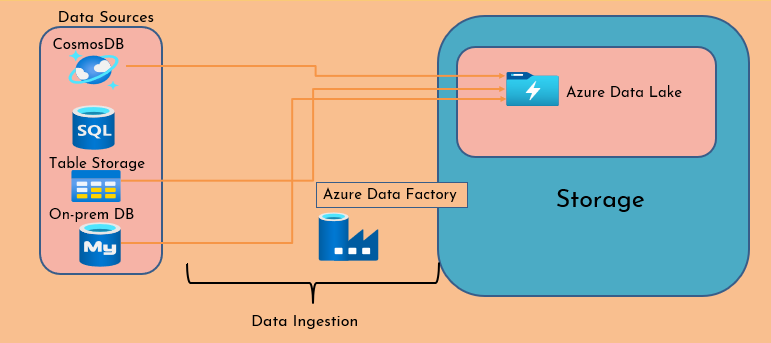
Data ingestion using Azure Data Factory
Power BI
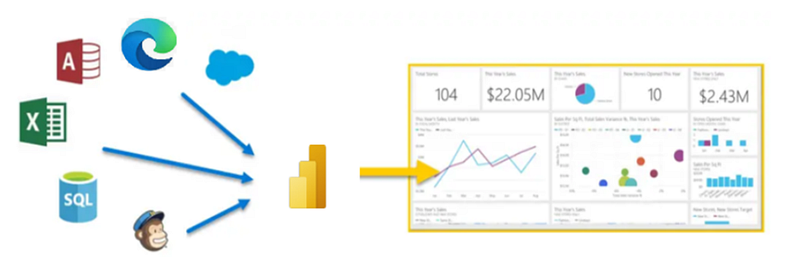
- Data visualization service which lets you generate dashboards, graphs, and reports.
- Can consume data from various data sources to create interactive visualizations
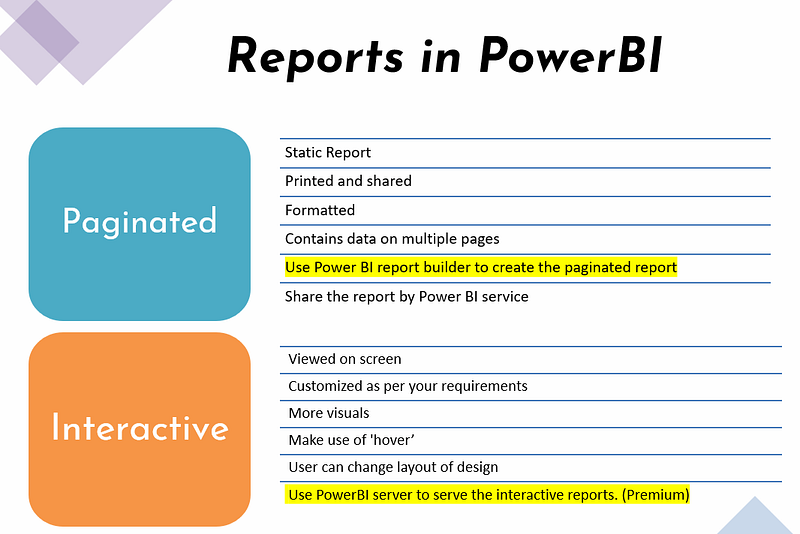
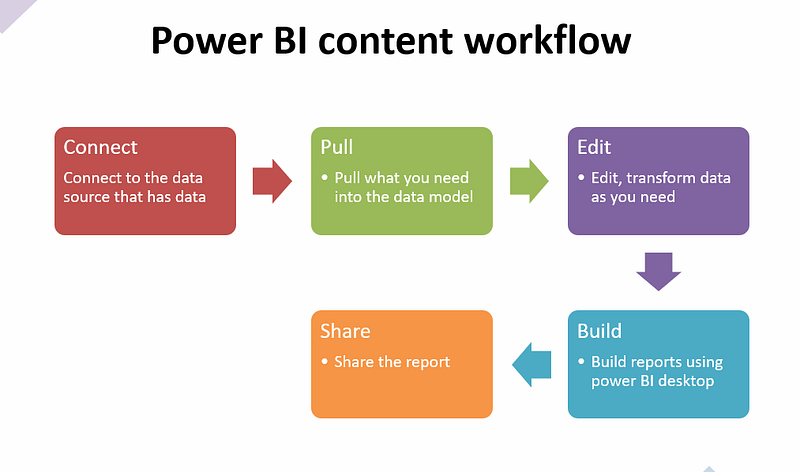
Parts of PowerBI
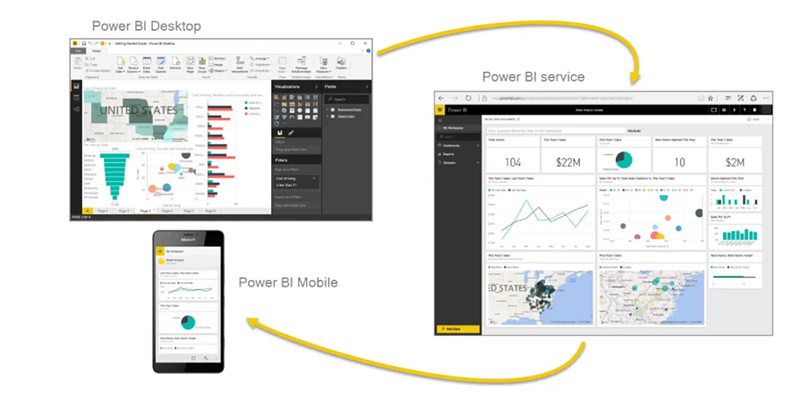
Building Blocks of PowerBI
- Visualizations
- Datasets
- Reports
- Dashboards
- Tiles
If you would like to watch the end-to-end hands-on demo of this tutorial, feel free to watch the below video:
🙏Thank you for following along with the tutorial so far. If you found this blog to be helpful, please don’t forget to give it a clap or two. If you want to stay updated on my future content, be sure to follow me and consider subscribing to my YouTube channel, and don’t hesitate to reach out if you have any questions or need additional support.
In conclusion, passing the Azure Data Fundamentals DP-900 certification exam may seem daunting at first, but with the right approach, resources and determination, it is definitely achievable. I hope that this blog has provided you with a comprehensive guide on how to prepare for the exam and pass it with flying colors. Remember to always stay motivated and focused, and to take advantage of the resources and study materials that are available to you. 📚🎓 I wish you all the best of luck on your journey to becoming Azure Data Fundamentals certified! 🎉🎉 Don’t forget to celebrate your success once you pass the exam!🎊