
How Python 3.11 is becoming faster
Python is a great language but everyone already knows that. Now with Python 3.11, it’s making quite some noise in the Python circles. It has become almost 2x times faster than its predecessor. In this article, we are not going to show that python 3.11 runs a particular piece of code faster but actually focus on what changed at the architecture level hence giving Python 3.11 such an improved performance.
Warning: This blog is not for the faint-hearted, it's going to be super complex. 🧠💡🔥
For people who are not very familiar with python let me set a little bit of context here. Python is the most used language in the world as of 2022. Python has great community support and a never-ending list of all sorts of libraries be it image processing, sound processing, or Artificial intelligence. Theoretically, you can develop any piece of software on python be it a game, a simple search engine, advanced computation models, servers side applications, website frameworks, or IoT. Python can do it all but the only catch is that for some applications it's not optimum in terms of speed. Below are the diagrams showing speed comparison and Python’s popularity or usage.
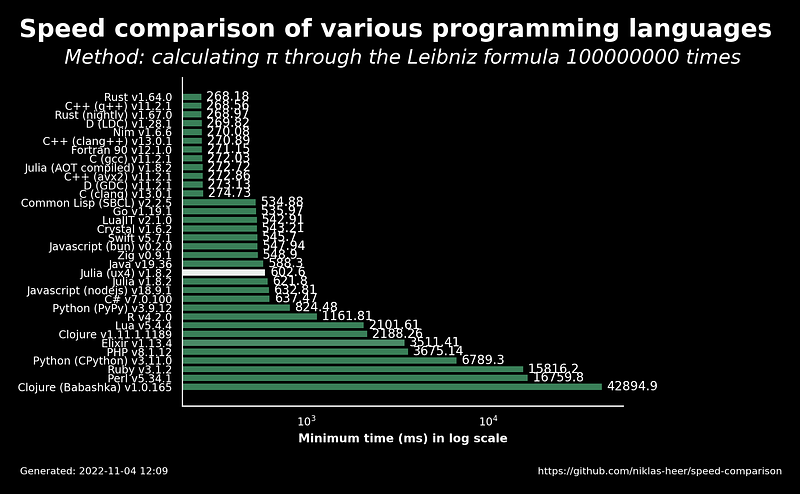
Despite being much slower than traditional languages like C++ and Java it is still the most used language in 2022. Let’s look at another image showing Python’s popularity.
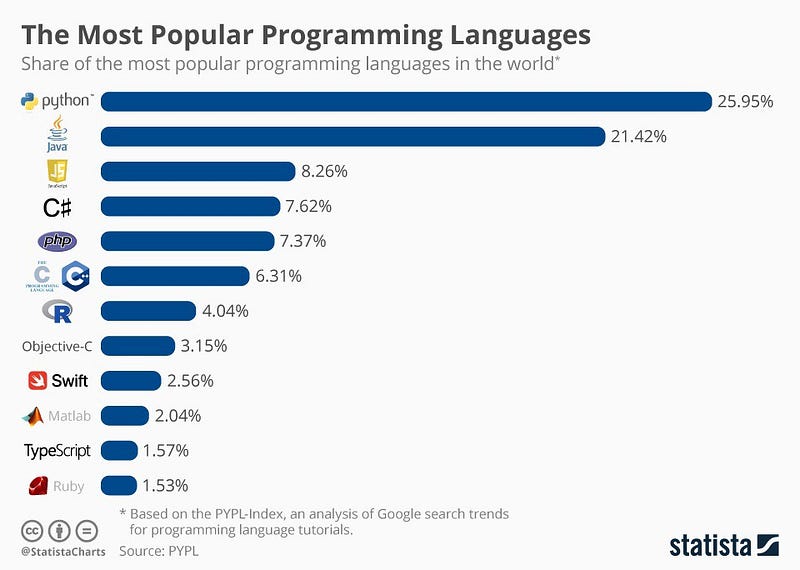
Enough praises about Python let’s dig deep into the fundamental changes that have been brought to Python 3.11. Before we understand architectural changes to Python 3.11 let’s look at memory access a little bit.
Memory access is expensive
- Arithmetic operation: 1 cycle
- L1 cache latency: ~4 cycles
- L2 cache latency: ~10 cycles
- L3 cache latency: ~30 cycles
- RAM latency: ~200+ cycles
To understand the need for different caches (caches are a small chunk of memories) we’re going to look at the light, for a CPU operating at 5Ghz, light moves 6 cm physically in the time takes it takes to complete one oscillation. Basically, we can’t access memory faster than this. In order to solve this issue we put different types of caches all around the CPU to make the memory read faster. What do these caches hold? Simple instructions that the CPU needs to perform. L1 cache which is barely a few Kbs holds the most used instructions and as we move towards L2, L3 and RAM; memory starts increasing but the time to extract information decreases. The bigger the memory size slower it's going to be fetched.
Once the relationship between cache memory and speed is clear, now, let’s look at the Data structure python implements internally.
Python’s Internal Data structure implementations
Let’s look at the below figure showing the comparison between Link lists and arrays.
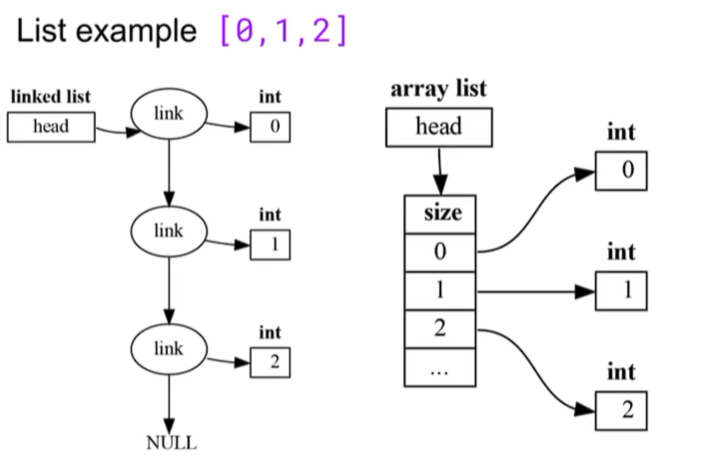
In the case of the link list in order to read the integer 2, we need to read 4 links, i.e. we need to access memory 4 times. When this is compared to the array we only need to access the memory only 2 times. Thus saving us 2 cycles.
Before we look into Python’s internal data structure let’s look at something called Frame Stack. Python creates a frame while accessing different objects out of the cache.
Each call to a python function pushes a frame object to the stack
- Or iteration of a generator, or awaiting a coroutine
The Frame contains:
- The local variables for that function
- Space for temporary values (the evaluation stack)
- References to the previous frame, globals, builtins, etc.
- Debugging information
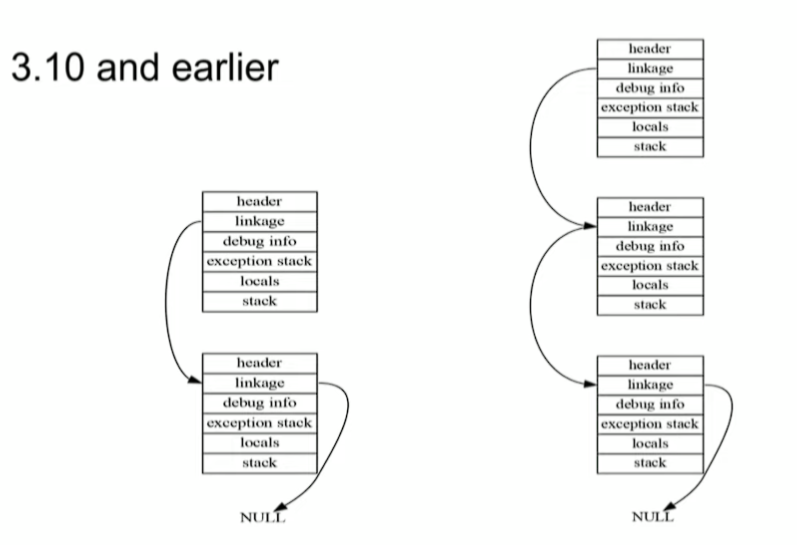
In python 3.10, a big chunk of memory per thread is allocated for several link stacks, memory needs to be bigger to hold more than what a frame stack requires. Now when a new frame is created, memory can be used from the same cache without looking for memory in slower (distant orL2, L3) caches or RAM.
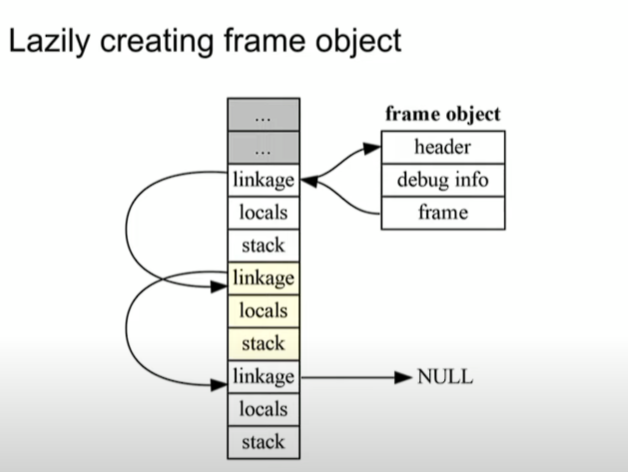
In Python 3.11 frame objects are lazily created thus requiring less memory. The way it is designed is that the common case is fast, while the less common case might be slightly slower. So if we compare the frame object of python 3.10 and 3.11 we see that there are 2 changes, first debug info is lazily created, basically, it’s not directly part of the frame stack and then the exception stack is dropped. Also, the namespace dictionaries now share keys whenever possible.
Because of the removal of exception stack huge memory is being saved which is again used by cache to allocate to newly created frame.
Now, let’s understand what exactly is happening by removing the exception stack and also how the exception works.
In 3.10, try-except was implemented explicitly in the bytecode
- The try would push a little piece of data to the internal stack, which then tells the system where to go for exception handling and how much stuff to pop off the execution stack.
- Required 160 bytes in every frame object (240 bytes in earlier versions <3.10).
In 3.11 the information is stored in a table
- Nothing needs to be done unless an exception is raised.
- If an exception is raised, the offset and stack depth is a lookup in the table.
Not quite zero-cost, but close
- Increases the size of the code object a bit
- Is a bit slower when an exception is raised.
Note: If we write 21 nested try statement in Python 3.10, the sytem breaks because of 160 bytes x 21 memory issue.
Plain Python Objects
class C:
     def __init__(self, a, b):
         self.a = a
         self.b = b
So, the above code snippet shows a standard python object. Let’s look at how these python class objects are laid out in memory.
Almost all Python objects have a __dict__
- It holds the attributes of that object
The __dict__ attribute is rarely used directly (we use obj.name but not using the quoted dictionary key)
Python objects are not fixed in size
- They can also have __slots__
- They can inherit from built-in types like list
A naive implementation of Python objects is slow and bulky
I know a lot of things don’t make sense but let’s look at some diagrams to get a little bit more clarity.
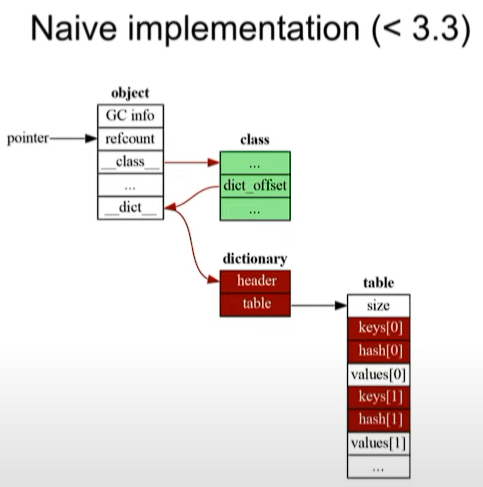
So, we have an object (the white box) and it has a pointer to its class in its dictionary except that its size is variable (Python’s Object) pointer to the dictionary isn’t at a fixed offset thus we need to look up what’s the offset in the class (marked in green). The green box is only one for any number of instances for the given class. On the other hand, the red ones multiply with more instances of the same class. This is the stuff we want to get rid of (the red one).
Basically, we got objects, it got its class, it also has a dictionary and in that dictionary, it got an array of keys, hashes, and values. So, when we put the value into self.a in our class, that value will be hashed in the table linked to the class object through dictionary.
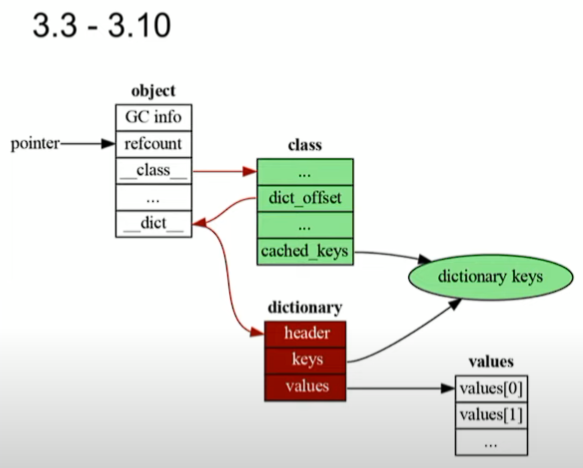
So, from 3.3 to 3.10 the data structures were modified and the dictionary keys (given in the table in <3.3) were made to be one for any number of class instances, i.e. they removed the redundant keys and hashes. All of these are moved to a separate data structure that is shared across the class (cached_keys, in the green one).
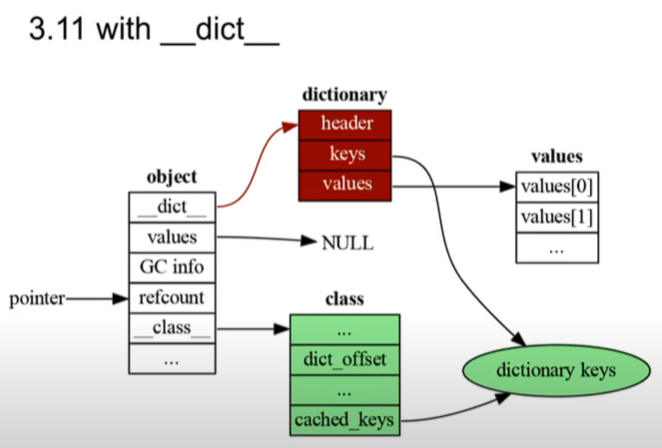
The first thing that happened in Python 3.11 is to move the pointer, basically, the dictionary pointer (__dict__) is moved to the front of the object which means it's a fixed offset, which means we don’t need to look into the value dict_offset (the green box). As of now, we haven’t saved any memory yet but reduced the number of cycles to reach the values. Another thing to note here is that now the dictionary (the red one) is redundant. We can access the dictionary keys through the class (the green one) and all the values can be accessed by putting values in the object (the white one). Look at the below diagram to see the final memory layout.
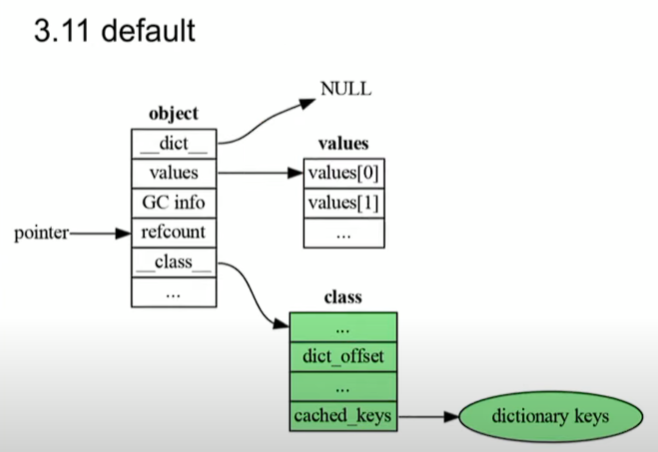
Now we can see that we have reduced both the redundant memory as well as cycles to fetch the data.
Algorithms
Bytecode
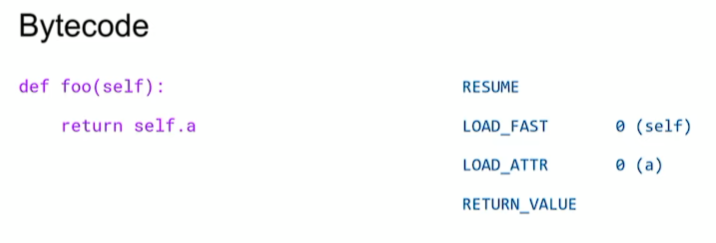
Bytecode is what the interpreter runs when running a Python program. So, the function on the left returns the a attributes of its argument (self.a=a). In the below diagram, Bytecode on the right loads the local variable self on the evaluation stack then replaces that with a attribute of that value and then returns a value on top of the stack.
Specializing Adaptive Interpreter
The idea here is that for complex bytecodes, (like looking up attributes: value on the attribute, the value on the class) there are several ways (around 13) to do it.
So, for each instruction, we have two states: general form (it basically does general lookup like in 3.10) and then decrements a counter and when the counter reaches 0 it is specialized.
Some bytecode instructions adapt to the code they execute.
Each instruction is one of the two states.
- General, with a warm-up counter: When the counter reaches zero, the instruction is specialized. (to do general lookup)
- Specialized, with a miss counter: When the counter reaches zero, the instruction is de-optimized. (to lookup particular values or types of values)
Specialization
- Convert a general instruction into a specialized one.
- Eg. BIANRY_OP becomes BINARY_OP_ADD_INT
De-optimization
- Convert specialized instruction back into a general one.
Let’s understand Specializing from a simple example, let’s say we see an addition for two ints that doesn’t mean that the next time we see an addition it will be ints only, it can be floating points or strings. If we don’t see the thing we had seen before last time, we fall back to the general case and we decrement the counter, this is where it is adaptive, it basically flips flops between general and specialized.
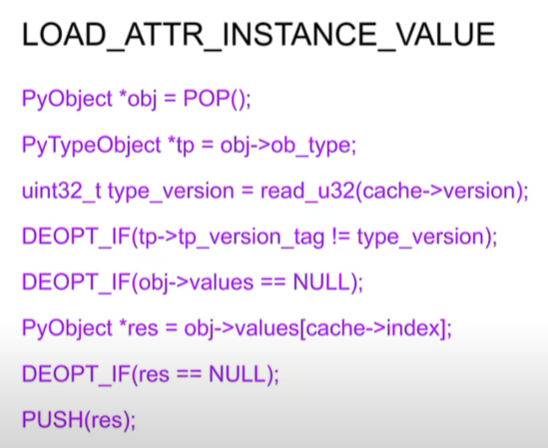
Let’s understand the above C code to understand the overall flow.
- The object is on the top of the stack, we pop that off.
- Check the type version, (just reading the cache).
- We have the type the version in the cache, check on the class.
- If we don’t match, we de-opt (decrement the counter, falling to the general form)
- If it matches, we read out the index and we are done.
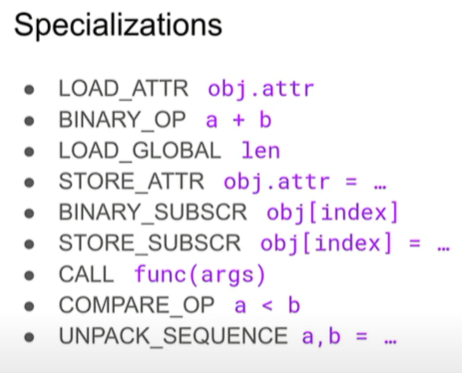
In short, specialization is just how the memory is read (the reading order) when a particular instruction runs. Same stuff can be accessed in multiple ways, specialization is just optimizing the memory read for that particular instruction.
Summary
Python 3.11 designed the specialized bytecode to take advantage of the new data structures.
New data structure + specialized bytecode = Faster Python.
Uff, finally it’s over. This has been the most challenging article I’ve ever written. Writing this type of content takes an insane amount of time and effort. If you particularly enjoyed this article consider tipping, motivating me to bring amazing content like this 🤓.
_________________________________________________________________
By the way: In case, you don’t already have a Medium membership, I recommend using ▶ my referral link ◀ as it will give you access to all content on Medium and support me with a small portion of the fee without any extra costs for you. Thank you! ✨
Thanks for giving your time and if you think this blog added something to your knowledge base, please consider following the AIGuys Blog. If you are interested in becoming a writer at AI Guys, you can follow this link ✨


