avatarKeith Dias

Free AI web copilot to create summaries, insights and extended knowledge, download it at here

5791

Abstract

7156">I covered user-specific secrets here:</p><div id="744d" class="link-block"> <a href="https://readmedium.com/create-a-per-user-secret-in-secrets-manager-part-1-bb97b66e2a2d"> <div> <div> <h2>User-Specific Secrets on AWS: IAM Policies</h2> <div><h3>ACM.82 IAM Policies to allow users to describe their own secrets</h3></div> <div><p>medium.com</p></div> </div> <div> <div style="background-image: url(https://miro.readmedium.com/v2/resize:fit:320/1*PcniDpBJq2db0jbdryc_Nw.png)"></div> </div> </div> </a> </div><h2 id="aada">Create the user-specific Secret to store the automation credentials</h2><p id="a515">Next I create <b>SandboxDevAutomationSecret</b> in Secrets Manager, encrypted with my <b>Sandbox KMS key</b>.</p><figure id="e15e"><img src="https://cdn-images-1.readmedium.com/v2/resize:fit:800/1*DQonCyF8UzPnZZoiGOKD9w.png"><figcaption></figcaption></figure><figure id="f7b3"><img src="https://cdn-images-1.readmedium.com/v2/resize:fit:800/1*zITxEtD__wFDwpPrBpqv4w.png"><figcaption></figcaption></figure><h2 id="2e63">Create a user-specific EC2 instance role for the SandboxDev user</h2><p id="3417">Next I create an EC2 instance role that the developer is allowed to pass to EC2 instances named <b>SandboxDevEC2Role</b>.</p><figure id="44ef"><img src="https://cdn-images-1.readmedium.com/v2/resize:fit:800/1*__fohZeTWjwdYrS__B4imQ.png"><figcaption></figcaption></figure><p id="eee9">The role will have a prefix with the username:</p><figure id="7afa"><img src="https://cdn-images-1.readmedium.com/v2/resize:fit:800/1*7dKW5KiQMivtKqjgzA_1Gw.png"><figcaption></figcaption></figure><p id="a338">This role is granted access to:</p><ul><li>Read the<b> SandboxDevSecret.</b></li><li>Pull containers from the <b>sandbox Elastic Container Repository.</b></li><li>Use the <b>sandbox KMS key </b>to access decrypt the secret and the container in the repository</li></ul><h2 id="df90">Create the Automation user</h2><p id="b752">Create the <b>SandboxDevAutomation</b> user. Do not give this user console access.</p><figure id="ddeb"><img src="https://cdn-images-1.readmedium.com/v2/resize:fit:800/1*QWVvQMA9aDCtmiVxSR61iw.png"><figcaption></figcaption></figure><p id="c19e">Remember that I already have a role (<b>CloneGitHubtoCodeCommitRole</b>) used by my batch job from prior posts. Create a policy that allows the SandboxDevAutomation user to use STS to assume that role.</p><p id="559f">The <b>SandboxDev</b> user needs permission to change the <b>credentials</b> <b>and</b> MFA device of the <b>SandboxDevAutomation</b> user.</p><h2 id="0f53">Edit the batch job role trust policy to allow the SandboxDevAutomation role to assume it</h2><p id="7f1d">We need to modify the trust policy to allow the <b>SandboxDevAutomation</b> <b>user</b> to assume the <b>CloneGitHubtoCodeCommitRole</b> role with MFA.</p><figure id="6ad1"><img src="https://cdn-images-1.readmedium.com/v2/resize:fit:800/1*xAHGslW3SSbv6c5NO8mhzg.png"><figcaption></figcaption></figure><p id="7ad0">Edit the trust policy:</p><figure id="cfaf"><img src="https://cdn-images-1.readmedium.com/v2/resize:fit:800/1*Vna71G_F2e-8Vdtw4yBwFw.png"><figcaption></figcaption></figure><p id="6a5a">Change the user to SandboxDev:</p><figure id="f788"><img src="https://cdn-images-1.readmedium.com/v2/resize:fit:800/1*vpSqEqjFa_qg59v_dnPCzQ.png"><figcaption></figcaption></figure><h2 id="49b3">Add permissions to KMS Key Resource Policy</h2><p id="8cf1">Next I need to allow the <b>SandboxDev</b> user to encrypt and decrypt and the <b>SanboxDevEC2Role</b> to decrypt with the <b>sandbox KMS Key.</b> I edit my automation to add those two roles to the encrypt and decrypt users.</p><figure id="380f"><img src="https://cdn-images-1.readmedium.com/v2/resize:fit:800/1*UkzCt10p0iqCR4OpMs6uhQ.png"><figcaption></figcaption></figure><h2 id="d015">Login as SandboxDev</h2><p id="725d">Log into the AWS Console with the SandboxDev user. If you’ve been following along, you have an account with a prefix specific to your organization and -Dev at the end if you used my deployment scripts.</p><figure id="13d5"><img src="https://cdn-images-1.readmedium.com/v2/resize:fit:800/1*5L-3C9ORVXOWv6KRdCkBLg.png"><figcaption></figcaption></figure><h2 id="d260">Add MFA devices</h2><p id="5cca">Add a Hardware MFA device to the SandboxDev User.</p><figure id="21f0"><img src="https://cdn-images-1.readmedium.com/v2/resize:fit:800/1*8s8rTuyWOsLAQUEqfwTtOQ.png"><figcaption></figcaption></figure><p id="c0e6">Add a Virtual MFA device to the SandboxDevAutomation User.</p><p id="5cec">I explain why I do not use a Yubikey to generate MFA codes here:</p><div id="1308" class="link-block"> <a href="https://readmedium.com/the-yubikey-cli-and-aws-mfa-50e6be0698a7"> <div> <div> <h2>The Yubikey CLI and AWS MFA</h2> <div><h3>ACM.11 Considering the attack surface and MFA choices for our Security Batch Jobs</h3></div> <div><p>medium.com</p></div> </div> <div> <div style="background-image: url(https://miro.readmedium.com/v2/resize:fit:320/1*SFAKbcK__GlbJbJJJVXK9w.png)"></div> </div> </div> </a> </div><figure id="5893"><img src="https://cdn-images-1.readmedium.com/v2/resize:fit:800/1*iFl4DTQNuplt-SGONHpNYw.png"><figcaption></figcaption></figure><h2 id="d7df">Create automation credentials</h2><p id="b9e4">Create an <b>Access key</b> for the <b>SandboxDevAutomation</b> user.</p><figure id="7f1e"><img src="https://cdn-images-1.readmedium.com/v2/resize:fit:800/1*KoVfxp-aJvzBiacPyFeMlA.png"><figcaption></figcap

Options

tion></figure><p id="217e">I have explained before that I disagree with the verbiage on this page. The CLI in the browser has a much larger attack surface and it depends how you are using the keys.</p><figure id="0423"><img src="https://cdn-images-1.readmedium.com/v2/resize:fit:800/1*_CCe4xu8AcNLloUHgvF5Aw.png"><figcaption></figcaption></figure><h2 id="8caa">Store the credentials in the SandboxDevAutomationSecret</h2><p id="24aa">Head to the Secrets Manager dashboard.</p><p id="432d">Click on the SandboxDevAutomationSecret.</p><figure id="6893"><img src="https://cdn-images-1.readmedium.com/v2/resize:fit:800/1*cz9jnYSnBsGXf9Y8VZjGPQ.png"><figcaption></figcaption></figure><p id="f616">Store the secret key id and secret access key.</p><figure id="4b95"><img src="https://cdn-images-1.readmedium.com/v2/resize:fit:800/1*-G9eR929nKSsGWrsOuzucg.png"><figcaption></figcaption></figure><h2 id="5496">Test Launching an EC2 Instance with the SandboxDev role</h2><p id="8907">Head over the EC2 dashboard and test launching an EC2 Instance. Recall that the Instance name needs to match what we specified in the policy above.</p><figure id="a1c7"><img src="https://cdn-images-1.readmedium.com/v2/resize:fit:800/1*FqCLLp7V854JJZa88TIdvA.png"><figcaption></figcaption></figure><p id="2bc8">If you need to decode any error messages I explained how to do that here:</p><div id="bb13" class="link-block"> <a href="https://readmedium.com/decoding-aws-error-messages-db0e0cbecf0d"> <div> <div> <h2>Decoding AWS Error Messages</h2> <div><h3>Free Content on Jobs in Cybersecurity | Sign up for the Email List</h3></div> <div><p>medium.com</p></div> </div> <div> <div style="background-image: url(https://miro.readmedium.com/v2/resize:fit:320/1*4oxP4LXk8l8c3mpRvO7ejg.png)"></div> </div> </div> </a> </div><p id="bd85">Choose the existing networking created for EC2 instances from prior posts.</p><div id="a149" class="link-block"> <a href="https://readmedium.com/automating-cybersecurity-metrics-890dfabb6198"> <div> <div> <h2>Automating Cybersecurity Metrics (ACM)</h2> <div><h3>A series of blog posts on cybersecurity metrics and security automation</h3></div> <div><p>medium.com</p></div> </div> <div> <div style="background-image: url(https://miro.readmedium.com/v2/resize:fit:320/1*L9lEIsaWt6xm2Op2ww-G5w.png)"></div> </div> </div> </a> </div><p id="2937">Choose the role we created under Advanced details.</p><figure id="8870"><img src="https://cdn-images-1.readmedium.com/v2/resize:fit:800/1*oHJior3Ueea6woDB1zqqKQ.png"><figcaption></figcaption></figure><p id="a822">One note that took me a bit to resolve. The message when your user does not have permission to pass the IAM role to the EC2 instance is a bit ambiguous.</p><div id="a0fb" class="link-block"> <a href="https://readmedium.com/ambiguous-error-message-when-a-user-doesnt-have-permission-to-pass-a-specific-iam-role-to-an-ec2-b005f338b6df"> <div> <div> <h2>Ambiguous Error Message When a User Doesn’t Have Permission to Pass a Specific IAM Role to an EC2…</h2> <div><h3>This error message needs to be more specific and doesn’t show up in CloudTrail for the User Name</h3></div> <div><p>medium.com</p></div> </div> <div> <div style="background-image: url(https://miro.readmedium.com/v2/resize:fit:320/1*4oxP4LXk8l8c3mpRvO7ejg.png)"></div> </div> </div> </a> </div><p id="51b2">Getting the resources setup took some time because I realized I had to revise my approach. I didn’t automate any of this but I will in the future. For now I just want to make sure it works. I can also figure out what permissions each policy requires.</p><p id="1fb5">I will test the initialization script in the next post.</p><p id="2c31">Follow for updates.</p><p id="4a3a">Teri Radichel | <i>© <a href="https://2ndsightlab.com/?source=post_page---------------------------">2nd Sight Lab</a> 2023</i></p><div id="8b5f"><pre><span class="hljs-section">About Teri Radichel:

⭐️ Author: Cybersecurity Books
⭐️ Presentations: Presentations by Teri Radichel
⭐️ Recognition: SANS Award, AWS Security Hero, IANS Faculty
⭐️ Certifications: SANS ~ GSE 240
⭐️ Education: BA Business, Master of Software Engineering, Master of Infosec
⭐️ Company: Penetration Tests, Assessments, Phone Consulting ~ 2nd Sight Lab</pre></div><div id="caae"><pre><span class="hljs-section">Need Help With Cybersecurity, Cloud, or Application Security?
~~~~~~~~~~~~~~~~~~~~~~~~~~~~~~~~~~~~~~~~~~~~~~~~~~~~~~~~~~~~~</span>
🔒 Request a penetration test or security assessment
🔒 Schedule a consulting call
🔒 Cybersecurity Speaker for Presentation</pre></div><div id="530b"><pre>Follow <span class="hljs-keyword">for</span> more stories like <span class="hljs-keyword">this</span>:

❤️ Sign Up my Medium Email List ❤️ Twitter: <span class="hljs-meta">@teriradichel</span> ❤️ LinkedIn: https:<span class="hljs-comment">//www.linkedin.com/in/teriradichel</span> ❤️ Mastodon: <span class="hljs-meta">@teriradichel</span><span class="hljs-meta">@infosec</span>.exchange ❤️ Facebook: 2nd Sight Lab ❤️ YouTube: @2ndsightlab</pre></div><figure id="eecf"><img src="https://cdn-images-1.readmedium.com/v2/resize:fit:800/0*H9Ew1KCl-29nZiPR.jpeg"><figcaption></figcaption></figure></article></body>

Politics

“Just Watch Me”: How Justin Trudeau’s Dad Put Canada in a Military Lock Down

In 1970, Prime Minister Pierre Trudeau Ordered Everyone To Remain In Their Houses.
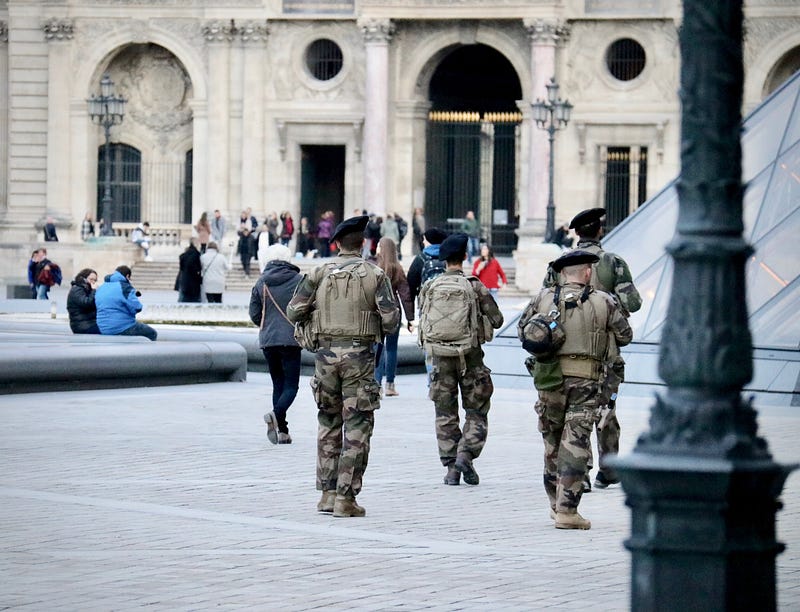
Photo by Fabien Maurin on Unsplash

There was a time when many Canadians welcomed the sight of armed soldiers and police officers patrolling their streets.

It was October 10th, 1970, and a French Canadian politician by the name of Pierre Laporte, who was playing football on his front lawn, was suddenly kidnapped.

The terrorist group ‘Front de libération du Québec’ (FLQ)claimed responsibility for the kidnapping and were also claiming responsibility for the kidnapping of a British diplomat named James Cross.

The FLQ wanted the Canadian government to release 23 political prisoners in exchange for Laporte’s freedom.

Prime Minister Pierre Elliot Trudeau, (the current Prime Minister’s father), said at the time “Nothing that either the Government of Canada or the Government of Quebec has done or failed to do, now or in the future, could possibly excuse any injury to either of these two innocent men.”

The Prime Minister would not submit to the FLQ’s demands. The public feared for the prospect of more kidnappings — more terrorism.

On October 17th, Laporte’s body was found in a 1968 Chevrolet Biscayne at Montreal Saint-Hubert Longueuil Airport.

What would Trudeau do?

Trudeau’s Controversial Decision: The War Measures Act

In an effort to find and stop the FLQ, the Prime Minister deployed the War Measures Act, which allowed mass arrests and raids to take place. While many supported this decision, there were others who claimed that it had the potential to violate human rights.

In all, 465 people were arrested as a result of the War Measures act, and held without being charged with a crime. Most of those people were later released.

When confronted by Canadian Broadcasting Corporation reporter Tim Ralfe about what more he was willing to do in order to keep the peace, he famously responded “Just Watch Me”.

According to opinion polls, most Canadians supported the decision to bring the military in to assist the police.

On November 6, Bernard Lortie of the FLQ, was arrested after a police raid. Three other members escaped the raid but were captured in late December. All of them were sent to prison.

In this case, it seems that military intervention brought order and justice to the country.

Politics
Terrorism
History
Leadership
Government
Recommended from ReadMedium