his will add an extra layer to users’ Instagram experience. However, this feature hasn’t made its way to the US yet, but could be a welcomed replacement should TikTok get banned.</p><p id="633f">You also don’t need to worry about copyright issues with the music available on Reels, as Instagram has partnered with big-name labels in the industry to make the music accessible with its users.</p><h1 id="3bdc">Why Launch Instagram Reels?</h1><figure id="2a44"><img src="https://cdn-images-1.readmedium.com/v2/resize:fit:800/1*vAG-IBzy_O1bXSo4OTrbzA.png"><figcaption>Source: <a href="https://techcrunch.com/2019/11/12/instagram-reels/">Tech Crunch</a></figcaption></figure><p id="f569">Reels could be considered as a direct response to the growing popularity of TikTok, which surged in popularity over the last 12 months. TikTok generated <b>“the most downloads for any app ever in a quarter” </b>in Q1 2020, according to <a href="https://www.adweek.com/digital/tiktok-is-growing-up-and-so-are-its-users/">Adweek</a>.</p><p id="5e19">The interesting bit is that TikTok’s core demographic is rapidly changing. While once dominated by Gen-Z users, Millennials now make up a greater share of TikTok’s user base than ever before. This makes the platform a much more attractive proposition for advertisers. Oh trust me, this is very effective.</p><p id="54bc">According to recent data from <a href="https://www.adweek.com/digital/tiktok-is-growing-up-and-so-are-its-users/">Comscore</a>, the percentage of US-based TikTok users between the ages of 25–34 increased from 22.4% in January to 27.4% in April, while the 18–24 year-old bracket fell from 41.1% to 35.3%. This clearly illustrates the change in demographics bit which was mentioned earlier.</p><p id="929d">Reels has a great chance at success thanks to its prime positioning in the Instagram app and all of the exposure and familiarity that comes with it.</p><h1 id="80c9">How Does It Work?</h1><p id="14a3">The Reels feature can be accessed the same way you use Boomerangs or Instagram Lives through options at the bottom of your screen on Instagram. By holding down the circle at the bottom of the screen, users will be able to start recording their 15-second videos with various options like speed, effects, AR filters, and a timer available to them.</p><p id="49c5">Simple, right?</p><p id="0a6b">If you still have trouble understanding these steps. Here’s an <b>8-step</b> visual representation on how you can create your own Instagram Reel.</p><p id="e7c2">Don’t worry, you can thank me later.</p><ol><li>Begin by opening the Instagram Stories camera to find the Reels icon.</li></ol><figure id="90d0"><img src="https://cdn-images-1.readmedium.com/v2/resize:fit:800/1*SGlJz8CfIRxMaljMi1yTHA.png"><figcaption></figcaption></figure><p id="f8c0">2. From this screen, you can now select your music by clicking on the <b><i>audio</i></b> icon. Choose from a list of your favourite tracks or popular ones, while also choosing the track duration.</p><figure id="9c11"><img src="https://cdn-images-1.readmedium.com/v2/resize:fit:800/1*ExcDJ2QFQBNUMSs-jJ7TeA.png"><figcaption></figcaption></figure><p id="8253">3. You can fix, edit or modify the pace of your video by clicking on the <b><i>speed </i></b>icon. Reels offers a wide range of tempo options, pick which suits your video best.</p><figure id="2af5"><img src="https://cdn-images-1.readmedium.com/v2/resize:fit:800/1*CvGfiDZcP-dbIVJcPWzQIg.png"><figcaption></figcaption></figure><p id="
Options
d7c8">4. Choose how long you’d like your clips to be by selecting the <b><i>timer</i></b> icon. When you set a timer, there’s usually a countdown before the recording starts. This helps you to prep yourself before the “reel” take.</p><figure id="09ab"><img src="https://cdn-images-1.readmedium.com/v2/resize:fit:800/1*x-i4TCI8DMKxcqeFOwImrw.png"><figcaption></figcaption></figure><p id="0b62">5. Similar to Instagram Stories, you can scroll across through a variety of AR filters to apply to your Instagram Reels video. You can choose between previously saved filters or you can scroll to the end and tap “Browse Effects” to discover new ones.</p><figure id="ca5a"><img src="https://cdn-images-1.readmedium.com/v2/resize:fit:800/1*i21hXo9V9Ywyf-KDRA7Zlw.png"><figcaption></figcaption></figure><p id="9dfd">6. Finally, hold down the record button to capture the footage. And voilà! You are done.</p><figure id="60b5"><img src="https://cdn-images-1.readmedium.com/v2/resize:fit:800/1*F7TQN0Enbg8JC2wOVK5e7w.png"><figcaption></figcaption></figure><p id="56bf">7. Similar to TikTok, you can start and stop recording multiple times during your 15-second video by pressing and holding the record button.</p><figure id="1ce0"><img src="https://cdn-images-1.readmedium.com/v2/resize:fit:800/1*sCVNa7oa11GwL--jvvB0Ug.png"><figcaption></figcaption></figure><p id="3d19">8. Once you’ve recorded your Reel, you can choose where you want to share it. Along with your Story and direct messages to other people, you even have the option of sharing your Instagram Reels on the Explore page for everyone to see.</p><figure id="7dd3"><img src="https://cdn-images-1.readmedium.com/v2/resize:fit:800/1*HrNtfaGGYKt20y_Mm4N37Q.png"><figcaption></figcaption></figure><p id="890f">Here’s a great example of how the “Instagram Reels tab” is showcased on a user’s profile. You will find your videos and drafts saved here. This is also the spot where your followers can locate your posted Reels.</p><figure id="522c"><img src="https://cdn-images-1.readmedium.com/v2/resize:fit:800/1*8-Py0nCxI0w1S6enhnPgKg.png"><figcaption>Source: <a href="https://www.instagram.com/jessicaworb/?hl=en">Instagram</a></figcaption></figure><h1 id="a654">Final Thoughts</h1><p id="e9be">It’s no surprise to me that Instagram is making such moves to replicate TikTok’s most popular features, especially in areas where TikTok hasn’t already amassed a strong foothold, like Brazil. These markets will be detrimental in predicting the future of this feature.</p><p id="0f95">The “desire” for a new social network is always high. Reels allows you to enhance the video content by integrating it with a simple user-friendly editor, while also meeting the needs of new digital natives.</p><p id="4f6f">However, this isn’t the first time that Facebook, Instagram’s parent company, has attempted to launch a TikTok alternative. Facebook previously launched a short-form standalone app, called <a href="https://lassovideos.com/">Lasso</a>, but it has failed to take off as of yet.</p><p id="c071">Well, if we have learned anything from the introduction of Instagram Stories in the past, it’s that Instagram knows how to replicate a tried-and-tested format with absolute success.</p><p id="cd29">Will Reels be able to curb the TikTok rise and become the new flagship feature within the next few years?</p><p id="bcde">Nobody can say for sure.</p><p id="f2c1">But, Instagram surely poses to be a “reel” problem for TikTok up ahead.</p></article></body>
How Instagram Launched a TikTok Clone, Because Stories Are So 2018
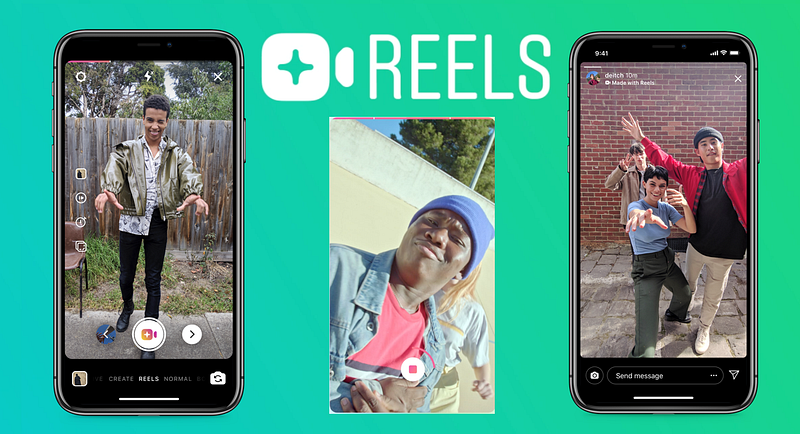
With the US government’s plans to potentially ban TikTok due to data privacy concerns, Instagram started testing a new feature that’s similar to the China-based app. Instagram Reels, a new way to record 15-second clips set to music on Instagram, has recently launched in India. This feature has already been rolled out in other parts of the world like Brazil, France, and Germany.
If this concept sounds a little familiar to you, you’re right. Almost everyone is comparing Instagram Reels to the recently famous app TikTok. We are no longer living in 2013, where Mark tried to buy Snapchat, but since the response was not promising, he decided to simply replicate this function on Instagram to eliminate the problem. A lot of things have changed since then, and the ball game has turned more global, not just catering to the US.
According to Sensor Tower reports, TikTok possessesrich features and has a community of 1.5 billion monthly users, including 611 million just in India. It’s a no brainer why Instagram is using India to test this new feature. Also, it helps that the Indian government has already banned TikTok . Instead of trying to start from scratch, Instagram could try to cross-promote Reels heavily to its own billion users.
What is Instagram Reels?
Instagram Reels allows users to create 15-second videos using popular songs. Similar to TikTok, Instagram hopes for Reels to become a place where users can partake in fun challenges and trends. If you are wondering what kind of challenges or trends, here’s a list of the top 10 trends from last year.
According to Instagram, 45% of the Instagram videos created are 15 seconds or less, which makes Reels a great feature to showcase the videos users wouldn’t normally post on their stories or feed. You know what the great thing about Reels is? It offers the ability to film, add filters, include music, and share that film in a separate space specifically for videos. This will add an extra layer to users’ Instagram experience. However, this feature hasn’t made its way to the US yet, but could be a welcomed replacement should TikTok get banned.
You also don’t need to worry about copyright issues with the music available on Reels, as Instagram has partnered with big-name labels in the industry to make the music accessible with its users.
Reels could be considered as a direct response to the growing popularity of TikTok, which surged in popularity over the last 12 months. TikTok generated “the most downloads for any app ever in a quarter” in Q1 2020, according to Adweek.
The interesting bit is that TikTok’s core demographic is rapidly changing. While once dominated by Gen-Z users, Millennials now make up a greater share of TikTok’s user base than ever before. This makes the platform a much more attractive proposition for advertisers. Oh trust me, this is very effective.
According to recent data from Comscore, the percentage of US-based TikTok users between the ages of 25–34 increased from 22.4% in January to 27.4% in April, while the 18–24 year-old bracket fell from 41.1% to 35.3%. This clearly illustrates the change in demographics bit which was mentioned earlier.
Reels has a great chance at success thanks to its prime positioning in the Instagram app and all of the exposure and familiarity that comes with it.
How Does It Work?
The Reels feature can be accessed the same way you use Boomerangs or Instagram Lives through options at the bottom of your screen on Instagram. By holding down the circle at the bottom of the screen, users will be able to start recording their 15-second videos with various options like speed, effects, AR filters, and a timer available to them.
Simple, right?
If you still have trouble understanding these steps. Here’s an 8-step visual representation on how you can create your own Instagram Reel.
Don’t worry, you can thank me later.
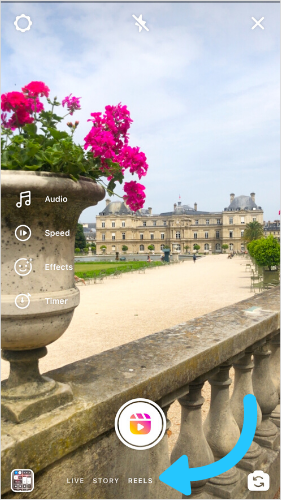
Begin by opening the Instagram Stories camera to find the Reels icon.
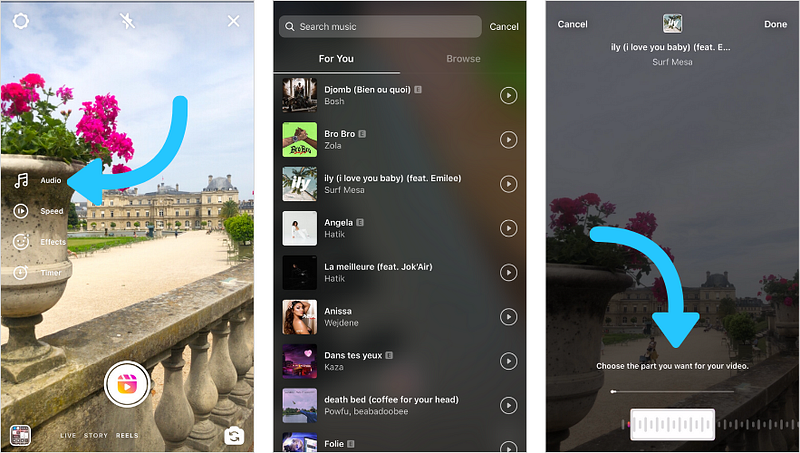
2. From this screen, you can now select your music by clicking on the audio icon. Choose from a list of your favourite tracks or popular ones, while also choosing the track duration.
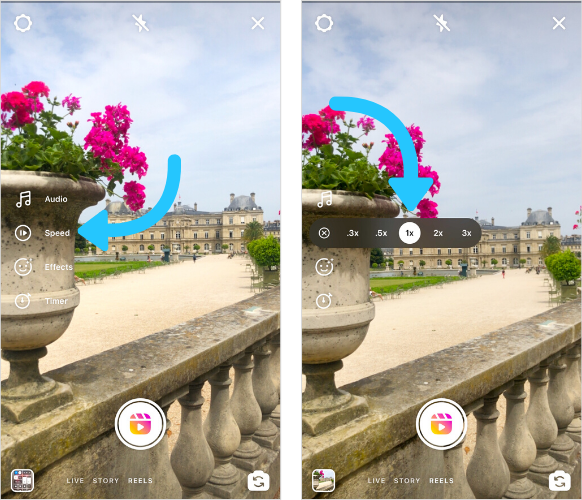
3. You can fix, edit or modify the pace of your video by clicking on the speed icon. Reels offers a wide range of tempo options, pick which suits your video best.
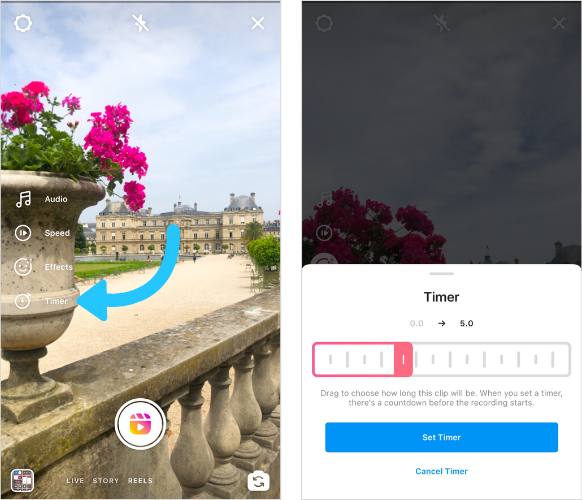
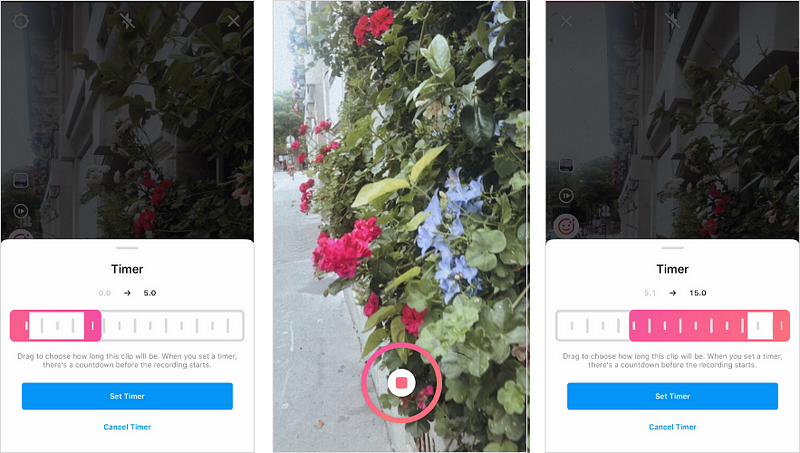
4. Choose how long you’d like your clips to be by selecting the timer icon. When you set a timer, there’s usually a countdown before the recording starts. This helps you to prep yourself before the “reel” take.
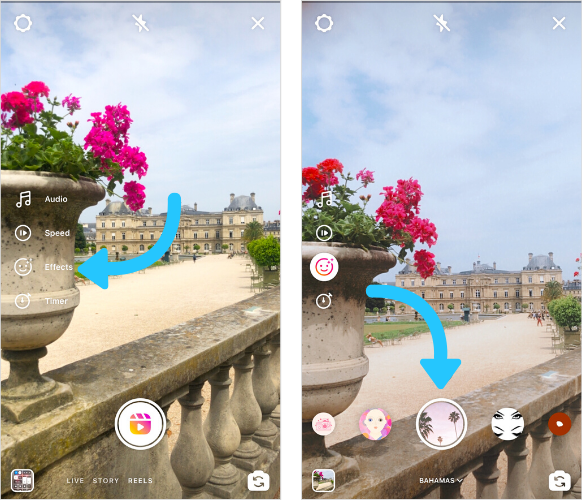
5. Similar to Instagram Stories, you can scroll across through a variety of AR filters to apply to your Instagram Reels video. You can choose between previously saved filters or you can scroll to the end and tap “Browse Effects” to discover new ones.
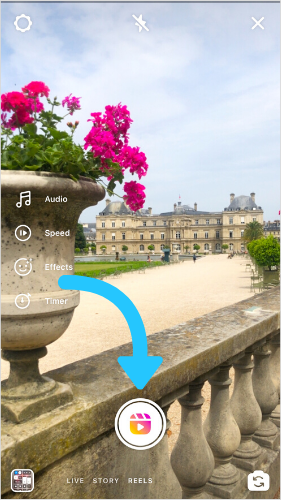
6. Finally, hold down the record button to capture the footage. And voilà! You are done.
7. Similar to TikTok, you can start and stop recording multiple times during your 15-second video by pressing and holding the record button.
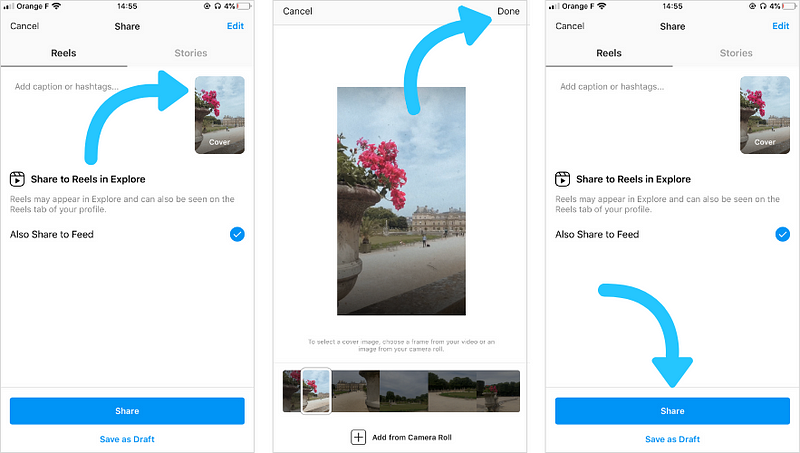
8. Once you’ve recorded your Reel, you can choose where you want to share it. Along with your Story and direct messages to other people, you even have the option of sharing your Instagram Reels on the Explore page for everyone to see.
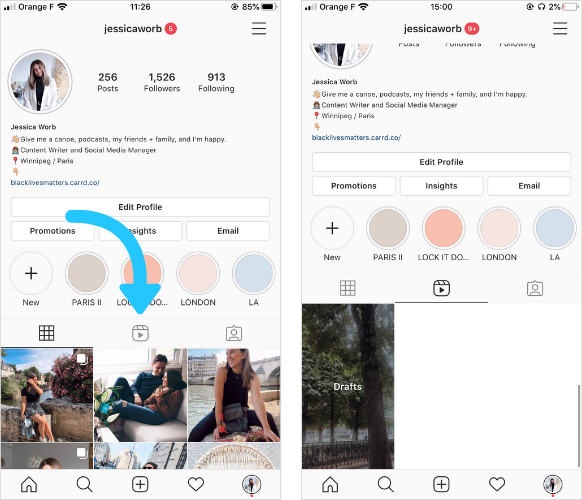
Here’s a great example of how the “Instagram Reels tab” is showcased on a user’s profile. You will find your videos and drafts saved here. This is also the spot where your followers can locate your posted Reels.
It’s no surprise to me that Instagram is making such moves to replicate TikTok’s most popular features, especially in areas where TikTok hasn’t already amassed a strong foothold, like Brazil. These markets will be detrimental in predicting the future of this feature.
The “desire” for a new social network is always high. Reels allows you to enhance the video content by integrating it with a simple user-friendly editor, while also meeting the needs of new digital natives.
However, this isn’t the first time that Facebook, Instagram’s parent company, has attempted to launch a TikTok alternative. Facebook previously launched a short-form standalone app, called Lasso, but it has failed to take off as of yet.
Well, if we have learned anything from the introduction of Instagram Stories in the past, it’s that Instagram knows how to replicate a tried-and-tested format with absolute success.
Will Reels be able to curb the TikTok rise and become the new flagship feature within the next few years?
Nobody can say for sure.
But, Instagram surely poses to be a “reel” problem for TikTok up ahead.