
How I Used My Evernote-PKM System to Publish a 43-Year-Old Poem
The step-by-step process I used to assemble the info from my PKM system in Evernote and write the article.

It started with a random thought: Why don’t you publish that old poem you wrote in the 80s?
Isn’t that often how it starts? You have an idea — a moment of inspiration.
But, then, what? Can you immediately act upon it? Do you have a workflow in place so that you can freely run with that initial thought to the point of hitting the publish button with maximum efficiency?
I’ve been working on my PKM system for years — only I didn’t know what a PKM system WAS until last year. I also had no idea in 2013 that those first fledgling notes I was making in Evernote would form the foundation of what has become my most essential tool as a writer.
There’s a verse in the Bible that says that you reap what you sow. (Galatians 6:7) Last week, after years of sowing into my PKM system, I did a little reaping. And man, was it ever sweet!
So here’s my contribution to this new publication, PKM in the Wild — my story of how I used my Evernote-based PKM system to produce what is currently my best-performing post — which is a surprise because I’m NOT a poet!
An Overview of My Evernote
To start, I want to give you a brief look at how I’ve organized my Evernote notebooks and stacks:
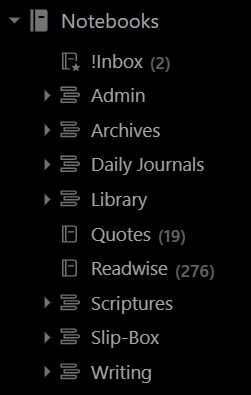
I loosely follow Tiago Forte’s PARA system in creating stacks for Admin, Archives, Daily Journals, etc.
!Inbox, Quotes, and Readwise are my only stand-alone notebooks. If I had been a stickler for proper organization, I would have put Quotes and Readwise in the Library stack. But since I use those notebooks frequently and they are where I can easily access them, why bother?
ALWAYS structure your PKM system to facilitate your workflow — not the other way around!
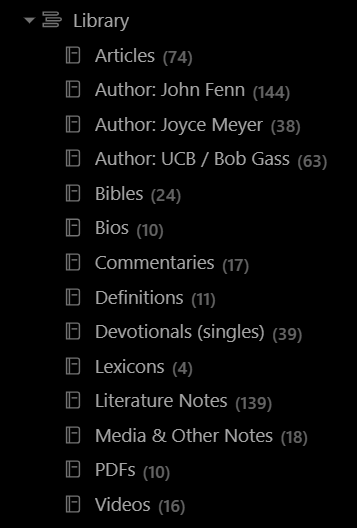
My Library stack is where I keep all of the notebooks that contain emails, newsletters, notes on articles, books, videos, etc.
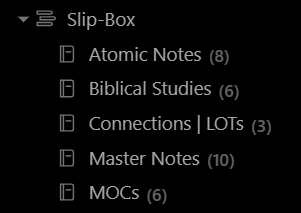
Even though I didn’t use any notes from my Slip-Box stack in the process I’m about to walk you through, the following are my current Zettelkasten smart notes notebooks:
My Writing stack is where I keep all my writing projects:
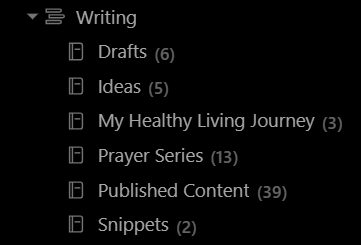
As I write this, I’m working in the Drafts notebook. Once I publish the article, I’ll then copy all the text from the Medium editor (in case I tweaked anything there before or after publishing) and paste it into the Published Content notebook. You’ll see why I do this in a moment.
Step 1 — Find That Old Poem
Even though I hadn’t seen or thought of that old poem in years, I knew where to look: My Daily Journal stack. Why? Because I took the time to input the most important entries from my older journals into Evernote in 2016.
I didn’t even remember what I had called the poem.
But that was not a problem. I ran a Standard search (as opposed to the new AI-powered) in the Daily Journal stack for “old chair” and found the note instantly along with the date I had written it: July 1, 1980.
I then pasted the contents into the Medium editor.
Step 2 — Craft the Opening with Ed Cyzewski’s Info
Next, I needed to write the opening.
While reviewing the poem, I remembered that I was in a contemplative mood the day I wrote it. Once I realized THAT, I thought of Ed Cyzewski and the review I had written for his book Pray, Write, Grow.
That meant I needed three things:
- The link to his website
- The link to his book on Amazon
- The link to my book review.
I could have opened Medium, scrolled through my Stories, found that article, and pulled everything from there. But why when I already had all of that info in my Published Content notebook?
I have a master index of all my published posts. So, I selected it, clicked on the internal link to the note for that article, and opened it. I then grabbed the links and pasted them into the editor — just like I did a minute ago for THIS article.
Step 3 — Choose a Good Quote
For the finishing touch, I decided to add a quote from Ed’s book. But which one? I used three in that book review, but none seemed to be a suitable segue to my poem.
About a month ago, I signed up with Readwise and configured it to export to Evernote. That meant every highlight from Pray, Write, Grow was in that notebook.
So I opened my Readwise notebook (which I can always see under Notebooks without having to open a stack), selected the note for the book, scanned the highlights until I found the one I liked, and then popped that puppy right into the editor.
Step 4 — Finalize Edits, Add Footnote, and Publish
Like most writers, I have a checklist of things I do before hitting the publish button. One is to run everything through Grammarly to check my grammar and punctuation.
Another thing I do is add footnotes. I realize this isn’t common among online writers, but I always do whenever appropriate. Yes, it would have been okay to have skipped it since I had already linked to Ed’s book on Amazon (and that’s all that’s required legally and ethically).
But why not include the citation? It gives the page number of the quote. And in my book, it’s the right thing to do.
I use a super, little free app called Zotero to track and format my citations. Plus, I keep the Note and Bibliography formats of each book and reference work in my Library stack.
So, all I had to do was click on Libary and search for Pray, Write, Grow. Once located, I opened it, copied the info under Note, and pasted it at the bottom of the Draft as Footnote 1, replacing xx-xx with the page number.
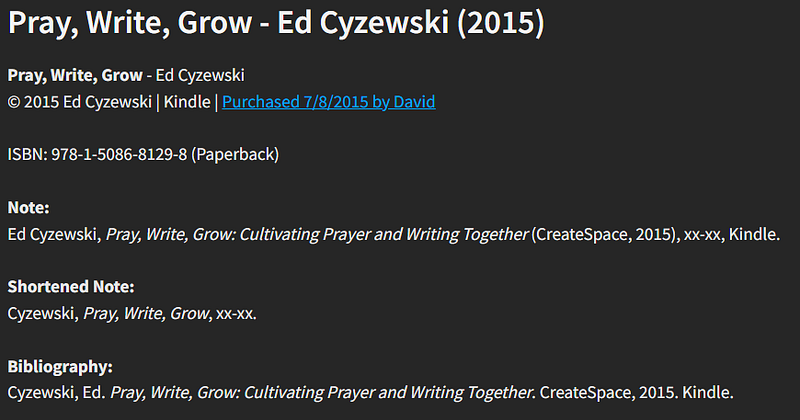
That’s it! After a final once-over, I added the topic tags (I ALWAYS use 5!), and submitted it to the Good Vibes Club for publication.
Done — and it sure was a lot of fun, too!
A Few Words About the Zettelkasten System
In conclusion, I want to leave you with a few words about the Zettelkasten system.
In this example, I worked in a typical fashion — top-down, developing the article from the initial idea to publication. My PKM system worked well!
But what if I told you there’s another way to come up with ideas for articles and stories from the bottom up? It’s called the Zettelkasten note-taking system. I learned about it last year when I read How to Take Smart Notes by Sönke Ahrens.
Even though I didn’t use any notes from my Slip-Box stack in the process above, I DID utilize some of the concepts, especially regarding creating atomic-like notes and linking them together.
In January this year, Evernote added backlinking. So don’t tell me I can’t implement the Zettelkasten system in Evernote.
I’m already doing it! 😀


