
How I used Montreal Forced Aligner for a New Language (Sinhalese)
Hi There,
Let’s see how to use Montreal Forced Aligner(MFA) with a low-resource language or a completely new language. You can find everything online like how I did. But it would take more time, So I am going to give you all the resources in one place here.
MFA is a fantastic tool for forced alignments. According to the User Guides of MFA, Forced alignment is a technique to take an orthographic transcription of an audio file and generate a time-aligned version using a pronunciation dictionary to look up phones for words. I see a good article to understand forced alignment here.
In MFA documentation, we can see there are four use cases of using this tool. If your language is listed in MFA acoustic models, MFA dictionaries, and MFA G2P models your life will be easy, you can use steps 1 or 2 to continue with this tool. But what if your language is not listed in the above places. Huh! This makes your life harder. Today I am going to discuss this topic. I recently used this tool and I used this with the Sinhalese language. The Sinhalese language is not listed in any of the above links and my only option was to use this tool in 3rd use case of the MFA documentation.
If your language is not listed in the above links, you have to follow 3rd use case. That means you must have,
- A Speech Corpus. (https://montreal-forced-aligner.readthedocs.io/en/latest/user_guide/corpus_structure.html#corpus-structure)
- A Pronunciation Dictionary. (https://montreal-forced-aligner.readthedocs.io/en/latest/user_guide/dictionary.html#dictionary-format)
Speech Corpus
The speech corpus formats have been given in the above link. I used the Prosodylab-aligner format. That means I have the audio file in the .wav extension and its transcription should be in a .lab format file. I found a Sinhalese Text To Speech data set from here. I am going to use this data set for this forced alignment. You can find the transcriptions of the audio files in the prompts.txt file in this data set. I did some modifications to this file by doing some manipulations with excel. and I created a metadata.csv file. You can find it here. Then I wrote a simple python script to write each transcription to each file to get the speech corpus format as requested. This python manipulation was done in Google colab here. Download the transcriptions.zip file. extract it and paste the files into your corpus.
Pronunciation Dictionary
You have to find a pronunciation dictionary for your language. This link provides a sample dictionary for the English language. If it is not available to your language, you have to generate the pronunciation dictionary on your own. This might be challenging with your language. There is an online tool XPF that can be used for generating transcriptions. This has a pretty cool web interface, If your language is there, you can generate the transcriptions. The other alternative is if the orthography is pretty transparent would be to just write your rule-based G2P script (i.e. all ක symbols go to k a). For the Sinhalese language, the pronunciation dictionary is already there in this link. Luckily previous researchers have done that for my language. 😇
Okay, now we have the speech corpus and pronunciation dictionary with us. Now you need to install Miniconda to your machine. All the instructions for downloading the Miniconda can be found in the Conda documentation.
Install MFA with Miniconda
- Create a new environment and install MFA:
conda create -n aligner -c conda-forge montreal-forced-aligner2. Ensure you’re in the new environment created
conda activate aligner3. Check whether MFA is installed successfully.
mfa — helpThe above command should list down the set of options we can do with MFA.
The rest of the article will be discussed assuming your speech corpus is in the following location
~/mfa_data/speech_corpusand your pronunciation dictionary are in the following location.
~/mfa_data/pronunciation_dictionary.txtThe first data set should be validated to make sure whether the data set is in the proper format with MFA. For validating you should run the following command first.
mfa validate ~/mfa_data/speech_corpus ~/mfa_data/pronunciation_dictionary.txtThis command will look through the corpus and make sure that MFA is parsing everything correctly. After this command, will give a summary of the validation.
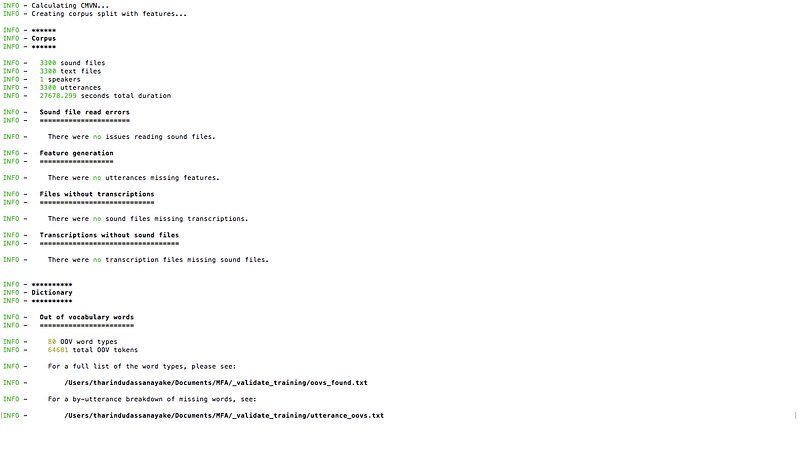
Then we can run the commands to generate acoustic models and training alignments.
To export just the trained acoustic model, run the following command
mfa train ~/mfa_data/speech_corpus ~/mfa_data/pronunciation_dictionary.txt ~/mfa_data/new_acoustic_model.zipTo export just the training alignments, run the following command
mfa train ~/mfa_data/speech_corpus ~/mfa_data/pronunciation_dictionary.txt ~/mfa_data/my_corpus_alignedTo export both trained model and alignments, run following command
mfa train ~/mfa_data/speech_corpus ~/mfa_data/pronunciation_dictionary.txt ~/mfa_data/new_acoustic_model.zip ~/mfa_data/my_corpus_alignedThe above commands are referenced from here.
According to my experience of using MFA, it is hard to run on ubuntu machines. Also, I tried Google colab, But it is also not running as expected. MFA runs smoothly in macOS,. This tool is mainly used by researchers and its bugs have been solved in macOS, But I have doubts about other operating systems.
For further reading, refer to the following
- https://www.eleanorchodroff.com/tutorial/montreal-forced-aligner-v2.html
- https://www.youtube.com/watch?v=Zhj-ccMDj_w&t=7567s
Hope You enjoyed this article and this has been helpful If so give this a clap, comment, and share.


