
How I Use Trello to Make More Money on Medium
Use this tool to organize and maximize your writing output
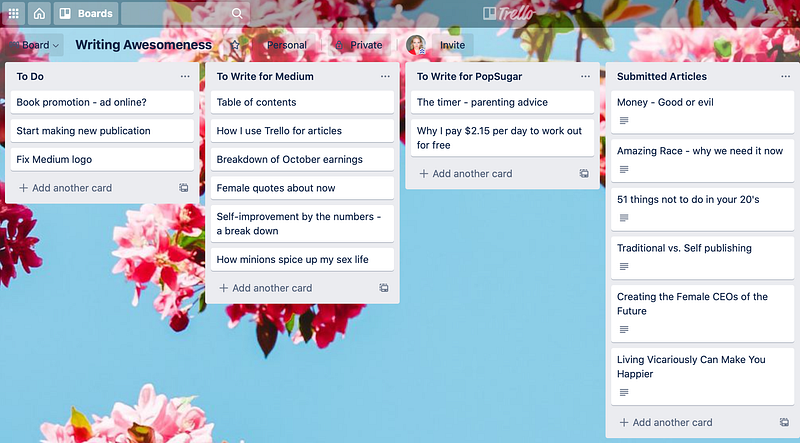
You might be asking, “What the heck is Trello?” Well, I have an answer. Trello is a free Kanban-style list-making app that has been changing the way I look at and organize my writing.
You might also now be asking, “What the heck is Kanban?” Another great question. Kanban is a style of tracking and managing workflow that originated in Japan. After learning about this app, I remembered that I had learned about Kanban in grad school and I figured that it might be worth a try to see if it could help me with article organization, money tracking, and submission optimization.
Kanban is loosely translated as a type of signboard. It is a product of what is called “just in time” manufacturing, which creates products for consumer demand (rather than creating products first and then selling them). The thing that has always fascinated me about “just in time” manufacturing is that there is little to no excess product or wasted time. It is fantastically efficient!
I wanted to be fantastically efficient, so I decided to “Kanbanize” my writing. Here’s how it works:
Story Ideas
First of all, Trello is super easy to set up, so I created an account, chose a pretty background, and named my Trello Board “WRITING AWESOMENESS.” Just because I can.
Next, I use the left side of the board to keep track of my writing ideas. When I have an idea, I pop it into one of two lists of ideas that I created (the two center columns in the photo above). Because I write for both Medium and PopSugar, when I come up with an idea for an article, I decide which publication it would be right for and I create a card for the idea in the appropriate column.
If I have any specific ideas of how to research or write these articles and I don’t want to forget them, I double click on the name of the article and include those ideas or notes in the description portion of the Trello card. Most of the notes I take only make sense to me, but that’s okay because I’m the only person using the board at this time.
Additionally, as I’m coming up with story ideas, I’ll inevitably think of things I need to do (like fix the dang header on my Medium profile). Rather than navigating away from the board, I just throw a card onto the “To Do” list so that I don’t forget about it. When I get tired of writing or I need a little break, I’ll pop over to that list and try to knock one or two things off of it so that I feel productive.
Submissions
After I write a story, I then click and drag the card over to the “Submitted Articles” list and I double click on the card. I add a note with the name of the publication and the date I submitted it under the “Activity” portion of the card.
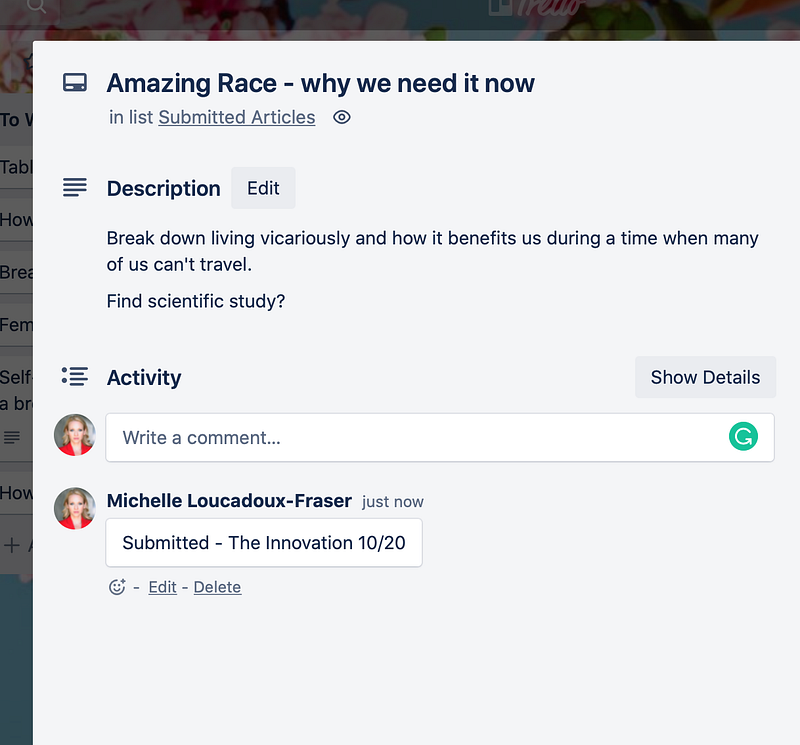
Here’s the thing: I forget what date I submitted to publications all the time. Sometimes, I look at the “Last edited on . . .” portion under the drafts tab of the Stories page on Medium, but if I make any kind of change to the article after I have submitted it, it updates to the most recent date and then I have no way of knowing when I sent off my article.
Because not every publication responds to you if they’re not interested in the story, keeping track of when you submit is super helpful. For instance, I submitted an article called “51 Things Not to Do in Your 20’s” to The Ascent. Because their submission guidelines say that their turnaround time is five to seven business days, I will move on to another publication if I don’t hear from them. (Hey, The Ascent, it’s a pretty awesome piece! Shameless plug, I know).
If a story is rejected by a publication (and boy, do my stories get rejected), I just submit to another publication and add another comment into the “Activity” section of my Trello with the new date and the name of the publication. (And if stories sit too long and I get impatient, I just publish them myself. That’s the beauty of Medium.)
Money Tracking
Once a story is published, I move it from the “Submitted Articles” list over to the “Published” list. Now, the right side of my Trello board is where it gets interesting. Every week or so, I look at the lifetime earnings of my stories. If a story makes more than $2, I move it from the “Published” list into one of the following lists:
- $2 — $5 Medium Articles
- $5 — $10 Medium Articles
- $10 — $50 Medium Articles
- $50+ and Better Humans Articles
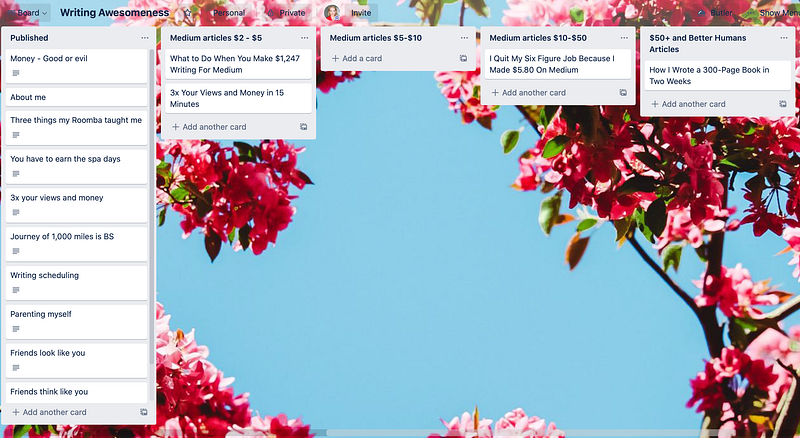
As you’ll note in the photo above, my stories haven’t made a lot of dough yet because I’m still new on Medium and I’ve only been writing full-time for less than two months. However, my Trello board can help me see trends in which articles are successful.
Now, unsurprisingly, my most successful pieces have been about making money on Medium. (Which is exactly why I’m writing this piece right now.) However, my successful piece with Better Humans was about writing. So, I just submitted another piece to them about . . . you guessed it. Writing.
While I don’t have a huge amount of data right now to be able to definitively see trends, I do think that, in the long run, this will be very helpful. I’m thinking of creating a different board for which pieces have been accepted into which publications so that I can do a better job at pairing my pieces with the appropriate publication.
Whether it makes me more money on Medium or just helps calm my disorganized brain, Trello is rocking my world right now. First of all, I’m lucky enough to have enough pieces written that I need a tool to keep track of them. Second, I’m thrilled that the app is free and I don’t have to spend the $1.29 I made writing a 1,500-word article to pay for a new app. Keep creating, my friends, and fare thee well.


