
How I Use Notion for My Ideas and Medium Articles
Start a daily ideas list

Which writing tool do I use?
I hate this question, and I mostly think it’s irrelevant.
Not because some tools are better or worse than others, it just isn’t the main point. It doesn’t matter (that) much.
What matters more is that you’re doing work at all. The tools and workflows are an easy distraction, something that makes you feel productive without really being productive.
That said, I do prefer some tools more than others.
I use Notion a lot for my personal writing, but if you prefer Google Docs for its simplicity or something more connected like Obsidian, go for it.
I’m not the guy that’s going to try out a million tools, I’ve been there and done that, especially in my work life.
So what I’m about to share with you is more about the process than the tools.
It’s about how I use Notion to organize and store my ideas, and then flip them into pages for writing.
1. Create a regular habit of idea generation
I’ve talked about this before, but it bears repeating: You don’t want to sit down with a blank page and then try to write.
The best way to stave off the crazy blank page syndrome is to have a regular list of ideas that you can turn back to and start an article or essay from.
You can then get out the bad ideas, and then sort through ones to write about. And if you don’t feel like writing on that topic on that particular day, it’s not lost forever — it’s still in your idea doc and then you can review it later.
Here’s a screenshot of what one of my daily idea generations looked like in February.
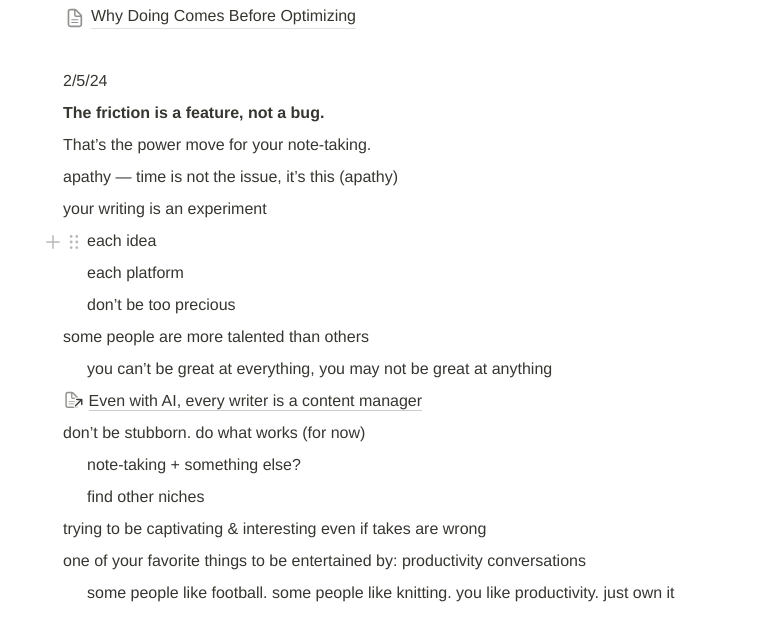
To be honest, I don’t come up with ideas every day or even 10 per day, but if you force yourself to do that especially if you’re getting started, it’ll make a world of difference.
You can grab this exact, free Notion template to help with your ideas.
2. Pick out an idea to write about, but don’t delete any of your ideas.
It’s very tempting to delete ideas, but if you know your niche and what you’re focused on, you won’t have many “bad” ideas.
More like “that’s interesting” or “hmmm….”.
If you find yourself coming up with ideas that you’re excited about but are outside your niche (review of a new music album won’t necessarily work on a blog about strategies for merchandising in a retail store), then consider starting a different blog, newsletter or writing outlet.
Otherwise, keep the ideas in the list. It may be the start of something bigger. It may help you in a few days.
This is what you’ll notice: the idea process becomes easier and faster, because you can use your old ideas to jumpstart new ideas. They are the fodder, the raw materials for more ideas.
The ideas compound and grow.
3. Flip the idea into a new page.
This is why Notion is very helpful. You can take a “block” or the line your idea was written on, and then flip into a page, and then start writing the article there.
Here’s what it looks like:
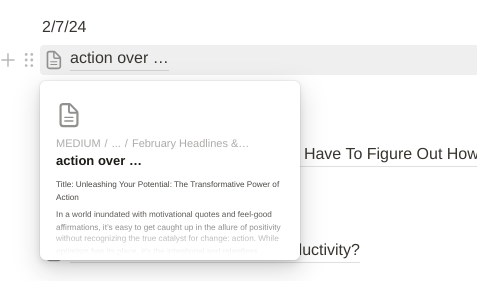
You can see the page icon next to it, indicating that it is now a brand-new page.
It’s still within my Notion category and file for that month of ideas.
That way, I can go directly to the month and see not only the ideas that I came up with but the articles I wrote.
Usually, I add a checkmark next to the idea to let me know the article has been finished and published.
Then I copy and paste that into Medium, into Substack or wherever else I’m publishing.
I use Notion for some other projects, even my SEO course, but this is how I do my regular ideation for my regular Medium articles.
My Notion system isn’t perfect…
The hardcore planners and project managers are freaking out right now.
I don’t have specific designated dates for when I publish.
I don’t really tag by topic.
There’s still a lot of opportunity to improve this system and how I use Notion.
But, guess what? I’m not terribly bothered by it.
I have a full-time job with a lot of other stuff going on. This system works for me.
At some point it may break, but for right now it’s functional and it works.
Don’t overthink any of the tools. Do what works for you, and then scale it when it starts to break.
If it ain’t broke, don’t break it.
Begin your own ideas list in Notion with this free template. Start writing more today.


