avatarNick Nolan

Free AI web copilot to create summaries, insights and extended knowledge, download it at here

2442

Abstract

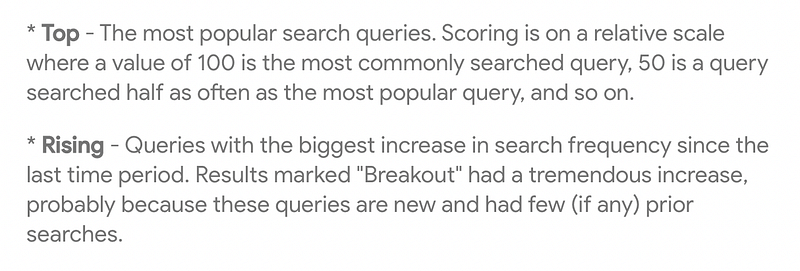
bit from the peak — when GPT-4 was released, but there’s still a lot of people who are interested in this.</p><figure id="1112"><img src="https://cdn-images-1.readmedium.com/v2/resize:fit:800/1*I27Q8piHSbSW6xvAH8-v1Q.png"><figcaption>Google trends Screenshot</figcaption></figure><p id="39e6">For what we’re doing, the interest over time doesn’t matter much.</p><p id="068e">We’re mainly interested in the <b>Related queries.</b></p><p id="bed6">These are the search terms that people interested in the main topic are searching for. We’re creating content about ChatGPT and can find what these people are typing into their Google search bars.</p><h1 id="16de">2. Set the time range</h1><p id="d0d2">We have 9 preset time ranges.</p><p id="688a">All of these will show us different results in the Interest over time graph and the Related queries.</p><p id="459e">I start with the past 30 days.</p><figure id="057d"><img src="https://cdn-images-1.readmedium.com/v2/resize:fit:800/1*fvgWNzI8zF0ZUQriM5tQuQ.png"><figcaption>Google trends Screenshot</figcaption></figure><p id="f096">Scroll down to the Related queries and look at what’s rising:</p><figure id="5421"><img src="https://cdn-images-1.readmedium.com/v2/resize:fit:800/1*h69UdHPK3ePXnsxpuhsIAQ.png"><figcaption>Google trends Screenshot</figcaption></figure><p id="3047">We see 16 search queries related to ChatGPT.</p><p id="be04">I’ve never heard of Looka — apparently they’re an AI-powered design company that helps you create logos and branding.</p><p id="e4bb">We can switch the filter from “Rising” to “Top” and get a different list of 25 more related queries.</p><figure id="f4d4"><img src="https://cdn-images-1.readmedium.com/v2/resize:fit:800/1*tzCSUCEj26rFIaaEZo07Zg.png"><figcaption></figcaption></figure><figure id="40f0"><img src="https://cdn-images-1.readmedium.com/v2/resize:fit:800/1*e5AiSRLb8LDOfqkUXqWkYQ.png"><figcaption>Google trends Screenshot</figcaption></figure><p id="5c3f">Then, we can repeat this process with a different time range and get different results. If we switch from 30 days to 90 days, we get a whole new list of rising and top queries.</p><figure id="ecd9"><img src="https://cdn-images-1.readmedium.com/v2/resize:fit:800/1*sEmI1WOC4G9REWQcvd0jkw.png"><figcaption>Google trends Screenshot</figcaption></figure><p id="212a">The more recent timeframes will give us newer trendy topic ideas, and the longer timeframes will give us more foundational t

Options

opics.</p><h1 id="8d60">3. Change the search type</h1><p id="67ca">We started with the default web search.</p><p id="b7f4">Next, you can switch to YouTube searches, or News searches.</p><figure id="8f25"><img src="https://cdn-images-1.readmedium.com/v2/resize:fit:800/1*eyDIQLrryi9VZBD6jH-wNw.png"><figcaption>Google trends Screenshot</figcaption></figure><p id="855d">Again, you can filter through the different timeframes and find a lot more content ideas.</p><p id="ddd8">What you find will depend on the main topic. There weren’t any Related queries for ChatGPT Google Shopping searches, because it’s not related to any physical products.</p><p id="6f4c">We get lots of shopping queries if we search something like “running”.</p><p id="b8eb">When I switched over to YouTube, I found more “how to” queries where a video makes more sense than an article.</p><p id="14d3">Not all of these ideas will be interesting. “What is ChatGPT?” showed up nearly every time. But, this is an easy and quick way to get a list of topics that people are searching for.</p><p id="8042">I found 100+ unique queries and questions about ChatGPT in under 10 minutes.</p><p id="8625">If you do this for the topic you’re interested in, you’ll surely find something new to post about.</p><p id="f777">Plus, you know there’s current demand for that information. You won’t be guessing if anyone’s interested in your content.</p><p id="7e72">Hopefully this helps you use Google Trends more effectively and unlock some new ideas! Let me know where your favorite place to find ideas is in the comments!</p><p id="1cfa"><b>Enjoyed this article? Hit the clap button a few times.</b></p><figure id="a259"><img src="https://cdn-images-1.readmedium.com/v2/resize:fit:800/1*6W2E93YiZHZCILtcEg08LA.gif"><figcaption></figcaption></figure><h2 id="2e76">Read more articles about creating content here:</h2><div id="6a9a" class="link-block"> <a href="https://nick-nolan.medium.com/list/f7c201e20c12"> <div> <div> <h2>Creating Content</h2> <div><h3>Edit description</h3></div> <div><p>nick-nolan.medium.com</p></div> </div> <div> <div style="background-image: url(https://miro.readmedium.com/v2/resize:fit:320/0*5f561a0c456cb32b64725a8ed7d5f146c8a19b14.jpeg)"></div> </div> </div> </a> </div></article></body>

How I Use Google Trends To Discover New Content Ideas

Image via Canva

This week I felt stuck.

I’m trying my hardest to think of new, interesting ideas to write about and getting nothing to work with. I’ve got 274 potential articles sitting in my drafts section on Medium. Nothing looks worth writing or publishing.

This isn’t a new problem.

Over the years, I’ve discovered a few tricks to get back into the flow.

I don’t have a secret formula or surefire way of getting myself unstuck. But there are a handful of things I do to fix the problem when I’m just not feeling it.

Sometimes I simply put my head down and ignore my feelings. Once I start writing the first few sentences, the rest flows easily.

I tried that yesterday and again this morning with no such luck.

Onto my next trick: visiting different rooms on the internet.

I have a few favorite places where I find inspiration for the next piece of content. Podcasts, Twitter, Reddit, Facebook groups. I have my go-to people and places that spark new ideas.

When those aren’t getting me anywhere, I need to get out of my regular routines. Instead of going to Twitter, I check Instagram. Instead of Reddit, I search Quora.

One of the internet rooms I don’t visit often is Google Trends.

I decided to go there and was pleasantly surprised with fresh ideas — exactly what I needed.

I’m going to show you how to use it to uncover some exciting new content ideas. You can use these for social media posts, your blog, or here on Medium.

1. Type in the main topic

Your goal is to get interesting, specific ideas. You’ll start with a broad topic that you’re creating content about.

If you need some examples of broad topics that you’re interested in, check the top of your Medium homepage:
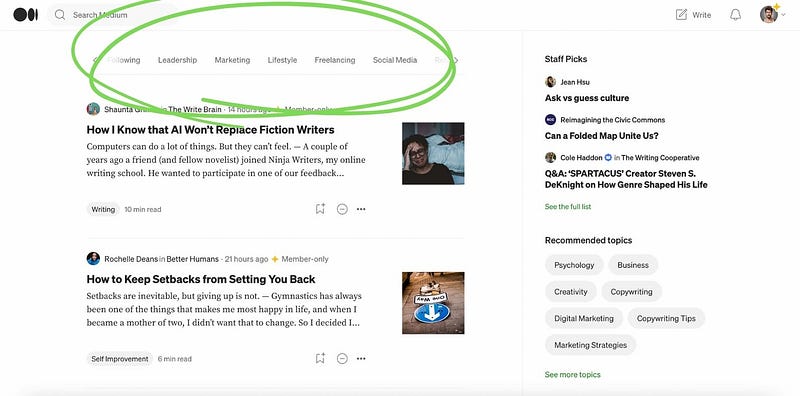
Author screenshot

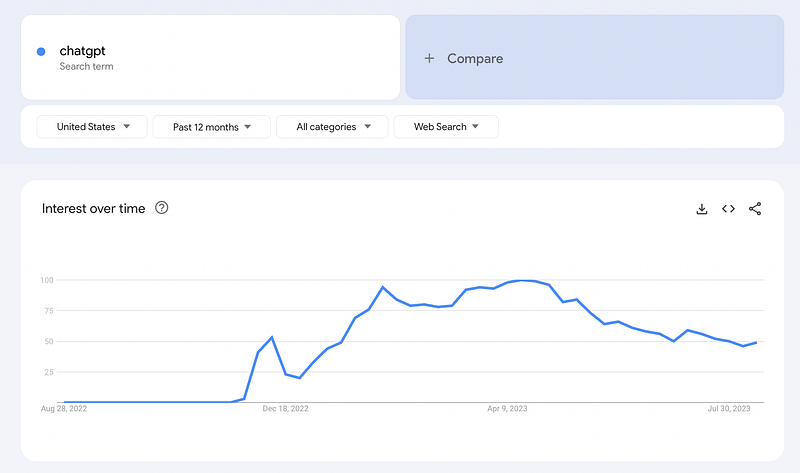
For this example, I chose the topic ChatGPT.

The interest has declined a bit from the peak — when GPT-4 was released, but there’s still a lot of people who are interested in this.
Google trends Screenshot

For what we’re doing, the interest over time doesn’t matter much.

We’re mainly interested in the Related queries.

These are the search terms that people interested in the main topic are searching for. We’re creating content about ChatGPT and can find what these people are typing into their Google search bars.

2. Set the time range

We have 9 preset time ranges.

All of these will show us different results in the Interest over time graph and the Related queries.

I start with the past 30 days.
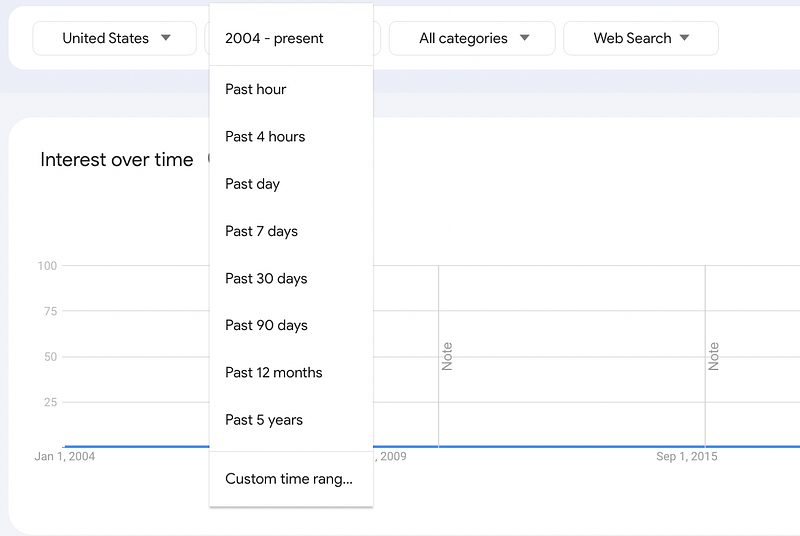
Google trends Screenshot

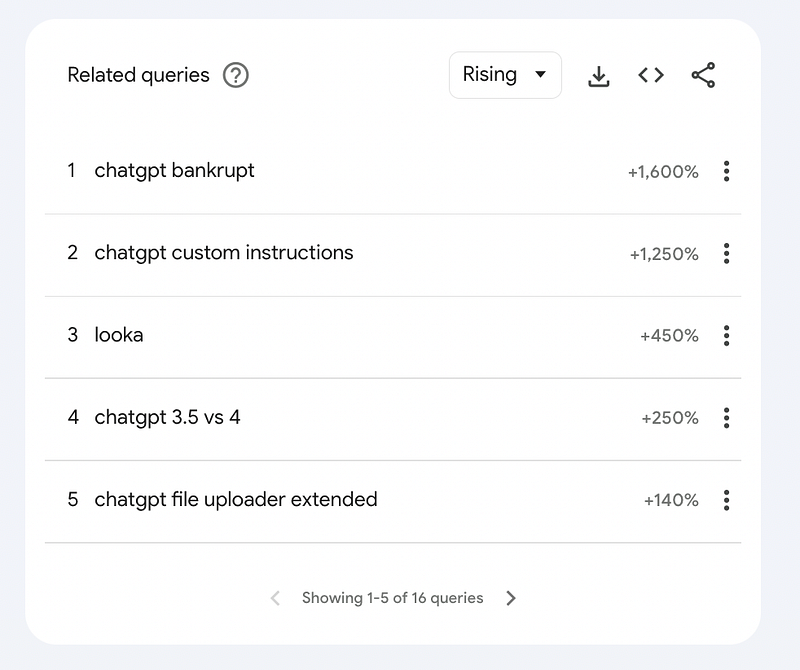
Scroll down to the Related queries and look at what’s rising:
Google trends Screenshot

We see 16 search queries related to ChatGPT.

I’ve never heard of Looka — apparently they’re an AI-powered design company that helps you create logos and branding.

We can switch the filter from “Rising” to “Top” and get a different list of 25 more related queries.
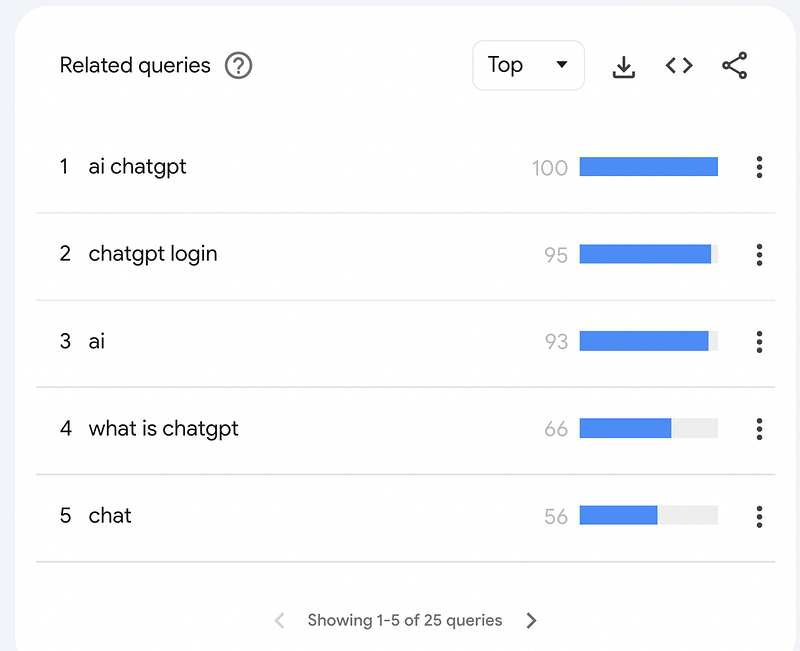
Google trends Screenshot

Then, we can repeat this process with a different time range and get different results. If we switch from 30 days to 90 days, we get a whole new list of rising and top queries.
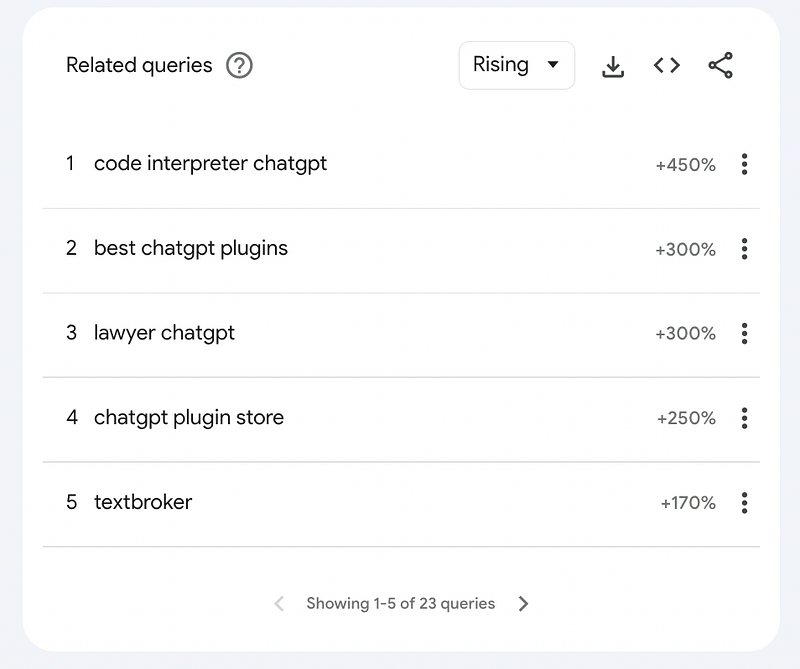
Google trends Screenshot

The more recent timeframes will give us newer trendy topic ideas, and the longer timeframes will give us more foundational topics.

3. Change the search type

We started with the default web search.

Next, you can switch to YouTube searches, or News searches.
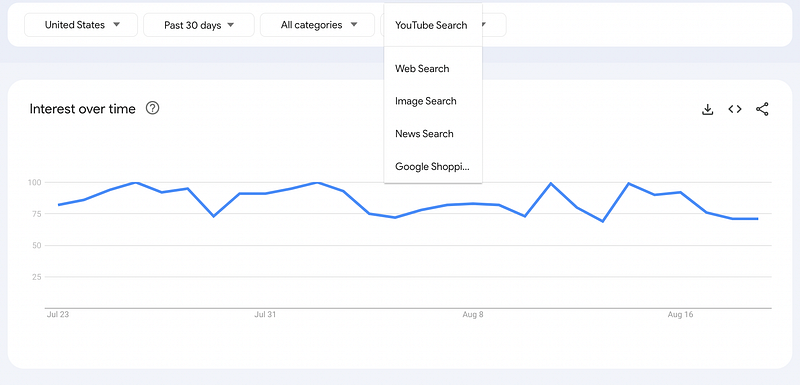
Google trends Screenshot

Again, you can filter through the different timeframes and find a lot more content ideas.

What you find will depend on the main topic. There weren’t any Related queries for ChatGPT Google Shopping searches, because it’s not related to any physical products.

We get lots of shopping queries if we search something like “running”.

When I switched over to YouTube, I found more “how to” queries where a video makes more sense than an article.

Not all of these ideas will be interesting. “What is ChatGPT?” showed up nearly every time. But, this is an easy and quick way to get a list of topics that people are searching for.

I found 100+ unique queries and questions about ChatGPT in under 10 minutes.

If you do this for the topic you’re interested in, you’ll surely find something new to post about.

Plus, you know there’s current demand for that information. You won’t be guessing if anyone’s interested in your content.

Hopefully this helps you use Google Trends more effectively and unlock some new ideas! Let me know where your favorite place to find ideas is in the comments!

Enjoyed this article? Hit the clap button a few times.

Read more articles about creating content here:

Content
Content Creation
Writing
Writing Tips
Making Money Online
Recommended from ReadMedium