
How I Use Google Search Console to Come Up with New Content Ideas

For every website, either a client’s or my own, I usually create a content calendar for 3–6 months in advance. This way, I’m never out of ideas about what to write or assign to the content writers I manage.
Sometimes I deviate from my plan and write articles based on suggestions from Google Search Console (GSC). Whenever I can find an article idea from GSC, I prioritize that article for 2 reasons:
1. The article usually ranks faster than those from my original content plan
2. It helps improve the ranking of the other articles from that silo
Let me show you how I do it.
Step 1 — Finding Content Ideas in GSC
First, I go to GSC and analyze an article. I usually do this only for important articles that are part of a silo. If you don’t know what a silo is, check out this article I wrote about silos. It explains how they help you rank your articles higher and has a step-by-step process on how to create one.
So, I Go to GSC>Search Results and add the URL of the article I want to analyze.
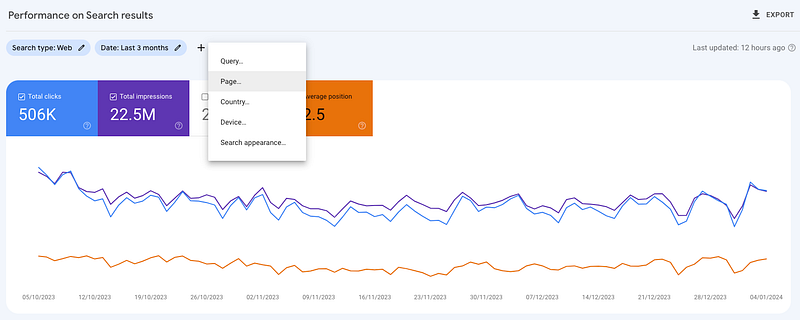
Next, I scroll down and use the filter to see only the queries that I rank for on page 3 and higher.
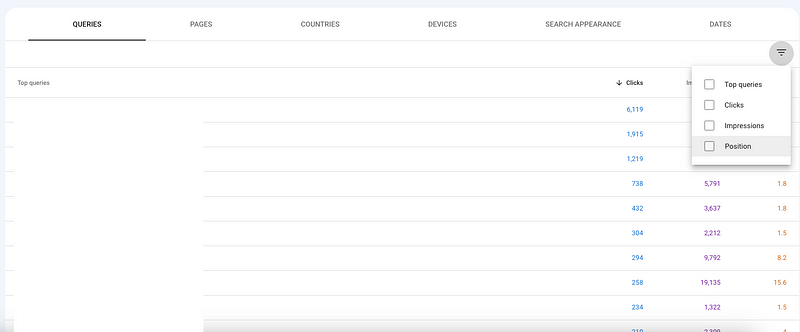
Why so low? The idea is simple. Google wants to rank my article for that query, but the content of the page doesn’t exactly satisfy the search intent.
Keep in mind that not all keywords work. Some of them you can actually use to improve the existing article. I explained how in this article. Others, you can use to create new articles.
For example, if your article is about ‘how to clean fabric upholstery sofa’ and you see that on page 4 you are ranking for ‘how to clean a leather sofa’, that’s a good topic to cover in a different article.
So what I do is take that keyword, which is usually a longtail as you can see in the example above, and search for it on Google. Next, I analyze the top 5 articles and see what kind of information I need to write to satisfy the search intent behind that query.
Now comes the important part. After I’m done with my research, I create the article outline. I make sure to connect this article to the other ones in the silo. Adding this article to an existing silo means that I can instantly get a few relevant internal links. And, if the articles in that silo are ranking high enough, they will boost this new article as well. Lastly, adding a new article to my silo increases the overall topical authority of my website, which can help all improve all my other articles.
To see how I tackle internal linking, check out this article.
After I’m done with the outline, I start writing or give it to one of my content writers.
Step 2 — Link the 2 Articles Using That Query
Once the new article is ready and published, I start editing the one I used to find my new content idea.
What I do is I add a new section to it, where I briefly explain the new article. I either do it under an H2 or an H3, depending on how important my new article is (and by important, I mean the traffic potential).
Next, I use the query I identified on page 3 in the GSC and use it as an anchor text to connect the existing article to the new one.
By using the exact same query I signal to Google that the new page is actually the one it should display to people googling that query.
In the screenshots below you can see some examples of a few articles I created this way in the last 6 months.
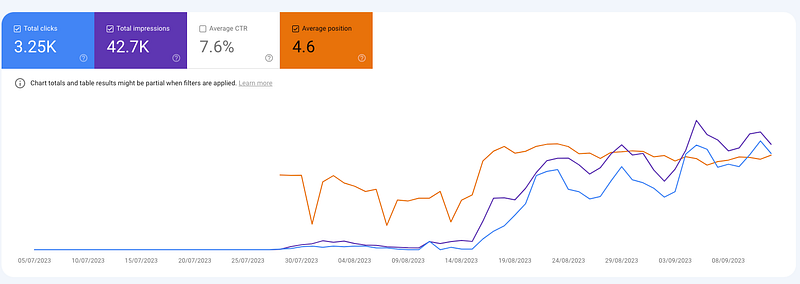
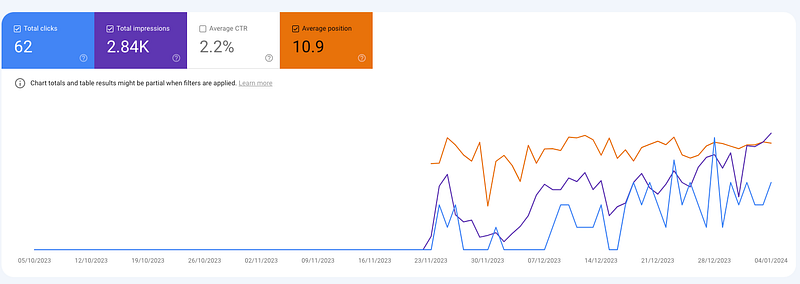
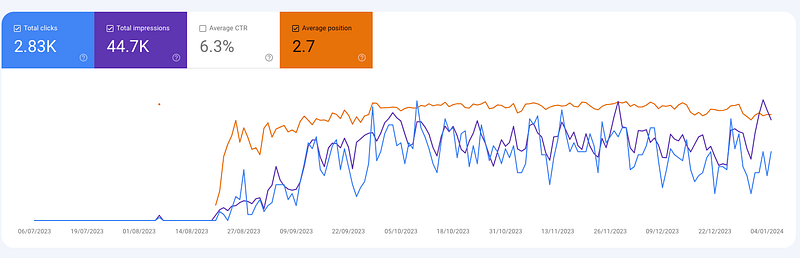
Although this process got me many wins, the number of article ideas I find is rather small. On average, I can get a new content idea each month per website.
In Conclusion
Google Search Console is a great tool to use to come up with new articles. Why? Because those new articles are easier to rank.
To find these, search the queries an article is ranking for on page 3 or 4. Take the ones that you can create an article for and write it. Be sure to include it in a silo with the existing article.
Next, add a new section to the existing article about the new article and use the query as an anchor text to link the two.
Want more marketing tips and tricks? Subscribe to the Better Marketing newsletter The Marketing Memo here.


