
How I take Literature Notes in Capacities
How to learn from your books and still love reading
The first thing I do when I get a new book is break the spine. I can almost see you wince, but let me explain. I love a well-loved book. A book that has been carried around, pored over, written in. A book that has been cherished by someone. I love borrowing books from my friends that have little notes written in the margins because it feels like a whispered conversation between my friend, the book, and me. A book is not a sacred object. Also, I want to be able to bend the front cover back around and read the book one-handed. Hence the spine-snapping.
Reading is my favourite thing to do, and I read a lot of books. This worked out well for me during my literature degree; sitting around all day in my university library with a cup of earl grey and a mountain of books stacked on the floor at my feet was my idea of perfection.
Which is why it’s insane to me that I never thought to do anything with the information I read until recently. Yes, at university I used my reading to write essays, but the information never went further than that. I took some reading notes (which looked more like sparse marginalia and loose PostIt notes that got lost at the bottom of my bag) and went about my degree. I loved it, don’t get me wrong. But there was so much more I could have done.
The problem: reading and forgetting
When I left university I quickly forgot everything I had learnt to do with my reading, and even though I kept reading, I was forever forgetting bits of information I found interesting. It was incredibly frustrating, especially because I was putting so much time into reading these incredible books.
This was niggling at me when I discovered Readwise. I quickly realised it would be the first part of the solution for me. They are a service that connects to your Kindle highlights and automatically exports them to a database of your choice. They also resurface the highlights so you can re-discover and review them. Now every note I take on my Kindle isn’t lost in the depths of my ‘snippets’ folder. It is automatically linked to a Notion database that is tagged, filtered and searchable. (Readwise’s new read it later app has cemented Readwise in my workflow — it’s amazing). As nice as this is, it wasn’t enough, because highlights in themselves aren’t particularly useful, especially if you don’t do anything with them after highlighting.
The solution: Capacities
At this point, I missed my degree. I was still reading but I had stopped taking notes because I wasn’t writing essays anymore. The reading I was doing was passive, and I missed learning from books. So, I decided to start doing something with my Kindle highlights.
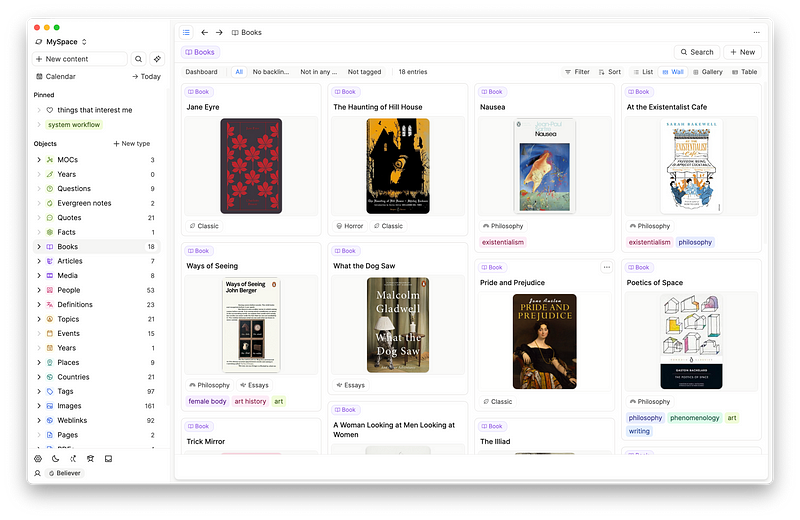
Capacities was the app I chose to house my reading notes in, because it made sense. Books are a massive part of my life and the content I consume, so it makes sense they would become a part of my PKM. I was already building my PKM system in Capacities, and a lot of the topics I was researching had led me to some interesting reading lists. Adding my literature notes to Capacities was the natural progression of things. I could connect a book to its film adaptation, its relevant historical period and important historical figures all in one place. This, to me, is genuinely mind-blowing. Combining note-taking and reading became a really fun and fruitful way to spend my time.
A small caveat — to integrate or not to integrate?
There is an integration-sized elephant in this virtual room, because Capacities doesn’t integrate with Readwise. This means all my Kindle (and article, website, general internet) highlights are synced to a database in Notion. I have to manually move highlights to my Capacities database if I want them there. I LOVE this.
I know an integration is coming, and when it does I don’t know if I’ll turn it on. This might be controversial, but for me, the process of having to read through all my highlights for a specific book and decide which ones are worth moving into Capacities is valuable. It is an extra step where I am actively engaging with that I have read, and deciding how it fits into my system. Everything I do within Capacities is intentional, and this includes the information I feed into it.
Adding new books to Capacities
It starts with a Book object. I have a separate object for Articles and Media that I won’t touch on right now.
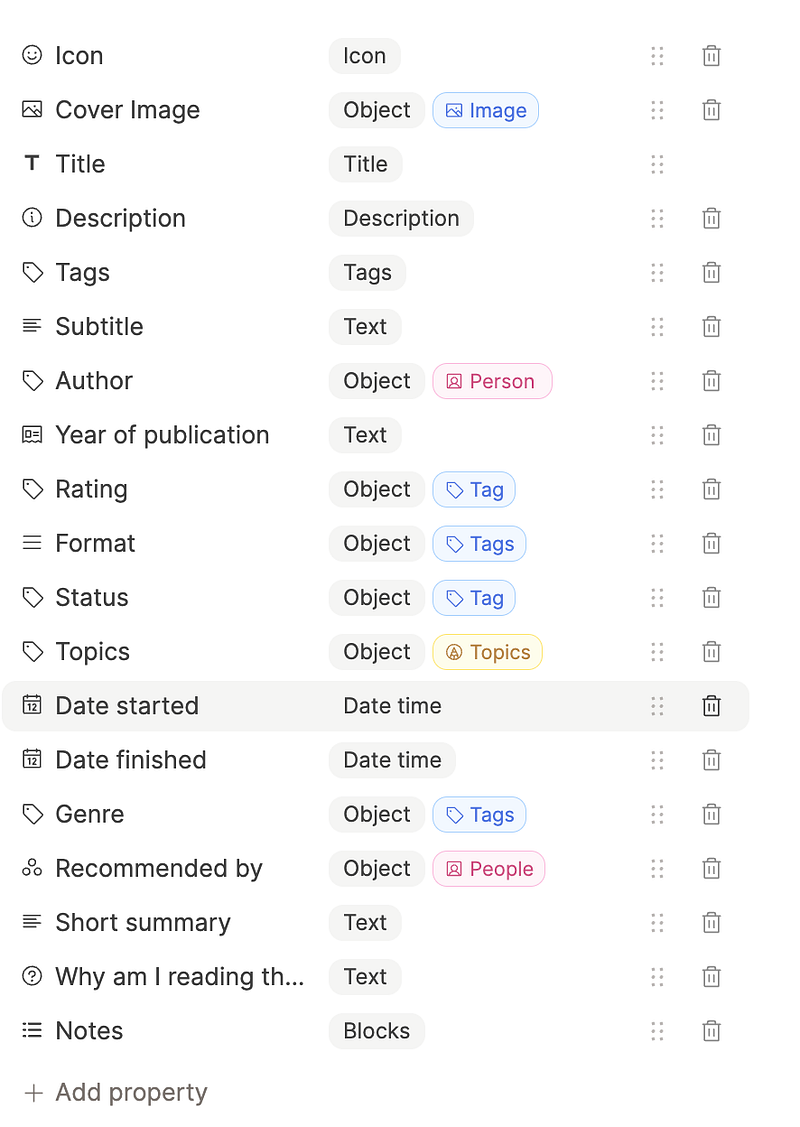
As I said, everything I add to Capacities is intentional, so I only add books that are relevant to a topic I am actively researching and interested in. The way I add new books usually appears in either my daily notes section, or a topic page in my Topics object. Let me show you what I mean.
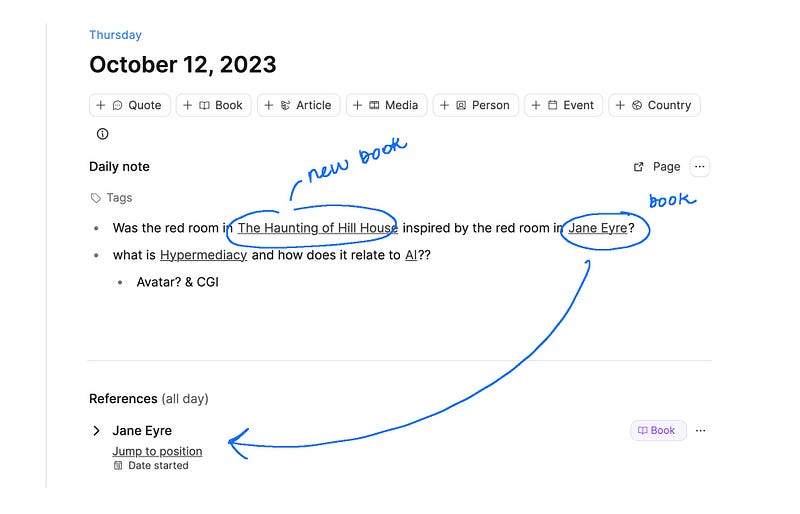
Sometimes I read something, or have an idea and I will jot it down into my daily note on my phone and instantly create the book I was thinking about. Inputting new objects in Capacities is a breeze (+book/title of book). In this instance, I started reading Jane Eyre and remembered that the Haunting of Hill House also has a red room. I wanted to record this to later see if these two things were related.
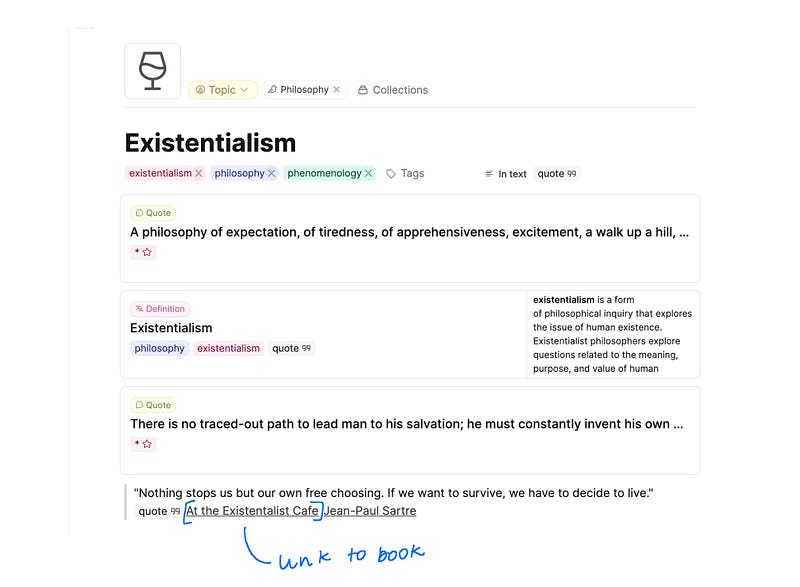
Or, sometimes I am already researching a topic and want to add a quote or excerpt from a book on the subject. This is what happened here when adding to my Topic note on existentialism.
Before reading
Now that my book has been added to Capacities, I insert my ‘new book note’ template into my note.
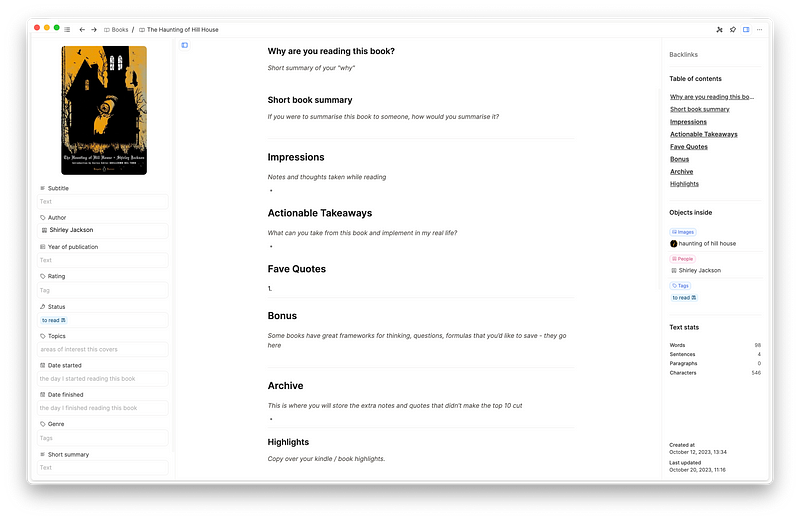
I fill out the ‘why am I reading this book’ section. I always want to have a reason for reading anything. Reasons can range from ‘I want something light and easy to read and this looks fun’, to ‘I want to learn more about life in Russia in the years leading up to the Russian Revolution’.
I also add a short (spoiler-free) summary of the novel to my note. This way, I can always refer back to the summary if I want to describe the book to someone and I can’t exactly remember what it’s about.
I make sure to link my Book note to any other relevant objects within my Capacities database, especially related Topics and Events. Backlinks will evolve organically over time, but it’s good to know where this book fits in to my research right from the start.
I also add some stats about the book like the publication year, who recommended it (if anyone), the format I own the book in and the genre. Then I’m ready to read.
During reading
I usually do not have a notebook open next to me while I read, and I am not much of a physical book highlighter. Taking notes while I read takes me out of the flow of the book, and also feels too much like school. Therefore, I try to keep my note-taking during reading pretty minimal and as interruption free as possible. On Kindle, this is easy, because I can just highlight away and rest assured knowing my highlights are being safely synced to my Notion database. Things look slightly different when reading physical books. Oftentimes, I will scribble something in the margins, or take a picture of the section that interests me and keep reading. I don’t touch my Capacities note for the book while I’m reading, unless there is something really important I want to write down. I have a section for this in my reading notes template called ‘Impressions’, just in case.
After reading
This is where most of the note-taking happens. After sifting through my Kindle highlights in my Notion database, I select a couple that really stuck with me and copy-paste them into my Capacities note. If I read a physical copy of the book, I will manually type the quotes into my note. To be very honest, I prefer reading physical books to e-books, but Readwise has made me a true Kindle convert. It’s just so easy. I then go on and fill out the rest of my template.
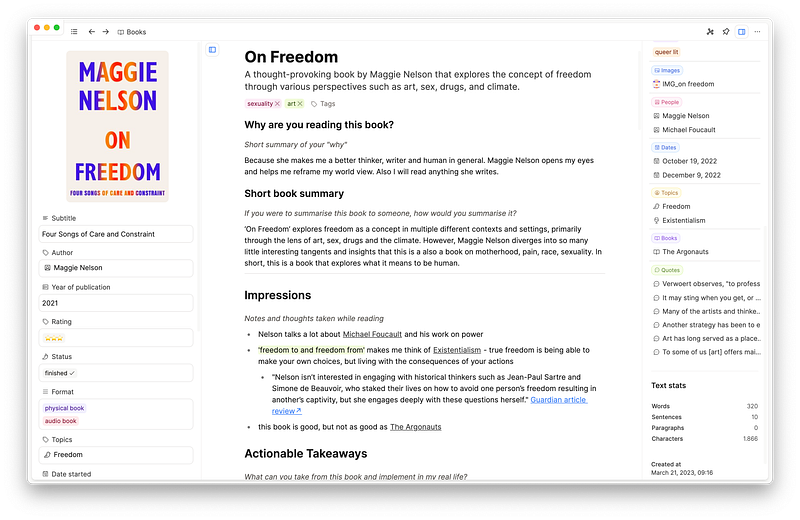
There are a couple things I want to take from the books I read. They are:
- Actionable takeaways
- Favourite quotes
I am also a big fan of Brené Brown’s ‘Integration Index’. She uses the points below to integrate the book she has read into her life, which is what I try to do as well. She notes down the following:
- Beautiful words
- Definitions
- I don’t get this
- I want to work on this
- Quotes
- Read more on
- SO HARD
- Takeaways
- To talk about with
- Dig into research
I especially love how she is always looking to further her research and dive deeper with her ‘dig into research’ section. This is something I am trying to do more of as I read and take more notes. I plan on using parts of her integration ideas going forwards.
Once I have finished taking my note and filling the template out, that’s it! As the books I read are all very much related to ideas and themes I am interested in, they will form backlinks to other notes, books and topics over time.
Reading is meant to be fun
I do want to mention that I don’t do this for every book I read. Reading is my main and favourite hobby. Most of the time, I read for pure joy and entertainment. Reading is a sacred activity to me, and I want to protect my reading time and headspace above all else. I wouldn’t be able to do that and read the amount of books I read if I took detailed notes on every single one. I only take notes like this on the books that link into my existing research, or that I believe I will be referencing in my day-to-day life and conversation. So I mainly only do this for non-fiction books, and some fiction books that link into the topics and interests in my PKM. But this is where Readwise is so helpful. I can passively highlight sections of any book I read, and I know that if I ever want to make a reading note on it in the future, the highlights are right there waiting for me.
Everyone interacts with books and literature differently, and I definitely don’t believe my way is the best and only way. This is just what works for me when I want to dive deeper into the books I read in a way that engages my curiosity and furtheres my knowledge.


