
How I Stickied the Notebook Pane on Evernote for the Web
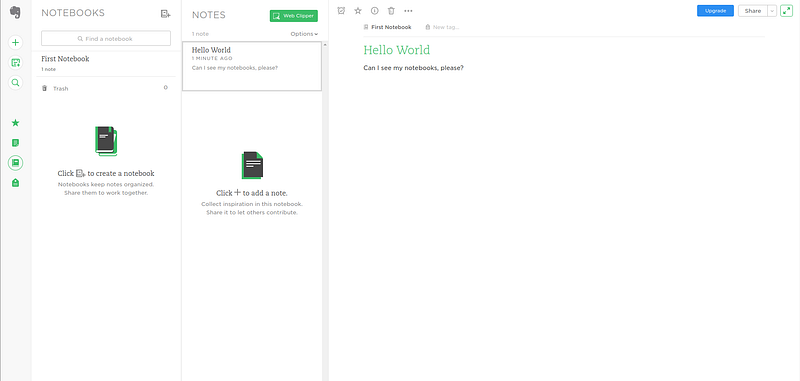
So, I’ve been using Linux (Ubuntu + Unity) a lot more lately, motivated by my growing distaste for virtualization and the current (horrifically slow) state of WSL (Windows Subsystem for Linux). Being a long-time, devoted user of Evernote, I started hunting around for a decent Evernote client for Linux.
Don’t listen to what they tell you…
There is no good Evernote client for Linux. Not one of them delivers even half the package you get with the Windows Desktop version of Evernote. And Evernote has explicitly stated they have no interest in pursuing a Linux version (https://help.evernote.com/hc/en-us/articles/208313748-Evernote-on-Linux). Their suggestion, NeverNote (now NixNote), pales in comparison to even the web version of Evernote.
And so, with that…
I now use Evernote on the web. However, this came with a drawback… I switch between notebooks frequently in Evernote. An experience that is a breeze in the Windows desktop version, but a nightmare on the web. Sadly, Evernote for Web stubbornly tucks away the notebooks pane in a drawer with no configuration option in sight.
But, I’m a web developer (I said to myself) and these little tweaks are trivial, especially with a little jQuery (I know, but it still has its usefulness) sprinkled on top. So, I hacked something together and threw together a little gist I thought I’d share with you all. Just copy and paste this code into a browser extension that executes JavaScript for you when you access a particular domain (I personally use this guy: https://chrome.google.com/webstore/detail/custom-javascript-for-web/) Also, be sure to enable jQuery. In CJS there is a dropdown option that lets you load in jQuery 2.0 with zero (0) effort.
Here’s the code you’ll want to inject into Evernote. Not the prettiest, but it does the trick:
Feel free to tweak as you see fit and let me know what you come up with!


