
How I scraped IPL Auction data using Beautiful Soup
IPL 2020 data scrapped from scratch!
Python does nearly everything — from data analysis, building web frameworks, handling backend, or scraping data from the web. Scraping seems very gibberish-y when people read code. But, it isn’t! That gibberish you read is most often the web elements from which we extract data. Other than that, it is all easy-peasy-japaneesy.
I have scraped IPL Auction 2019–2020 season data using Beautiful Soup. Take a look at what does it take to scrape any website. Mostly, an eagle eye to catch web elements and knowledge of the library. So, let’s scrape!
Libraries included
I have included Beautiful Soup, Pandas, and requests library. Requests library will send the HTTP request, BeautifulSoup will get us the web elements, and Pandas to analyze the data.
from bs4 import BeautifulSoup
import pandas as pd
import requests as rq
Requesting and Parsing URL
I have used the “requests” library to call the URL. After a successful call, I used to “Beautiful Soup” to parse the web elements of the website.
url="https://www.cricbuzz.com/cricket-series/ipl-2020/auction/completed"
get_url=rq.get(url)
soup=BeautifulSoup(get_url.text,"html.parser")
Getting web elements
I used the “findAll” method to bring every name and status into the list using list comprehension. findAll is used to find every single web element using a certain tag. And, you can iterate through them using a loop. Further, extract value from each iteration and append it into a list as I did in the below scenarios.
Name= [i.text for i in soup.findAll('div',{'class':'cb-font-18'})]Sold_Unsold= [i.text for i in soup.findAll('div',{'class':'cb-col cb-col-20 cb-lst-itm-sm'})]Just a little tweaking here and there like replacing ‘\xa0\xa0’ with blank in the Price columns and Sold_To columns.
Base_Price= [i.text for i in soup.findAll('div',{'class':'cb-col cb-col-33 cb-lst-itm-sm text-left','class':'cb-font-16'})]Base_Price=Base_Price[0:len(Base_Price)-3:3]
Base_Price=[i.replace('\xa0\xa0',' ') for i in Base_Price]Final_Price= [i.text for i in soup.findAll('div',{'class':'cb-col cb-col-33 cb-lst-itm-sm text-left','class':'cb-font-16'})]Final_Price=Final_Price[1:len(Final_Price)-3:3]
Final_Price=[i.replace('\xa0\xa0',' ') for i in Final_Price]Sold_To= [i.text for i in soup.findAll('div',{'class':'cb-col cb-col-33 cb-lst-itm-sm text-left','class':'cb-font-16'})]Sold_To=Sold_To[2:len(Sold_To)-3:3]
Sold_To=[i.replace('\xa0\xa0',' ') for i in Sold_To]Role= [i.text for i in soup.findAll('div',{'class':'cb-col cb-col-80','class':'cb-font-12 text-gray'})]Role=Role[0::4]
Role=[i.split(' • ')[0] for i in Role]I included a split function to get the role of each cricketer from the table. My output looked like this:
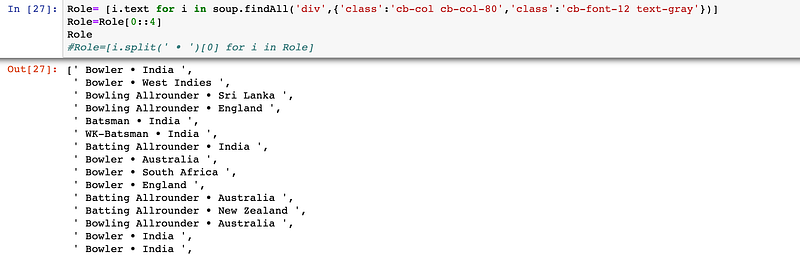
So, I only added the ‘0’th index to my role list.
Final Touch
Finally, bring every column into the datagram. Convert the data frame to the CSV file using the pandas’ to_csv method. And, you are done!
Table=pd.DataFrame({
    "Name":Name,
    "Role": Role,
    "Status":Sold_Unsold,
    "Base Price": Base_Price,
    "Final Price": Final_Price,
"Team": Sold_To })Table.replace("-","",inplace=True)Table.to_csv("IPLAuction2019.csv")It takes nothing but 10–20 minutes to scrape something like this. And, you get a good dataset which you can use to get insights and do exploratory analysis.
Peace!