
How this company saved 160K$ using low-code instead of SaaS.
An acquaintance wanted my help exploring alternatives to big tech names. He was about to sign a 200K$ check to Oracle Netsuite for a 6-month ERP project. I completed it for 40K$ using Retool & Supabase instead. How it went:
In this article I’ll share how we’ve done that with my pals from code.store, the #1 No/Low code agency in Europe.
The Problem & The Wine
In the city of Paris, where art and wine often meet, I stumbled upon Sylvain, the CEO of a 30M$ ARR IoT company. We were at a wine-tasting event that soon turned into a lively gathering among the Parisian bourgeois.
As the music played loudly, I asked Sylvain with teenage-like English, fueled by my second bottle of Cote Rotie, “What’s your pain in the ass these days?”
Not in a better state himself, Sylvain replied with a pained groan, “Mega Excel”, and then fell into a pile of oyster shells. The rest of that night became a blur.
A week later thus, I met with Richard, the company’s sharp-tongued CFO. He explained what Sylvain had meant by the “Mega Excel” issue.
- They sell IoT products and services and user Oracle Netsuite to manage Sales Orders.
- Once validated, Sales Orders are exported into a giant 10.000 rows Excel File (!)…
- …where they manage bookings, revenue breakdowns, and invoices. It’s the financial backbone of their entire activity (> 30M$ of ARR)
- Excel reaches its physical limits, and each operation takes minutes on their computers (!)
- They asked a supplier to configure and adapt Oracle Netsuite and got a 200K$ offer
- Wanted to be sure there are no other ways to solve their problem…
The Solution & The Pain
I started by analyzing my options. I wanted to do the project myself.
Some may argue that it’s counterproductive for a CEO to focus on anything other than high-level strategy. However, I believe that staying grounded and involved in the work offers valuable benefits:
— Enhance sales skills by understanding the ins and outs of project execution.
— Improve marketing copy by being familiar with the strengths and weaknesses of each tool.
— Acquire knowledge in new areas (in my case, Finance and IoT).
Most importantly, have a blast! I’m passionate about coding and low-code projects. There’s nothing more rewarding than witnessing happy users whose lives have been made easier by the tools I’ve helped create.
So I’ve used our internal 850+ bible of no & low-code tools and tried :
- Xano > Eliminated because I wanted to make complex SQL queries, and Xano UI would be too limiting and I did not want to reinvent the wheel with their functions no-code.
- Airtable > Absolutely useless brick, if you need to make jointures or calculus on columns.
- Google Sheets > Honestly would probably work, but I really felt scared by the over-complex API and limited capabilities in jointures
- AWS Dynamo DB > Would work, but I would need a GUI on top of it, and the setup was too long.
- Retool Database > Tested their beta, but features were limited and the CSV import I’ve tried did not work correctly (dates, strings, and foreign keys are not managed yet).
- Supabase > Perfect fit in this case. Full SQL Support, a nice graphical interface, and basic API / Authentication support. It’s open-source and their cloud offer is cheap and took me 5 min to set up.
And for the front end:
- WeWeb > I love the tool, but its tables and other input components are not ready for complex financial tools as this Mega XLS project.
- Custom-made React > Would work perfectly, but I wanted a Build-Operate-Transfert engagement, where the support & maintenance would be given back to the client. So I needed a low-code tool.
- Admin Forest > Setup was easy, but their customization and admin screens are from the 90s, I abandoned the battle after 30 mins of fighting with their UX.
- Retool > Perfect fit, I can write plain SQL and connect to Supabase within 3 min.
Let it be : Retool + Supabase = 💝
How we did do it?
It all starts with incremental exports in XLS for validated Sales Orders from Oracle Netsuite. Exports are manually downloaded from there, with no API, and no automation.

A file with a set of 20 columns: customer, product or service sold, sales representative, project manager, quantity & amount, etc..
Import XLS file into Supabase
In the dim maze of automation, I faced the challenge of importing a simple XLS file into a Postgres DB. To my surprise, unsolved. In our advanced world, it was baffling that after rigorous research, the issue continued to loom like an unwelcome ghost in the low-code machinery:
- Parabola > Never managed to clean dates…
- Hevo > May have worked, but the initial experience was clunky for me: had to go by Google Sheets as Hevo is machine2machine ETL, wasn’t able to load/understand data structures (loaded 21 columns with letters ‘A’), and never managed to transfer 450 initial rows after 5 minutes…. I abandoned.
- Talend > Way too complex for the simple task I had
- Fivetran > Never made it work. I don’t get why it’s so popular
- Airbyte > Never made it past initial connexions.
- Make > Needed Enterprise plans for everything.
I had to ask for help from my team. I needed :
- Clean-up XLS (headers, columns, percentages, amounts, dates…)
- Split rows into Sales Orders and Sales Order Lines
- Create referential data (cube) : project managers, sales representatives, customers, etc..

With an air of mockery, my developers were swift to deride my endeavor: peddling a no-code project, only to resort to developers mere days later — truly a failure.
I was compelled to swallow my pride; however, the fruits of this humbling experience yielded a pristine REST API, nestled within a deployable container. Untouched, an XLS file from Netsuite could be submitted via simple HTTP POST, its contents seamlessly disseminated across multiple Supabase tables.
Many Queries from Retool
In Retool, the pathways to reach your back-end data are manifold, be it through REST or GraphQL API, or even SQL. With Supabase fully operational, the most straightforward course for me involved the utilization of plain SQL.
A near-decade had elapsed since I last penned an SQL query. The distinctions between LEFT, RIGHT, INNER, and OUTER JOINs? I too found myself adrift in that sea of confusion; but, merely 24 hours had passed since my plea for assistance to my team with XLS import into Supabase, and the embarrassment of seeking aid once more weighed heavily upon me. Thus, I beseeched the aid of ChatGPT-4 to extricate me from my trouble.
I first wrote simple SQL to get schemas of my Supabase tables:
SELECT
   table_name,
   column_name,
   data_type
FROM
   information_schema.columns
WHERE
   table_name = 'SalesOrder';
Then a simple prompt for ChatGPT-4 :
“Act as a database administrator. I will provide you separately descriptions of my tables. Do not answer anything but “UNDERSTOOD” each time.”
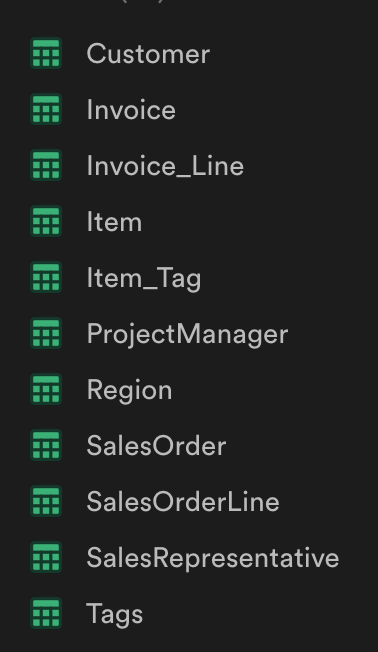
I pasted one by one the 11 tables’ schemas :
| table_name | column_name                      | data_type                   |
| ---------- | -------------------------------- | --------------------------- |
| SalesOrder | id                               | integer                     |
| SalesOrder | customerId                       | integer                     |
| SalesOrder | date                             | timestamp without time zone |
| SalesOrder | endUserId                        | integer                     |
| SalesOrder | oppCategory                      | text                        |
| SalesOrder | entity                           | text                        |
| SalesOrder | sourceOpporunitySalesTerritoryId | integer                     |
| SalesOrder | documentNumber                   | text                        |
| SalesOrder | projectManagerId                 | integer                     |
| SalesOrder | salesRepresentativeId            | integer                     |
| SalesOrder | comment                          | text                        |
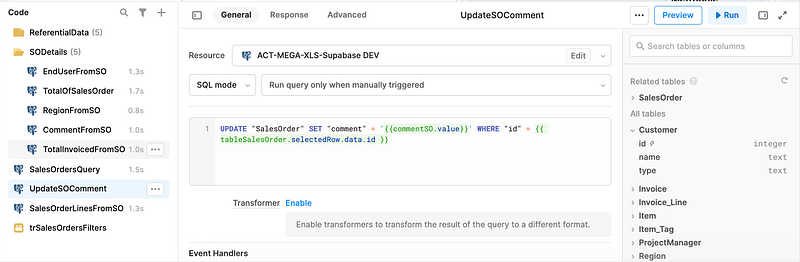
Now I was ready to build all my queries in Retool: a list of all sales orders, details, total amounts, etc.
“Now write an SQL Query presenting me a list of unique SalesOrder with the name of ProjectManager and SalesRepresentative, total amount (sum of all SalesOrderLines), total quantity (sum of all SalesOrderLines), and Customer name”

ChatGPT began to weave its tale, each letter emerging with languid grace, tauntingly slow yet surpassing mortal pace. I found myself enraptured by this ethereal scribe, feeling a twinge of insignificance.
SELECT
  "pm"."name" AS "projectmanager_name",
  "sr"."name" AS "salesrepresentative_name",
  SUM("sol"."amount") AS "total_amount",
  SUM("sol"."quantity") AS "total_quantity",
  "c"."name" AS "customer_name"
FROM
  "SalesOrder" "so"
JOIN
  "SalesOrderLine" "sol" ON "so"."id" = "sol"."salesOrderId"
JOIN
  "ProjectManager" "pm" ON "so"."projectManagerId" = "pm"."id"
JOIN
  "SalesRepresentative" "sr" ON "so"."salesRepresentativeId" = "sr"."id"
JOIN
  "Customer" "c" ON "so"."customerId" = "c"."id"
GROUP BY
  "so"."id", "pm"."name", "sr"."name", "c"."name"; "so".*,
A mere sixty minutes sufficed: I got all my queries and a few lines of Javascript done. None of them were written by me. Every single line of code here was generated by ChatGPT.
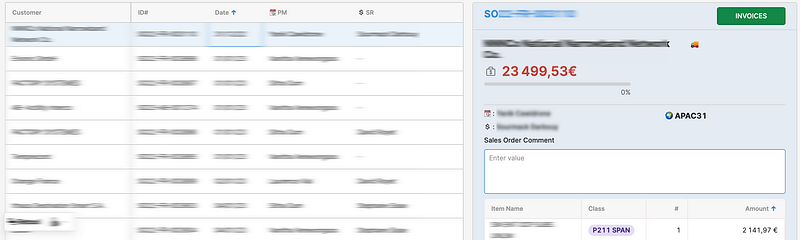
And just an hour later, the first application screen was ready. I was able to browse SalesOrders, filter them, and show all the details.

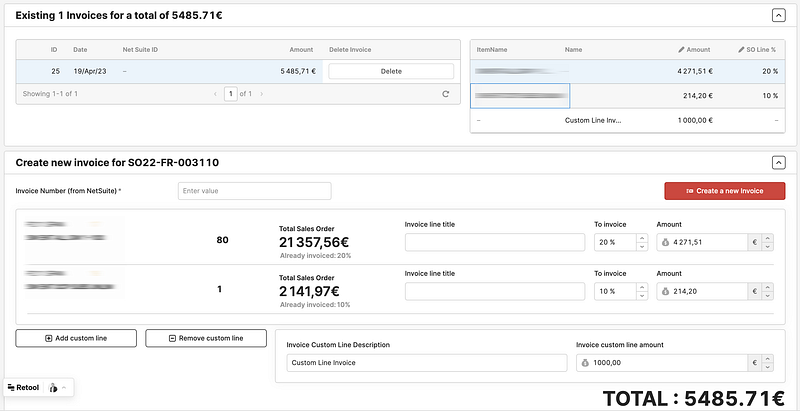
Generating Invoices from Retool
Retool, is a very special tool, where each screen of your application is an independent app from a Retool point of view. It simplifies the overall software logic but requires extra gymnastics like propagating application state or re-use queries.
Undeterred, I embarked on the creation of a new app tailored for invoice management. Their process is straightforward:
- Every week, visits were made to project managers to identify sales orders eligible for invoicing.
- A percentage of each sales order line, be it product or service, was invoiced.
- Custom lines, such as transport or unforeseen fees, might be added to the invoices.
However, Retool’s Achilles heel lay in its limited capacity for manipulating internal components through code. Surprisingly, I’ve spent most of my time on the best way to add invoices custom lines, when the user clicks on a button (add a custom line)…
Retool may prove less than ideal if your project necessitates exacting standards for the responsiveness and behavior of your user interface.
Furthermore, I lamented the absence of their renowned autocomplete functionality within custom Javascript code. Debugging Javascript in Retool proved to be a thorny task, but the assistance of ChatGPT rendered it more bearable.
This article has already been extended to a considerable length. In a subsequent publication, I shall elucidate my endeavors in revenue breakdown and recognition, as well as reporting and dashboard creation. Should you find yourself grappling with analogous requirements, do not hesitate to reach out to us!
