avatarElna Cain

Free AI web copilot to create summaries, insights and extended knowledge, download it at here

2640

Abstract

eyword with at least 600 searches per month</li></ul><p id="8e74">That’s it!</p><p id="c562">So, I go to Ahref’s Keyword Explorer and choose a topic. For this demonstration, I looked up “how to organize a closet.”</p><figure id="f0ee"><img src="https://cdn-images-1.readmedium.com/v2/resize:fit:800/1*jo3yGWIGWw-PlbMvjhIsDA.png"><figcaption>Ahrefs Keyword Explorer</figcaption></figure><p id="dda4">I can immediately see this is a VERY difficult keyword to rank for, especially since my niche site isn’t even a month old.</p><p id="9f71">So, to find that perfect keyword, I will go to:</p><ul><li>Matching terms</li><li>Set the KD (keyword difficulty) to Max of 20</li></ul><figure id="d71e"><img src="https://cdn-images-1.readmedium.com/v2/resize:fit:800/1*hThJpYJRJnHioNSCMw8bOw.png"><figcaption>Finding the right keyword</figcaption></figure><p id="22fd">Those are fine, but my base is around 600 searches per month, so I’m going to click on some “parent topics” on the right-hand side to find a better keyword.</p><figure id="514f"><img src="https://cdn-images-1.readmedium.com/v2/resize:fit:800/1*XuHa68xa_rEW8hH3EXex0Q.png"><figcaption>Better keyword</figcaption></figure><p id="2444">Bingo.</p><p id="18e5">I found a good keyword. It’s “green” meaning it’s not that difficult to rank for and this topic gets searched a lot (7,000 searches/month).</p><p id="1ed8">But, I still don’t know if this is the perfect keyword. I have go into step two of my blog post outline process.</p><h1 id="cceb">2. Check Keyword on Google</h1><p id="13f0">Just because an SEO tool tells you this is a good keyword to rank for, I need to check on Google who is ranking for this keyword.</p><p id="5f88">If I find big stores like Target or Amazon ranking on the first page, it will be hard for me to get on page one of the SERPS.</p><figure id="350b"><img src="https://cdn-images-1.readmedium.com/v2/resize:fit:800/1*77uy9BIl7_QFVy2sKd_vrg.png"><figcaption>Google Result for keyword</figcaption></figure><p id="317a">I can immediately see the results are blogs, which is a great sign that my new niche site can compete with, but I take a quick look in Ahrefs to see their domain rating, page rating, and backlink profile.</p><figure id="f73a"><img src="https://cdn-images-1.readmedium.com/v2/resize:fit:800/1*-F2Vrt3rK9q7DtoSpuXNgg.png"><figcaption>Comparing Google results in Ahrefs</figcaption></figure><p id="3ee8">Ahrefs tells me there is a site with a domain ranking of 28 raking #4.</p><p id="4100">This isn’t too bad, but I do know it will be awhile for my post to rank on page one. In any case, I’ll use this as my main keyword to build my blog p

Options

ost idea.</p><h1 id="d617">3. Gather Related Keywords (and Put them Into WordPress)</h1><p id="68d1">I use Ahrefs to search my keyword’s related search terms and find ones that are easy “low hanging fruit” words and add them to my Wordpress outline.</p><h1 id="fc8d">4. I Build Out My H2’s With Related Keywords</h1><p id="f094">As soon as I gather my related keywords, I pick out good ones for my H2s. Then, under H2s I’ll add more keywords that make sense.</p><figure id="1763"><img src="https://cdn-images-1.readmedium.com/v2/resize:fit:800/1*nFNqMFeU2wxExxhYGe2iEg.png"><figcaption>Beginning of my Blog Post Outline</figcaption></figure><h1 id="5ab6">5. Gather the Items for my List Post</h1><p id="f7f3">For this particular blog post on my niche site, I will include affiliate marketing as well as inspirational Pin ideas.</p><p id="497e">So I will source Pins and Amazon for ideas.</p><p id="8028">I also know that for each section I need at least 10 items, make it easy to build out my outline.</p><h1 id="65dd">6. Write an Intro and a Few Sentences for Each H2</h1><p id="1768">This is where the actual blog writing occurs. I will write the intro and some transitionary sentences for teach topic leaning into the product or idea and end with a conclusion.</p><p id="46cc">For example,</p><p id="3bbc"><i>“How cute is this grey modern small walk in closet? I love this closet idea! This would be perfect to convert my tiny guest room, and DIY it into a small closet.”</i></p><p id="9f9c">No rough draft — that will end up being published.</p><p id="c37d">If you need more help with SEO writing, feel free to take my <a href="https://twinsmommy.com/seo-your-post/">Free Video Course+Workbook</a> on how I “SEO’d” and existing post to get it to rank.</p><p id="a6ec">If you are interested in writing on Medium, <a href="https://medium.com/@ecainwrites/membership">you can sign up here</a>! Once you sign up you can read all my articles and thousands on Medium!</p><div id="250a" class="link-block"> <a href="https://ecainwrites.medium.com/membership"> <div> <div> <h2>Join Medium and start making money! - Elna Cain</h2> <div><h3>As a Medium member, a portion of your membership fee goes to writers you read, and you get full access to every story…</h3></div> <div><p>ecainwrites.medium.com</p></div> </div> <div> <div style="background-image: url(https://miro.readmedium.com/v2/resize:fit:320/0*DSqCnEM5GgrDN4O1)"></div> </div> </div> </a> </div></article></body>

How I Outline My Blog Post Step-By-Step

Having a detailed outline means you don’t need a first draft

Image from Depositphotos

Two years ago, I wrote a post here on how I write 1,000 words in under an hour. I lay out my writing process from start to finish.

I thought I’d dive deeper on the first part of my writing process: the outline. This part is the bulk of my writing process, and since my outlines are detailed, I don’t even write a first draft.

My outline ends up being my first draft.

How is that so? Here are the steps of how I write an outline for a blog post.

1. I Find a Keyword to Rank For

I have several blogs I own and write for:

  • Elna Cain — my freelance writing blog
  • Twins Mommy — my mom blog
  • Smart Mom Ideas — my lifestyle pregnancy blog
  • FreelancerFAQs — my freelance contributor blog
  • Imperfectly Perfect Mama — my motherhood contributor blog
  • My niche site

It’s a lot, for sure, but I have ghostwriters for my other projects and I’m responsible mostly for Twins Mommy and Elna Cain.

But, I do enjoy writing a post or two on Smart Mom Ideas or Freelancer FAQs as well, I also am creating a lot of content for my niche site.

That’s why it’s important that I have a detailed outline for my blog post, so that when it’s time to actually sit down and write the post, I just have to add some transitionary sentences, check the flow, and that’s it!

And the first step to this entire process is to find a keyword to rank for. I use Ahrefs to find the right keyword.

My criteria for my niche site, for example, is:

  • Low competition keyword with at least 600 searches per month

That’s it!

So, I go to Ahref’s Keyword Explorer and choose a topic. For this demonstration, I looked up “how to organize a closet.”
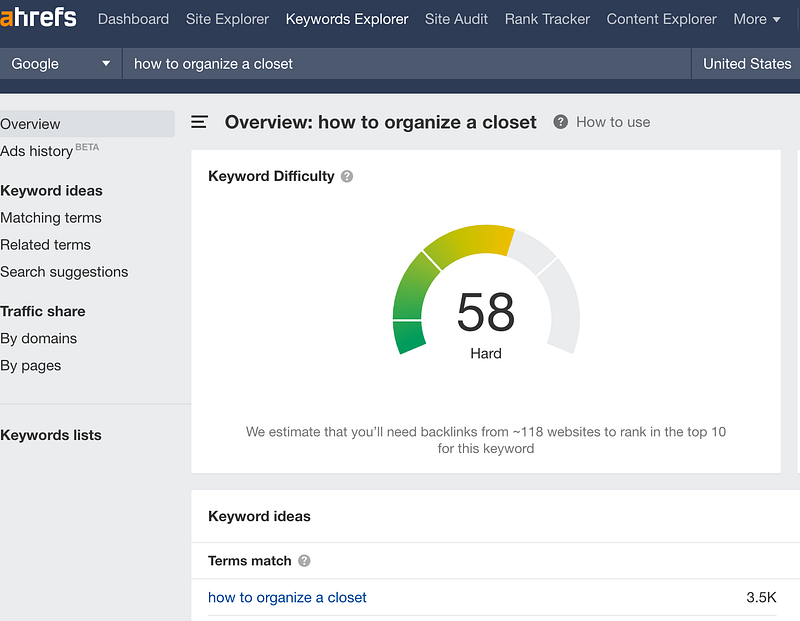
Ahrefs Keyword Explorer

I can immediately see this is a VERY difficult keyword to rank for, especially since my niche site isn’t even a month old.

So, to find that perfect keyword, I will go to:

  • Matching terms
  • Set the KD (keyword difficulty) to Max of 20
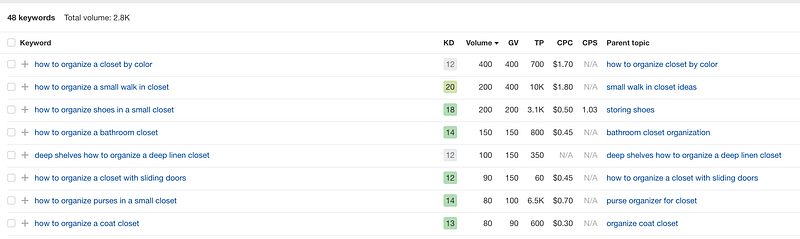
Finding the right keyword

Those are fine, but my base is around 600 searches per month, so I’m going to click on some “parent topics” on the right-hand side to find a better keyword.
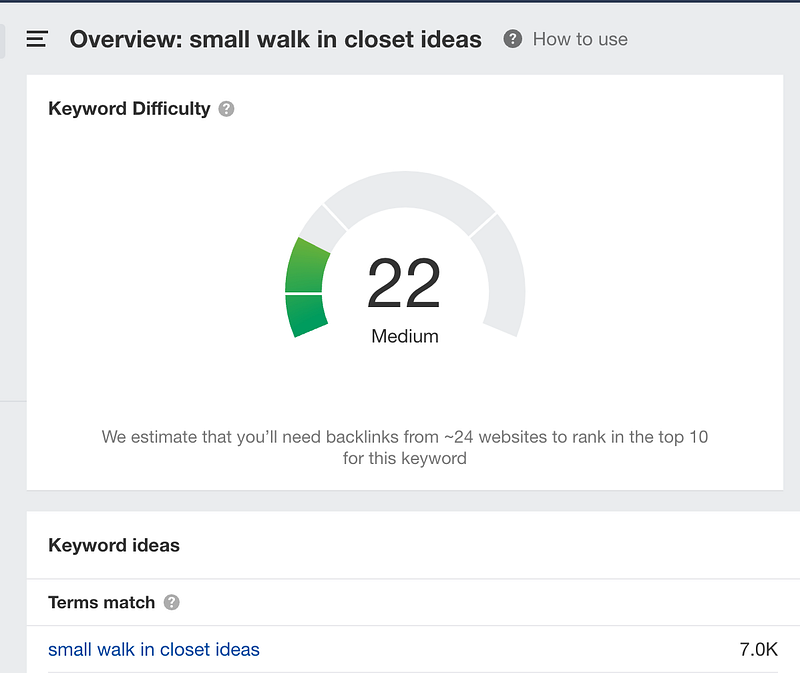
Better keyword

Bingo.

I found a good keyword. It’s “green” meaning it’s not that difficult to rank for and this topic gets searched a lot (7,000 searches/month).

But, I still don’t know if this is the perfect keyword. I have go into step two of my blog post outline process.

2. Check Keyword on Google

Just because an SEO tool tells you this is a good keyword to rank for, I need to check on Google who is ranking for this keyword.

If I find big stores like Target or Amazon ranking on the first page, it will be hard for me to get on page one of the SERPS.
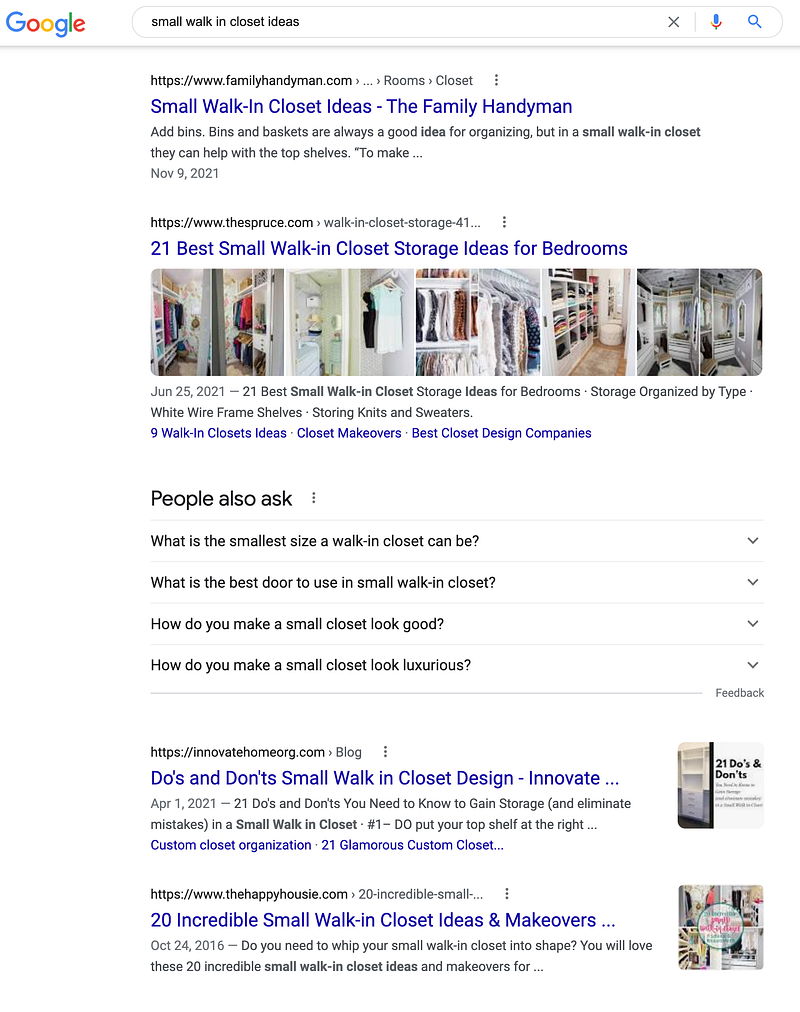
Google Result for keyword

I can immediately see the results are blogs, which is a great sign that my new niche site can compete with, but I take a quick look in Ahrefs to see their domain rating, page rating, and backlink profile.
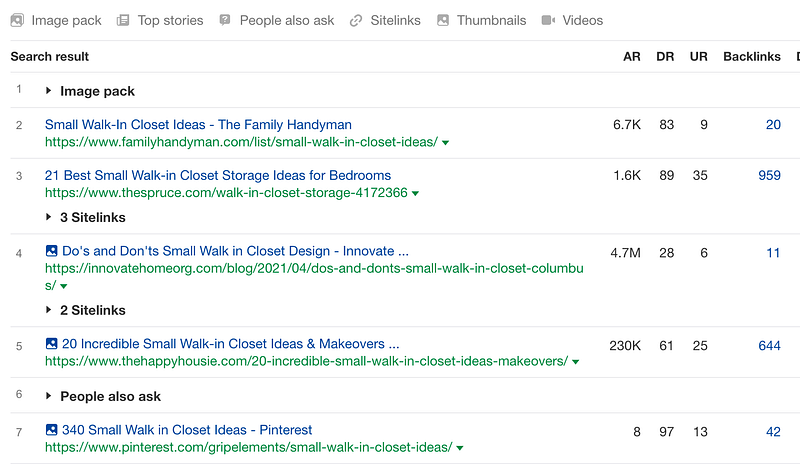
Comparing Google results in Ahrefs

Ahrefs tells me there is a site with a domain ranking of 28 raking #4.

This isn’t too bad, but I do know it will be awhile for my post to rank on page one. In any case, I’ll use this as my main keyword to build my blog post idea.

3. Gather Related Keywords (and Put them Into WordPress)

I use Ahrefs to search my keyword’s related search terms and find ones that are easy “low hanging fruit” words and add them to my Wordpress outline.

4. I Build Out My H2’s With Related Keywords

As soon as I gather my related keywords, I pick out good ones for my H2s. Then, under H2s I’ll add more keywords that make sense.
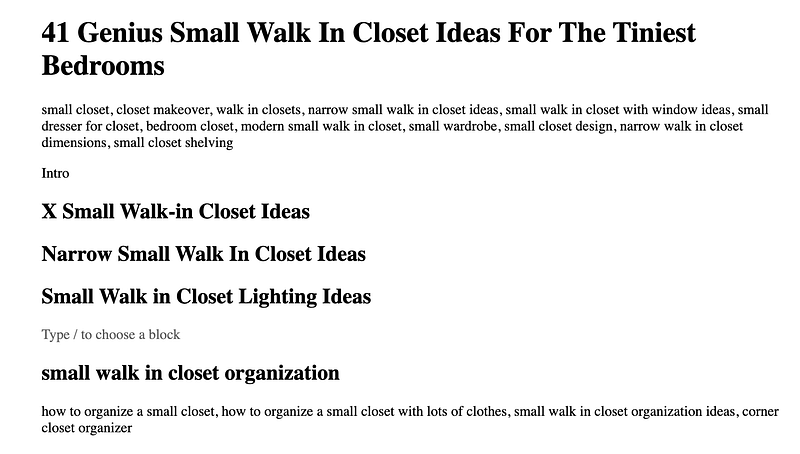
Beginning of my Blog Post Outline

5. Gather the Items for my List Post

For this particular blog post on my niche site, I will include affiliate marketing as well as inspirational Pin ideas.

So I will source Pins and Amazon for ideas.

I also know that for each section I need at least 10 items, make it easy to build out my outline.

6. Write an Intro and a Few Sentences for Each H2

This is where the actual blog writing occurs. I will write the intro and some transitionary sentences for teach topic leaning into the product or idea and end with a conclusion.

For example,

“How cute is this grey modern small walk in closet? I love this closet idea! This would be perfect to convert my tiny guest room, and DIY it into a small closet.”

No rough draft — that will end up being published.

If you need more help with SEO writing, feel free to take my Free Video Course+Workbook on how I “SEO’d” and existing post to get it to rank.

If you are interested in writing on Medium, you can sign up here! Once you sign up you can read all my articles and thousands on Medium!

SEO
Search Engine Optimizati
Blog Post Tips
Blog Post Titles
Writing Tips
Recommended from ReadMedium