

How I Manage my To-Do List to Help Me Stay Productive
The never-ending question of how you can make yourself more productive. Personally, I don’t think the same tactic works for everyone. It requires not only discipline, but a custom system of management to create a reference point in life.

Again, I don’t think there is a full-proof system that works for everyone. I have found it best to read and pay attention to how others work and brings bits and pieces into your own workflow to establish and improve your own system. Because this topic has been requested and I think I’ve started to get a good system going, I’d like to share that with you here.
NOTE: I use Notion.so as my hub for all my notes and to-do lists. I’ve been using it solely for the past year and it has been a life changer. I’ll be referencing it throughout this article and showing screenshots of the app. Not necessary to use it but I recommend it. They are a great team of people making a useful tool.
🐭 The Smaller, the Better
Before even looking at managing a to-do list, first rule is to learn to break up your to-dos. Try to never have a task on your list that is very broad, be sure to break down that task into actionable steps. Smaller tasks lead to more items you are able to get done, leaving you feeling more productive (which is why you’re here, right?). Even if the size of the task can feel silly at times, it can be worth writing down to get more stuff out of your head and onto paper so you can focus. Plus that gives you more points done at the end of the day.
📂 Short-Term and Long-Term Backlog Lists
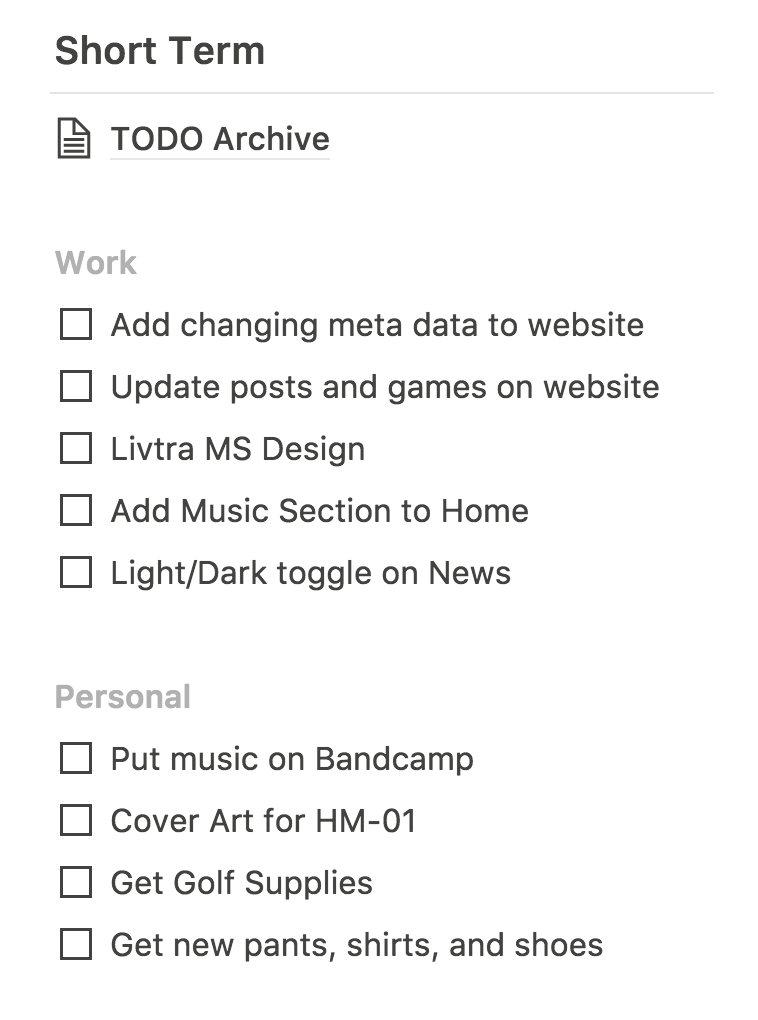
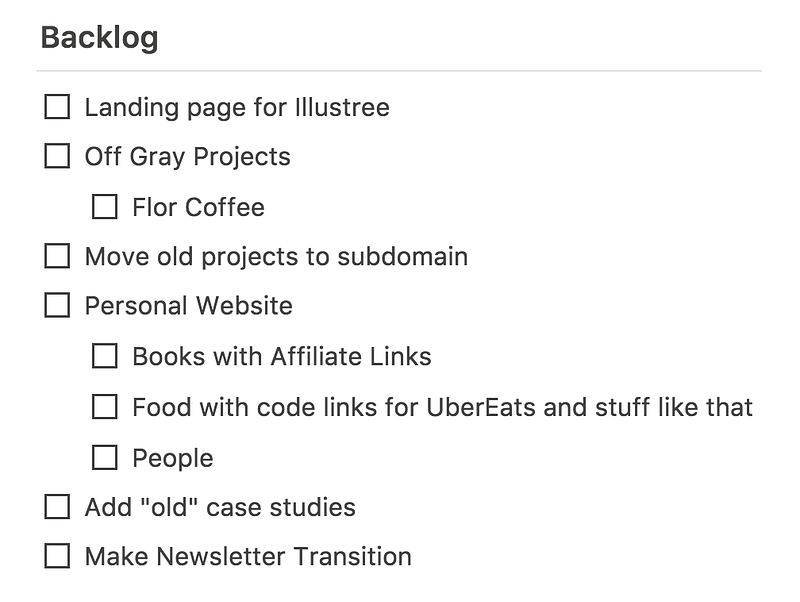
Something that has helped me create a more manageable to-do list is separating tasks into short-term and long-term backlog lists. My short-term list consists of items I want to do or work on over the next 2 weeks. My long-term backlog has to-dos that I can’t work on currently but want to do at some point.
The short-term backlog is not completely reliant on what exists in the long term as stuff can come up, but it’s a good rule of thumb to feed tasks into the short-term list from the long-term list. And be careful not to flood your short-term list with items or you’ll begin to feel overwhelmed. It’s great to be ambitious and want to get a lot done, but be realistic and let the rest live in your long-term backlog.
As you can see below, I also have an Archive “folder” (or a Page in Notion terms) where I put tasks I’ve finished. I don’t really have this to reference much, but more so as an action for completing something. It’s pretty satisfying I will say though 😅.
💼 Work and Personal Separation
You may have noticed in my short term list I have two categories: Work and Personal. Separation here is important to me as it keeps my mindset towards each more predictable and allows me to choose what task to do based on the day and time. Sort of a “separation of concerns” if you will.
For me, my mindset is very much influenced by the environment around me; the time of day, where I physically am, the type of music I’m listening to, if I’m alone or with someone else, etc. The separation here acts as a checking process for what I can do at that moment in time when I check my list.
If I don’t feel like I can focus at that time or I want to watch YouTube while I work for example, I could choose to do a Personal task that doesn’t require much focus. And vice versa, if I’m in the zone and finish a work task, I can move that task into the archive page I have at the top and move on to another task from the Work list.
🗓 The Today Section
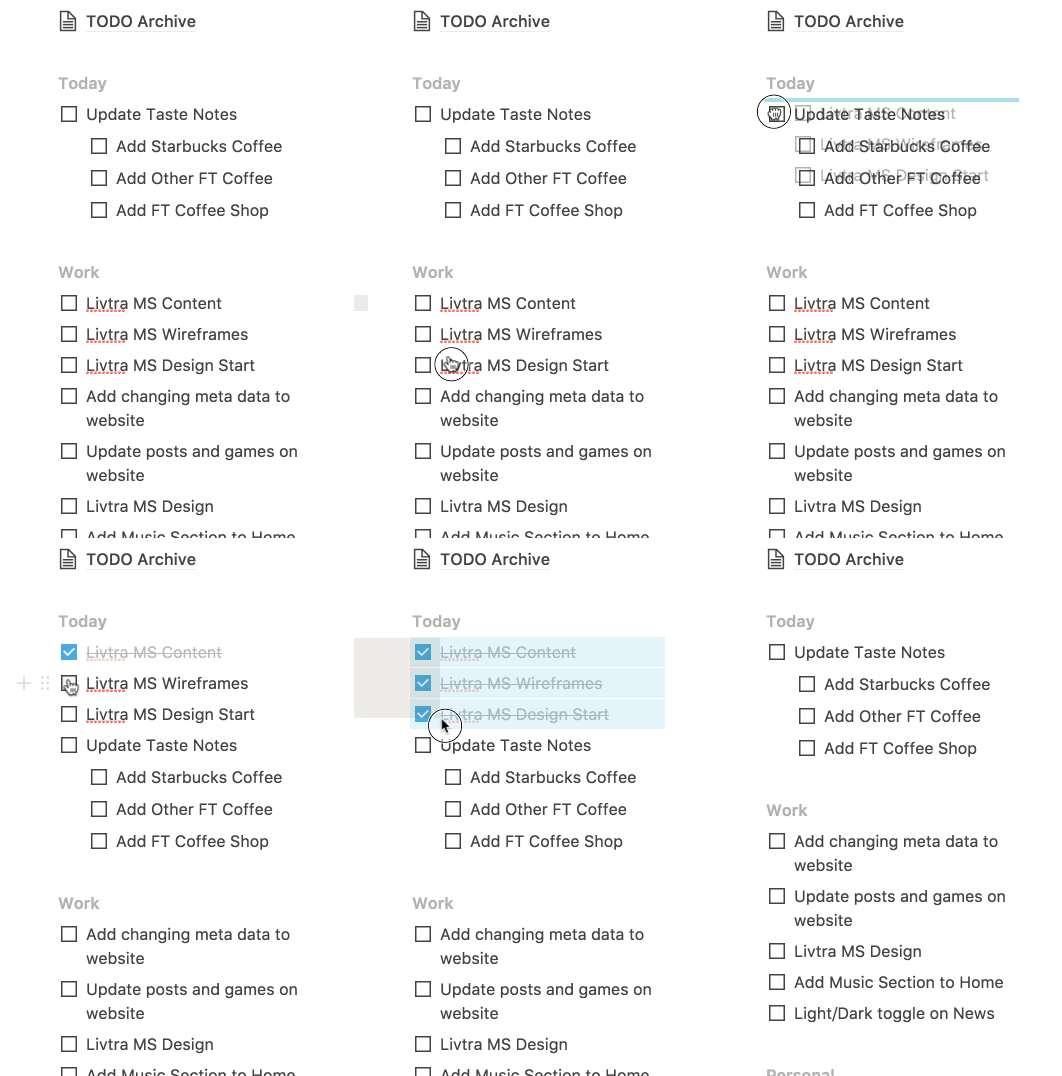
I saved the most important part of the process for last; the Today section (ooo and ahhh here please). The Today section of my to-do list has become the most important part of my task management system.
The Today section acts like it sounds, it acts as the hub for what I want to do that day. Every day when I get on my laptop I head over to my Notion (which I recommend you “pin” in your browser) and think about what I need to do for that day. Usually these come straight from the Personal and Work sections, but stuff can come up.
I drag what I want to do today into the Today section and order them by priority for what I need to get done so I can work down the list throughout the day. Once an item is done, I check it off and drag it into my Archive Page and move onto the next task. See a live demo example above for a visual of this.
This Today section may seem small, but it has made a huge change in productivity for me. Instead of staring at a long list and trying to decide what to do for five minutes, I have what I need to do for that day that I already prioritized that morning. No more time wasted thinking over tasks, I can just get something done, check it off, and move onto the next task at hand.
Like I mentioned before, try to make sure these tasks you assign are doable during that day. Of course it can move on to the next day if it doesn’t get done but being conscious here and making tasks small is paramount in keeping you feeling you accomplished things that day.
With all this said though, don’t stress over a to-do list. It’s a list of tasks that help get them on paper instead of taking up headspace at the end of the day. If you can’t get everything done that you planned that day or your backlog is piling up, it’s okay! We’re all human and doing our best after all. It could just be a sign to revisit the size of your tasks or your prioritization. It’s all about doing your best and iterating on a process that can never be full-proof.
I hope this was helpful, and next week I’ll be going over how I use this in combination with tracking my goals to lead to both a productive and hopefully focused process around your work and personal life.
—
Dennis Cortés Designer & Illustrator that codes, writes, and makes music www.cortes.us