
How I Make Money with Pinterest Affiliate Marketing
It took me 2 minutes to design and publish a Pinterest pin about a product I reviewed on my blog, recently. Within an hour of publishing that pin, I earned an affiliate commission!

Pinterest affiliate marketing is powerful.
I think it’s largely untapped as a channel for affiliate marketing. And, if you can use it the right way, you can funnel buckets of cash into your wallet.
This is the step-by-step strategy for how I make money with Pinterest affiliate marketing.
5 Steps for Making Money with Affiliate Marketing

1. Choose a Niche
First, pick a niche. While niching down isn’t 100% necessary with Pinterest affiliate marketing, I think it makes the process easier and can help you start earning affiliate commissions faster, too.
Examples of niches:
- Gardening
- Parenting
- Fitness
- Fashion
- Food
- Money
Once you choose your niche, you’ll pick an offer (or multiple offers).
2. Identify your audience and choose an Offer
In this step, you’ll hone in on your audience. Who are you targeting on Pinterest?
- Stay-at-home moms
- College students
- Recent college grads
- Empty nesters
Identify your audience you’ll be marketing to and then start choosing affiliate offers that align with them and your niche.
Choosing an affiliate offer
Find an affiliate product you’ll promote.
For example, for the blogging niche, you might choose Siteground hosting. The small business niche might choose the Starter Story subscription.
Gardening might go for gardening products on Amazon. Fashion may use Liketoknowit fashion affiliate products.
Find affiliate offers on affiliate networks like:
- Impact Radius
- Panthera Interactive
- Maxbounty
You could also go to the brand's website to find and apply to their affiliate program directly.
3. Create your Pinterest Business Account
A Pinterest business account is free. It gives you access to metrics like analytics, conversion data, etc. which is extremely helpful for businesses.
Go to Pinterest, set up a Pinterest business account, fill out your profile completely, and then start setting up your pin boards.
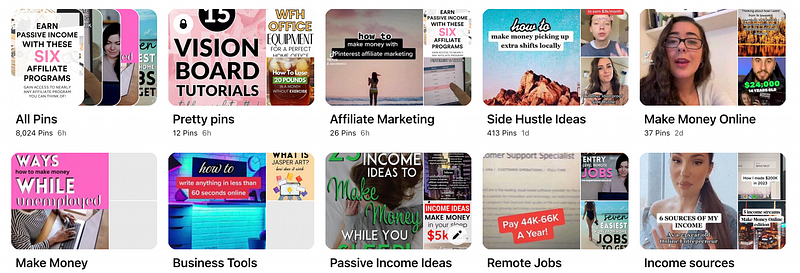
Pin boards are collections. You can group similar pins in these boards.
For example, if you pin chocolate dessert recipes, you could pin them in a Chocolate Desserts pin board which will house all the pins in that category.
It makes it much easier to organize your Pinterest pins.
Create 10 pin boards that are in line with your niche. Write a description for each one, then, start pinning!
4. Pin
Create Pinterest pins using Canva. Download the final pin image and upload it to Pinterest with the:
- Headline/title
- Pin description
- URL
- Notes
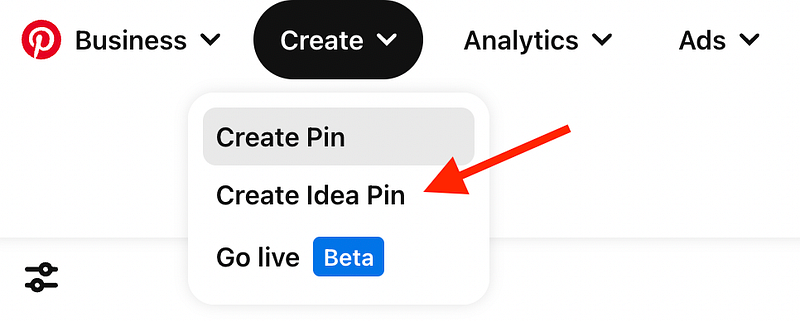
Posting Idea Pins is what I’d recommend right now. It’s Pinterest’s newest pin type and it gets better exposure/traffic than the standard pin.
How much do you pin?
As much as you’d like. It’s easy to pin dozens of pins within 15 minutes or so. It can go really fast.
The more you pin, the better.
You want to pin a mix of your own created pins plus, other pins on Pinterest that you can repin.
In the URL section of your pins, make sure to put a link to your landing page.
DO NOT put the affiliate link there.
Instead, use a landing page like an email signup form or blog post that the pinner will land on, and can convert from that point.
Putting the affiliate link in the URL part of the pin will likely get your Pinterest account suspended because that can be seen as spammy.
5. Track your results
Lastly, track your results. Check what your click-through rates and conversions are looking like.
You can do this on a spreadsheet or Notion template.
Make changes and adjust your strategy as needed so you can get an optimally performing Pinterest campaign and make money from Pinterest affiliate marketing.
That’s how you do it!
FAQ
Your burning questions answered…
1. How much should you pin per day?
I’d start with 5 to 10 pins daily and try to get to a point where you’re pinning 20–30 pins/day.
Do not pin the same pin over and over again (can be marked as spam). Mix it up by pinning your pins and other pinners pins.
2. How can you automate your pinning?
Pinterest has a built-in tool where you upload the pin and you can schedule your pin, instead of posting it, on the spot.
Click Schedule and choose a date/time for publication.

You can also use Tailwind which is a social media posting tool.
3. How much can you make from Pinterest affiliate marketing?
I made nearly $100 within an hour of posting an affiliate pin!
I’m sure there are marketers killing it with Pinterest, earning a full-time income from affiliate marketing + Pinterest.
4. Are Pinterest ads needed?
No, Pinterest ads are not needed to make money from Pinterest affiliate marketing.
Ads are an advanced strategy that you can pursue at any time but, what I’m talking about in this post is organically posting to Pinterest, no ads needed.
Bottom Line
Pinterest affiliate marketing is a fun way to make some money on the side. If you’re successful, this can turn into a full-time income stream as well. If you’re already doing affiliate marketing, try Pinterest as a traffic channel!
Is Pinterest affiliate marketing something you’d try?
Note: Affiliate links are in this article which means if you click a link and make a purchase, I earn a commission at no additional cost to you.
Learn Pinterest Affiliate Marketing with my ebook! Discover the power of Pinterest with affiliate marketing and add an extra income stream to your business.


