
How to Make Inserts Into SQL Server 100x faster with Pyodbc
How I fixed an issue related to “fast_executemany” when loading data to SQL Server

I’ve been recently trying to load large datasets to a SQL Server database with Python. Usually, to speed up the inserts with pyodbc, I tend to use the feature cursor.fast_executemany = True which significantly speeds up the inserts. However, today I experienced a weird bug and started digging deeper into how fast_executemany really works.
Schema of my dataframe and SQL Server table
When I was trying to load my data into SQL Server, I got the error: “Error converting data type varchar to numeric.”
This error was extremely confusing to me since the data types of my Pandas dataframe matched perfectly with those defined in the SQL Server table. In particular, the data that I was trying to load was a time series with a timestamp and measurement columns + some metadata columns.
My dataframe schema:
summertime     bool
time           datetime64[ns]
unique_id      object
measurement    float64
entered        datetime64[ns]
updated        datetime64[ns]
The SQL Server table has a schema similar to this:
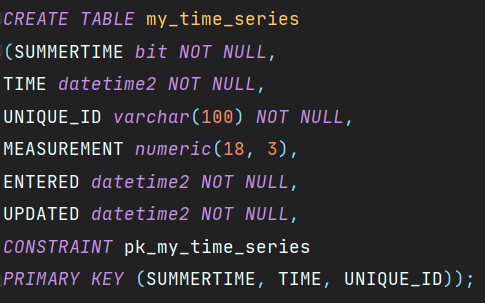
If you look at the data types, they are matching perfectly.
“Error converting data type varchar to numeric”
In order to load this data to the SQL Server database fast, I converted the Pandas dataframe to a list of lists by using df.values.tolist(). To ingest my data into the database instance, I created:
- the connection object to the SQL Server database instance
- the cursor object (from the connection object)
- and the
INSERT INTOstatement.
Note that on line 14, we make use of the cursor.fast_executemany = True feature. Executing the script gave me the following error (with the version: pyodbc==4.0.23):
ProgrammingError: [Microsoft][ODBC Driver 17 for SQL Server][SQL Server] Error converting data type varchar to numeric. (SQLExecute)Why is pyodbc trying to convert something from varchar to numeric?! When I commented out line 14 in order to use cursor.executemany() without the fast_executemany feature, the script worked just fine! I was able to insert my data without any issues.
The only problem is that without fast_executemany, it’s slow.
Digging deeper into “fast_executemany"
According to the Pyodbc Wiki [1]:
fast_executemanycan boost the performance ofexecutemanyoperations by greatly reducing the number of round-trips to the server.
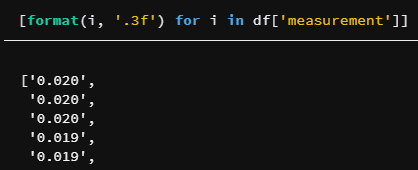
This is the primary reason why I wanted to fix this. According to the Github issue from the pyodbc repository [2], pyodbc internally passes all decimal values as strings because of some discrepancies and bugs related to decimal points used by various database drivers. This means that when my data has a value of 0.021527 or 0.02, both of those values may not be accepted because my SQL Server data type was specified as NUMERIC(18,3). Also, pyodbc needs strings rather than floats, so the correct value would be '0.021' i.e. a string (not float!) with exactly three numbers after the comma.
So my solution boiled down to adding this single line:
This line is just converting floats to strings representing numbers with exactly three decimal points:
Benefits of fixing “fast_executemany”
After fixing the issue, the script ran 100 times faster as compared to running it without line 14 (cursor.fast_executemany = True). Note that it’s so fast because it loads the entire data into memory before loading it to SQL Server, so take loading in chunks into consideration, if you come across out of memory errors.
Conclusion
In summary, I was able to fix the “Error converting data type varchar to numeric” by converting my float column to string with exactly the same decimal point number as defined in the SQL Server table. It was quite surprising to me that pyodbc doesn’t handle that under the hood (or maybe is it fixed in more recent Pyodbc versions?).
If you found it useful, follow me to not miss my next articles.
Resources:
[1] https://github.com/mkleehammer/pyodbc/wiki/Features-beyond-the-DB-API


