
HOW I DID IT
How I Generated 50,000+ Leads With Facebook Ads
A step-by-step tutorial

Follow this five-step process to mirror my success.
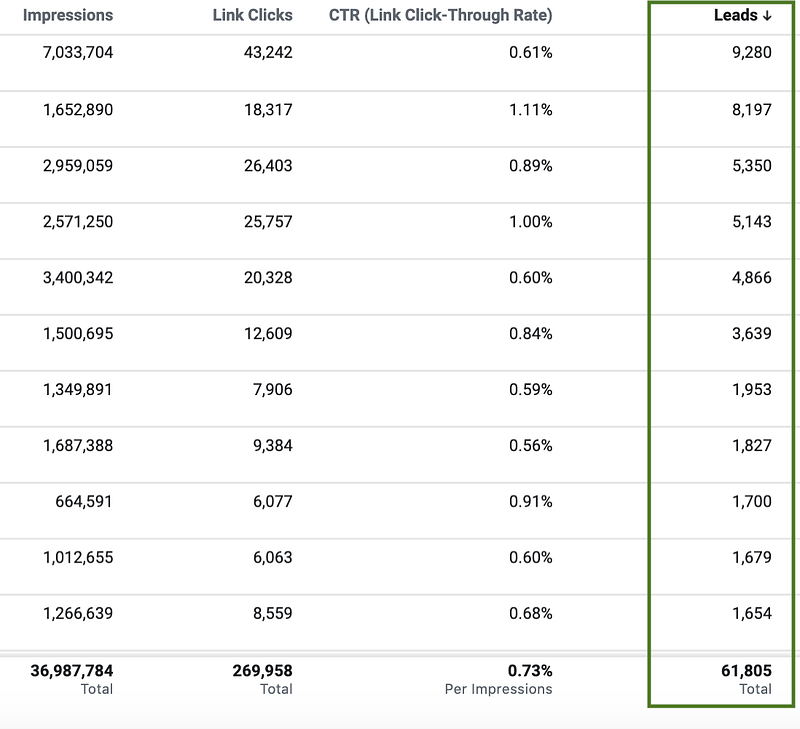
The above screenshot is from the various Facebook marketing campaigns I managed for a national franchise with over 500 locations across the United States. For the past two years, I helped the business generate thousands of leads each month. In the beginning, we started with a budget of $1,000 a month and scaled it to almost $100,000 a month. I successfully managed over $1,000,000 in marketing spend and generated over 50,000 leads.
Want to learn how to properly use Facebook to generate leads or sales for your business? Below are the key strategies I followed to generate 61,805 leads for this brand.
1. Set Up the Facebook Pixel
The first and most important step to launching a successful Facebook marketing campaign is to install the Facebook Pixel. The Facebook Pixel is a piece of code that you place on your website to build targeted audiences, collect performance data, track conversion actions, and optimize creatives. Without installing the pixel, you will be unable to track website activity or make data-driven optimizations for your campaigns.
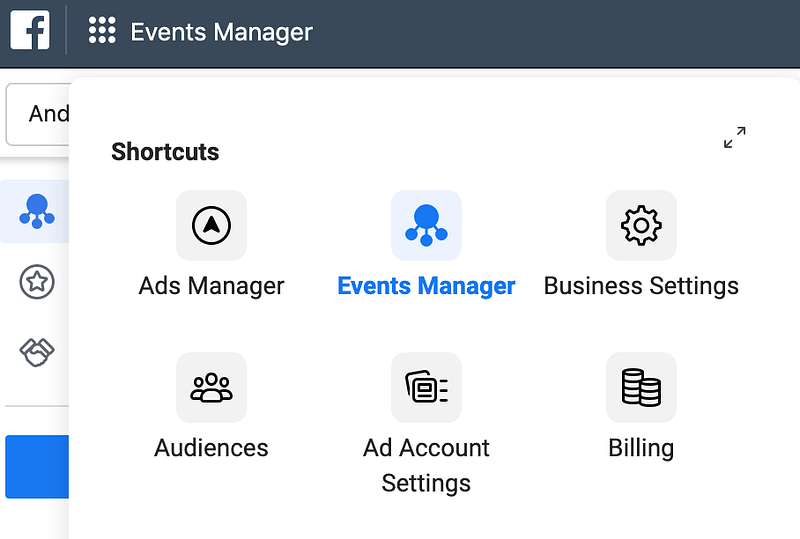
To set up the Facebook Pixel, go to the Events Manager in the Facebook UI.
Click on the green button: “Set up Pixel.”
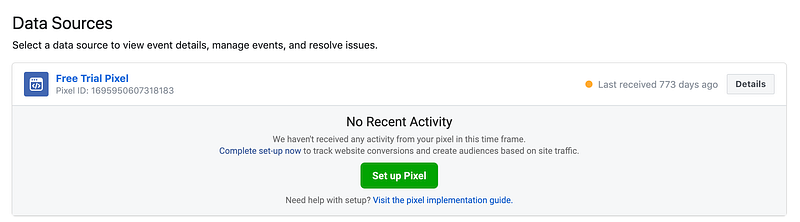
There are three options to connect your pixel to your website:
- API integration: The most common integrations include Google Tag Manager, HubSpot, Wordpress, Shopify, and Magento. Facebook provides step-by-step instructions depending on API integration. I’d recommend going this route since it saves you the hassle and headache of having to manually install the pixel on your website.
- Manually: Facebook provides a Javascript code for you to add to your website. Only go down this route if you are comfortable with web development.
- Email instructions to your web developer: If you work with a web developer, Facebook can send an email with the pixel code and installation instructions to your developer.
Now that your Facebook Pixel is installed, you may have to wait a few days for data to populate. This will be dependent on the traffic levels your website receives. A successful pixel installation looks like this:

After the Pixel is installed, you can build Custom Conversions based on various actions and activities on your website. Once again, go to Events Manager and then Custom Conversions. Below is an example of a custom conversion I am building to track Lead Submissions on my website.
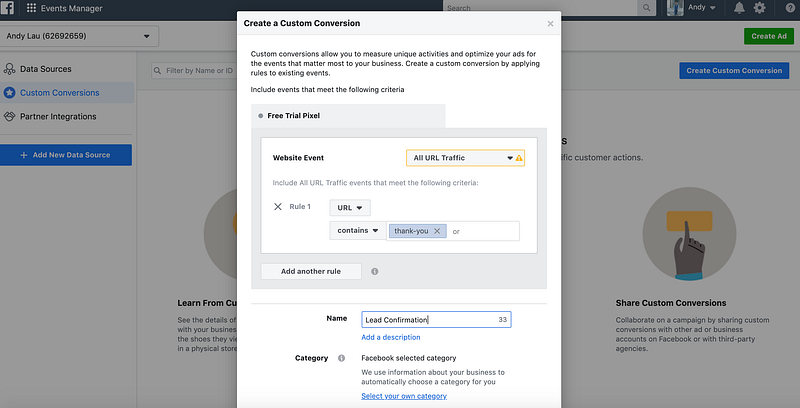
The most common Custom Conversions tracked on websites include:
- Pageviews
- Button clicks
- Add to cart
- Lead submissions
- Phone calls
2. Build Five Different Audiences
The next step is to build audiences. These audiences should mimic the characteristics of your target audience. To create an audience, go to the Audiences section in the Facebook UI.
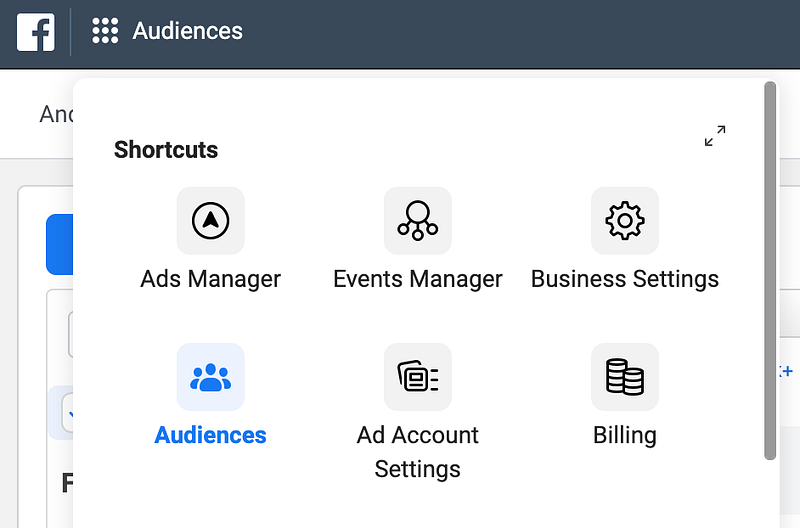
Facebook provides users with three types of audiences:
- Custom Audiences: This includes website activity, customer lists, app activity, offline data, and even activity from your Facebook and Instagram pages.
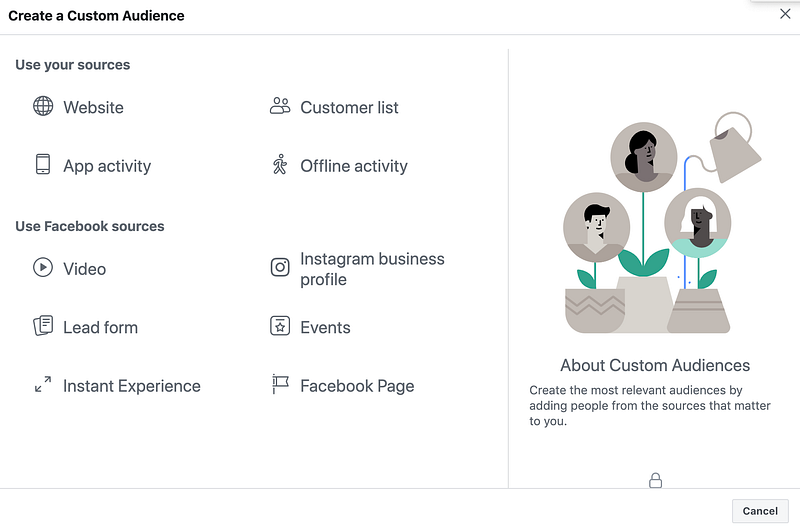
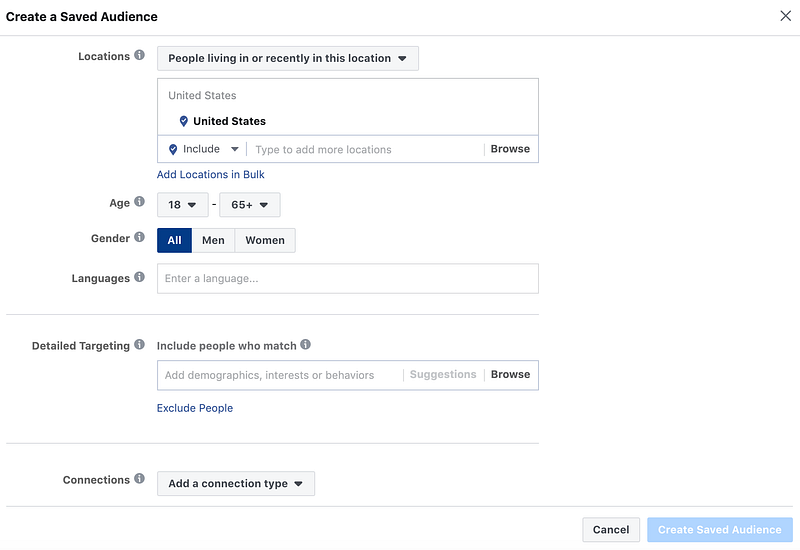
- Saved Audiences: These audiences utilize Facebook’s interest and first-party data. You are able to customize locations, age, gender, languages, demographics, interests, and behaviors.
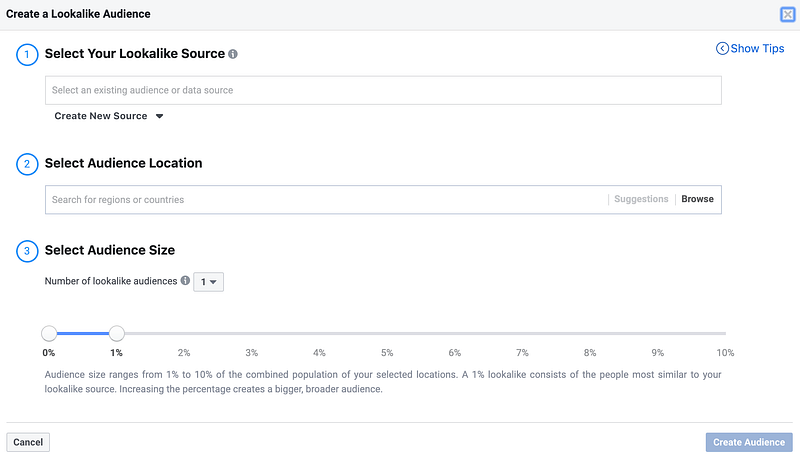
- Lookalike Audiences: Once you build a Custom or Saved Audience, you are able to create a lookalike audience off it. Lookalikes are algorithmically assembled audiences based on the seed audience, as known as the original audience. Select your Lookalike source as well as Audience location. Pick a range between 1% (most similar to your seed audience) to 10% audience (least similar to your seed audience). Click “Create Audience” and Facebook’s pixel will create similar provides of your seed audiences.
I recommend starting with five audiences so you can gauge performance against each one. For example, say your website sells men’s shoes. You may want to create the following audiences:
Custom Audience examples
- Retargeting Audience: Users who visited the site within the last 30 days
- Email List Audience: Users in your CRM database who have not purchased shoes within the last year
Saved Audiences examples
- Fitness Audience: Men aged 18–25 who are interested in fitness, working out, or protein shakes
- Shopping Enthusiast Audience: Men aged 21–35 who are interested in footwear, shoes, fashion, or online shopping
Lookalike Audience examples
- Sales Lookalike Audience: Users who are lookalikes off your offline sales data
- Add to Cart Lookalike Audience: Users who are lookalikes off “Add to Cart” button clicks on your website
It’s important to test various audiences to understand which performs the strongest. Pause audiences that do not perform well and increase the budget for audiences that generate a high return.
3. Develop Compelling Creative
This is what I personally struggle with the most. There are people whose profession is to develop creatives for brands. Lucky for me, I typically am handed a library of assets and copy from the creative team.
However, most of you are probably starting from scratch. What type of assets do you already have on hand? If you have images and videos, you can easily repurpose those on Facebook. If not, go out and shoot some photos with your phone or camera.
Make sure your creative assets meet Facebook’s design and size specifications or else your creative won’t run. Images should be clear and compelling. Carousel and video formats allow you to tell a story.
Writing the copy is the second step to the creative process. It’s recommended to convey your message within 125 characters. Headlines and descriptions are optional but highly recommended. Some ideas to guide your copywriting:
- What is the value proposition you would like to convey?
- Why should someone pick your brand over a competitor?
- How can they buy your product or service?
- Are you offering any special offers or discounts?
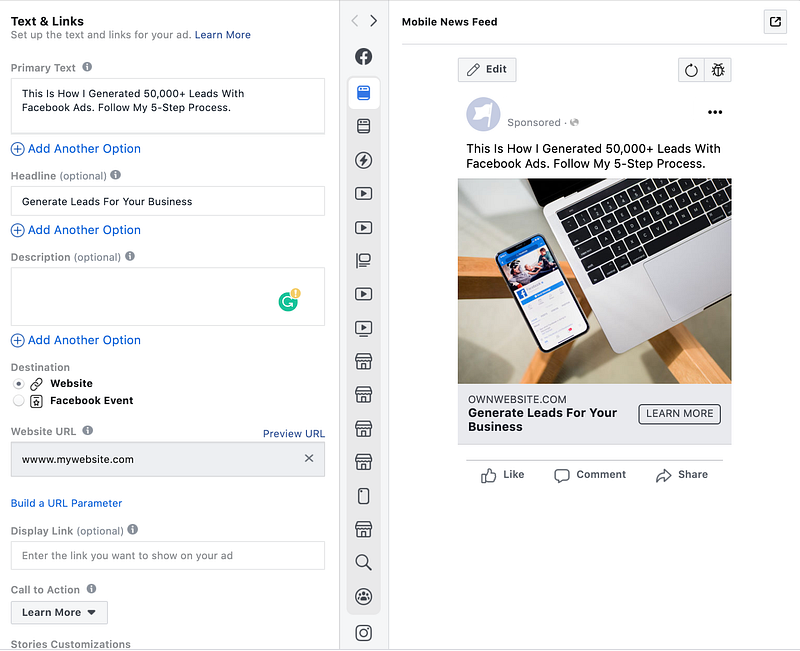
Facebook makes it very easy for you to develop creatives on the platform. When you are building out a campaign, the last step in the Facebook UI is to build the creative. In the screenshot below, you can see the places to put your primary text, headline, description, URL, and call to action. On the right-hand side, you will see the mockup of your creative.
Below are examples of compelling and high performing Facebook creatives. These can serve as a guide to give you some ideas for creative development.
Crunch Fitness
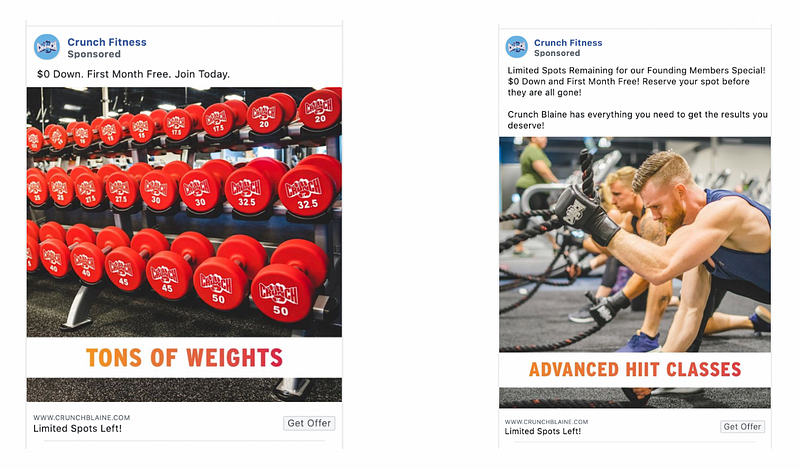
Why are these excellent examples?
- Enticing ad copy: $0 down and first month free
- Ad copy is localized to the region by calling out “Crunch Blane” studio
- Image is clear and showcases the brand's services
- Limited text in the image that conveys brand’s selling points
- Headline creates a sense of urgency: “Limited Spots Left”
- Strong call-to-action button: “Get Offer”
Hubspot
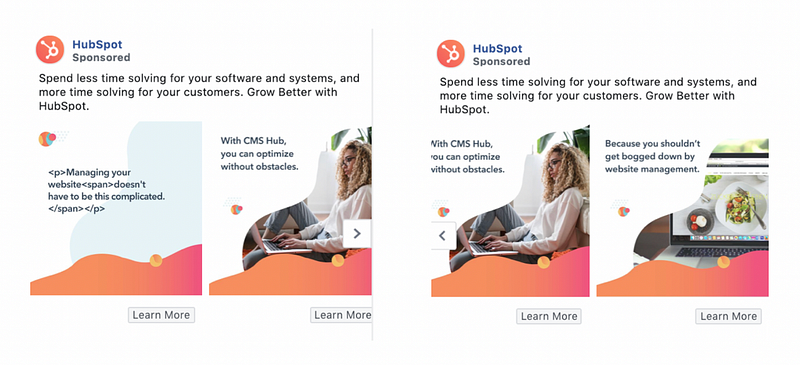
Why are these excellent examples?
- Utilizes three sets of images to convey the brand story
- Ad copy calls out the value proposition for using Hubspot’s services
- Images are colorful, engaging, and relate to the service offerings
- Great usage of text in images to further educate potential customers
- A clear and relevant call-to-action button: “Learn More”
Udemy

Why is this an excellent example?
- Usage of video to convey service offers
- Short, simple, and to the point
- Ad copy calls out value proposition: up to 50% off and satisfaction guarantee
- Clear call-to-action in video and bottom of creative: “Get Offer”
- Showcases the logo at the end of the video for brand recognition
4. Run Campaigns for at Least One Month
It’s important to give your campaigns time to run. A lot of Facebook marketing beginners watch their campaigns like a hawk. However, that’s not necessary.
Let your campaigns to run at least a month to generate data before making any major changes. Facebook recommends at least 50 conversions before making any adjustments to your campaigns. From my experience, you will want to spend at least $500 against each audience to gain significant learnings.
5. Analyze the Data and Optimize
After one month, it’s time to put on your analytical hat. You’ll probably need to polish up your excel skills as there will be large amounts of data to sort through. Vlookups and Pivot tables will become your best friend.
There are multiple metrics to look at and analyze. These include:
- Time, day, week
- Age and gender
- Business location, country, region, DMA region
- Impression device, platform, placement
- Creative performance
You’ll want to find commonalities between audiences and your creative:
- Is there a specific time, day, or week that performs the strongest?
- Do certain combinations of age and gender yield the highest volume of conversions?
- Do certain geographies generate the lowest cost per lead?
- Are there specific devices, platforms, or creative placements that result in the best performance?
- Which creative or creative formats do users most engage with?
- Does certain ad copy perform better?
The key is to increase budgets for top-performing segments, while exclude or decrease budgets for low-performing segments. In addition, based on the data provided, find ways to build new audiences and creatives to test.
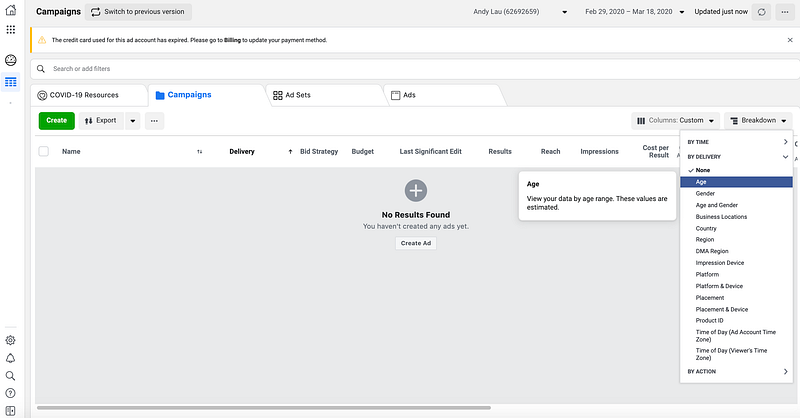
To find these reporting metrics, go to the Breakdown section in the platform as shown below.
Takeaways
If managed correctly, Facebook can help you generate thousands of leads. There are brands that solely rely on Facebook to keep their business afloat. Expert campaign managers recommend to always be testing something, whether it’s audiences, creative copy and formats, or the overall strategy.
As a new marketer on Facebook, following these steps will put you on the path to success:
- Create and set up your Facebook Pixel and Custom Conversions
- Build five audiences
- Develop compelling creative
- Allow campaigns to run for one month
- Analyze performance and optimize


