avatarOscar Leo

Free AI web copilot to create summaries, insights and extended knowledge, download it at here

2619

Abstract

files.sort() <span class="hljs-keyword">return</span> files</pre></div><p id="2556">I have one function to structure the earnings from the JSON data that looks like this.</p><div id="95d0"><pre><span class="hljs-keyword">def</span> <span class="hljs-title function_">get_earnings</span>(<span class="hljs-params">data</span>): earnings = data[<span class="hljs-string">"post"</span>][<span class="hljs-string">"earnings"</span>][<span class="hljs-string">"dailyEarnings"</span>] earnings = [( <span class="hljs-built_in">str</span>(pd.to_datetime(e[<span class="hljs-string">"periodStartedAt"</span>], unit=<span class="hljs-string">"ms"</span>).date()), e[<span class="hljs-string">"amount"</span>] ) <span class="hljs-keyword">for</span> e <span class="hljs-keyword">in</span> earnings]

<span class="hljs-keyword">return</span> earnings</pre></div><p id="5fa9">And one that works for all other stats.</p><div id="2600"><pre><span class="hljs-keyword">def</span> <span class="hljs-title function_">get_stats</span>(<span class="hljs-params">data</span>):
stats = {}

<span class="hljs-keyword">for</span> d <span class="hljs-keyword">in</span> data[<span class="hljs-string">"postStatsDailyBundle"</span>][<span class="hljs-string">"buckets"</span>]:
    date = <span class="hljs-built_in">str</span>(pd.to_datetime(d[<span class="hljs-string">"dayStartsAt"</span>], unit=<span class="hljs-string">"ms"</span>).date())

    <span class="hljs-keyword">if</span> date <span class="hljs-keyword">not</span> <span class="hljs-keyword">in</span> stats.keys():
        stats[date] = {<span class="hljs-string">"member"</span>: {}, <span class="hljs-string">"nonmember"</span>: {}}

    stats[date][d[<span class="hljs-string">"membershipType"</span>].lower()] = {
        <span class="hljs-string">"readersThatRead"</span>: d[<span class="hljs-string">"readersThatReadCount"</span>],
        <span class="hljs-string">"readersThatViewed"</span>: d[<span class="hljs-string">"readersThatViewedCount"</span>],
        <span class="hljs-string">"readersThatClapped"</span>: d[<span class="hljs-string">"readersThatClappedCount"</span>],
        <span class="hljs-string">"readersThatReplied"</span>: d[<span class="hljs-string">"readersThatRepliedCount"</span>],
        <span class="hljs-string">"readersThatHighlighted"</span>: d[<span class="hljs-string">"readersThatHighlightedCount"</span>],
        <span class="hljs-string">"readersThatFollowed"</span>: d[<span class="hljs-string">"readersThatInitiallyFollowedAuthorFromThisPostCount"

Options

</span>], }

<span class="hljs-keyword">return</span> stats</pre></div><p id="732b">I call these three functions using the following primary function, which returns a dictionary with all the data for that story.</p><div id="8957"><pre><span class="hljs-keyword">def</span> <span class="hljs-title function_">get_story_stats</span>(<span class="hljs-params">story_folder</span>):
files = get_files(story_folder)
story_stats = {}

<span class="hljs-keyword">for</span> file <span class="hljs-keyword">in</span> files:
    <span class="hljs-keyword">with</span> <span class="hljs-built_in">open</span>(story_folder + file) <span class="hljs-keyword">as</span> f:
        data = json.load(f)[<span class="hljs-number">0</span>][<span class="hljs-string">"data"</span>]
        story_stats = {**story_stats, **get_stats(data)}
        <span class="hljs-keyword">for</span> date, amount <span class="hljs-keyword">in</span> get_earnings(data):
            story_stats[date][<span class="hljs-string">"earning"</span>] = amount
            
<span class="hljs-keyword">return</span> story_stats</pre></div><p id="d880">Here’s what it looks like in my Jupyter Notebook.</p><figure id="fc88"><img src="https://cdn-images-1.readmedium.com/v2/resize:fit:800/1*_svdKgQYEmzhGKvmb_yMaw.png"><figcaption></figcaption></figure><p id="bef8">Now, I run my analysis or create a data visualization.</p><h2 id="8217">Example: Visualizing my story data</h2><p id="85e8">I will cover the code for creating my story data visualization in another post, but here’s what it looks like.</p><figure id="6bf4"><img src="https://cdn-images-1.readmedium.com/v2/resize:fit:800/1*TcHSL2i3c-Wrrpgxex01bA.png"><figcaption>Data visualization created by the author</figcaption></figure><p id="8ce2">I have created visualizations like this one for my most successful stories, allowing me to detect patterns and differences quickly.</p><h2 id="d975">Conclusion</h2><p id="35e7">With a few minutes of manual labor, you can extract data from your stories quickly (until there’s a better alternative).</p><p id="1a92">With access to raw data, you can better understand why some of your stories perform better than others.</p><p id="5a35">And you can create beautiful data visualizations that tell you everything you need to know in one look.</p><p id="4008">Also,</p><p id="bf92">I’m learning about technology, entrepreneurship, and online content creation. It’s a lot of fun, and if you agree, you should have a look at my <a href="https://oscarleo.ghost.io">Free Newsletter</a>! 😄</p></article></body>

How I Extract Data From My Medium Stories

Accessing stats from my stories to discover what works and what doesn’t

Photo by Emiliano Vittoriosi on Unsplash

The stats page on Medium is decent, but as a data lover, I want a way to export all that data for further analysis.

Luckily, that’s possible with a few manual steps.

Let me show you how.

Step 1: Go to stats and select a story

First, you choose a story of interest on your stats page. When you do, you only see the data from the current month, but you can change that using the monthly dropdown.
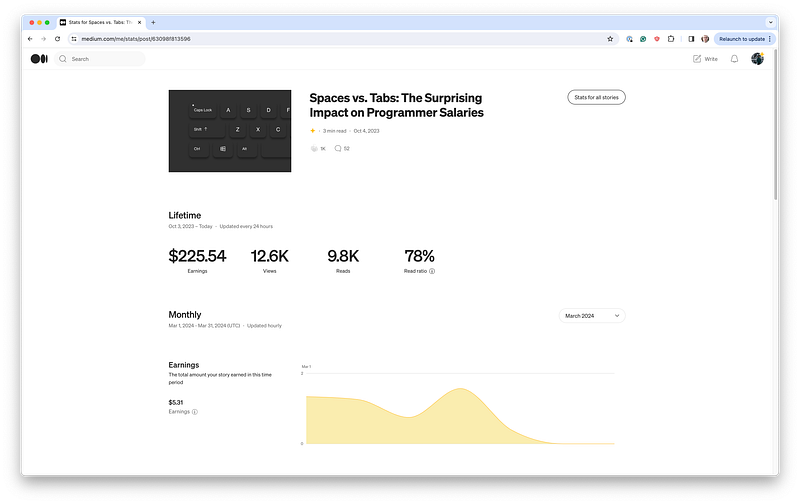
screenshot by the author

Next, you open the developer tools (for example, by right-clicking anywhere on the page and clicking inspect).

If you change the selected month and go to Network → GraphQL → Response, you can see the JSON data from the server.
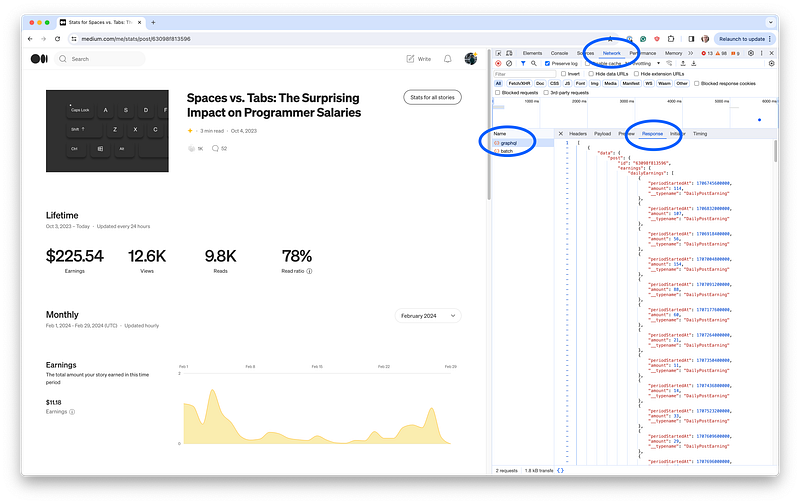
screenshot by the author

I have a folder for each story I want to look at, and I create a JSON file for each month, as shown in the screenshot below.
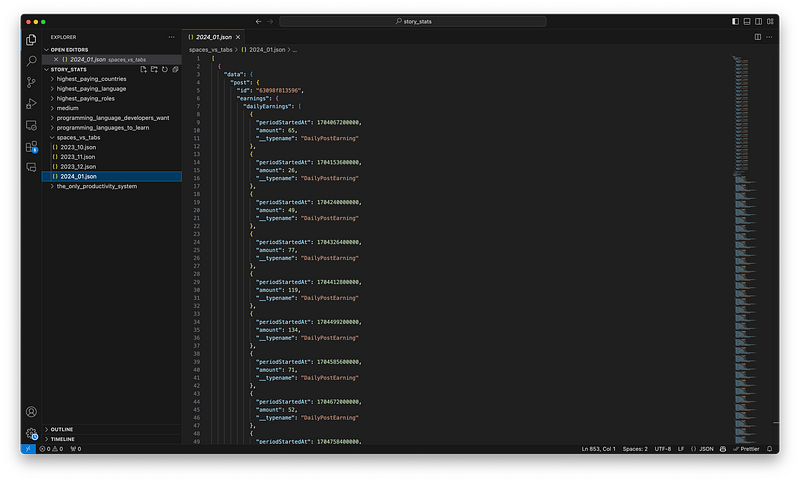
screenshot by the author

It’s a bit too manual, but it’s good enough since historical data doesn’t change.

Step 2: Reading the data in Python

I use Python to look at the data, and the first step is to utilize the following function that lists all JSON files in my story folder.

def get_files(story_folder):
    files = os.listdir(story_folder)
    files = [f for f in files if ".json" in f]
    files.sort()
    return files

I have one function to structure the earnings from the JSON data that looks like this.

def get_earnings(data):
    earnings = data["post"]["earnings"]["dailyEarnings"]
    earnings = [(
        str(pd.to_datetime(e["periodStartedAt"], unit="ms").date()), e["amount"]
    ) for e in earnings]
    
    return earnings

And one that works for all other stats.

def get_stats(data):
    stats = {}
    
    for d in data["postStatsDailyBundle"]["buckets"]:
        date = str(pd.to_datetime(d["dayStartsAt"], unit="ms").date())

        if date not in stats.keys():
            stats[date] = {"member": {}, "nonmember": {}}

        stats[date][d["membershipType"].lower()] = {
            "readersThatRead": d["readersThatReadCount"],
            "readersThatViewed": d["readersThatViewedCount"],
            "readersThatClapped": d["readersThatClappedCount"],
            "readersThatReplied": d["readersThatRepliedCount"],
            "readersThatHighlighted": d["readersThatHighlightedCount"],
            "readersThatFollowed": d["readersThatInitiallyFollowedAuthorFromThisPostCount"],
        }
        
    return stats

I call these three functions using the following primary function, which returns a dictionary with all the data for that story.

def get_story_stats(story_folder):
    files = get_files(story_folder)
    story_stats = {}

    for file in files:
        with open(story_folder + file) as f:
            data = json.load(f)[0]["data"]
            story_stats = {**story_stats, **get_stats(data)}
            for date, amount in get_earnings(data):
                story_stats[date]["earning"] = amount
                
    return story_stats

Here’s what it looks like in my Jupyter Notebook.
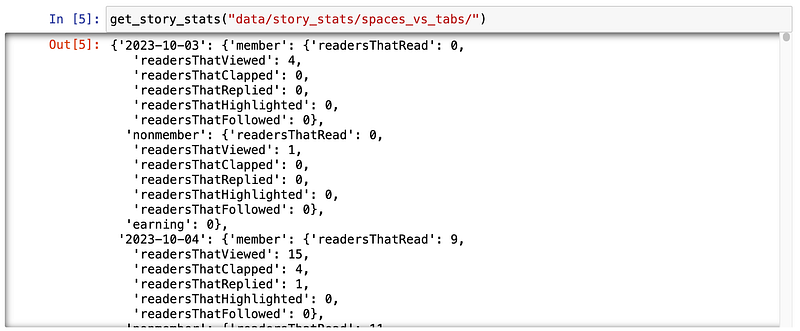
Now, I run my analysis or create a data visualization.

Example: Visualizing my story data

I will cover the code for creating my story data visualization in another post, but here’s what it looks like.
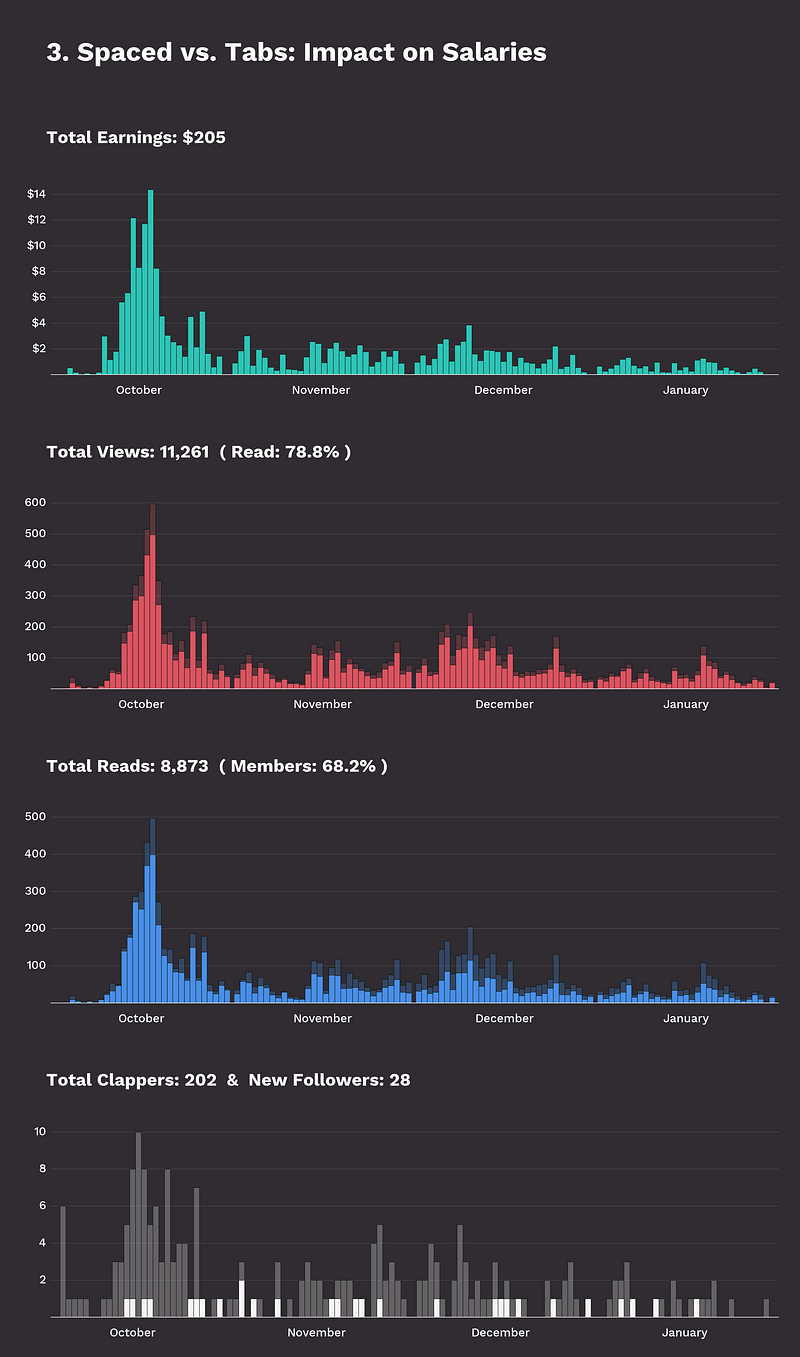
Data visualization created by the author

I have created visualizations like this one for my most successful stories, allowing me to detect patterns and differences quickly.

Conclusion

With a few minutes of manual labor, you can extract data from your stories quickly (until there’s a better alternative).

With access to raw data, you can better understand why some of your stories perform better than others.

And you can create beautiful data visualizations that tell you everything you need to know in one look.

Also,

I’m learning about technology, entrepreneurship, and online content creation. It’s a lot of fun, and if you agree, you should have a look at my Free Newsletter! 😄

Programming
Data Science
Writing
Medium
Data Analysis
Recommended from ReadMedium