
How I Come Up With Great Ideas for YouTube Videos
It works for blog posts, too
Earlier this month, I published an article about my secret YouTube channel, which has grown to 1,300+ followers — and is monetized with a $13+ CPM.
I’ve gotten a lot of excited responses to the article, and a lot of people saying they plan to try out YouTube, too. Today, I want to delve into one aspect of my channel in more detail — how I come up with ideas for videos.
As I shared before, I put basically zero resources into production quality or editing. My videos are usually shot on a cell phone and uploaded as-is. This means their success relies entirely on the information they contain. If they share useful info, they do well.
My channel is about home automation and consumer electronics. Within that broad topic, how do I choose specific topics for videos? And if you’re a marketer and want to get started with YouTube, how should you choose topics for your own videos?
Start With a Hook
First, start with a hook — some basic topic that’s relevant to your audience. For me, this is usually a new product that I’ve purchased to cover on the channel, a new service I’m testing out, etc.
For other channels, this would be a topic relevant to you. So if you’re running a channel about marketing, maybe your hook would be “paid mailing lists” or “Mailchimp.”
The hook is like a seed which then grows into all the other ideas for a particular set of videos. You want a hook that’s specific enough (“home automation” would be too broad) but not so specific that you’ll find zero data (like “pausing music on the Google Home Mini”).
For this example, I’ll use a product that I just recently purchased to review, the Dyson V7 vacuum cleaner.
Use Answer the Public
I start by running my hook through the website AnswerThePublic.com. It has a really unnerving and creepy landing page but is an extremely helpful service with a free tier.
You enter your hook, and the site creates questions about it and then provides search data on how often these questions are asked.
Let’s enter “Dyson V7”. The site presents its results as a circular hub of questions. Here’s the result for that hook:
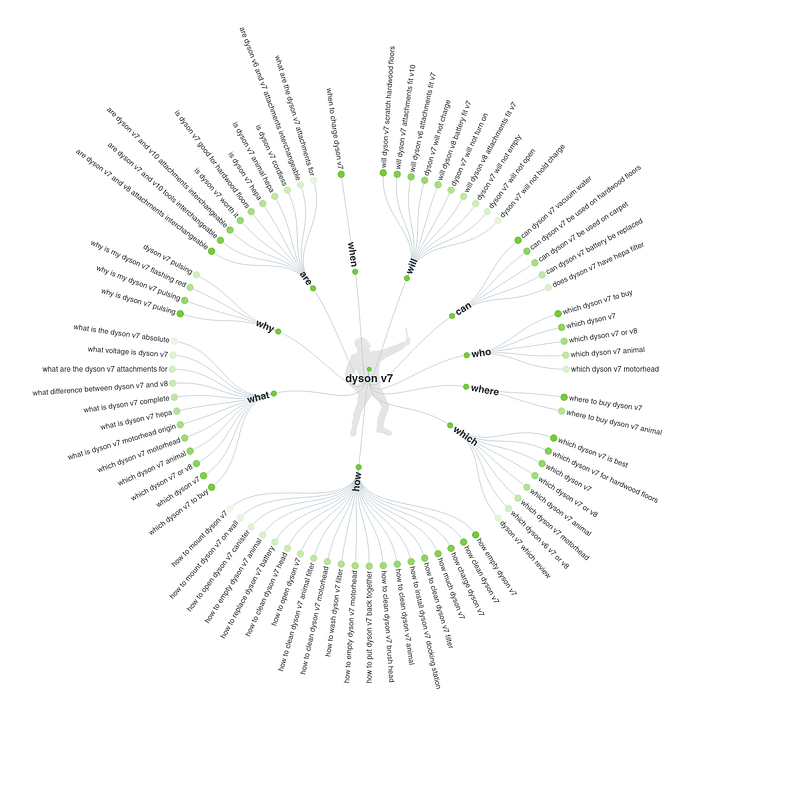
It’s a little hard to see here, but basically, the site has taken some action words (Why, What, How, etc.) and then shown the most-searched terms using your hook and those words. The greener a dot is, the more often it’s been searched.
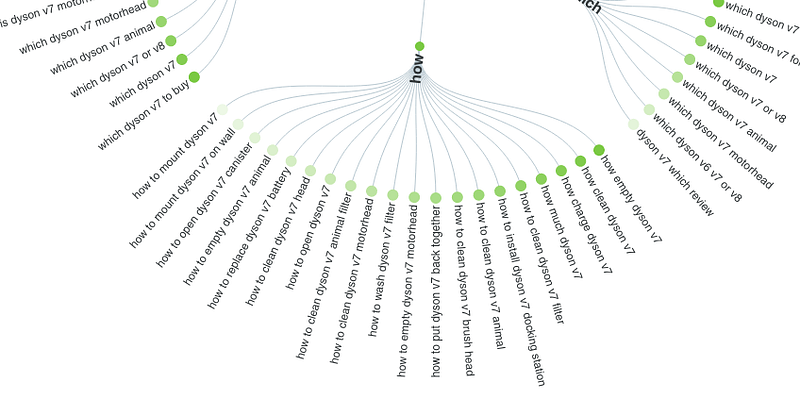
Here’s a close-up of one part of the output:
This output shows the specific questions people are asking about your hook. My next step is to print this graphic out, go through it, and ask myself, “could I answer this question?”
Don’t overthink it. Under How, for example, there’s a question reading, “How empty Dyson V7.” I’ve used the vacuum. I know how to empty it. There’s a video right there. I highlight (yes, with a physical highlighter) anything I think I can answer.
I then sit down and quickly write out videos titles answering each question I’ve highlighted. This usually yields 5-10 video ideas at least. You can pay for a pro version to get even more responses and data.
Wordtracker
My next tool is Wordtracker. With Wordtracker, you enter a keyword or phrase and they give you relevant searches related to that phrase.
They do a bit more keyword expansion than Answer the Public. So when you enter a keyword, they branch out to other relevant topics, rather than just inserting action words. You do have to work at it a bit more, though, to infer the searcher’s actual intent.
Here is some sample output for Dyson V7.
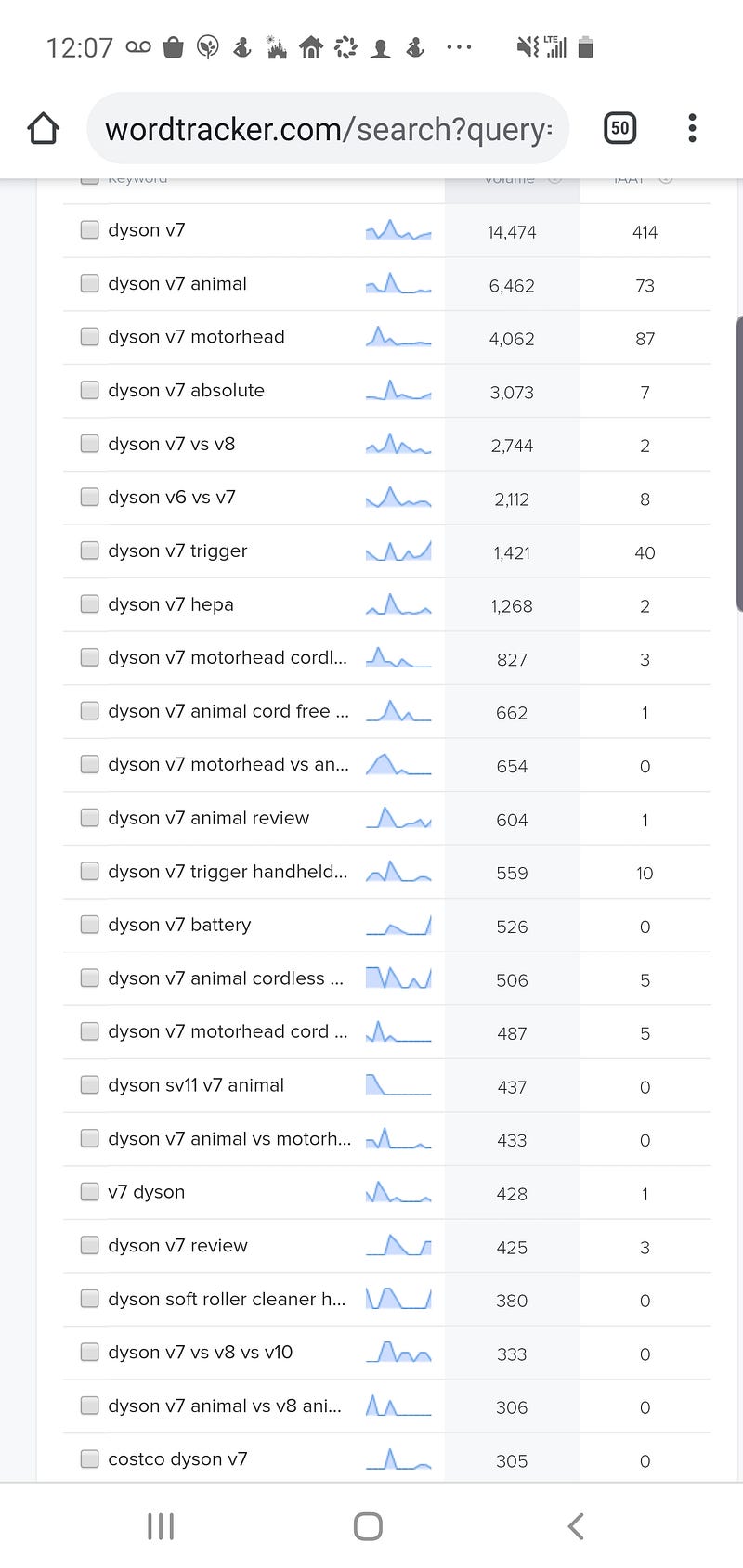
For example, I can look through this and infer that “Dyson V7 hepa" was from people wondering if the vacuum has a HEPA filter. That sounds like a video to me!
I find that Wordtracker tends to provide fewer questions than Answer the People, but will sometimes pick up on a non-obvious search term that ends up yielding a great video. They also have a premium version with more features (like giving suggestions for specific search platforms, including YouTube), but the basic version is free and good enough for my purposes.
Amazon is Your Friend
For product-related hooks, I go directly to the product page on Amazon and look at the questions people tend to ask.
This works great — you’re seeing the actual questions people had before and after buying the product, in their own words.
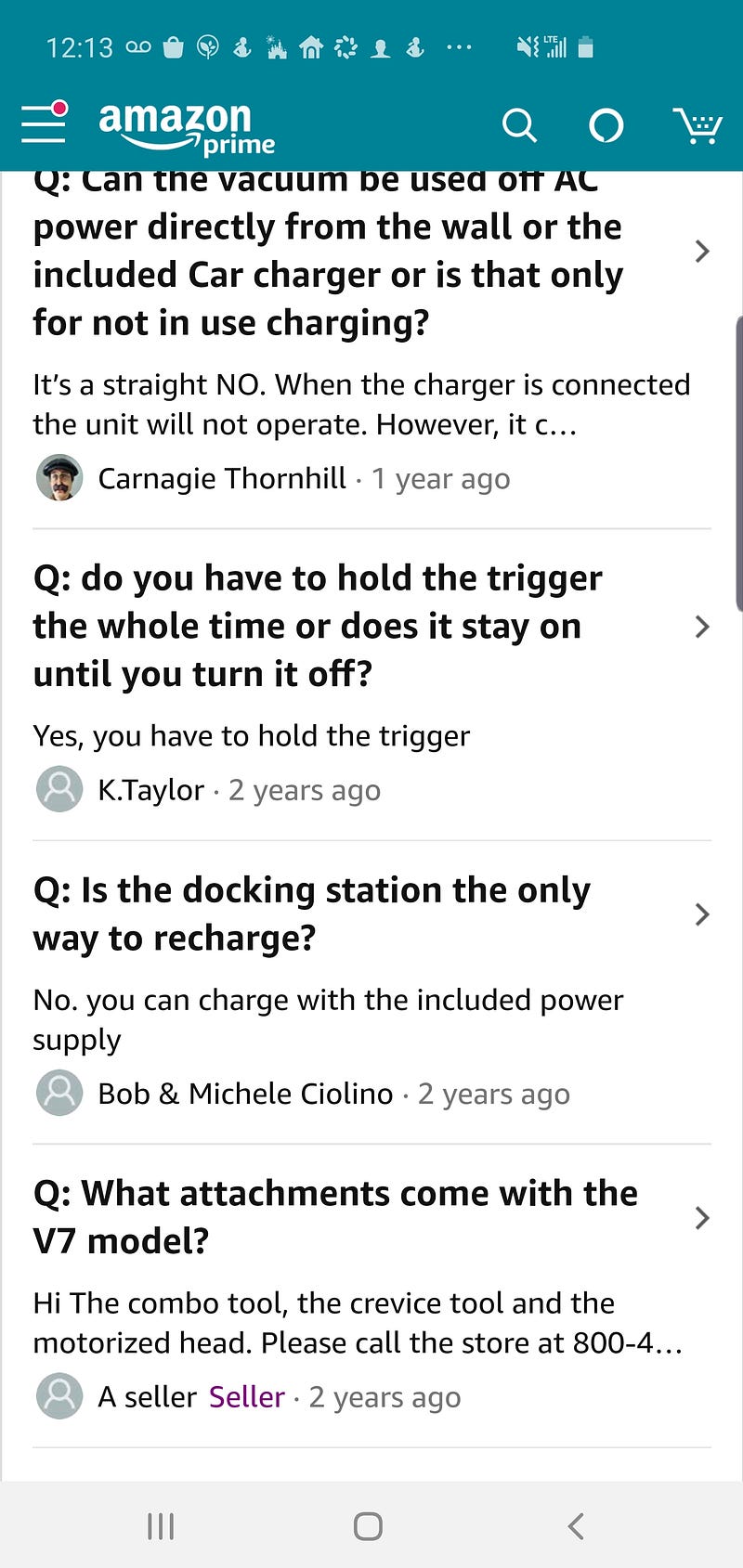
For the Dyson V7, this included a lot of questions about the accessories. So I made a video all about the vacuum’s accessories. By this point, you’ll start to see questions recurring across multiple sources. Everyone wants to know how to charge this thing, for example!
Amazon pages only work for product-related hooks, but if you’re making videos about a product, it’s a great resource.
Google Autocomplete
This is an oldie but a goodie. Go to Google in a full web browser and start to type in your hook. You’ll get autocomplete suggestions for popular searches related to the hook.
You only get a few, but they can be very helpful. You can also enter other words to seed different kinds of videos.
So you could enter “Dyson v7 problem", for example, to see how it breaks and make videos about that.
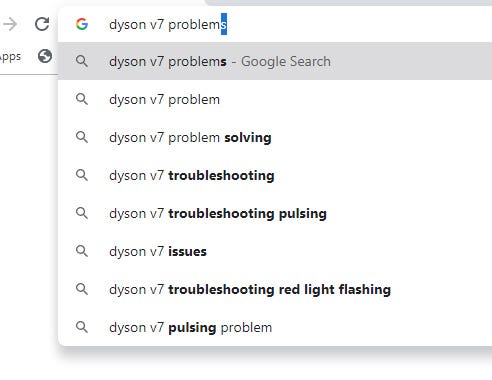
Or for a service-related hook, you could search something like “Mailchimp issue" to see what problems people are having and provide video solutions.
I learned here about a pulsing problem with the Dyson V7. This is obviously something people worry about, so with a little research, it would make a great video.
My Own Video Comments
As I post videos about a hook and people start to respond, I constantly watch for comments that could lead to a new video.
I haven’t made enough Dyson videos to have something I can show you. But as another example, I posted a video complaining about a flexible hose that broke.
A viewer wrote in with a detailed comment about a stainless steel hose his family member used in a construction business. So I bought the hose, tested it out, and did a whole series of videos about it.
Pay special attention to the negative comments — where people didn’t get what they wanted from your video. These are opportunities to make new videos addressing their questions. For every person annoyed enough to complain on your channel, there are probably tons of others who had the same follow-up question but didn’t bother to write in. Negative comments (though not nasty or abusive ones) are your friend!
Use Your Own Experiences
Finally, sit down for five minutes and write down all the specific experiences you’ve had with your hook.
Consider questions about your buyer journey, too. How did you originally hear about the hook? Why did you buy and use it?
Consider good and bad things that have happened along the way. If the hook is a product, did it break? Did someone you know share positive or negative feedback about the hook? Does it look cool, or is it ugly but functional? Write these things down, too.
Then start to use these to brainstorm video ideas. I realized that I bought the Dyson V7 mainly because I wanted a vacuum that I could easily carry out to the garage and use in my car. So I made a video about using the vacuum to clean your car, sharing the specifics of how I do this. This meshed with questions from users on several of the research sites, too.
Anything drawing from your direct personal experience tends to do well. This is especially true if you can describe it in your own voice — it makes your content more real and relatable, which is a big benefit on YouTube.
Bringing It All Together
In the end, I gather all the video ideas from these sources together and make a list. I then sit down, take out my phone, and rapid-fire record videos answering each question or exploring each concept.
I tend to start with the most basic ones first. The video about emptying the Dyson V7 is important to users, but would only take about a minute to record since I already know how to empty the vacuum.
I then move on to videos that require a little more research, but not much. The questions about voltage, for example, required about two minutes of Googling.
Finally, I save the more complex videos for last. These include videos that require me to go to a different location, do more extensive research, etc. I also wait until last for comparison videos.
People love to look for videos that compare one thing to another similar thing, especially for products. Many of the search terms you see will address comparisons, picking the “best" of something, etc.
These do well, but they can be time consuming, since you have to research the features of your hook and the features of other similar products and services. There are a lot of Dyson vacuum models out there! Leave time to create comparisons, but do it last.
When all is said and done, I usually end up with at least 20-30 videos about a specific hook. The research process usually takes under 10 minutes, so it adds very little extra time. And the insights can be extremely valuable — it makes creating videos a lot faster and ensures that they’re answering real customer questions. That leads to better performance, more subscribers, and higher revenue.
Here’s my final list of video ideas for the Dyson V7, using the methods I’ve described.
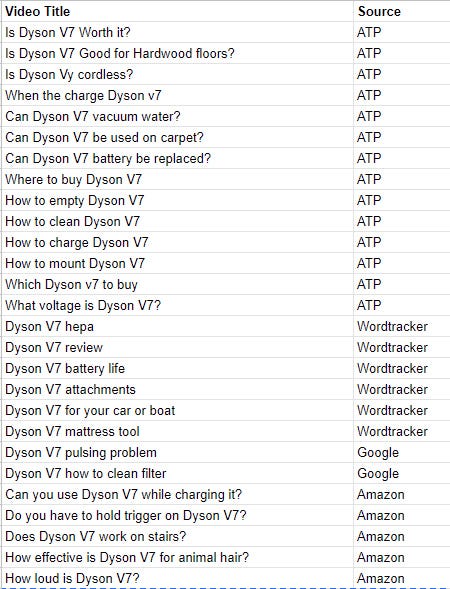
As you can see, I got almost 30 ideas. I could probably sit down and shoot all of these in a few hours, adding lots of great new content to my channel. In fact, I’ll likely do just that — stay tuned to my future articles, and I’ll provide an update when I can.
Beyond YouTube
I use this research process primarily for YouTube, but you could apply it to marketing all kinds of content. It would work great for Medium articles, for example. You could enter a specific subject as a hook and get lots of ideas for articles about that subject.
This same process would work well for researching your own product, too. Enter its name, see what questions people are asking, and then create materials for your customers addressing those questions. If more companies did this themselves, there would be less need for third-party YouTubers like me!
YouTube is a great resource, with a massive audience. Relevant videos can do very well, but some people struggle to come up with video ideas (or enough video ideas to be prolific).
Try this approach, give yourself the gift of 20+ ideas, and see how the resulting videos perform!
P.S.: First, you should get my posts in your inbox. Do that here! Secondly, if you like to experience Medium yourself, consider supporting me and thousands of other writers by signing up for a membership. It only costs $5 per month, and you can read all my articles about earning money on YouTube. I’ve applied the tips from those articles to make up to $951 from a single YouTube video. By signing up with this link, you’ll support me directly with a portion of your Medium fee and get access to my articles, it won’t cost you more. If you do so, thank you a million times!