
How I Built a Predictive Incident Management for a Large Financial Institution
A Machine Learning Models to Analyze Historical Incident Data for Our DevOps Team
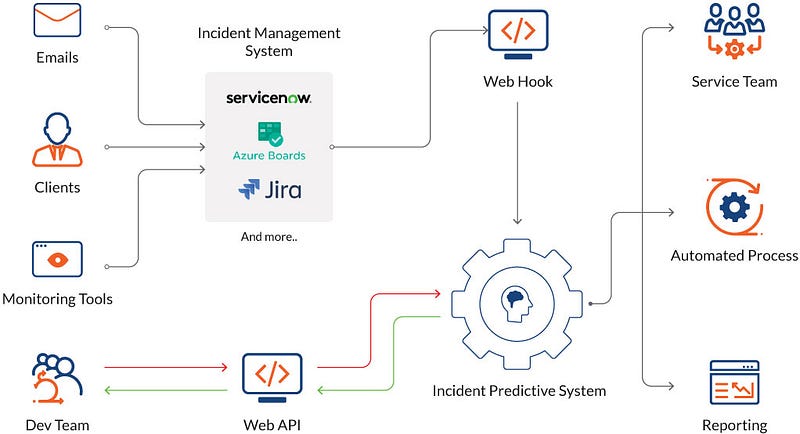
Client: A large financial institution aims to minimize downtime. AI can predict incidents by analyzing historical data and alerting the DevOps team to potential problems before they impact services.
Project: Develop an incident prediction and response system. This project should involve creating machine learning models that analyze historical incident data, alert the DevOps team to potential incidents, and automate incident response procedures, minimizing downtime.
In the constantly shifting and cutting-edge realm of modern technology, I’ve always believed that reducing downtime and quickly responding to incidents is of paramount importance for any organization. My journey led me to explore the world of machine learning, and I found that it can be a game-changer for DevOps teams, helping them efficiently analyze historical incident data and automate incident response procedures.
Prerequisites
Before I delve into the exciting implementation process, let’s take a look at the prerequisites:
- Python: To start this journey, I ensured that I had Python installed on my system. You can easily grab it from the official Python website.
- Data Source: Historical incident data is the heart of this endeavor. It can come from various sources such as log files, monitoring tools, or incident tracking systems. It’s crucial to have access to a structured dataset in a format that’s easy to work with.
- Python Libraries: I installed essential Python libraries, including Pandas, scikit-learn, and any additional libraries required for alerting and automation.
- Incident Response Procedures: Knowing your organization’s incident response procedures is a must. It provides guidance for defining the automation steps in your Python code.
Step-by-Step Implementation
Now, let’s embark on the exciting journey of creating a machine learning system for incident analysis and automation:
1. Data Collection:
Implementation: Start by collecting historical incident data from your various sources and storing it in a Pandas DataFrame for easy manipulation. For instance, you can use the pd.read_csv() function in Python to load your incident data.
import pandas as pd

# Load your incident data into a Pandas DataFrame
data = pd.read_csv('incident_data.csv')
2. Data Preprocessing:
Implementation: Prepare the data for machine learning by cleaning, transforming, and normalizing it. You can replace the placeholders with your specific data preprocessing steps.
# Python Code: Data Preprocessing and Feature Engineering
# (Replace this with your specific data preprocessing steps)
import pandas as pd
from sklearn.preprocessing import MinMaxScaler

data = pd.read_csv('incident_data.csv')
data.fillna(data.mean(), inplace=True)
data = pd.get_dummies(data, columns=['categorical_feature'])
scaler = MinMaxScaler()
data[['feature1', 'feature2', 'feature3']] = scaler.fit_transform(data[['feature1', 'feature2', 'feature3'])
3. Feature Engineering:
Implementation: Extract relevant features from the data to help the model identify potential incidents. This might involve aggregating time-based metrics, extracting patterns, and creating new features.
4. Labeling:
Implementation: Annotate your data with labels indicating whether each data point corresponds to an incident (1) or not (0).
5. Data Split:
Implementation: Split your data into training and testing sets. This ensures you can evaluate your model’s performance effectively. You can use train_test_split from scikit-learn.
# Python Code: Data Split
from sklearn.model_selection import train_test_split

X = data.drop('incident_label', axis=1)  # Features
y = data['incident_label']  # Labels
X_train, X_test, y_train, y_test = train_test_split(X, y, test_size=0.2, random_state=42)
6. Model Selection:
Implementation: Choose a machine learning algorithm suitable for your use case. Common choices include decision trees, random forests, support vector machines, or deep learning models.
# Python Code: Model Training
from sklearn.tree import DecisionTreeClassifier

model = DecisionTreeClassifier()
model.fit(X_train, y_train)
7. Model Training:
Implementation: Train the selected machine learning model using the training data. Monitor and fine-tune it using validation data and cross-validation techniques.
8. Model Evaluation:
Implementation: Evaluate the model’s performance using the test set. Use appropriate metrics for classification, such as accuracy, precision, recall, and F1-score.
# Python Code: Model Evaluation
from sklearn.metrics import accuracy_score

y_pred = model.predict(X_test)
accuracy = accuracy_score(y_test, y_pred)
9. Model Deployment:
Implementation: Deploy your model in your DevOps environment and integrate it with your alerting and automation systems.
10. Alerting and Automation:
Implementation: Integrate your model with alerting mechanisms and automation tools. When potential incidents are detected, send alerts and trigger incident response procedures. You can replace the placeholders with your specific alerting and automation mechanisms.
# Python Code: Alerting and Automation
# (Replace this with your specific alerting and automation mechanisms)
import smtplib  # For sending email alerts
import subprocess  # For executing commands

if any(y_pred == 1):
    # Send email alert
    # Trigger incident response actions (e.g., execute a script)
    subject = "Potential Incident Detected"
    message = "Anomaly detected in the system. Please investigate."
    sender_email = "[email protected]"
    receiver_email = "[email protected]"
    smtp_server = "smtp.example.com"
    smtp_port = 587
    smtp_username = "your_username"
    smtp_password = "your_password"

    # Use the smtplib library to send an email alert
    with smtplib.SMTP(smtp_server, smtp_port) as server:
        server.starttls()
        server.login(smtp_username, smtp_password)
        server.sendmail(sender_email, receiver_email, f"Subject: {subject}\n\n{message}")

    # Trigger an incident response action (e.g., execute a script)
    response_script = "response_script.sh"
    subprocess.run([response_script])

# You can replace the email sending and script execution with your specific alerting and automation mechanisms.
11. Documentation and Testing:
Implementation: Properly document your system, including the model, data preprocessing, feature engineering, and incident response procedures. Test the system thoroughly to ensure its effectiveness and reliability.
Sample Incident Data
Here’s a sample incident_data.csv to help you get started:
feature1,feature2,feature3,incident_label
1.2,3.4,5.6,0
2.1,3.7,5.2,0
1.5,2.8,4.9,1
3.0,4.2,5.5,1
1.7,3.1,5.8,0
2.9,3.8,5.4,0
In this example, we have three features (feature1, feature2, feature3) and an incident_label column, which indicates whether an incident occurred (1) or not (0).
Incident Response Script
Here’s the incident response script (response_script.sh) that you can use as part of your incident response procedures. The script logs the incident, takes actions to address it, and notifies the incident response team:
#!/bin/bash

# Log the incident and capture relevant information
TIMESTAMP=$(date +"%Y-%m-%d %H:%M:%S")
LOG_FILE="/var/log/incident.log"
echo "Incident detected at $TIMESTAMP" >> "$LOG_FILE"

# Take actions to address the incident
# You can customize this part based on your specific incident response procedures

# For example, restart a service
SERVICE_NAME="your_service"
echo "Restarting $SERVICE_NAME..."
systemctl restart "$SERVICE_NAME"

# Notify the incident response team
# You can send notifications using various methods, such as email, messaging, or alerting tools

# For example, send an email
TO_EMAIL="[email protected]"
SUBJECT="Incident Detected"
MESSAGE="An incident has been detected and the $SERVICE_NAME service has been restarted."
echo "$MESSAGE" | mail -s "$SUBJECT" "$TO_EMAIL"

# You can add more actions and notifications as per your organization's requirements

# Exit with an appropriate status code
exit 0
Conclusion
My journey of creating machine learning models for incident analysis and automation has been an exciting and transformative experience. By following the steps outlined in this article and customizing the code to our specific needs, we’ve developed a system that analyzes historical incident data, alerts the team to potential issues, and automates incident response procedures. This has significantly reduced downtime and improved the efficiency of incident management within our organization.
Remember that this is a complex and ongoing process that requires continuous monitoring, maintenance, and improvement to stay effective in a dynamic IT environment.
Want to connect?
https://www.linkedin.com/in/timothy-ugbaja-acfellow-osl-006b111a/
Contact me if you have any issue for further assistance.
In Plain English
Thank you for being a part of our community! Before you go:
- Be sure to clap and follow the writer! 👏
- You can find even more content at PlainEnglish.io 🚀
- Sign up for our free weekly newsletter. 🗞️
- Follow us: Twitter(X), LinkedIn, YouTube, Discord.
- Check out our other platforms: Stackademic, CoFeed, Venture.