
How I Built a Hand Gesture Recognition Model in Python — Part 1

Click here for part 2.
In this and the next blog, I want to document my journey on how I built a model that can recognize different hand gestures and perform certain commands with it. The source code of the program can be found in my GitHub repository.
A hand gesture recognition model is a program that detects the hand, figures out which gesture the hand is performing, and predicts that gesture. We may additionally decide to perform certain actions based on certain predictions. My original plan was to perform up, down, right and left hand motions that would be predicted as one gesture. In other words, the input would be an ordered sequence of images and the output would be a classification task.
Getting Data
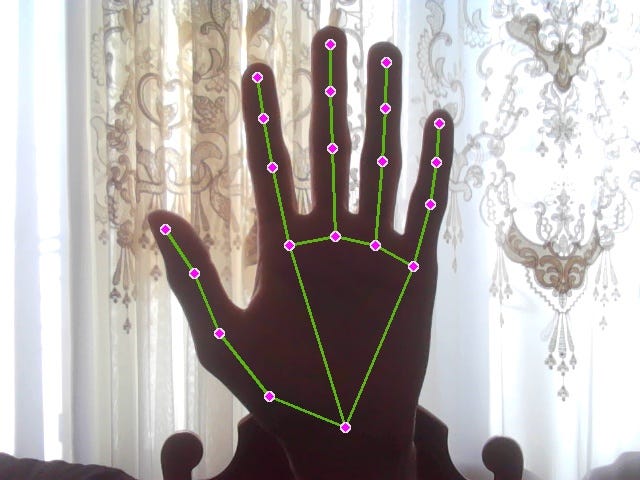
So my first task was to somehow detect the hand. To do this, I decided to use a library called Mediapipe. Mediapipe can detect the position of the hand in the image along with the landmarks of the hand. The landmarks are different points on the hand (e.g. joints). I used OpenCV, a computer vision library, to open the webcam. Here is the code that helped me do this:
import mediapipe as mp
import cv2

mp_drawing = mp.solutions.drawing_utils
mp_hands = mp.solutions.hands

capture = cv2.VideoCapture(0)

with mp_hands.Hands(min_detection_confidence=0.8, min_tracking_confidence=0.5) as hands:
  while capture.isOpened():
      ret, frame = capture.read()
      frame = cv2.flip(frame, 1)
      image = cv2.cvtColor(frame, cv2.COLOR_BGR2RGB)
      detected_image = hands.process(image)
      image = cv2.cvtColor(image, cv2.COLOR_RGB2BGR)

      if detected_image.multi_hand_landmarks:
          for hand_lms in detected_image.multi_hand_landmarks:
              mp_drawing.draw_landmarks(image, hand_lms,
                                        mp_hands.HAND_CONNECTIONS,
                                        landmark_drawing_spec=mp.solutions.drawing_utils.DrawingSpec(
                                            color=(255, 0, 255), thickness=4, circle_radius=2),
                                        connection_drawing_spec=mp.solutions.drawing_utils.DrawingSpec(
                                            color=(20, 180, 90), thickness=2, circle_radius=2)
                                        )

      cv2.imshow('Webcam', image)

      if cv2.waitKey(1) & 0xFF == ord('q'):
          break

capture.release()
cv2.destroyAllWindows()
When run, this code opens a webcam and draws the landmarks on the hand on the current frame. The code capture = cv2.VideoCapture(0) specifies to use the integrated webcam (0) for capture. One iteration of the while loop refers to one frame of the captured video. The line frame = cv2.flip(frame, 1) flips the image horizontally such that the program produces an image like a mirror. The line image = cv2.cvtColor(frame, cv2.COLOR_BGR2RGB) converts the image from BGR to RGB colored because OpenCV uses the BGR color channels while Mediapipe uses RGB. To close the webcam, press ‘Q’. Here is an example of one frame that is produced with the above code:
For the model to understand which gesture the hand is performing, it would have to be trained first. This requires data. So my next step is to generate data which can then later be used to train and test my model. As I have stated before, I would need a series of images to be used as one input. So I made a folder called ‘data’ that stored subdirectories ‘hand_up’, ‘hand_down’, ‘hand_right’, and ‘hand_left’. These were the gesture category names. Each subdirectory would contain 32 additional folders that referred to one sample of the input. These folders would store the sequence of images. I used 8 images per image sequence. To obtain these images I used the following script:
import mediapipe as mp
import cv2
import os

mp_drawing = mp.solutions.drawing_utils
mp_hands = mp.solutions.hands
subdir = 'hand_down'                # specify which hand gesture directory to save the image sequences
n_frames_save = 8                   # specify how many frames in one sequence you wish to save
iteration_counter = n_frames_save + 1
folder_counter = 1

capture = cv2.VideoCapture(0)

with mp_hands.Hands(min_detection_confidence=0.8, min_tracking_confidence=0.5) as hands:
    while capture.isOpened():
        ret, frame = capture.read()
        image = cv2.flip(frame, 1)
        detected_image = hands.process(image)

        if detected_image.multi_hand_landmarks:
            for hand_lms in detected_image.multi_hand_landmarks:
                mp_drawing.draw_landmarks(image, hand_lms,
                                          mp_hands.HAND_CONNECTIONS,
                                          landmark_drawing_spec=mp.solutions.drawing_utils.DrawingSpec(
                                              color=(255, 0, 255), thickness=4, circle_radius=2),
                                          connection_drawing_spec=mp.solutions.drawing_utils.DrawingSpec(
                                              color=(20, 180, 90), thickness=2, circle_radius=2)
                                          )

        cv2.imshow('Webcam', image)

        if cv2.waitKey(10) & 0xFF == ord('r'):
            seq_folder_path = os.path.join('data', subdir, f'sequence{folder_counter}')
            os.mkdir(seq_folder_path)
            folder_counter += 1
            iteration_counter = 1

        if iteration_counter < n_frames_save + 1:
            cv2.imwrite(os.path.join(seq_folder_path, f'{subdir}_sequence{folder_counter}_frame{iteration_counter}.jpg'), image)
            if iteration_counter == n_frames_save:
                print(f'Images for sequence {folder_counter - 1} saved.')
            iteration_counter += 1

        if cv2.waitKey(10) & 0xFF == ord('q'):
            break

capture.release()
cv2.destroyAllWindows()
The os library allows me to access the files and folders. When ‘R’ is pressed, the program saves the next 8 frames (specified by n_frames_save variable) in a new folder inside the gesture category subdirectory specified by the subdir variable. So I had to save those new folders 32 times for each gesture type. To save the data for the next model, I had to stop the program, change the subdir variable, and run the program again. After pressing ‘R’, I performed a downward motion with my hand (as hand_down category was first). However, a problem occurred where the program was unable to draw the landmarks for every frame when I was moving my hand. So I decided to remove the landmarks completely. To improve the data quality, I saved the images in different backgrounds, performed the action with both hands, and included my face in some of the images while excluding in others.
Building the Model
So now I had my data in the form of image sequences where I did not include the landmarks. I knew I would have to use a convolutional neural network to process the spatial features in the images. Moreover, since I used a sequence of images, I would also have to include LSTM layers to process the temporal features from the images. Keras had three kinds of layers that could be used to build the necessary neural network model: ConvLSTM2D and Conv2D with LSTM (aka LCRN). Here are their code snippets:
Conv2D w/ LSTM (LCRN)
# Conv2D w/ LSTM (LCRN)

import os
import cv2
import imgaug.augmenters as iaa
import pandas as pd
import numpy as np
import tensorflow as tf
import random
import datetime as dt
import matplotlib.pyplot as plt
from sklearn.model_selection import train_test_split
from tensorflow.python.keras.layers import *
from tensorflow.keras.layers import *

with tf.device('/GPU:0'):
    all_data_dir = 'data'
    image_height, image_width = 120, 160
    sequence_length = 8
    X, y = [], []

    image_seq_augmenter = iaa.Sequential([
        iaa.Fliplr(0),
        iaa.Crop(percent=(0, 0.1)),
        iaa.LinearContrast((0.75, 1.5)),
        iaa.GaussianBlur(sigma=(0.0, 1.0)),
        iaa.Multiply((0.8, 1.2), per_channel=0.2)
    ])

    for idx, class_name in enumerate(os.listdir(all_data_dir)):
        for image_seq_name in os.listdir(os.path.join(all_data_dir, class_name)):
            image_seq = []
            for frame_name in os.listdir(os.path.join(all_data_dir, class_name, image_seq_name)):
                frame = cv2.imread(os.path.join(all_data_dir, class_name, image_seq_name, frame_name))
                frame = cv2.resize(frame, (image_height, image_width))
                frame = cv2.cvtColor(frame, cv2.COLOR_BGR2RGB)
                image_seq.append(frame)
            image_seq_aug = image_seq_augmenter(images=image_seq)
            X.extend([image_seq, image_seq_aug])
            y.extend([idx for i in range(2)])

    X = (np.array(X) / 255.0).astype('float32') # (n_samples, n_frames, height, width, channels)
    y = np.array(y)                             # (n_samples)

    X_train, X_test, y_train, y_test = train_test_split(X, y, test_size=0.2, shuffle=True, random_state=1)

    early_stopping = tf.keras.callbacks.EarlyStopping(restore_best_weights=True,
                                                      patience=10)

    model = tf.keras.Sequential([
        TimeDistributed(Conv2D(16, 3, activation='relu', input_shape=(sequence_length, image_height, image_width, 3),
                   padding='same')),
        TimeDistributed(BatchNormalization()),
        TimeDistributed(MaxPooling2D()),
        TimeDistributed(Dropout(0.3)),

        TimeDistributed(Conv2D(32, 3, activation='relu', padding='same')),
        TimeDistributed(BatchNormalization()),
        TimeDistributed(MaxPooling2D()),
        TimeDistributed(Dropout(0.3)),

        TimeDistributed(Conv2D(64, 3, activation='relu', padding='same')),
        TimeDistributed(BatchNormalization()),
        TimeDistributed(MaxPooling2D()),
        TimeDistributed(Dropout(0.3)),

        TimeDistributed(Conv2D(64, 3, activation='relu', padding='same')),
        TimeDistributed(BatchNormalization()),
        TimeDistributed(MaxPooling2D()),
        TimeDistributed(Dropout(0.3)),

        TimeDistributed(Flatten()),
        LSTM(32),
        Dense(4),
    ])

    model.compile(
        loss=tf.keras.losses.SparseCategoricalCrossentropy(from_logits=True),
        optimizer=tf.keras.optimizers.Adam(),
        metrics=['accuracy'],
    )

    model_train_hist = model.fit(
        X_train, y_train,
        shuffle=True,
        batch_size=4,
        epochs=70,
        validation_split=0.2,
        callbacks=[early_stopping],
    )

    model_eval_loss, model_eval_acc = model.evaluate(X_test, y_test)
    date_time_format = '%Y_%m_%d__%H_%M_%S'
    current_date_time_dt = dt.datetime.now()
    current_date_time_str = dt.datetime.strftime(current_date_time_dt, date_time_format)

    model_name = f'model__date_time_{current_date_time_str}__loss_{model_eval_loss}__acc_{model_eval_acc}__hand.h5'
    model.save(model_name)

    df_train_hist = pd.DataFrame(model_train_hist.history)
    df_train_hist.loc[:, ['loss', 'val_loss']].plot()
    plt.show()
ConvLSTM2D
# ConvLSTM2D

import os
import cv2
import imgaug.augmenters as iaa
import pandas as pd
import numpy as np
import tensorflow as tf
import random
import datetime as dt
import matplotlib.pyplot as plt
from sklearn.model_selection import train_test_split
from tensorflow.python.keras.layers import *
from tensorflow.keras.layers import *

with tf.device('/GPU:0'):
    all_data_dir = 'data'
    image_height, image_width = 120, 160
    sequence_length = 8
    X, y = [], []

    image_seq_augmenter = iaa.Sequential([
        iaa.Fliplr(0),
        iaa.Crop(percent=(0, 0.1)),
        iaa.LinearContrast((0.75, 1.5)),
        iaa.GaussianBlur(sigma=(0.0, 1.0)),
        iaa.Multiply((0.8, 1.2), per_channel=0.2)
    ])

    for idx, class_name in enumerate(os.listdir(all_data_dir)):
        for image_seq_name in os.listdir(os.path.join(all_data_dir, class_name)):
            image_seq = []
            for frame_name in os.listdir(os.path.join(all_data_dir, class_name, image_seq_name)):
                frame = cv2.imread(os.path.join(all_data_dir, class_name, image_seq_name, frame_name))
                frame = cv2.resize(frame, (image_height, image_width))
                frame = cv2.cvtColor(frame, cv2.COLOR_BGR2RGB)
                image_seq.append(frame)
            image_seq_aug = image_seq_augmenter(images=image_seq)
            X.extend([image_seq, image_seq_aug])
            y.extend([idx for i in range(2)])

    X = (np.array(X) / 255.0).astype('float32') # (n_samples, n_frames, height, width, channels)
    y = np.array(y)                             # (n_samples)

    X_train, X_test, y_train, y_test = train_test_split(X, y, test_size=0.2, shuffle=True, random_state=1)

    early_stopping = tf.keras.callbacks.EarlyStopping(restore_best_weights=True,
                                                      patience=10)

    model = tf.keras.Sequential([
        ConvLSTM2D(8, 3, activation='tanh', input_shape=(sequence_length, image_height, image_width, 3),
                   return_sequences=True, data_format='channels_last', recurrent_dropout=0.3),
        BatchNormalization(),
        MaxPooling3D(pool_size=(1, 2, 2), padding='same', data_format='channels_last'),
        TimeDistributed(Dropout(0.3)),

        ConvLSTM2D(8, 3, activation='tanh', return_sequences=True,
                   data_format='channels_last', recurrent_dropout=0.3),
        BatchNormalization(),
        MaxPooling3D(pool_size=(1, 2, 2), padding='same', data_format='channels_last'),
        TimeDistributed(Dropout(0.3)),

        ConvLSTM2D(16, 3, activation='tanh', return_sequences=True,
                   data_format='channels_last', recurrent_dropout=0.3),
        BatchNormalization(),
        MaxPooling3D(pool_size=(1, 2, 2), padding='same', data_format='channels_last'),
        TimeDistributed(Dropout(0.3)),

        ConvLSTM2D(20, 3, activation='tanh', return_sequences=True,
                   data_format='channels_last', recurrent_dropout=0.3),
        BatchNormalization(),
        MaxPooling3D(pool_size=(1, 2, 2), padding='same', data_format='channels_last'),
        TimeDistributed(Dropout(0.3)),

        Flatten(),
        Dense(64, activation='relu'),
        Dropout(0.3),
        Dense(32, activation='relu'),
        Dense(4),
    ])

    model.compile(
        loss=tf.keras.losses.SparseCategoricalCrossentropy(from_logits=True),
        optimizer=tf.keras.optimizers.Adam(),
        metrics=['accuracy'],
    )

    model_train_hist = model.fit(
        X_train, y_train,
        shuffle=True,
        batch_size=4,
        epochs=70,
        validation_split=0.2,
        callbacks=[early_stopping],
    )

    model_eval_loss, model_eval_acc = model.evaluate(X_test, y_test)
    date_time_format = '%Y_%m_%d__%H_%M_%S'
    current_date_time_dt = dt.datetime.now()
    current_date_time_str = dt.datetime.strftime(current_date_time_dt, date_time_format)

    model_name = f'model__date_time_{current_date_time_str}__loss_{model_eval_loss}__acc_{model_eval_acc}__hand.h5'
    model.save(model_name)

    df_train_hist = pd.DataFrame(model_train_hist.history)
    df_train_hist.loc[:, ['loss', 'val_loss']].plot()
    plt.show()
The line with tf.device(‘/GPU:0’): indicates that the code in this block will be executed using the GPU (remove it if you are using CPU). The LCRN model trained in less than 5 minutes (with GPU), much faster than ConvLSTM2D which took an hour to train. Additionally, LCRN had higher accuracy. For these reasons, I continued to use this model. I used the imgaug library to perform data augmentation on the images to make them more diverse and make the model more robust. Additionally, these augmentations doubled the data sample size. However, I couldn’t use the horizontal flipping data augmentation as the left and the right hand motions would become mixed. The data that was used to train the model was in the form of NumPy arrays. Array X had the following shape: (no. of samples, no. of frames, height, width, channels). The array y had the shape (no. of samples,) and contained the labels for the gestures in the form of numbers from 0 to 3 (down, left, right, up). Theearly_stopping variable stops the model training before it trains for the prescribed number of epochs if the validation loss of the model does not improve significantly after a certain number of epochs. It also selects the best weights for the model from the training and helps prevent overfitting. I included the TimeDistributed layer in LCRN because the Conv2D layers accept only one image as input. This layer allows every image in the image sequence to enter the convolutional layers independently. I saved the trained models so I don’t have to train them every time I want to use them. I used the datetime library to include the date and time the model was saved.
When training with the GPU, OOM errors were encountered. To overcome these errors, I could switch to using Google Colab or switch to using CPU which had more RAM. However, I decided to just decrease the resolution of the images by resizing so that they occupy less space in memory.
Testing the Model
After the training had finished, I decided to generate a few more samples of different gestures to see if the model could predict which gesture I was performing. I quickly came to realize that 8 frames were not enough to capture the entire motion of the hand. The last frame showed that the hand was still in the middle of the motion. Additionally, the predictions of the new samples were mostly wrong. I thought that the problem was that the number of frames was too small for it to understand. So my next objective is to retry the training and testing by using more than 8 frames per image sequence.
Refining the Model
I had to generate new images since the old ones had 8 frames and could not be used anymore. I increased the number of frames to 20 and used 16 samples per gesture category as I thought that would be enough. I also tried to capture them using a new webcam that produced better quality and had a higher frame rate. I just changed the linecapture = cv2.VideoCapture(1) from 0 to 1 to use this webcam. However, for some reason, the new webcam took significantly longer to open the webcam window compared to the integrated one. After retraining and retesting the model, the predictions were yet again unsatisfactory and were mostly wrong. In both cases, I included the entire image in the data. The background and the fact that the model does not know which part of the image is the hand could have affected the performance. So a possible solution was to apply image segmentation to the hand such that the hand would look white while the rest of the image would appear black.
Click here for part 2.


