
Bootstrapping
How I Build Websites for Just $58 and Sell Them for $1200+
The 2 Simple Services I Use to Acquire Clients For My Agency

Designing and creating websites is much easier than you might think.
You don’t even have to be an experienced web designer to create something impressive. Everything you need is to use some tools properly.
In this article, I’ll explain how by spending less than $58 a month, you can start building websites from scratch and sell them for several thousands.
Let’s begin.
Relume.io ($38/month)
Every product, every website, and every design starts with a prototype.
Prototyping is basically expressing your initial ideas and all your thoughts on paper. In other words, drawing a picture of how the overall structure of the website should look.
Where should every block be placed? Which elements should be in it? That’s the question that a well-crafted prototype can help you resolve.
And it’s a pretty time-consuming part of every design. It’s not as easy as you think, you can’t just place one block in front of another just because you want.
That’s when Relume.io comes in.
It’s simply the tools powered by AI that make it possible to create a prototype in several minutes or less.
Everything that you need is to give him a prompt and explain the idea behind the website, and it’ll craft everything for you.
Let me show you some examples:
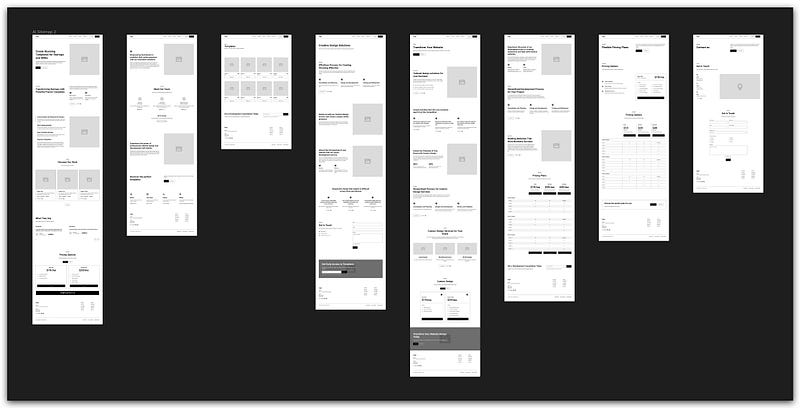
I can then take these prototypes and start turning them into the design itself.
It basically did all the logic stuff behind the design for me. I now don’t have to think about which block to place because the AI already did it for me.
And honestly, it’s pretty good. Yeah, sometimes I have to edit it manually, remove something, or add something, but it still saves me lots of time.
And it will definitely save you, especially if you’re a designer.
But if you’re not, don’t worry.
You can basically download some free projects on Figma Community or even use some of my free templates.
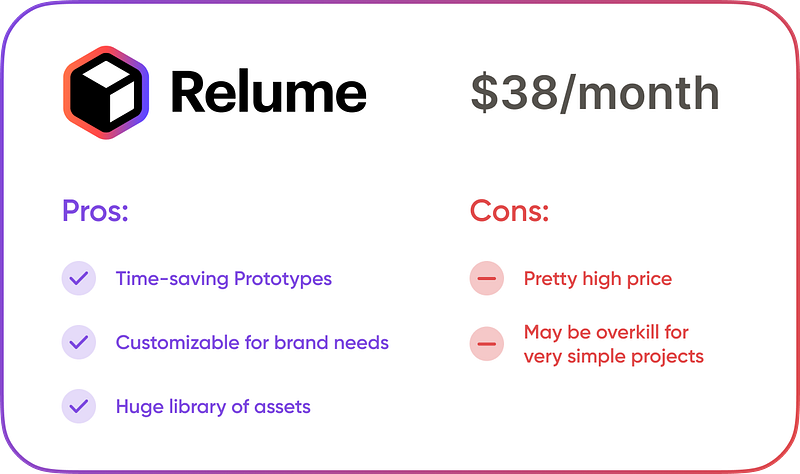
The Relume subscriptions cost $38/month which is pretty high, in my opinion.
But considering how many times it literally saved me clients, I still encourage you to try it out.
Framer ($20/month)
Framer is a game-changer that I’ve been using for almost a year now.
If you’re not familiar with it, then it’s simply an alternative to Webflow, a no-code website builder.
A much better alternative.
In other words, Framer is a tool that makes .com from your .png!
The best part is that you don’t actually have to do anything to get your website going. You can just paste your design from Figma into Framer, and voilà, your website is now alive!
Yeah, it would still take around 30 minutes for you to set everything up and make all the buttons interactive, but it’s still a no-brainer for literally everyone who has thought about building a website.
Trust me, I’ve worked as a front-end developer, and I’ve worked with WordPress. But Framer has some incredible features that move it several steps forward from all of its competitors. It just makes the overall process even quicker.
First of all, the Templates marketplace. I use it not only to sell templates but also to buy them and publish some of my other projects much much quickly.
Each template that you see in the marketplace is well-crafted and was verified by the Framer itself. You won’t see some garbage websites there, only the high-quality ones.
Secondly, you don’t need anything else except the previously made design and the Framer.
It’s free to use, but you’ll have to deal with the .framer domain and will have some other small limitations.
You can host your website on it, absolutely for free!
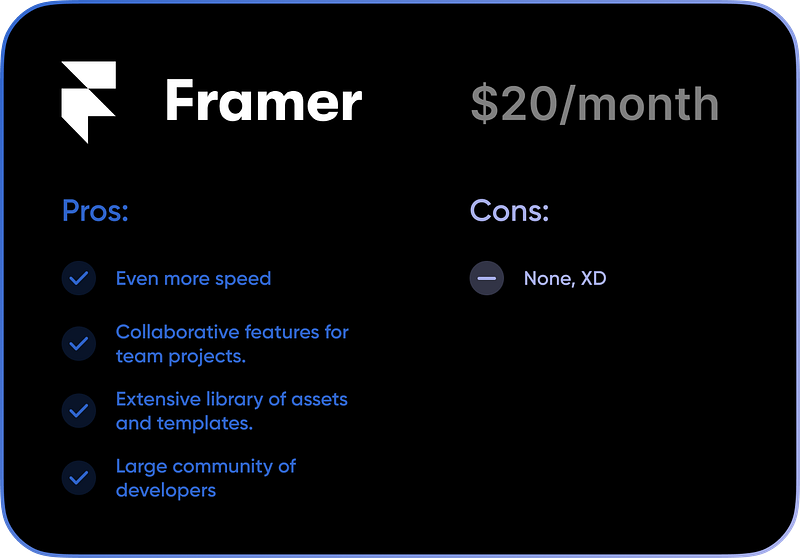
However, if you’re thinking about creating a professional website, connecting a custom domain, and connecting it with some other third-party apps, then the subscription starts at $10 and ends at $40 (Monthly).
I personally use the $20 subscriptions for most of my own projects.
I can show you several examples of the websites that I’ve recently made on Framer:
- Personal Blog (My own)
- TheGrowth (A free-to-use landing)
- NextAI (Website for AI & SaaS)
- and many, many others
Conclusion
You may be asking right now, “Alright, but how do you sell them for $1200+?”
The answer is simple — clients come themselves. I just need to offer the right service in their situation.
Most of the clients that I acquire are from Behance and Linkedin. Everything that I have to do is be active on these platforms, share my experience, and show my recent projects.
Most of the people are getting interested in it and want me to design something similar. That’s what we call clients, haha.
So, I created the design very quickly, thanks to Relume.
Then, my main goal is to offer not only the design but also a fully working website.
It’s a win-win situation for me and the client. He/she came for the design and has a live website as a result.
In conclusion, it is always possible to convert no matter how small an amount of money into no matter how large an amount of money.


